
1. はじめに
Thank you for choosing the LIECTROUX YW810 Robot Window Cleaner. This intelligent device is designed to simplify window cleaning, offering efficient and safe operation for various glass surfaces. This manual provides essential information for the proper setup, operation, maintenance, and troubleshooting of your robot window cleaner. Please read this manual thoroughly before using the product to ensure optimal performance and safety.
2.製品オーバーview
2.1 主な特徴
- Deep Window Cleaning: Integrated suction motor provides 2800Pa strong suction, combined with dual spiral cleaning heads and microfiber cloths for effective cleaning on vertical glass surfaces.
- 多用途アプリケーション: Compatible with various glass types, windows, tiles, glass floors, and hard-to-reach areas like high-rise interior/exterior windows.
- Intelligent Cleaning Modes: Features 3 pre-programmed automatic cleaning modes, intelligent AI path planning, and remote control for comprehensive window cleaning.
- APPコントロール: Control the robot via a smartphone application with a simple operating interface.
- Safety and Fall Protection: Built-in UPS battery provides 25 minutes of absorption protection during power outages, preventing falls. Equipped with a 4m professional safety rope and a 5.2m adapter cord.
- Dual Water Spray: Automatic water spraying function to assist in cleaning.
- Micron-scale Atomization Technology: Bilateral ultrasonic water atomization (15um mist) to soften stubborn stains.
- 低騒音動作: Noise level during operation is ≤65dB.
2.2製品コンポーネント
The LIECTROUX YW810 includes the main robot unit, power adapter, extension cords, safety rope, remote control, and microfiber cleaning cloths.

Figure 2.2.1: LIECTROUX YW810 Robot Window Cleaner and its smartphone application interface.

図2.2.2:詳細 view of the robot's cleaning mechanism, highlighting micron-scale spray, double-disc rotation, and microfiber cloth.

Figure 2.2.3: Illustration of the microfiber cleaning pads, designed to effectively remove various types of stains including rain marks, dirt, and general grime.
3. セットアップ
- クリーニングクロスを取り付ける: Ensure the microfiber cleaning cloths are securely attached to the robot's cleaning pads.
- 接続電源: Connect the power adapter to the robot and then plug it into a power outlet. The robot requires continuous power to operate.
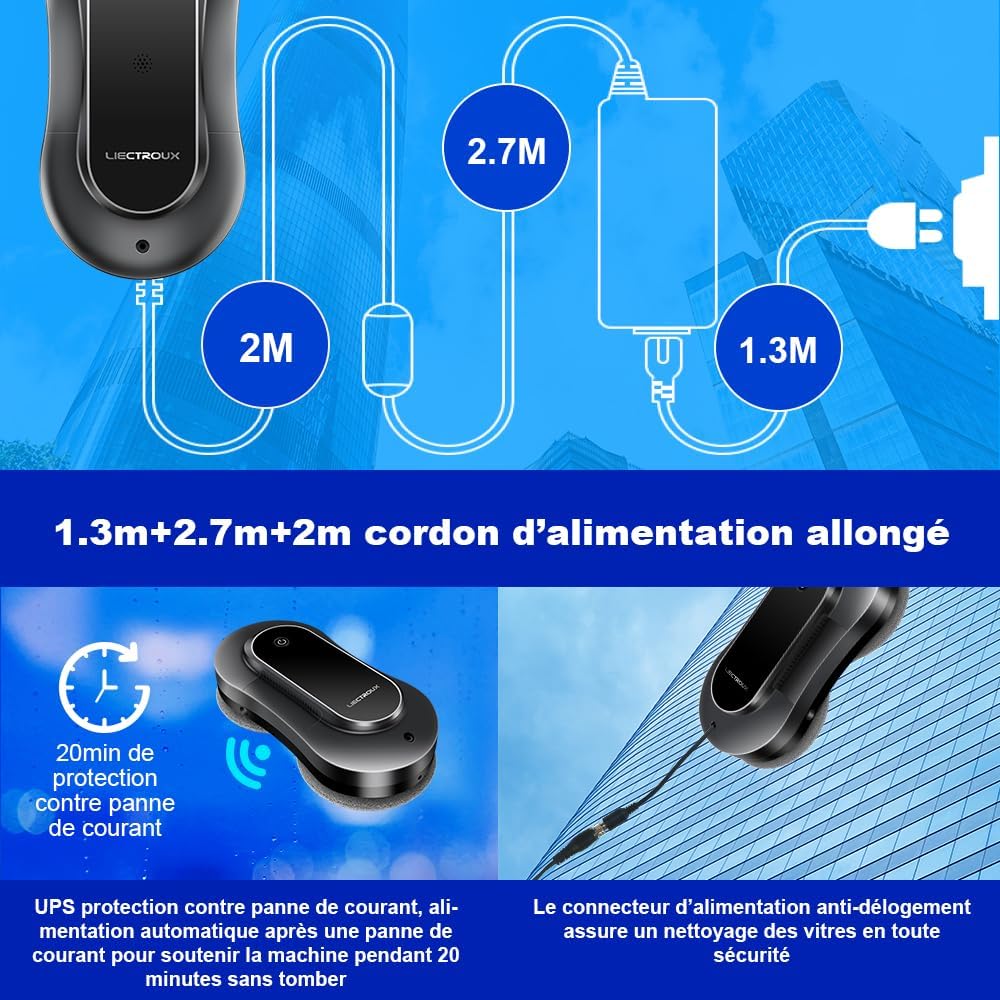
Figure 3.1: Diagram showing the extended power cord setup (1.3m + 2.7m + 2m) and the anti-dislodgement power connector for secure operation.
- 安全ロープを取り付ける: Always attach the professional safety rope to a secure anchor point before placing the robot on the window. This is crucial for preventing falls, especially when cleaning high windows.

Figure 3.2: Illustration of the robot's multiple safety protections, including the bionic suction cup and the safety rope, capable of supporting up to 6KG.
- 水タンクに水を入れる: Locate the water tank and fill it with appropriate window cleaning solution or distilled water. The robot features dual water spray for effective cleaning.
- 電源オン: ロボットの電源ボタンを押して電源を入れます。
4. 操作手順
4.1 ロボットを窓に置く
Hold the robot firmly against the glass surface. The suction motor will activate, creating a strong vacuum seal. Ensure the robot is securely attached before releasinギット。
4.2 Cleaning Modes and Control
The LIECTROUX YW810 offers both automatic and manual cleaning options.
- Automatic Cleaning Modes: The robot features 3 pre-programmed automatic cleaning modes. These modes utilize intelligent AI path planning to cover the entire window surface efficiently.

Figure 4.2.1: The robot's intelligent path planning, illustrating three cleaning patterns: Top-down, Left-to-right, and Right-to-left.
- APPコントロール: Download the dedicated LIECTROUX app on your smartphone. After activating the robot's power button, you can connect and control the robot via the app. The app interface is designed for ease of use.

Figure 4.2.2: Controlling the robot window cleaner using the smartphone application, showing the simple interface for operation.
- リモートコントロール: Use the provided 2.4G wireless remote control to operate the robot. It has an effective operating distance of 15 meters, allowing you to control the window cleaner remotely with a simple press of a button.

Figure 4.2.3: Operating the robot with the one-button remote control, demonstrating its ease of use from a distance.
4.3 Removing the Robot from the Window
Once cleaning is complete, or if you need to remove the robot, firmly grasp the robot and press the release button (if applicable, or power off). The suction will disengage, allowing you to safely remove the device. Always ensure you have a firm grip on the robot before disengaging suction.
5. メンテナンス
- クリーニング用マイクロファイバークロス: After each use, remove the microfiber cleaning cloths from the robot. Wash them with water and mild detergent. Allow them to air dry completely before reattaching for next use.
- Cleaning the Robot Body: ロボットの外側を柔らかくて乾いた布で拭いてください。amp 布で拭いてください。研磨剤入りの洗剤を使用したり、ロボットを水に浸したりしないでください。
- 水タンクのメンテナンス: Regularly empty and rinse the water tank to prevent residue buildup. Use only recommended cleaning solutions or distilled water to avoid clogging the spray nozzles.
- ストレージ: ロボットを使用しないときは、直射日光を避けて涼しく乾燥した場所に保管してください。
6。 トラブルシューティング
If you encounter issues with your LIECTROUX YW810, please refer to the following common problems and solutions:
| 問題 | 考えられる原因 | 解決 |
|---|---|---|
| Robot does not stick to the window. | 吸引力が不十分、クリーニングパッドが汚れている、表面が平らでない。 | Ensure power is connected and robot is powered on. Clean or replace microfiber cloths. Ensure surface is clean and relatively flat. |
| Robot falls during operation. | パワーアウトtage; safety rope not attached; suction loss. | Ensure continuous power supply. Always attach the safety rope to a secure point. Check for obstructions or excessive dirt on the window. The UPS battery provides temporary power during outages。 |
| Robot does not move or clean effectively. | Dirty cleaning pads; low water in tank; obstacle detection. | Clean or replace microfiber cloths. Refill water tank. Clear any obstacles from the cleaning path. |
| APP or remote control not responding. | Robot not powered on; battery low (remote); out of range; connectivity issue. | Ensure robot is powered on. Replace remote control batteries. Move closer to the robot. Re-pair the device if necessary. |
7. 仕様
| 特徴 | 仕様 |
|---|---|
| ブランド | リエクトゥルー |
| モデル名 | YW810 |
| 色 | シルバーグレー |
| 材料 | アブソリュート |
| 製品寸法(長さ x 幅 x 高さ) | 長さ29.5 x 幅14.5 x 高さ8.2センチメートル |
| アイテム重量 | 4キログラム |
| 電源 | コード式電気 |
| 制御方法 | アプリケーション、リモートコントロール |
| 特集 | Fall Protection (Anti-drop) |
| 吸引力 | 2800Pa (from feature bullets) |
| UPSバッテリーバックアップ | 25 minutes (from feature bullets) |
| 騒音レベル | ≤65dB (from aplus media image) |
8. 安全情報
To ensure safe operation of your LIECTROUX YW810 Robot Window Cleaner, please observe the following safety guidelines:
- Always connect the safety rope to a secure anchor point before placing the robot on any vertical surface.
- Ensure the robot is continuously connected to a power source during operation. The built-in UPS battery is for emergency power loss only, not for cordless operation.
- Do not use the robot on cracked, damaged, or extremely dirty glass surfaces.
- ロボットの可動部分に手、髪の毛、ゆったりとした衣服を近づけないでください。
- Do not allow children or pets to approach the robot during operation.
- Use only the recommended cleaning solutions or distilled water in the water tank.
- Do not attempt to disassemble or repair the robot yourself. Contact qualified service personnel for assistance.
- Ensure the power cord and safety rope are not tangled or obstructed during operation.
9. 保証とサポート
Specific warranty details for the LIECTROUX YW810 Robot Window Cleaner are not provided in the product specifications. Please refer to your purchase documentation or contact the seller directly for warranty information.
スペアパーツの入手可能性: この製品のスペアパーツの入手可能性に関する情報は現在入手できません。
For technical support or service inquiries, please contact the vendor or retailer from whom you purchased the product.