
1. はじめに
Thank you for choosing the HEBEOT Self-Resetting Door Release Button. This device is designed for secure and convenient access control in various environments. It features a durable construction and a self-resetting mechanism for reliable operation. Please read this manual carefully before installation and use to ensure proper function and safety.

図1: 前面 view of the HEBEOT Self-Resetting Door Release Button, showing the "PRESS TO EXIT" text and green button.
2 製品の特徴
- 耐久性のある素材: Constructed from aluminum alloy with a stainless steel panel, ensuring suitability for both indoor and outdoor use.
- 耐久性の向上: Features a built-in anti-deformation spring for extended service life.
- エレガントなデザイン: The 3.85mm thick stainless steel panel is brushed using a wire drawing process, providing a beautiful and shiny appearance.
- 堅牢なパフォーマンス: IK10 explosion-proof rating for increased safety.
- 明確な表示: The green button is highly visible and engraved with "PRESS TO EXIT" for clear operation.
- 多用途アプリケーション: Ideal for various access control security and electronic access control systems.

Figure 2: Detail of the 3.85mm thick stainless steel panel, highlighting its brushed finish for durability and corrosion resistance.
3. パッケージ内容
パッケージを開封したら、すべてのコンポーネントが揃っていて損傷がないことを確認してください。
- 1 x HEBEOT Self-Resetting Door Release Button
- 取り付けネジ2本
- 2 x Rubber Plugs (for screw holes)
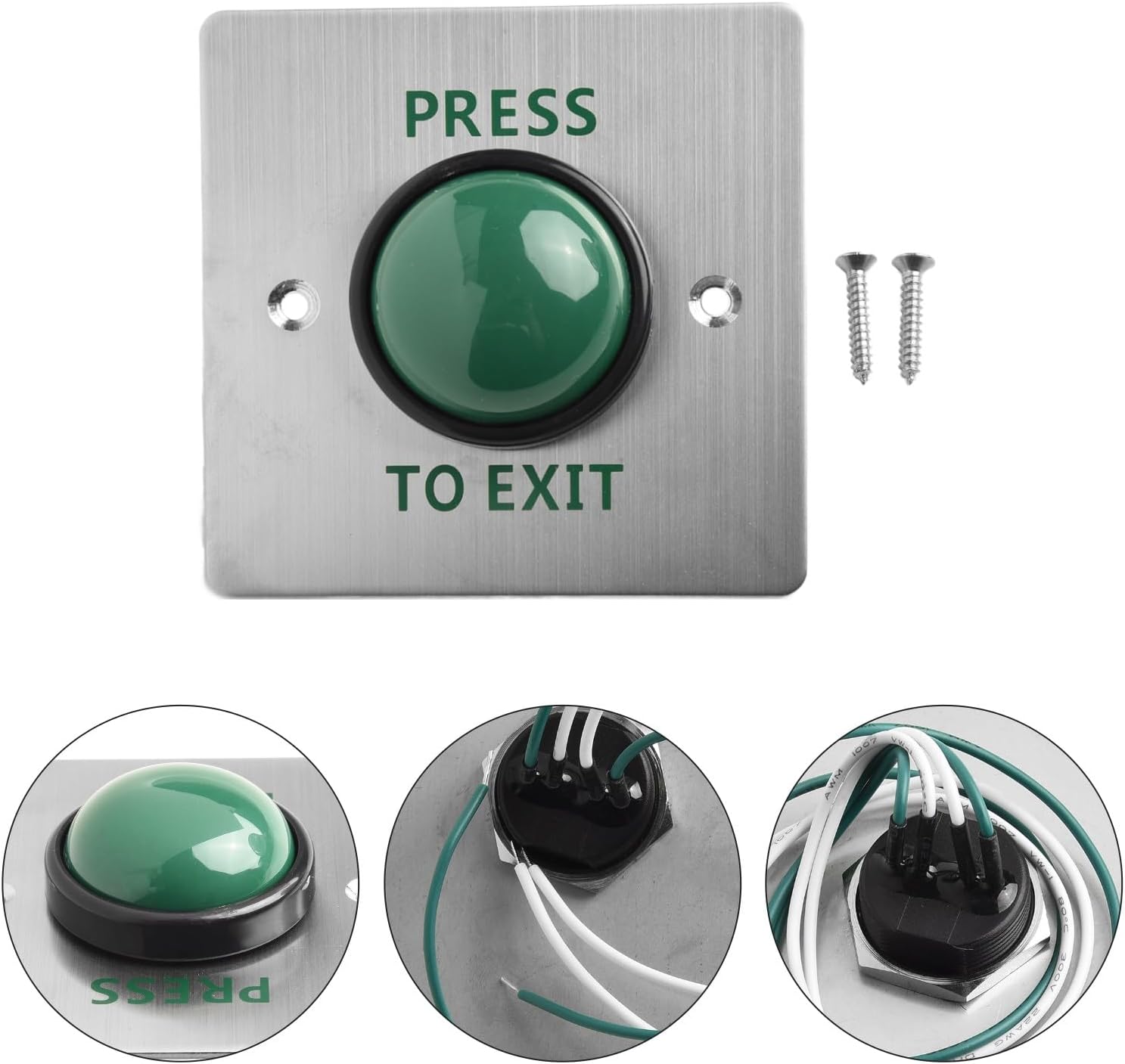
Figure 3: Contents of the package, including the door release button, two mounting screws, and two rubber plugs for secure installation.
4. 仕様
| パラメータ | 価値 |
|---|---|
| 製品名 | Switch Button / Door Release Button |
| ブランド | HEBEOT |
| モデル番号 | PE7J254XY81SW4DNT4F2 |
| 色 | As shown (Silver panel, Green button) |
| 材料 | ステンレス鋼、アルミニウム合金 |
| 巻tage | 12-24 V DC |
| 定格電流 | 5A |
| 動作モード | Self-Resetting Type |
| Explosion-proof Class | IK10 |
| 動作温度 | -20~50℃ |
| 動作湿度 | 10% ~ 99% Relative Humidity |
| パネルサイズ | 約86 x 86 mm(3.39 x 3.39インチ) |
| 製品寸法(長さ x 幅 x 高さ) | 8 x 5 x 5 cm(3.15 x 1.97 x 1.97インチ) |
| アイテム重量 | 100 g (0.22 ポンド) |
5. セットアップとインストール
This door release button is designed for easy installation. Please follow these steps carefully:
- 場所を選択してください: Select a suitable location near the door or access point where the button will be easily accessible. Ensure the surface is flat and stable.
- 掘削ポイントをマークする: Place the button panel against the wall or door frame and mark the positions for the two mounting screws.
- ドリル穴: Drill appropriate holes at the marked points. If installing on a hollow wall, use the provided rubber plugs as anchors.
- 配線: Connect the button's wires to your access control system. Refer to your access control system's manual for specific wiring diagrams. Typically, the button acts as a normally open (NO) or normally closed (NC) contact to trigger the door release.

図4:背面 view of the button showing the wiring terminals. Ensure correct polarity and connection type (NO/NC) as per your access control system requirements.
- ボタンをマウントします。 Align the button panel with the drilled holes and secure it using the provided screws. Do not overtighten.
- テスト機能: After installation, test the button to ensure it properly triggers the door release mechanism of your access control system.
注記: Professional installation is recommended for complex access control systems. Always disconnect power before performing any wiring.
6. 操作手順
The HEBEOT Self-Resetting Door Release Button operates on a simple push-to-exit principle.
- To exit a controlled area, simply press the green "PRESS TO EXIT" button.
- The button will momentarily activate the door release mechanism of your access control system.
- Once released, the button will automatically return to its original position, ready for the next use.

図5:例ample of the button in use within an office setting, demonstrating its application in access control systems.
7. メンテナンス
The HEBEOT Door Release Button requires minimal maintenance to ensure long-term performance:
- クリーニング: Periodically wipe the surface of the button and panel with a soft, damp 布で拭いてください。研磨剤入りの洗剤や溶剤は仕上げを傷める可能性があるため、使用しないでください。
- 検査: Regularly inspect the button for any signs of physical damage, loose connections, or unusual operation.
- 環境条件: While designed for indoor and outdoor use, avoid exposing the button to extreme conditions beyond its specified operating temperature and humidity ranges.
8。 トラブルシューティング
If you encounter issues with your HEBEOT Door Release Button, refer to the following common problems and solutions:
| 問題 | 考えられる原因 | 解決 |
|---|---|---|
| Button does not trigger door release. |
|
|
| Button feels stuck or does not self-reset. |
|
|
| Button panel is loose. |
|
|
9. 保証とサポート
No specific warranty information is provided with this product. For technical support, troubleshooting assistance, or inquiries regarding replacement parts, please contact your retailer or the HEBEOT customer service department through the contact information provided at the point of purchase.
Please have your model number (PE7J254XY81SW4DNT4F2) and purchase date ready when contacting support.