
1. はじめに
This manual provides detailed instructions for the safe and efficient use of the GODIYMODULES DC-DC 400W High-Power Step Down Buck Converter, Model SZ6012-001. This module is designed to convert a higher DC input voltagより低い調整可能なDC出力電圧tage with constant current capabilities. Please read this manual thoroughly before installation and operation.
2. 安全情報
- 電気安全: Always ensure power is disconnected before making any connections or adjustments to prevent electric shock or damage to the module.
- 極性: It is strictly forbidden to connect the positive and negative poles of the input and output in reverse. Reversed input will burn the fuse, and reversed output will damage the control board.
- オーバーボルtag保護: The module has input undervoltage protection (shuts off below 10.5V), but it does ない have input overvoltag保護。入力電圧がtageは60Vを超えません。
- 放熱: For continuous high-power operation (above 280W or 12A), forced cooling (e.g., a fan) is required to prevent overheating.
- 誘導負荷: When charging batteries or connecting inductive loads (e.g., motors), an anti-reverse diode must be added to the output to prevent damage.
- 環境: Operate the module within the specified temperature range of -10°C to +85°C.
3.製品オーバーview
3.1. 主な特徴
- ハイパワー出力: Natural heat dissipation supports up to 280W/12A. With forced cooling, it can achieve up to 400W.
- ワイド入力ボリュームtage: Accepts 10.5V to 60V DC input.
- 調整可能な出力: 出力ボリュームtage range from 0V to 45V (must meet step-down conditions, output is approximately 80% of input maximum).
- 定電流: Adjustable constant current output from 0.2A to 15A.
- 高効率: Up to 97% conversion efficiency, especially when output voltageは10Vを超えています。
- 保護機能: Includes input undervoltage protection and constant current short circuit protection.
- 指標: Features a constant current indicator (red LED) and a work indicator (blue LED).
- 簡単接続: Equipped with welding-free 25A terminal blocks.
3.2.コンポーネントの識別
The following image illustrates the key components and connection points of the buck converter module:
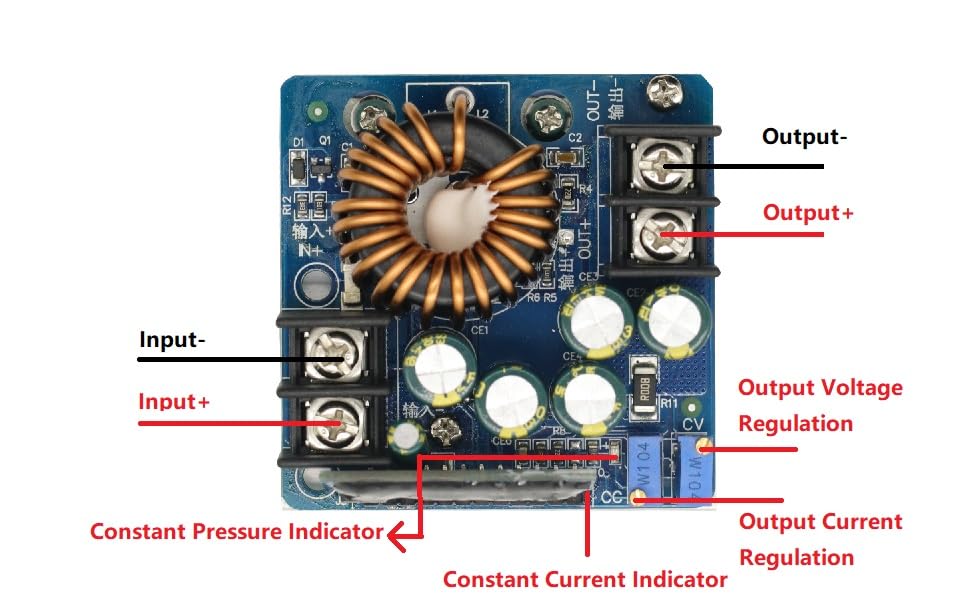
図1: Labeled diagram of the GODIYMODULES DC-DC 400W High-Power Step Down Buck Converter. This image highlights the Input+ (IN+), Input- (IN-), Output+ (OUT+), Output- (OUT-), Output Voltage Regulation potentiometer (CV), Output Current Regulation potentiometer (CC), Constant Pressure Indicator, and Constant Current Indicator.
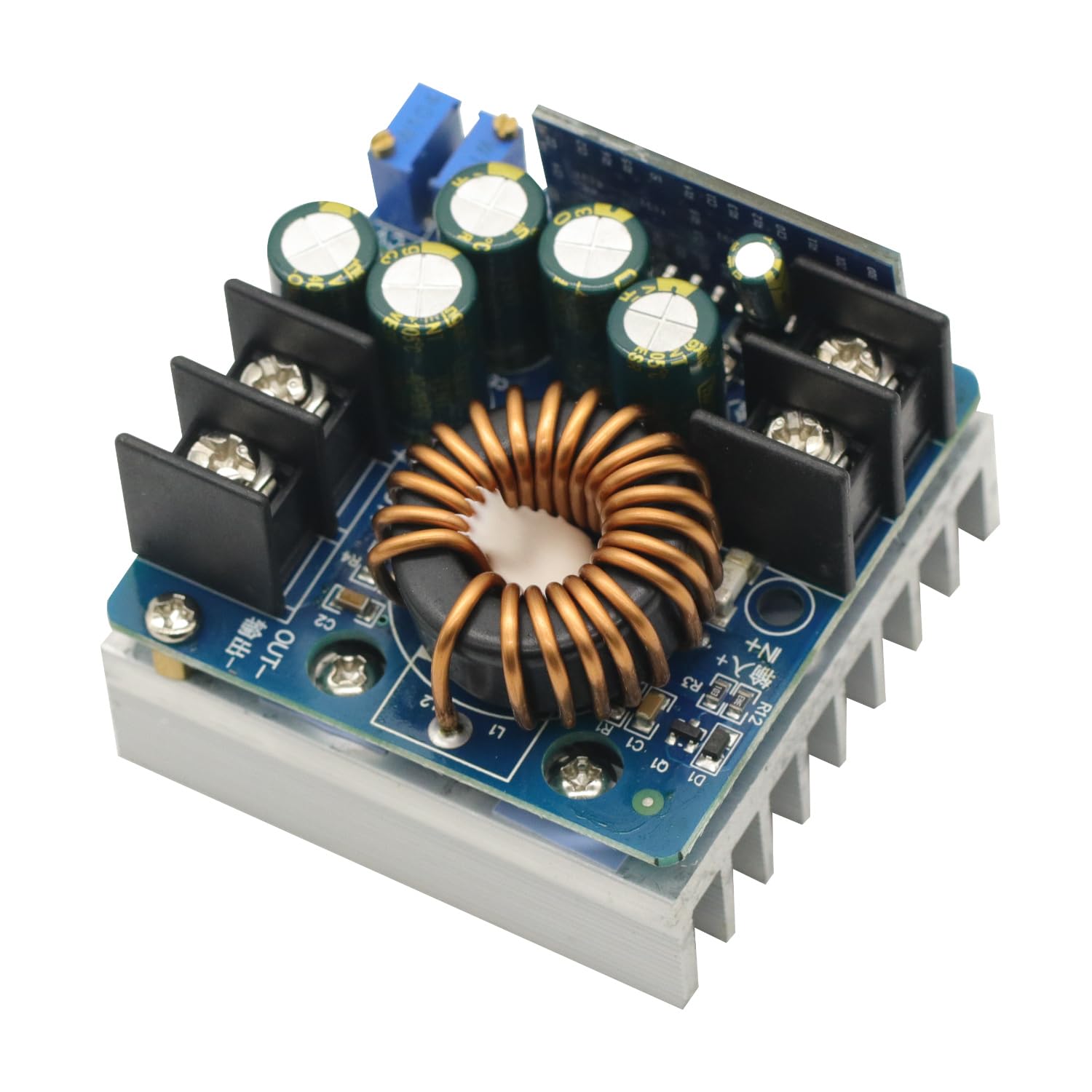
図2: トップダウン view of the GODIYMODULES DC-DC 400W High-Power Step Down Buck Converter, showcasing the inductor, capacitors, and heatsink.
4. 仕様
| パラメータ | 価値 |
|---|---|
| モジュール名 | 400W Step-Down Constant Voltageと定電流 |
| Module Nature | Non-isolated step-down module (BUCK) |
| 入力ボリュームtage | 10.5V~60V DC |
| 出力巻tage範囲 | 0V - 45V (adjustable, max output approx. 80% of input) |
| 最小出力ボリュームtage | 0V (+1V) |
| Output Constant Current | 0.2A - 15A (continuously adjustable) |
| 最大出力 | 400W (with forced cooling) |
| Continuous Max Working Power | 280W (under ventilated environment) |
| Continuous Max Working Current | 12A (under ventilated environment) |
| 入力アンダーボリュームtag保護 | Yes (output turns off below 10.5V, approx. 0.5V error) |
| 入力オーバーボリュームtag保護 | No (overvoltage is prohibited) |
| 動作温度 | -10°C to +85°C (enhance heat dissipation above 65°C) |
| 動作周波数 | 100 kHz |
| 変換効率 | Up to 97% (depends on input/output, current, and voltag差額 |
| 短絡保護 | Yes (constant current protection) |
| 入力逆接続保護 | Yes (but short-circuiting input with reverse connection will burn the fuse) |
| Output Anti-Recharge | No (requires external anti-reverse diode for battery charging/inductive loads) |
| 作業インジケーター | Yes (blue LED) |
| 定電流インジケーター | Yes (red LED, lights up when constant current is active) |
| 接続方法 | Welding-free 25A terminal block |
| モジュールの寸法 | 60mm (長さ) x 60mm (幅) x 45mm (高さ) |
| 正味重量 | 170グラム |
5. セットアップ
5.1. 配線接続
Refer to Figure 1 for component identification. Use appropriate gauge wires for your expected current draw.
- 入力接続: DC電源を イン+ (正の入力)と で- (negative input) terminals. Ensure correct polarity.
- 出力接続: 負荷またはデバイスを アウト+ (正の出力)と 外- (negative output) terminals. Ensure correct polarity.
- Battery Charging/Inductive Loads: If charging a battery or connecting an inductive load (e.g., a motor), an external anti-reverse diode must be connected in series with the output to prevent current backflow into the module.
5.2. 初期電源投入
Before applying power, double-check all connections for correct polarity and secure fastening. Once verified, apply power to the input terminals. The blue work indicator LED should illuminate.
6. 操作手順
6.1. 出力ボリュームの調整tage(CV)
- Connect the input power source.
- Without a load connected, or with a light load, use a multimeter to monitor the output voltage.
- を回す 出力巻tage Regulation (CV) potentiometer (refer to Figure 1) clockwise to increase the output voltag反時計回りに回すと音量が下がります。希望の音量に調整してください。tage.
6.2. Adjusting Output Current (CC)
The constant current feature is primarily used for charging batteries or driving LEDs.
- まず、希望の出力ボリュームを設定しますtage as described above.
- To set the constant current limit, you can either:
- Connect a suitable ammeter in series with the output and a load.
- Alternatively, for battery charging, connect a discharged battery.
- を回す Output Current Regulation (CC) potentiometer (refer to Figure 1) clockwise to increase the current limit or counter-clockwise to decrease it. Adjust to your desired current limit.
- When the module operates in constant current mode (e.g., when the load draws more current than the set limit, or during battery charging), the red 定電流インジケーター LED will illuminate. If the output current is below the set limit, the module operates in constant voltage mode, and the red LED will be off.
6.3. デモビデオ
This video demonstrates the adjustment of output voltage and current, and the module's performance under load.
ビデオ1: Demonstration of the GODIYMODULES DC-DC 400W Step Down Buck Converter. The video shows the process of adjusting the output voltage and current using the potentiometers, and monitoring the values on external measurement equipment. It illustrates the module's ability to maintain a stable output under varying load conditions.
7. メンテナンス
- クリーニング: モジュールを清潔に保ち、ほこりやゴミを取り除いてください。清掃には柔らかく乾いた布を使用してください。
- 放熱: Regularly check that the heatsink is clear of obstructions. If operating at high power, ensure any additional cooling fans are functioning correctly.
- 接続: すべての配線接続が安全で腐食がないことを確認するために定期的に点検してください。
- 環境条件: モジュールを過度の湿気、極端な温度、または腐食性の環境にさらさないでください。
8。 トラブルシューティング
- 出力なしVoltage:
- 入力電源を確認してください。
- 入力ボリュームを確認するtage is above 10.5V (undervoltage protection will shut off output below this).
- Ensure input and output polarities are correct. Reversed input will burn the fuse.
- 出力ボリュームを確認するtage potentiometer (CV) is adjusted to 0V.
- モジュールの過熱:
- Reduce the output power or current.
- モジュールの周囲に十分な換気を確保してください。
- For continuous operation above 280W or 12A, install a cooling fan.
- Constant Current Indicator (Red LED) Not Lighting Up:
- This is normal if the load is drawing less current than the set constant current limit (module is in constant voltageモード)。
- If you expect constant current operation, ensure the load is sufficient to draw current above the set limit, or that the battery being charged is sufficiently discharged.
- Damage from Reverse Polarity:
- Input reverse connection will burn the input fuse. Replace the fuse if accessible and verify polarity before reapplying power.
- Output reverse connection will damage the control board, which is generally not repairable and requires module replacement.
9. 保証とサポート
For technical support or warranty inquiries regarding your GODIYMODULES DC-DC 400W High-Power Step Down Buck Converter (Model SZ6012-001), please contact the seller or manufacturer through the platform where the product was purchased. Please have your purchase details and model number available when contacting support.