1.製品オーバーview
The GEARELEC S3 is an advanced motorcycle helmet Bluetooth headset integrated with a 1080P HD camera. Designed for enhanced communication and recording during rides, it features full-duplex intercom for up to 8 riders, G-Sensor lock for collision footage, and a 128GB TF card for extensive recording. It also includes HiFi stereo sound, music sharing, FM radio, and triple noise reduction technology for clear audio even at high speeds. The device is built with an IP65 waterproof rating and a long-lasting 2000mAh battery.
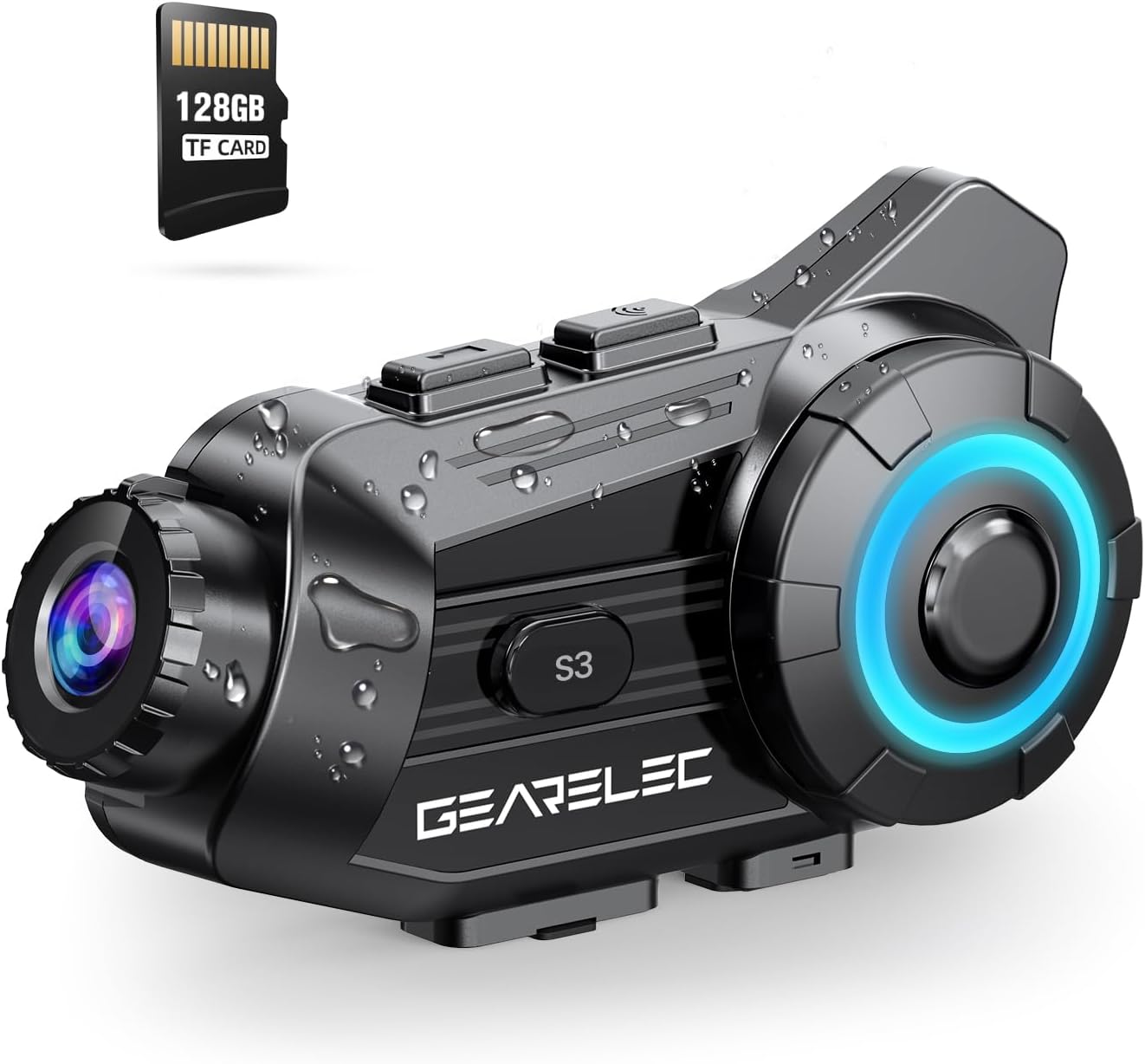
Figure 1: GEARELEC S3 Main Unit with 128GB TF Card.
2. パッケージ内容
パッケージにすべてのアイテムが揃っていることを確認してください:
- GEARELEC S3本体
- Headset Speakers and Microphone Kit
- Mounting Bracket (Clip and Adhesive)
- USB充電ケーブル
- 128GB TFカード(プリインストールまたは別途)
- ユーザーマニュアル(このドキュメント)
3. セットアップとインストール
3.1デバイスの充電
Before first use, fully charge the S3 unit. Connect the provided USB charging cable to the charging port on the S3 unit and to a standard USB power adapter (not included). The charging indicator light will show the charging status. A full charge takes approximately 3 hours.

Figure 2: Battery capacity and charging details. The 2000mAh battery provides up to 100 hours of music time and 7 hours of video recording.
3.2 TFカードのインストール
The S3 comes with a 128GB TF card. Locate the TF card slot on the unit. Gently insert the TF card into the slot until it clicks into place. Ensure the card is inserted correctly to enable video recording and storage.
3.3 ヘルメットへの取り付け
Choose between the clip-on bracket or the adhesive bracket for mounting the S3 unit to your helmet. Ensure the mounting location allows for optimal camera view and easy access to controls. Securely attach the speakers inside the helmet's ear pockets and position the microphone near your mouth for clear audio.
4. 操作手順
4.1 電源オン/オフ
- 電源オン: インジケーター ライトが点灯するまで、電源ボタンを約 3 秒間押し続けます。
- 電源を切る: インジケータ ライトが消えるまで、電源ボタンを約 3 秒間押し続けます。
4.2 モバイルデバイスとのBluetoothペアリング
- Ensure the S3 unit is powered off.
- インジケーター ライトが高速点滅してペアリング モードを示すまで、電源ボタンを約 5 ~ 7 秒間押し続けます。
- 携帯電話で Bluetooth を有効にし、利用可能なデバイスを検索します。
- Select "GEARELEC S3" from the list.
- ペアリングされると、インジケーター ライトが変化し、確認音が聞こえます。
4.3 インターコム通信
The S3 supports full-duplex intercom for 2 to 8 riders within a 2000-meter range.
- Ensure all S3 units are powered on and within range.
- Initiate intercom pairing according to the specific instructions for multi-unit connection (refer to the quick start guide for detailed steps on group pairing).
- Once connected, riders can communicate freely.

Figure 3: Intercom communication for multiple riders.
4.4 Camera Operation and Recording
The integrated 1080P HD camera captures video at 30 frames per second and 2MP still images. It features a 135° wide-angle lens and 20° lens rotation for flexible shooting angles.
- 記録の開始/停止: Press the Camera button once to start recording. Press again to stop.
- 写真を撮る: Press and hold the Camera button briefly to capture a still image.
- Gセンサーロック: The built-in gravity sensor automatically detects collisions and locks the current recording segment to prevent it from being overwritten, serving as protected evidence.
- ループ録音: TFカードがいっぱいになると、システムは自動的に最も古い保護されていないデータを上書きします。 file連続録画を保証します。

Figure 4: 1080P HD lens with 20° rotation for clear shooting.

Figure 5: Loop Recording and Gravity Sensor functionality.
4.5 Using the "RoadCam" App
The S3 has a built-in Wi-Fi module, allowing you to connect to the "RoadCam" application on your smartphone (available on Google Play and the App Store). This app enables you to view recorded videos and photos directly on your phone, and download them for sharing or backup.

Figure 6: "RoadCam" App for viewing and downloading media.
4.6 Audio Features (Music, FM, Noise Reduction)
- 音楽再生: Once paired with your phone, play music through your phone's media player. The S3's 40MM HiFi stereo speakers provide strong bass and clear sound.
- 音楽共有: The S3 supports music sharing between two riders within 30-50 meters. Activate this feature through the device controls or app.
- FMラジオ: Tune into FM radio stations directly from the S3 unit.
- ノイズ低減: Equipped with DSP & CVC noise reduction and a windproof microphone, the S3 minimizes wind and engine noise, ensuring clear calls and music even at speeds up to 80mph.

Figure 7: HiFi Stereo Sound with 40mm speakers.

Figure 8: Triple Noise-Reduction Technology for clear audio.
5. メンテナンスとケア
- クリーニング: Wipe the S3 unit with a soft, damp 布で拭いてください。強力な化学薬品や研磨剤入りの洗剤は使用しないでください。
- 耐水性: The S3 has an IP65 waterproof rating, making it suitable for use in rain and snow. However, avoid submerging the device in water.
- ストレージ: 使用しないときは、涼しく乾燥した場所に保管してください。極端な温度を避けてください。
- バッテリーのケア: For optimal battery life, avoid fully discharging the battery frequently. Charge the device regularly, even if not in active use for extended periods.
6。 トラブルシューティング
| 問題 | 考えられる原因 | 解決 |
|---|---|---|
| デバイスの電源が入りません。 | バッテリー残量が少なくなりました。 | デバイスを少なくとも 3 時間充電してください。 |
| 電話とペアリングできません。 | デバイスがペアリング モードになっていません。電話の Bluetooth がオフになっています。ペアリングされたデバイスが多すぎます。 | Ensure S3 is in pairing mode. Turn phone Bluetooth off/on. Clear old Bluetooth connections on phone. |
| 音質が悪い/ノイズが多い。 | Microphone not positioned correctly; high wind noise; speaker placement. | Adjust microphone closer to mouth. Ensure speakers are aligned with ears. Noise reduction works best at certain speeds. |
| カメラが録画していません。 | TF card full or not inserted correctly; card error. | Check TF card insertion. Format TF card (backup data first). Ensure sufficient space. |
| インターホンの接続が不安定です。 | 範囲外、干渉、電池残量不足。 | Ensure riders are within 2000m. Avoid obstacles. Charge devices. |
7. 仕様
| 特徴 | 詳細 |
|---|---|
| モデル名 | S3 |
| ビデオカメラの種類 | アクションカメラ |
| ビデオキャプチャ解像度 | 1080p |
| ビデオキャプチャフォーマット | MP4 |
| フォトセンサー技術 | シーモス |
| 最大絞り | 1.8ミリメートル |
| レンズ角度 | 135°広角 |
| レンズの回転 | 20° |
| 接続技術 | ワイヤレス(Bluetooth、Wi-Fi) |
| 特集 | Noise Cancellation (DSP & CVC), G-Sensor Lock, Loop Recording, Music Sharing, FM Radio |
| インターコム範囲 | Up to 2000 meters (full-duplex) |
| マックス・ライダーズ(インターコム) | 8人のライダー |
| バッテリー容量 | 2000mAh |
| 充電時間 | 約3時間 |
| 音楽の時間 | 最大100時間 |
| ビデオ録画時間 | 最大7時間 |
| 防水等級 | IP65 |
| アイテム重量 | 15.2オンス |
| 色 | 黒 |
8. 保証とサポート
For any questions, technical assistance, or warranty inquiries regarding your GEARELEC S3, please contact the seller directly. The seller, RuiSi Elctric, typically responds to inquiries within 6 hours.
To contact support, please visit the product page on Amazon and click on the seller's name "RuiSi Elctric" followed by "ASK A QUESTION".