
1.製品オーバーview
The llano CS2 18W PD USB-C Fast Charger is designed for efficient and safe charging of Nikon EN-EL14 and EN-EL14a camera batteries. This compact charger features a digital display for real-time battery status, multiple safety protections, and versatile charging options, making it an ideal accessory for photographers.

2. 主な特徴
- 18W PD急速充電: Provides up to 50% faster charging for Nikon EN-EL14/EN-EL14a batteries compared to standard USB chargers.
- デュアルバッテリースロット: Charges two batteries simultaneously.
- Advanced Digital Display: Real-time monitoring of battery charge levels and charging status.
- 包括的な保護: Incorporates 10-layer protection against over-voltage, overheating, short-circuiting, and more, ensuring battery longevity and safety.
- 超ポータブル設計: コンパクトで軽量なので、旅行や外出先での使用に最適です。
- 多様な電源入力: Supports charging via wall adapters, car chargers, and portable power banks using a USB-C connection.
- Integrated SD Card Storage: Includes a dedicated slot for storing one SD card.
- Magnetic Flip-Open Lid: Ensures secure closure and protects batteries from dust and damage.

3. 互換性
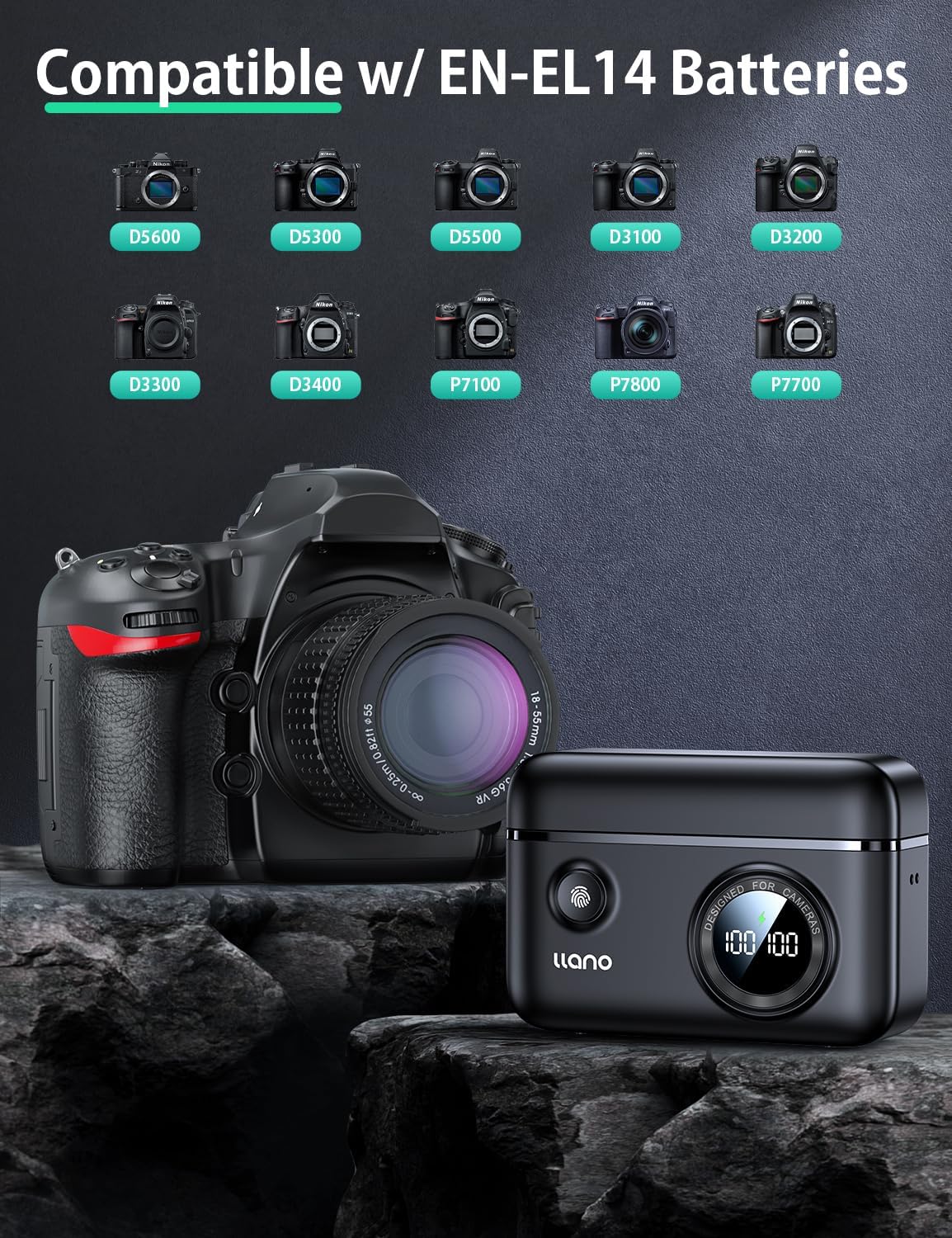
The llano CS2 charger is compatible with Nikon EN-EL14 and EN-EL14a batteries, used in various Nikon camera models, including:
- Nikon D3200, D3300, D3400, D3500
- Nikon D5100, D5200, D5300, D5500, D5600
- Nikon Coolpix P7000, P7100, P7700, P7800
4. 箱の中身
- llano CS2 18W PD USB-C Fast Charger
- ストラップ
- USB-C から USB-C へのケーブル
- 巾着バッグ
5. セットアップ手順
- 接続電源: Connect the provided USB-C cable to the charger's input port and to a compatible 18W PD (Power Delivery) USB-C power source (e.g., wall adapter, car charger, power bank). The digital display will illuminate.
- バッテリーの挿入: Open the magnetic lid. Insert one or two Nikon EN-EL14/EN-EL14a batteries into the designated charging slots (CH1 and CH2), ensuring correct orientation. The digital display will show the current charge percentage for each inserted battery.
- Optional SD Card Storage: If desired, place an SD card into the dedicated storage slot on the side of the charger. This slot is for storage only and does not function as a card reader.

6. 操作手順
- 開始チャージ: Once batteries are inserted and the charger is connected to a power source, charging will begin automatically. The digital display will show the charging icon and the increasingパーセントtage バッテリーごとに。
- Monitoring Charge Status: デジタルディスプレイはリアルタイムのバッテリー残量を表示しますtage. A lightning bolt icon indicates active charging. When a battery reaches 100%, the charging process for that slot will stop automatically.
- Checking Battery Level (Unplugged): Press the button on the front of the charger to view the current charge level of inserted batteries without being connected to a power source.
- 電池の取り外し: Once charging is complete, or if you need to remove a battery, gently pull it out from its slot.

7. メンテナンス
- クリーニング: Use a soft, dry cloth to clean the charger's exterior. Avoid using liquid cleaners or solvents. Ensure no debris enters the charging slots or USB-C port.
- ストレージ: Store the charger in a cool, dry place away from direct sunlight and extreme temperatures. Utilize the magnetic lid to protect the battery slots and the included drawstring bag for scratch resistance during transport.
- 取り扱い: Avoid dropping the charger or subjecting it to strong impacts. Ensure batteries are inserted and removed gently to prevent damage to the contacts.

8。 トラブルシューティング
| 問題 | 考えられる原因 | 解決 |
|---|---|---|
| Charger display is off / No power | 電源接続がないか、ケーブル/アダプタに障害があります。 | USB-Cケーブルが充電器と電源の両方にしっかりと接続されていることを確認してください。別のUSB-Cケーブルまたは電源アダプターをお試しください。 |
| バッテリーが充電されない | Battery not properly inserted; battery is damaged or incompatible; charger contacts are dirty. | Re-insert the battery, ensuring it clicks into place. Verify the battery is an EN-EL14/EN-EL14a type. Clean charger and battery contacts with a dry cloth. |
| 充電速度が遅い | Power source does not support 18W PD; cable is not PD compatible. | Use an 18W (or higher) Power Delivery (PD) compatible USB-C power adapter and a PD-compatible USB-C cable for optimal charging speed. |
| Digital display shows incorrect percentage | Temporary display glitch; battery calibration needed. | Remove and re-insert the battery. Allow the battery to fully charge and discharge a few times to recalibrate. |
9. 仕様
| 仕様 | 詳細 |
|---|---|
| モデル番号 | LJN-CS004 |
| ブランド | リャノ |
| 製品寸法 | 奥行き4.4インチ x 幅1.7インチ x 高さ3.3インチ (11.18 cm x 4.32 cm x 8.38 cm) |
| アイテム重量 | 0.4ポンド(約181グラム) |
| 入力ボリュームtage | 8.4ボルト |
| 出力巻tage | 7.4ボルト |
| バッテリー充電時間 | Approx. 1.45 Hours (with 18W PD charger) |
| コネクタタイプ | USB-C |
| ポート数 | 1(USB-C入力) |
| 色 | 黒 |
| 認定資格 | 連邦通信委員会 |
10. 保証とサポート
This llano CS2 Fast Charger comes with an 18ヶ月保証 from the date of purchase. For warranty claims, technical support, or any inquiries regarding your product, please contact llano customer service through the retailer where the product was purchased or visit the official llano webサポートの連絡先情報のサイト。
保証を有効にするために購入証明書を保管してください。