
1.製品オーバーview
The YOCTOSUN Headband Magnifier is a versatile tool designed for detailed close-up work, offering multiple magnification options and integrated LED lighting. It provides hands-free operation, making it ideal for hobbies, crafts, repairs, and other precision tasks.

Figure 1: Complete YOCTOSUN Headband Magnifier set including the headband, interchangeable lenses, storage case, and charging cable.
2. パッケージ内容
Upon opening your YOCTOSUN Headband Magnifier package, please verify that all components listed below are present:
- 1 x Headband Magnifier Unit with 3 LED Lights
- 交換レンズ5個(1倍、1.5倍、2倍、2.5倍、3.5倍)
- 1 x Auxiliary Lens (8X)
- USB充電ケーブル(マイクロUSB)×1
- 1 x Protective Storage Case for Lenses
- クリーニングクロス1枚
- ユーザーマニュアル (本書) x 1
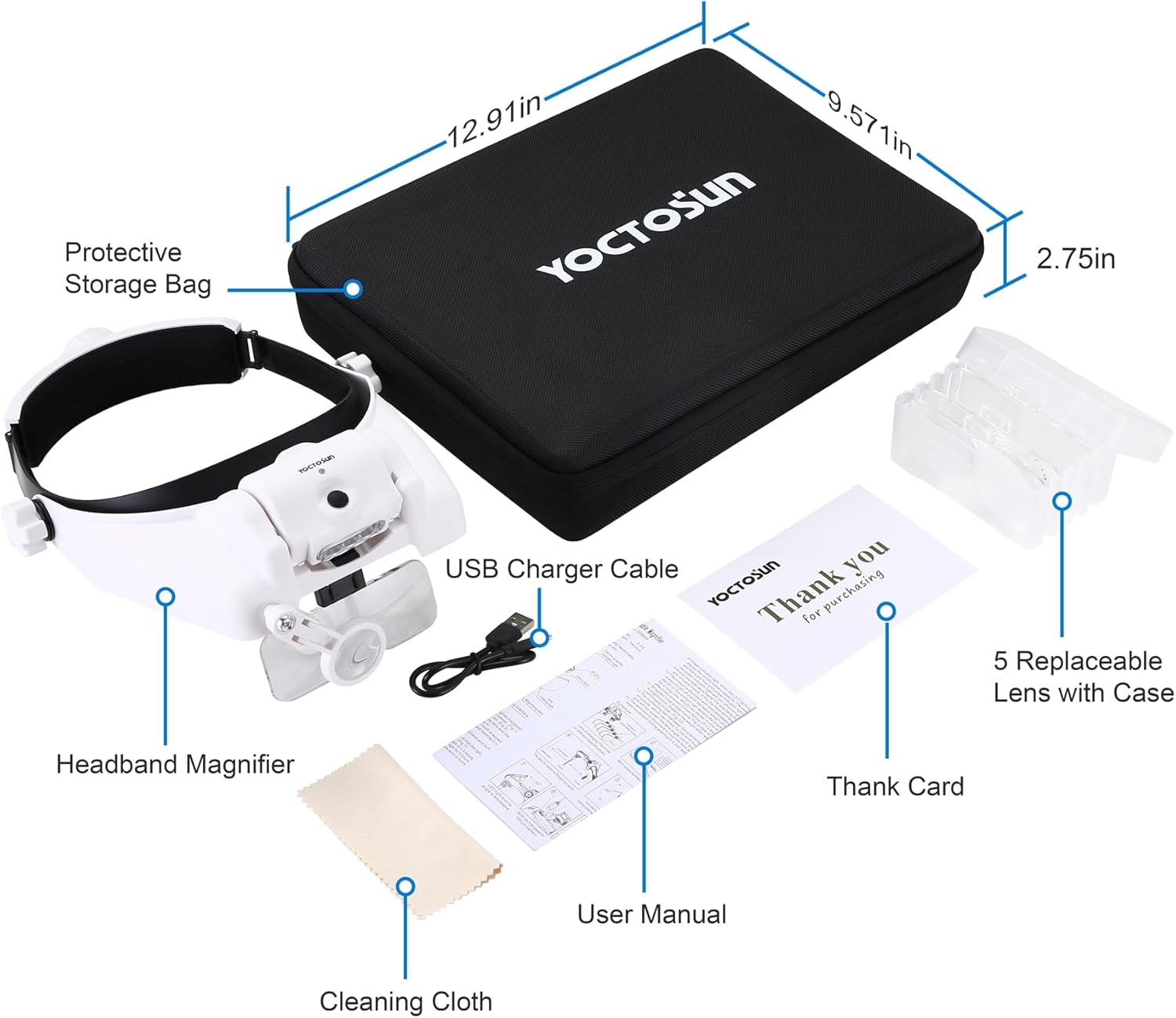
Figure 2: Visual representation of all items included in the product package.
3. 製品構造と構成
Familiarize yourself with the main parts of your headband magnifier for optimal use:
- ヘッドバンド: Adjustable strap for secure and comfortable fit.
- LEDライトユニット: Contains 3 detachable LED lights for illumination.
- Lens Slots: Designed to hold interchangeable main lenses.
- Auxiliary Lens Arm: Holds the small 8X round lens, which is 360° rotatable.
- 調整ノブ: Three knobs for adjusting lens height/angle and headband tightness.
- USB充電ポート: Located on the battery pack for recharging.

Figure 3: Detailed diagram showing the various parts of the headband magnifier.
4. セットアップ
4.1。 バッテリーの充電
The headband magnifier is equipped with a rechargeable Lithium Polymer battery. Before first use, or when the LED lights dim, charge the unit using the provided USB cable.
- Locate the Micro USB charging port on the side of the LED light unit.
- Connect the smaller end of the USB charging cable to the magnifier's port.
- USB ケーブルの大きい方の端を標準の USB 電源アダプタ (別売) またはコンピュータの USB ポートに接続します。
- A charging indicator light will illuminate. Charging typically takes about 4 hours for a full charge.
- Once fully charged, the LED lights can last continuously for approximately 6-8 hours.

Figure 4: Illustrates the USB charging port and connection.
4.2. レンズの取り付け
The magnifier comes with 5 interchangeable main lenses and one auxiliary lens. You can combine them for various magnifications.
- Select the desired main lens(es) from the storage case. The lenses are made of shatterproof crystal clear acrylic.
- Gently slide the chosen main lens(es) into the designated lens slots on the magnifier unit. Ensure they click securely into place.
- The small round 8X auxiliary lens is pre-attached and can be rotated into position as needed.

Figure 5: Demonstrates the process of inserting a main lens.
4.3. フィット感の調整
For comfortable and stable use, adjust the headband and lens positions:
- ヘッドバンドの締め付け: Use the knob on the back side of the headband to adjust it to fit your head size. The inner side is wrapped with a soft sponge for comfort.
- Lens Height/Angle: Use the two side knobs to adjust the height and angle of the main lenses for optimal viewing。
- 補助レンズ: The small round lens can be rotated 360° to position it precisely for your task.
- Folding Lenses: All optivisor lenses can be folded or rotated upwards when not in use, allowing for normal vision.


Figure 6: Illustrations of the angle/height regulating knob and the tightness regulating knob.
5. 操作手順
5.1. 倍率の変更
The headband magnifier offers a wide range of magnification levels by combining its lenses:
- You can use a single main lens (1X, 1.5X, 2X, 2.5X, 3.5X).
- Combine two main lenses for increased magnification (e.g., 1X + 1.5X = 2.5X).
- Utilize the 8X auxiliary lens in conjunction with main lenses for even higher magnification (e.g., 1X + 8X = 9X).
- A total of 23 magnification combinations are possible, ranging from 1X to 14X.

Figure 7: Reference table for various magnification combinations and their corresponding focal lengths.
5.2. Using LED Lights
The magnifier features 3 detachable LED lights to illuminate your work area:
- Press the power button on the LED light unit to turn the lights on.
- Press again to cycle through different brightness levels (if available) or turn off.
- Adjust the direction of the LED lights by tilting the light unit for precise illumination.

Figure 8: The integrated LED lights provide excellent illumination for detailed work.
6. メンテナンス
- レンズのクリーニング: Use the provided cleaning cloth to gently wipe the acrylic lenses. Avoid abrasive materials or harsh chemicals that could scratch the lens surface.
- ストレージ: When not in use, store the magnifier and its lenses in the protective storage case to prevent dust accumulation and damage.
- バッテリーのケア: To prolong battery life, avoid fully discharging the battery frequently. Recharge when the lights dim. If storing for extended periods, charge the battery every 3-6 months.
- 一般的なケア: Keep the unit away from extreme temperatures, direct sunlight, and moisture.
7。 トラブルシューティング
- LED ライトが点灯しない:
- バッテリーが充電されていることを確認してください。USBケーブルを接続し、少なくとも30分間充電してください。
- 電源ボタンが正しく押されていることを確認します。
- Magnification Not Clear:
- Check if the lenses are clean. Use the cleaning cloth to remove any smudges or dust.
- Adjust the lens height and angle using the side knobs to find the optimal focal point for your eyes and the object.
- Ensure you are using the correct magnification for the task and distance. Refer to the magnification table.
- Headband Feels Loose/Uncomfortable:
- Adjust the tightness regulating knob at the back of the headband.
- Ensure the soft sponge padding is correctly positioned on your forehead.
8. 仕様
| 特徴 | 詳細 |
|---|---|
| ブランド | ヨクトサン |
| モデル | Headband Magnifier 1x-14x With Storage Case |
| レンズ素材 | アクリル |
| 倍率範囲 | 1X, 1.5X, 2X, 2.5X, 3.5X (main lenses); 8X (auxiliary lens); Combinations up to 14X |
| 光源 | 3 Detachable LED Lights (Adjustable Brightness/Direction) |
| 電池のタイプ | リチウムポリマー電池 1 個 (付属) |
| 充電時間 | 約4時間 |
| Working Time (LED) | 約6~8時間(フル充電) |
| アイテム重量 | 1.98ポンド |
| パッケージ寸法 | 13.27 x 10.87 x 2.91インチ |
| 欧州連合 | 726679582455 |

Figure 9: Product dimensions and battery details.
9. 保証とサポート
For detailed warranty information, product registration, or technical support, please refer to the official YOCTOSUN website or contact their customer service directly. Contact information is typically provided in the full product manual or on the manufacturer's packaging.
訪問することができます YOCTOSUN Store on Amazon 詳細についてはこちらをご覧ください。