
導入
The SteelSeries Arctis GameBuds are advanced wireless gaming earbuds designed to provide an immersive audio experience across multiple platforms. Featuring a next-generation chipset, Active Noise Cancellation (ANC), and versatile connectivity options, these earbuds are engineered for performance and comfort.

Image: The SteelSeries Arctis GameBuds earbuds and their charging case.

Image: A user engaged in PC gaming while wearing the Arctis GameBuds.
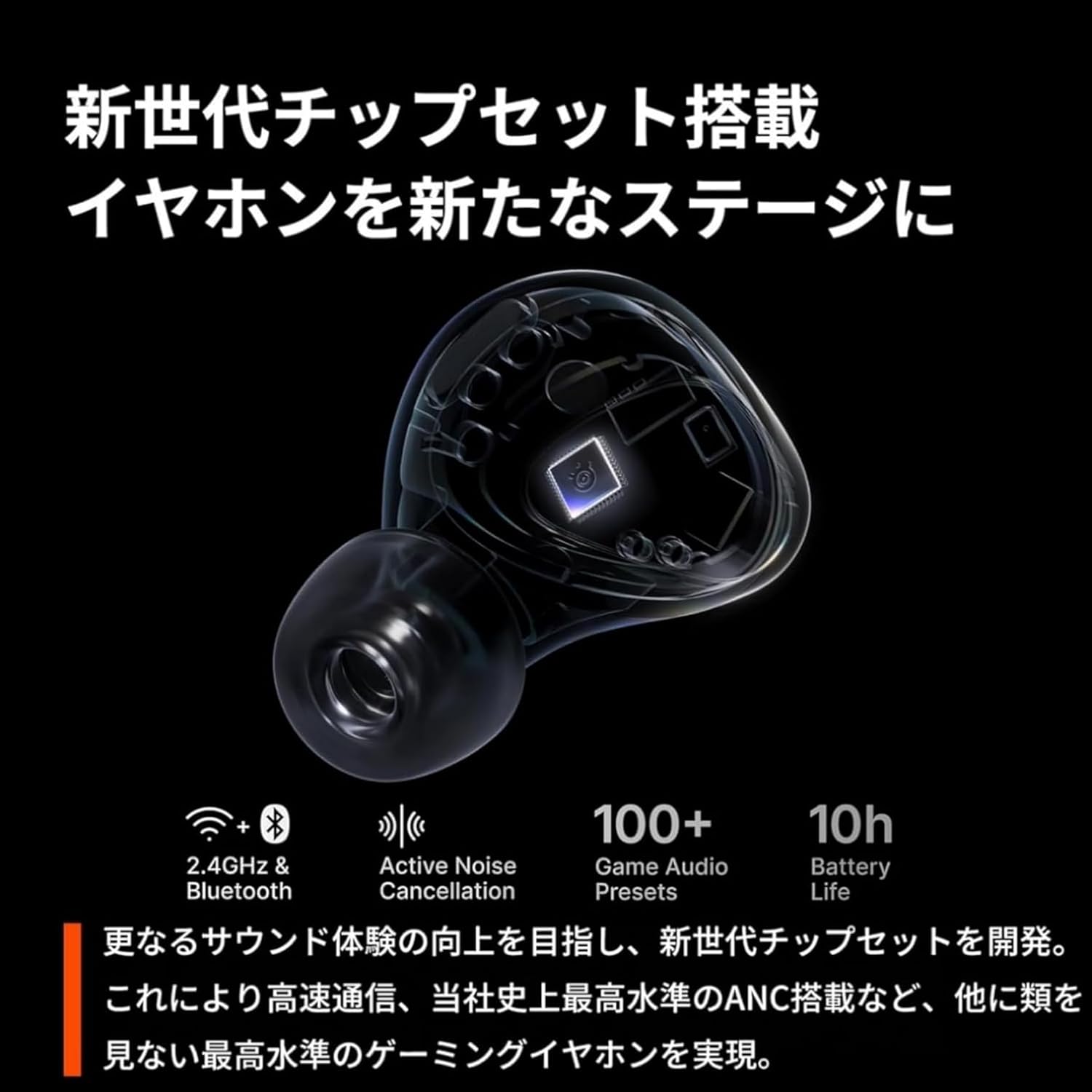
Image: A visual representation of the advanced internal chipset within the Arctis GameBuds.
パッケージ内容
パッケージにすべてのアイテムが含まれていることを確認します。
- Arctis GameBuds Wireless Earbuds
- 充電ケース
- USB-C Wireless Dongle (2.4GHz)
- USB-C充電ケーブル
- USB-C - USB-A アダプタ
- イヤーチップ(S/M/Lサイズ)
- 取扱説明書(本書)
設定
1. 初期充電
Before first use, fully charge your Arctis GameBuds and the charging case. Connect the USB-C charging cable to the charging case and a power source. The LED indicator on the case will show charging status.
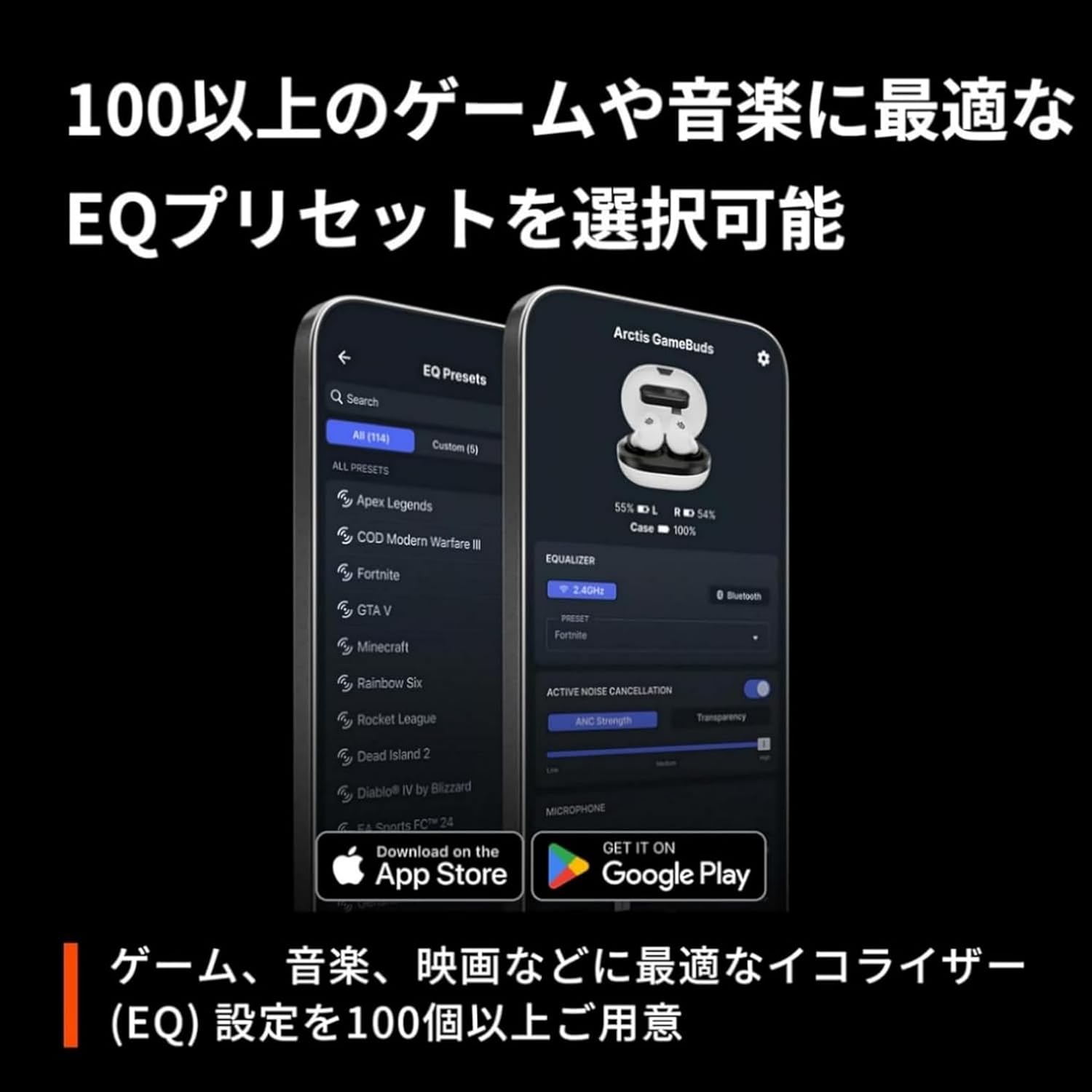
Image: The Arctis GameBuds charging case with a USB-C cable connected, indicating charging.
2. イヤーチップの選択とフィット
Select the ear tips that provide the most comfortable and secure fit for your ears. A proper seal is crucial for optimal sound quality and Active Noise Cancellation performance. Gently insert the earbuds into your ear canal and twist slightly to ensure a snug fit.

Image: A diagram illustrating the correct placement of the earbud within the ear for a secure and comfortable fit.
操作手順
接続性
The Arctis GameBuds offer dual wireless connectivity: 2.4GHz via USB-C dongle for low-latency gaming and Bluetooth 5.3 for mobile devices.
2.4GHz Wireless Connection (for PC, PlayStation, Switch, Meta Quest)
- Insert the USB-C wireless dongle into an available USB-C port on your device (PC, PS5, PS4, Nintendo Switch, Meta Quest, etc.). Use the USB-C to USB-A adapter if needed.
- The earbuds will automatically connect to the dongle. A successful connection is indicated by a solid light on the dongle.
- Ensure the Arctis GameBuds are selected as the audio output device in your system settings.

Image: The Arctis GameBuds shown with the USB-C dongle, illustrating the 2.4GHz wireless connection.
Bluetooth 5.3 Connection (for Mobile, Tablet)
- 充電ケースからイヤフォンを取り外します。
- モバイルデバイスで Bluetooth 設定に移動し、Bluetooth を有効にします。
- Select "Arctis GameBuds" from the list of available devices to pair.
Quick Switch Wireless
The Quick Switch Wireless feature allows seamless switching between 2.4GHz and Bluetooth connections. Triple-tap either earbud to switch between the two modes instantly.
アクティブノイズキャンセリング(ANC)と透明モード
The Arctis GameBuds feature Hybrid Active Noise Cancellation (ANC) to block out external distractions and a Transparency Mode to allow ambient sounds in.
- ANC を有効にする: ANC is typically enabled by default or can be toggled via the companion app.
- 透明モード: This mode allows you to hear your surroundings without removing the earbuds. Refer to the companion app for specific controls.

画像: 内部 view of the Arctis GameBuds, illustrating the components responsible for Active Noise Cancellation.
Audio Customization (EQ Presets)
Utilize the Arctis Companion App (for mobile) or SteelSeries GG software (for PC) to access over 100 game-specific EQ presets and customize your audio experience.
- Arctis Companion App: Download from the App Store (iOS 15.6+) or Google Play (Android 9+).
- SteelSeries GG Software: Download for Windows (8.1+) or Mac OS (10.13+). This software also enables ChatMix functionality on PC (Windows 10+).

Image: A screenshot of the companion app interface, displaying various equalizer presets optimized for different games.
物理ボタンコントロール
The Arctis GameBuds feature physical buttons to prevent accidental touches and provide precise control over your audio and calls.

画像: クローズアップ view of the physical buttons on the earbuds, designed for precise control.
Specific button functions can be customized via the SteelSeries GG software.
WearSense Feature
The WearSense feature automatically pauses media playback when you remove an earbud and resumes when you put it back in. This feature can be toggled on or off in the companion app.
充電とバッテリー寿命
The Arctis GameBuds offer extended battery life and convenient charging options.
- イヤホンの再生時間: Up to 10 hours on a single charge (with 2.4GHz active, Bluetooth connected, ANC off, 100% volume).
- ケース付き合計プレイ時間: Up to 40 hours (10 hours from earbuds + 30 hours from case).
- 急速充電: 15 分の充電で最大 3 時間の再生が可能です。
- ワイヤレス充電: The charging case supports Qi wireless charging for added convenience.
Image: The Arctis GameBuds charging case connected via USB-C, illustrating charging capabilities.
メンテナンス
IP55防塵・防水性能
The Arctis GameBuds are rated IP55 for dust and water resistance, meaning they are protected against dust ingress and low-pressure water jets from any direction. This makes them suitable for use during workouts or light rain, but they are not designed for submersion.

Image: An earbud being splashed with water, demonstrating its IP55 dust and water resistance.
To clean your earbuds, gently wipe them with a soft, dry cloth. Do not use abrasive materials or immerse them in water.
トラブルシューティング
- 音が出ない: Ensure earbuds are charged and properly connected (2.4GHz dongle or Bluetooth). Check device audio output settings.
- 接続の問題: Try re-pairing Bluetooth or re-inserting the 2.4GHz dongle. Ensure no other devices are interfering with the wireless signal.
- ANC が機能しない: Verify ANC is enabled in the companion app. Ensure a proper ear tip seal.
- マイクの問題: Check microphone settings on your device. Ensure the earbuds are properly seated.
- Software Update Issues (Mac OS): Some users have reported difficulties updating firmware via Mac OS. If encountering this, consider using a Windows PC for updates if available, or contact SteelSeries support.
仕様
| 特徴 | 詳細 |
|---|---|
| ブランド | スティールシリーズ |
| モデル番号 | 61680 |
| イヤフォンの重量 | 各5.3g |
| ケース重量 | 48.7グラム |
| 接続性 | 2.4GHzワイヤレス、Bluetooth 5.3 |
| Bluetooth範囲 | 10メートル |
| 互換性 | PS4, PS5, Mac, Switch, Switch 2, iPhone (USB-C), Android, Tablet (USB-C), Handheld, Meta Quest 2/3, PC |
| オーディオドライバー | Neodymium Magnetic Dynamic Drivers, 6mm |
| 周波数応答 | 20~20,000Hz |
| 感度 | 102デシベル |
| インピーダンス | 32オーム |
| 音声遅延 | 34.4ミリ秒 |
| 騒音制御 | Active Noise Cancellation (Hybrid, 4-mic), Transparency Mode |
| マイクロフォン | Integrated (4-mic hybrid system) |
| イヤホンのバッテリー寿命 | 最大10時間 |
| バッテリー総寿命(ケース付き) | 最大40時間 |
| 急速充電 | 15分の充電で3時間の再生が可能 |
| ワイヤレス充電 | Qi Wireless Charging (case) |
| 防塵・防水 | IP55 |
| コントロール | Physical buttons, App control |
| ソフトウェアサポート | Arctis Companion App (iOS 15.6+, Android 9+), SteelSeries GG + Engine (Windows 8.1+, Mac OS 10.13+), SteelSeries GG + Sonar (Windows 10+ for ChatMix) |
保証とサポート
The SteelSeries Arctis GameBuds come with a manufacturer's warranty of 1 year. For technical support, warranty claims, or additional information, please visit the official SteelSeries support webサイトにアクセスするか、カスタマーサービスにお問い合わせください。
Official SteelSeries Webサイト: スティールシリーズ.com
製品終了view ビデオ
ビデオ: 公式製品view video demonstrating the features and usage of the SteelSeries Arctis GameBuds.