
CCYLEZ CCYLEZ6gksbyu8q1
CCYLEZ 16MP Digital Camera with Microphone User Manual
Model: CCYLEZ6gksbyu8q1
導入
ご購入ありがとうございますasing the CCYLEZ 16MP Digital Camera. This manual provides detailed instructions on how to set up, operate, and maintain your camera to ensure optimal performance. This camera is designed for capturing high-resolution photos and 1080P videos, featuring a 16X digital zoom, a 2.4-inch display, and a professional external microphone for enhanced audio recording. Please read this manual thoroughly before using the product.
安全情報
- カメラを水や湿気にさらさないでください。
- カメラを落としたり、強い衝撃を与えたりしないでください。
- カメラを極端な温度や直射日光から遠ざけてください。
- 承認されたアクセサリと電源アダプタのみを使用してください。
- カメラをご自身で分解したり修理したりしないでください。サポートが必要な場合は、カスタマーサポートにお問い合わせください。
- お子様の手の届かない場所に保管してください。
パッケージ内容
以下の項目のボックスにチェックを入れてください。
- 1 x CCYLEZ Digital Camera
- 1 x Camera Accessory (Strap)
- 1xダストカバー
- 取扱説明書2部
- 1 x Professional Microphone
- USBケーブル1本
- サウンドケーブル x 1

Image: All included components, including the camera, microphone, cables, and dust cover.
製品終了view
フロント View
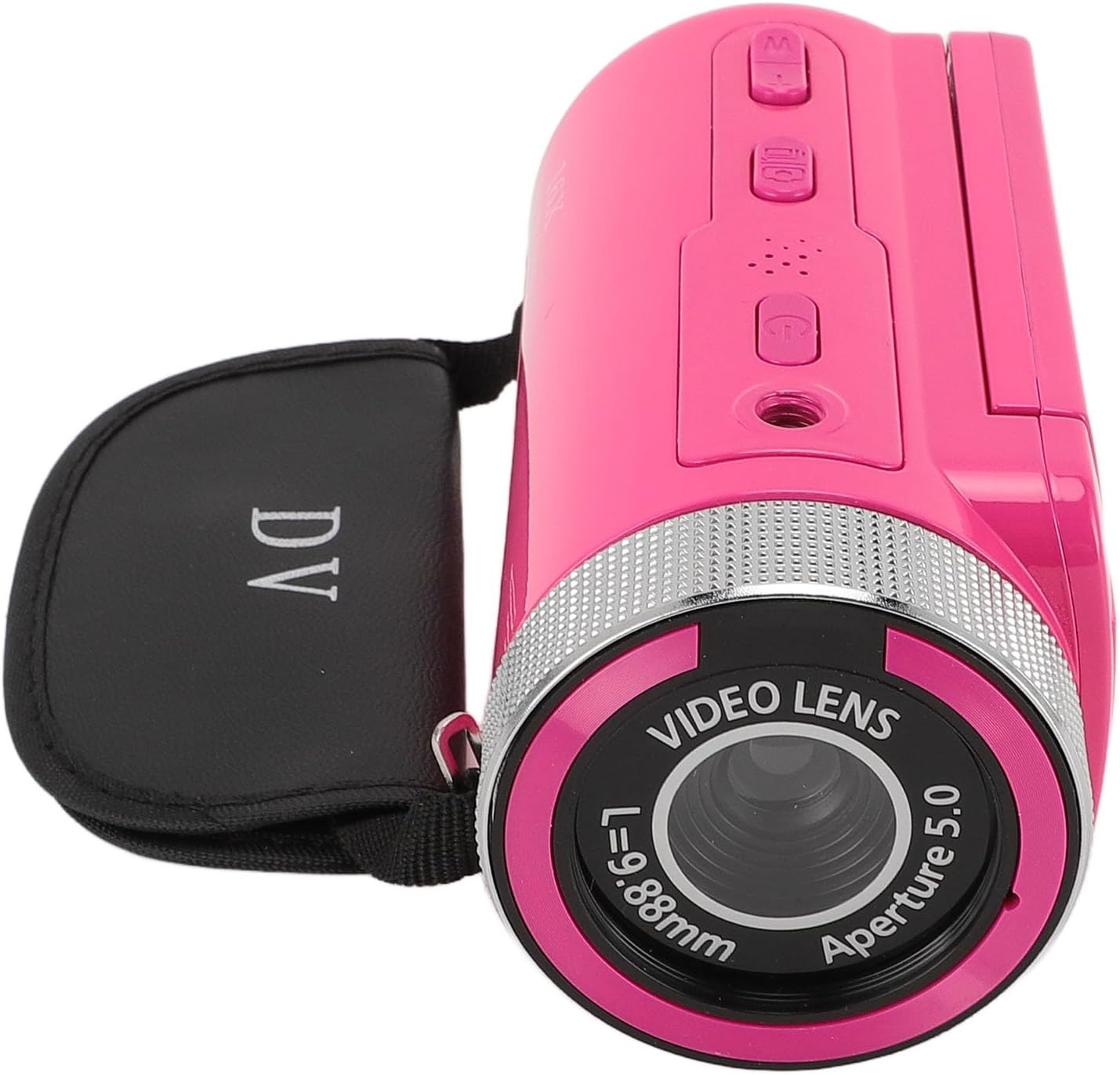
Image: The front of the camera, highlighting the video lens, aperture, and the 16X Digital Zoom label.
- Video Lens: 画像やビデオをキャプチャします。
- マイクマウント: Point for attaching the external microphone.
- 16倍デジタルズーム: Indicates the camera's digital zoom capability.
後方 View およびディスプレイ

Image: The camera's rear, showing the open 2.4-inch display and control buttons.
- 2.4インチHDディスプレイ: Swivel screen for viewing and framing shots.
- 電源ボタン: カメラのオン/オフを切り替えます。
- モードボタン: 写真モードとビデオモードを切り替えます。
- ナビゲーションボタン: メニューナビゲーションとズームコントロール用。
- 録画/シャッターボタン: ビデオ録画を開始/停止したり、写真を撮影します。
設定
1. バッテリーの充電
The camera comes with a built-in 1020mAh lithium battery. Before first use, ensure the battery is fully charged. Connect the camera to a power source using the provided USB cable. The charging indicator light will illuminate during charging and turn off when fully charged.
2. ストレージカードの挿入
This camera supports storage cards up to 128GB (not included). Locate the memory card slot, usually on the side or bottom of the camera. Insert the card with the metal contacts facing the correct direction until it clicks into place. To remove, gently push the card in until it springs out.
3. Attaching the Professional Microphone

Image: The camera with the external microphone securely attached, ready for use.
- Locate the microphone mount on top of the camera.
- Slide the microphone into the mount until it is secure.
- Connect the microphone's audio cable to the camera's microphone input jack (typically a 3.5mm port).
- Ensure the connection is firm for optimal audio capture.
4. 初回電源投入
Press and hold the Power button for a few seconds to turn on the camera. The 2.4-inch HD display will light up. You may need to set the date and time during the first startup.
操作手順
1.電源のオン/オフ
- 電源を入れるには: 電源ボタンを長押しします。
- 電源を切るには: 画面がオフになるまでもう一度電源ボタンを押し続けます。
2. Switching Modes (Photo/Video)
Press the Mode button to toggle between photo capture mode and video recording mode. The current mode will be indicated on the display.
3. 写真を撮影する

Image: The camera's 2.4-inch HD display showing a clear image, demonstrating its photo capture capability.
- カメラが写真モードになっていることを確認します。
- 2.4 インチ ディスプレイを使用してショットをフレーミングします。
- Press the Shutter button to take a picture. The camera supports up to 16MP photos.
4.ビデオの録画

Image: The camera in use, recording video with the attached microphone, highlighting its 1080P video resolution capability.
- ビデオ録画モードに切り替えます。
- Press the Record button to start recording. A red indicator or timer will appear on the screen.
- Press the Record button again to stop recording. The camera supports 1080P, 720P, and 480P video resolutions.
5. デジタルズームの使用
While in photo or video mode, use the zoom buttons (often integrated with navigation buttons) to zoom in or out. The camera features 16X digital zoom.
6. メニューナビゲーション
Press the Menu button to access camera settings. Use the navigation buttons to scroll through options and the OK/Shutter button to select. Settings include image resolution, video resolution, timestamp, exposure, and more.
7.再生

Image: The camera's screen displaying a recorded video or photo during playback, showing people shaking hands.
- Press the Playback button (if available, or navigate via Menu) to review 撮影した写真やビデオ。
- ナビゲーション ボタンを使用してスクロールします。 files.
- Press the OK/Shutter button to play videos or view photos in full screen.
8. コンピュータへの接続
Connect the camera to your computer using the provided USB cable. The camera will typically appear as a removable disk, allowing you to transfer files. Ensure the camera is powered on when connected.
メンテナンス
- クリーニング: Use a soft, dry cloth to clean the camera body. For the lens and screen, use a specialized lens cleaning cloth and solution. Avoid abrasive materials.
- ストレージ: When not in use, store the camera in a cool, dry place, away from dust and direct sunlight. Remove the memory card if storing for extended periods.
- バッテリーのケア: Fully charge the battery before long-term storage and recharge every few months to maintain battery health.
トラブルシューティング
| 問題 | 考えられる原因 | 解決 |
|---|---|---|
| カメラの電源が入りません。 | バッテリー残量が少ない、バッテリーに欠陥がある、電源ボタンに問題がある。 | Charge the battery fully. Ensure the power button is pressed correctly. |
| 写真やビデオを撮影できません。 | No memory card; memory card full; incorrect mode. | メモリーカードを挿入してください。不要なものを削除してください。 files or replace the card. Switch to the correct mode. |
| 音質が悪い。 | Microphone not connected properly; microphone settings. | Ensure the microphone is securely attached and connected. Check audio settings in the camera menu. |
| カメラがフリーズします。 | ソフトウェアの不具合、メモリカードの問題。 | Remove and reinsert the battery (if possible). Format the memory card (back up data first). |
仕様
| 特徴 | 仕様 |
|---|---|
| ブランド | CCYLEZ |
| モデル番号 | CCYLEZ6gksbyu8q1 |
| 実効静止画解像度 | 16 MP |
| ビデオ解像度 | 1080P、720P、480P |
| デジタルズーム | 16倍 |
| 画面サイズ | 2.4インチ |
| ストレージカードのサポート | 最大 128GB (含まれていません) |
| バッテリー | 1020mAh Lithium Battery (built-in) |
| マイクロフォン | プロフェッショナルインターview マイク(外付け) |
| 接続技術 | USB |
| File フォーマット(ビデオ) | MP4 |
| File フォーマット(画像) | JPEG |
| 下部インターフェース | 1/4 standard screw hole |
保証とサポート
This product comes with a standard manufacturer's warranty. For detailed warranty information, please refer to the separate warranty card included in your package or visit the official CCYLEZ website. If you encounter any issues or require technical assistance, please contact CCYLEZ customer support through their official channels.
さらに詳しいサポートについては、 CCYLEZ Store on Amazon.
Ask a question about this manual
Ask about setup, troubleshooting, compatibility, parts, safety, or missing instructions. Manuals+ will review the question and use this page’s manual context to help answer it.