
導入
This manual provides instructions for the safe and efficient use of the TRU Components TC-12358892 TC-KW-190 USB to RS485/RS422 Serial Converter. This device facilitates communication between a computer's USB port and RS485 or RS422 serial devices. It features an integrated FTDI FT232RL chip for reliable data transfer and 4 kV ESD protection.
安全情報
- Always handle the converter with care to prevent physical damage.
- Ensure proper grounding when connecting to other devices to avoid electrical hazards.
- The device includes 4 kV ESD (Electrostatic Discharge) protection. However, it is recommended to take standard ESD precautions when handling the device, especially in dry environments.
- Do not expose the device to moisture, extreme temperatures, or corrosive substances.
- 本装置を開けたり改造したりしないでください。修理は必ず資格のある担当者にご依頼ください。
パッケージ内容
パッケージには次のアイテムが含まれている必要があります。
- 1 x TRU Components TC-12358892 TC-KW-190 USB to RS485/RS422 Serial Converter
不足または破損している品目がある場合は、サプライヤーにご連絡ください。
設定
Follow these steps to set up your USB to RS485/RS422 serial converter:
- ドライバーのインストール: Before connecting the converter, ensure that the necessary drivers for the FTDI FT232RL chip are installed on your computer's operating system. These drivers are typically available from the FTDI website or your operating system's update service.
- コンピュータに接続します: Plug the USB Type-A connector of the converter into an available USB port on your computer. The operating system should detect the new hardware.
- シリアルデバイスに接続: Connect the RS485/RS422 side of the converter to your serial device using appropriate wiring. Refer to your serial device's manual for specific wiring diagrams for RS485 (2-wire or 4-wire) or RS422 connections.
- 接続を確認します: After connecting, check your computer's Device Manager (Windows) or equivalent system information (Linux/macOS) to confirm that the converter is recognized and assigned a COM port (Windows) or a serial device identifier.
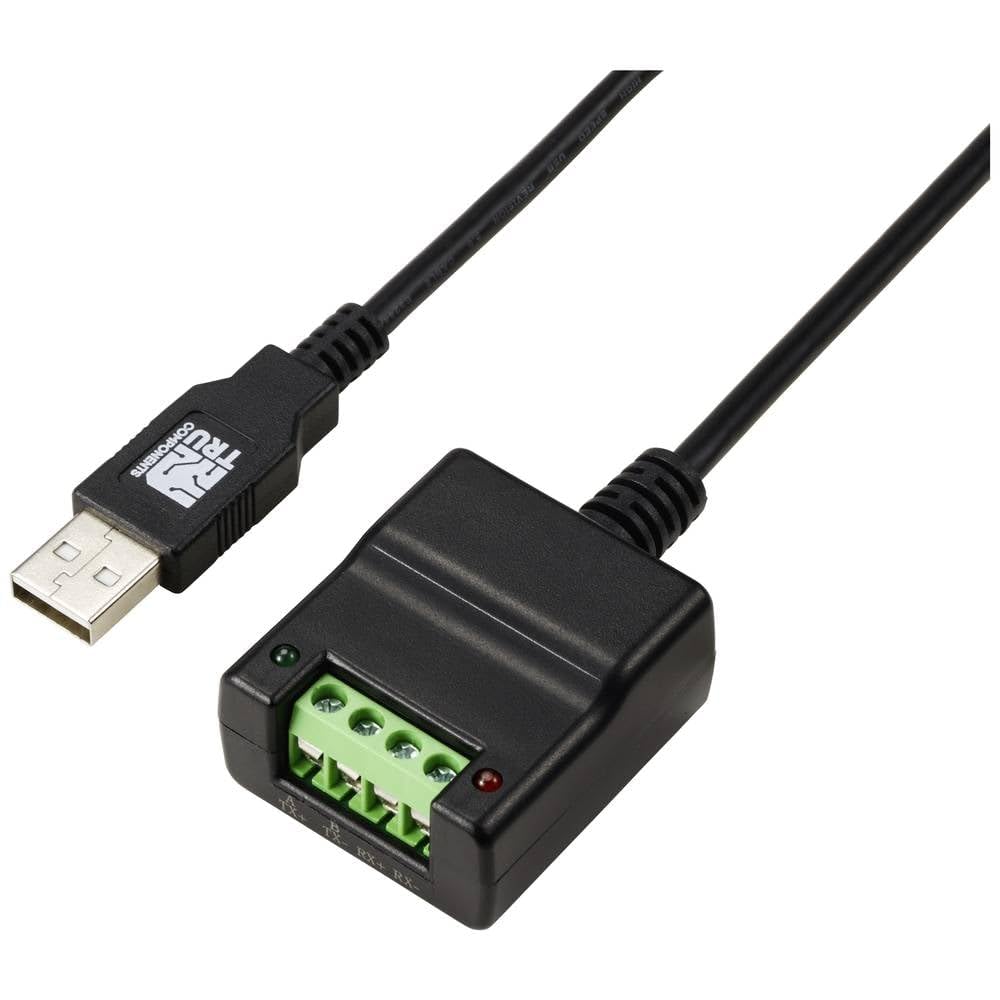
Image: TRU Components TC-12358892 TC-KW-190 USB to RS485/RS422 Serial Converter. This image shows the compact design of the converter with its USB connector on one end and the terminal block for RS485/RS422 connections on the other.
操作手順
Once the converter is successfully installed and recognized by your system, you can use it with serial communication software.
- COMポートを選択: Open your preferred serial communication software (e.g., PuTTY, Tera Term, or custom application) and select the COM port assigned to the converter.
- Configure Serial Parameters: Set the serial communication parameters (baud rate, data bits, parity, stop bits, flow control) to match those of your RS485/RS422 device. Incorrect settings will prevent communication.
- 通信を開始する: Begin sending and receiving data as required by your application. The converter will transparently handle the USB to RS485/RS422 conversion.
- RS485/RS422 Mode Selection: Some converters may have jumpers or software settings to select between RS485 (2-wire/4-wire) and RS422 modes. Consult the specific documentation for the converter if such options are present.
メンテナンス
The TRU Components TC-12358892 TC-KW-190 converter requires minimal maintenance.
- デバイスを清潔に保ち、ほこりを取り除いてください。清掃には柔らかく乾いた布を使用してください。
- コンバーターを使用しないときは、涼しく乾燥した場所に保管してください。
- ケーブル接続に摩耗や損傷の兆候がないか定期的に確認してください。
トラブルシューティング
If you encounter issues with the converter, consider the following:
- デバイスが認識されません:
- ドライバーが正しくインストールされていることを確認してください。必要に応じて再インストールしてください。
- コンピュータの別のUSBポートを試してください。
- USB ケーブルに損傷がないか確認してください。
- 通信なし:
- Verify that the correct COM port is selected in your software.
- Double-check all serial communication parameters (baud rate, data bits, parity, stop bits, flow control) to ensure they match the connected device.
- Inspect the RS485/RS422 wiring for correct polarity and connections.
- Confirm the RS485/RS422 device is powered on and functioning correctly.
- 断続的な通信:
- Check for electromagnetic interference (EMI) from other devices.
- Ensure cable lengths are within specifications for RS485/RS422.
- Verify proper termination resistors are used on the RS485/RS422 bus if required by your setup.
仕様
| 特徴 | 詳細 |
|---|---|
| モデル | TC-12358892 (TC-KW-190) |
| インタフェース | USB to RS485/RS422 |
| チップセット | FTDI FT232RL |
| ESD保護 | 4kV |
| 入力数 | 1 x (USB) |
| 出力数 | 1 x (RS485/RS422) |
| 重さ | 60グラム |
| メーカー | TRUコンポーネント |
保証とサポート
For warranty information and technical support, please refer to the documentation provided with your purchase or contact TRU Components directly through their official webサイトでご確認ください。保証請求に備えて購入証明書を保管してください。