
導入
The Linsoul Kiwi Ears Allegro Mini is a compact and portable Digital-to-Analog Converter (DAC) and amplifier designed to elevate your audio experience. It provides high-fidelity sound for your in-ear monitors (IEMs) and headphones, connecting seamlessly to various devices via USB-C. This manual will guide you through the setup, operation, and maintenance of your Allegro Mini to ensure optimal performance.

Image: The Kiwi Ears Allegro Mini, a compact silver DAC with a USB-C connector and audio output ports.
箱の中身
- Kiwi Ears Allegro Mini Portable IEM DAC
- ユーザーマニュアル
設定
- デバイスに接続します: Insert the USB-C connector of the Allegro Mini into the USB-C port of your smartphone, tablet, or computer. Ensure a secure connection.
- Connect Headphones/IEMs: Plug your 3.5mm single-ended or 4.4mm balanced headphones/IEMs into the corresponding output port on the Allegro Mini.
- 自動認識: Most modern Android devices (version 5.1 and above), PCs, and other compatible devices will automatically recognize the Allegro Mini as an external audio output device. No additional drivers are typically required for basic functionality.
- 音量調整: Adjust the volume using your connected device's volume controls.
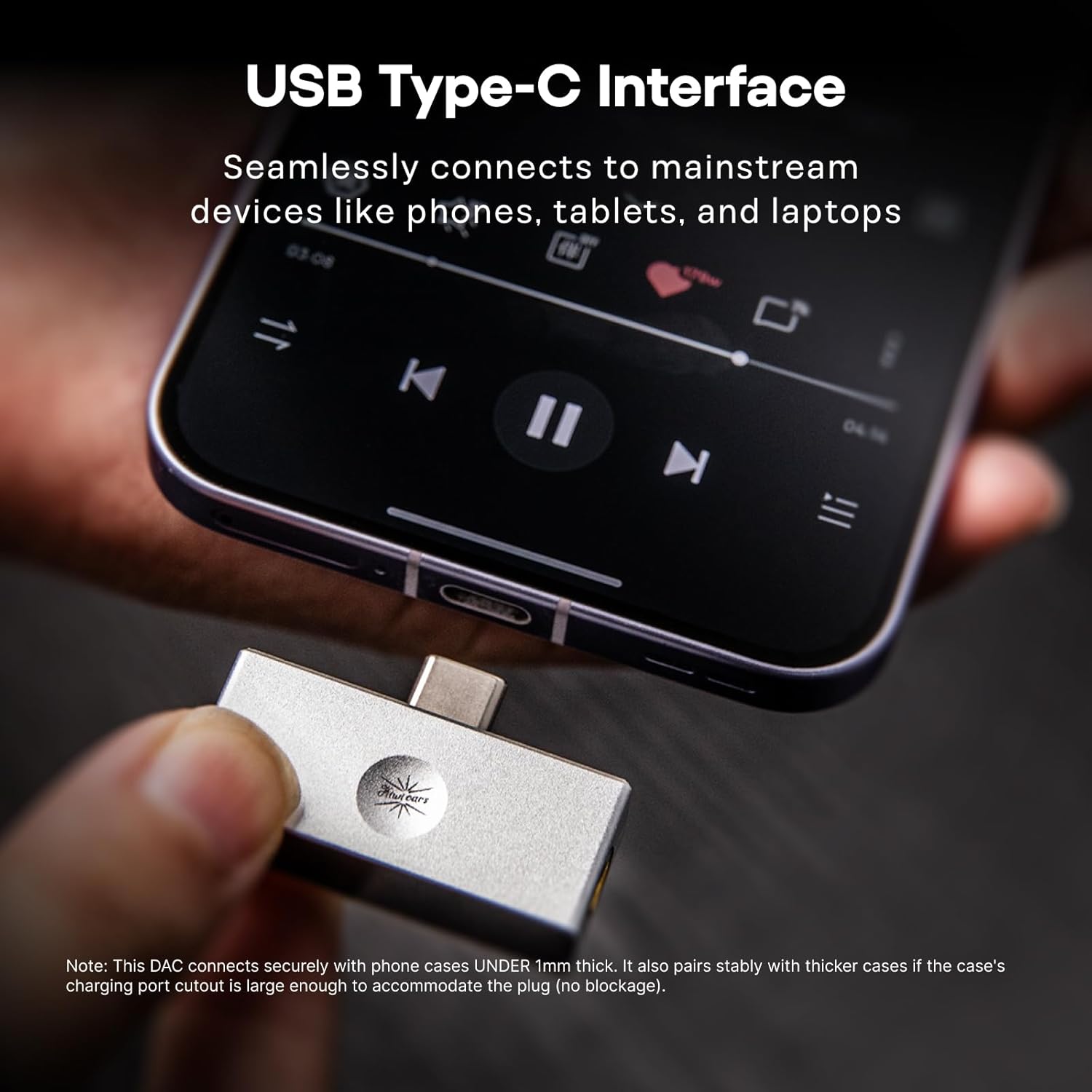
Image: The Allegro Mini connected to a smartphone via its USB-C port, with an IEM cable plugged into the 3.5mm output.
操作手順
- プラグアンドプレイ: The Allegro Mini is designed for immediate use. Simply connect it to your source device and audio output.
- オーディオ再生: Begin playing audio from your device. Sound will be routed through the Allegro Mini to your connected headphones or IEMs.
- 音量コントロール: Use the volume buttons on your connected smartphone, tablet, or computer to adjust the playback volume.
- 出力オプション: The Allegro Mini features both 3.5mm single-ended and 4.4mm balanced output ports. Choose the appropriate port for your headphones or IEMs. The 4.4mm balanced output may offer improved sound quality and power for compatible headphones.

Image: The Allegro Mini connected to a smartphone, demonstrating its plug-and-play functionality for audio playback.
特徴
- コンパクトでポータブルなデザイン: Inspired by the original Allegro, the Mini version offers high-fidelity sound in a smaller, all-aluminum alloy body for enhanced durability and a minimalist aesthetic.
- 柔軟な出力オプション: Equipped with both 4.4mm balanced and 3.5mm single-ended outputs to accommodate a wide range of headphones and IEMs.
- High-Resolution Audio Performance: Supports PCM up to 32bit/384kHz and DSD up to DSD128, ensuring detailed and clear audio reproduction.
- ユニバーサル互換性: Features a USB Type-C interface for seamless plug-and-play connection with most modern Android devices (version 5.1 and above), as well as PCs and other compatible devices.
- 優れたオーディオの明瞭性: Achieves an ultra-low THD+N of 0.004% at 32 Ohms, providing pure, undistorted sound with a wide frequency response and excellent signal-to-noise ratio.

Image: The Allegro Mini highlighting its 3.5mm single-ended and 4.4mm balanced output options.
仕様
| 属性 | 価値 |
|---|---|
| ブランド | リンソール |
| モデル名 | Kiwi Ears Allegro Mini |
| 色 | 銀 |
| 接続技術 | Wired (USB Type-C input) |
| 出力ポート | 3.5mmシングルエンド、4.4mmバランス |
| PCMサポート | 最大32ビット/384kHz |
| DSDサポート | 最大DSD128 |
| THD+N | 0.004% (at 32 Ohms) |
| フォームファクター | ミニポータブル |
| メーカー | リンソール |
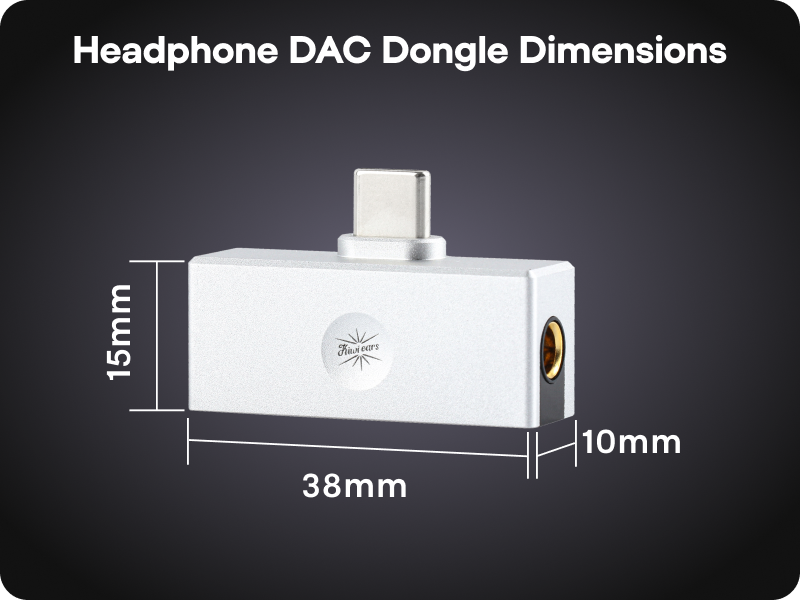
Image: A diagram illustrating the compact dimensions of the Kiwi Ears Allegro Mini.
メンテナンス
- クリーニング: Use a soft, dry cloth to wipe the exterior of the Allegro Mini. Avoid using liquid cleaners or abrasive materials.
- ストレージ: デバイスは直射日光や極端な温度を避け、涼しく乾燥した場所に保管してください。
- 取り扱いにはご注意ください: 耐久性はありますが、デバイスを落としたり、強い衝撃を与えたりしないでください。
- ポート保護: When not in use, consider using dust caps for the USB-C and audio ports to prevent dust and debris accumulation.
トラブルシューティング
- サウンド出力なし:
- Ensure the Allegro Mini is securely connected to both your source device and headphones/IEMs.
- デバイスの音量設定を確認し、ミュートされていないことを確認してください。
- Verify that your source device recognizes the Allegro Mini as the active audio output. This can usually be checked in your device's sound settings.
- Test with different headphones/IEMs to rule out an issue with your audio output device.
- 音量が小さい、または音が歪んでいる:
- ソースデバイスの音量を上げます。
- Ensure your headphones/IEMs are fully plugged into the Allegro Mini. A partial connection can cause distortion or sound only in one channel.
- If using a phone case, ensure it does not obstruct the USB-C connection, as this can prevent a full connection.
- For optimal performance, especially with demanding headphones, use the 4.4mm balanced output if your headphones support it.
- デバイスが認識されません:
- Disconnect and reconnect the Allegro Mini.
- Try connecting to a different USB-C port or a different compatible device to isolate the issue.
- デバイスのオペレーティング システムが最新であることを確認してください。
公式製品ビデオ
Linsoul Kiwi Ears Allegro Mini Portable IEM DAC Overview
ビデオ: 当局者がview of the Linsoul Kiwi Ears Allegro Mini Portable IEM DAC, showcasinその機能とデザイン。
Linsoul Kiwi Ears In-Ear Monitor Manufacturing Process
Video: A detailed look into the manufacturing process of Linsoul Kiwi Ears in-ear monitors, demonstrating the craftsmanship and quality control.
保証とサポート
The Linsoul Kiwi Ears Allegro Mini comes with a 1年間保証 ご購入日から1年間。この保証は、製造上の欠陥および通常の使用に起因する問題を対象としています。
For technical support, warranty claims, or any questions regarding your product, please contact Linsoul Audio customer service through their official webご購入いただいたサイトまたは販売店にお問い合わせください。保証の有効性を確認するため、購入証明書を保管してください。
You can visit the Linsoul Store for more information: Linsoul Official Store