
1.製品オーバーview
The CAMECHO 9'' Touchscreen Car Radio is an advanced head unit designed specifically for Hyundai Veloster models from 2011 to 2015. It integrates modern automotive entertainment and navigation features, including Wireless/Wired CarPlay and Android Auto, GPS navigation, WiFi connectivity, Bluetooth 5.0, and FM/RDS radio. This unit features a 9-inch 2.5D tempered glass 1080P high-definition display, providing a clear and responsive touch experience.
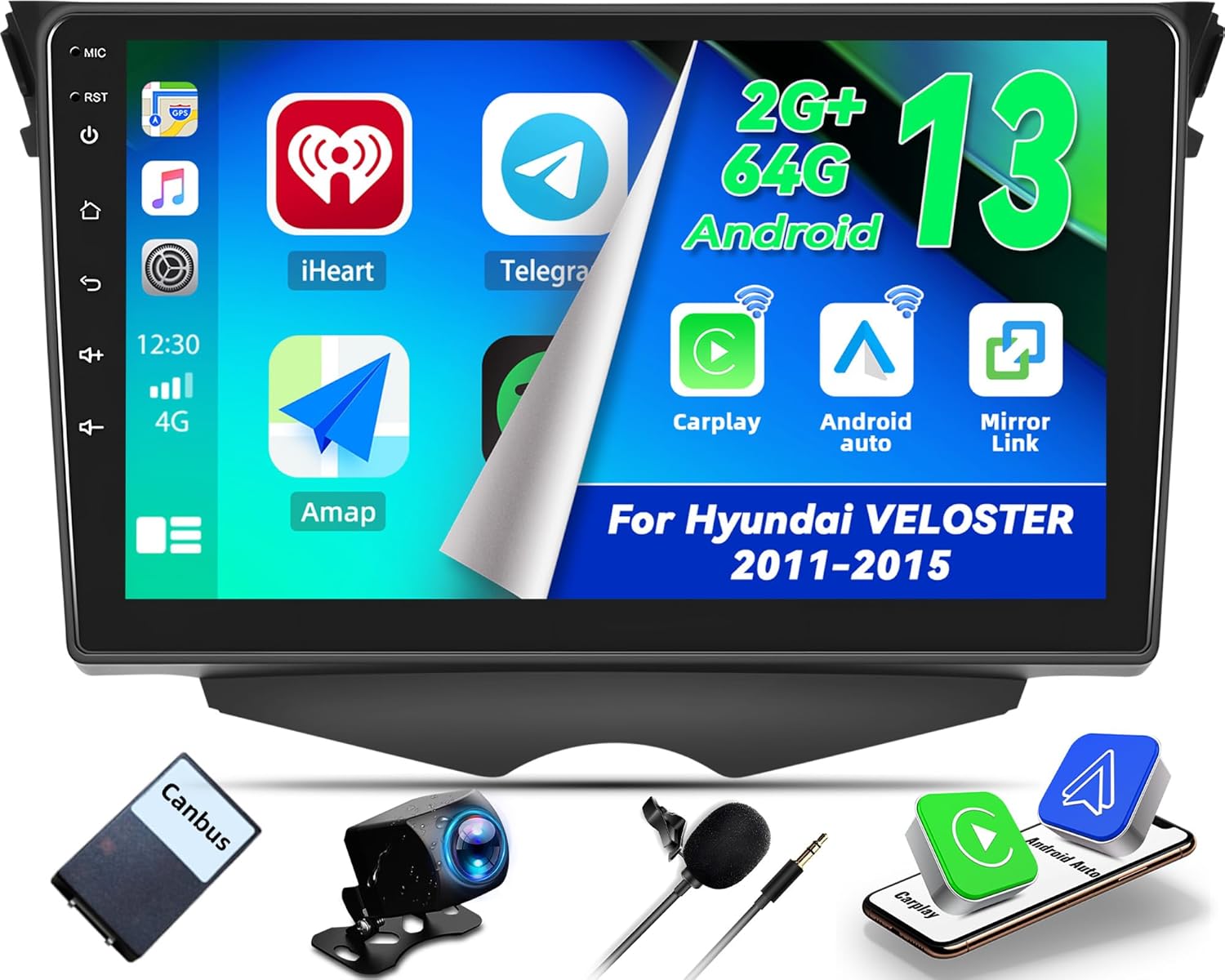
Figure 1.1: CAMECHO 9'' Touchscreen Car Radio and included components.
This image displays the main head unit along with various accessories such as the Canbus box, backup camera, and microphone, highlighting the comprehensive package for installation.
2. 主な特徴
- 画面: 9-inch 2.5D tempered glass IPS touchscreen with 1080P high resolution.
- オペレーティング·システム: 2GB RAM、64GB ROM を搭載した Android 13。
- スマートフォンの統合: Built-in Wireless/Wired CarPlay and Android Auto support (IOS 15.4 and below, Android 12 and below; Huawei mobile phones are not supported).
- ナビゲーション: Built-in GPS with support for offline maps (e.g., "Here We GO") and online navigation applications.
- 接続性: WiFi for internet access and app downloads, Bluetooth 5.0 for hands-free calling and music streaming.
- 無線: 18 のプリセット局を備えた FM/RDS ラジオ。
- カメラサポート: Rear camera input for backup camera functionality.
- オーディオ: EQ settings for customized sound output.
- コントロール: ステアリングホイールコントロールの互換性。
- ミラーリンク: Wired & wireless mirror link to sync smartphone display.

図2.1:以上view of the CAMECHO car radio's main features.
This image visually summarizes the core functionalities of the head unit, such as CarPlay, Android Auto, 2+64G memory, 9-inch touchscreen, FM/RDS, AHD backup camera support, video playback, and music playback.
3. パッケージ内容
以下にリストされているすべてのアイテムがパッケージに含まれていることを確認してください。
- CAMECHO 9'' Touchscreen Car Radio Head Unit
- バックアップカメラ
- マイクロフォン
- キャンバスボックス
- カメラケーブル
- USBケーブル(複数)
- ラジオアンテナ
- RCAケーブル(複数)
- 電源ケーブル
- ユーザーマニュアル(このドキュメント)
- GPSアンテナ
- 後方 View ケーブル
- Installation Tools (basic set)

図3.1:詳細 view パッケージの内容。
This image provides a visual checklist of all items you should find in the product box, including the main unit, various cables, antennas, and the backup camera.
4.インストールガイド
Installation of the CAMECHO car radio requires technical knowledge and careful handling of vehicle electronics. It is highly recommended to seek professional installation to ensure proper functionality and avoid damage to your vehicle or the unit.
4.1 一般的な配線図
Refer to the following diagram for connecting the main power, audio, and data cables to the head unit.

図 4.1: 製品の配線図。
This diagram illustrates the connection points on the back of the head unit for the RCA cables, USB cables, power cable, rear view video input cable, and GPS antenna.
4.2 バックカメラ配線
Proper connection of the reversing camera is crucial for its functionality. Ensure the white plug is connected to the main device to enable Bluetooth and WiFi signals.
- 赤いケーブル(1): 車のバックランプケーブルのプラス極に接続します。
- 黒ケーブル(2) 車のバックランプケーブルのマイナス極に接続します。
- Note: The other two red extension cables (3 and 4) do not need to be connected.
- Tip: The reversing input must be plugged in even when the reversing camera is not used.

Figure 4.2: Reversing Camera Wiring Diagram.
This diagram details the specific connections required for the backup camera, including power and signal cables, and highlights important notes for proper setup.
4.3 Pre-Installation and Post-Installation Comparison
Observe the visual difference in your vehicle's dashboard before and after the installation of the CAMECHO head unit.

図 4.3: インストールの比較。
This image shows the original car dashboard next to the dashboard with the CAMECHO 9-inch touchscreen car radio installed, demonstrating the integrated appearance.
5. 操作手順
5.1 ワイヤレス CarPlay と Android Auto
The unit supports both wireless and wired CarPlay and Android Auto. This allows you to access navigation, make calls, send messages, and enjoy music directly from your smartphone through the car radio's interface.
- 繋がり: Connect CarPlay via USB/WiFi; Connect Android Auto via USB/WiFi.
- 互換性: Supports iOS 15.4 and below, Android 12 and below. (Note: Huawei mobile phones are not supported).
- 音声アシスタント: Utilize smart voice assistants like Siri or Google Assistant for hands-free control.

図 5.1: CarPlay と Android Auto インターフェース。
This image shows the user interface for both CarPlay and Android Auto, demonstrating how smartphone apps like iHeartRadio, Telegram, Spotify, and navigation tools are displayed on the car radio screen.

Figure 5.2: Wireless CarPlay & Android Auto Functionality.
This image highlights the wireless capabilities of CarPlay and Android Auto, showing voice command examples like "Hey Siri, Navigate to the beach!" and "OK Google, play pop music," along with app icons.
5.2 Built-in GPS Navigation & WiFi Connection
The car radio features built-in GPS navigation. After connecting to WiFi, you can download offline maps or use online mapping services. The unit supports various navigation applications.
- オフラインマップ: Pre-installed with "Here We GO" APK for offline navigation.
- オンラインマップ: Connect to WiFi or a mobile hotspot to use online maps and download other applications like YouTube, Waze, Facebook, etc.

Figure 5.3: GPS Navigation and WiFi Connection.
This image illustrates the GPS navigation interface showing a map with route details and a visual representation of WiFi connectivity with various app icons, indicating internet access.
5.3 Bluetooth Hands-free Calling & Music
Connect your smartphone via Bluetooth for hands-free calling, music streaming, and automatic phonebook loading. An external microphone (not included) can be added for clearer voice quality during calls.

Figure 5.4: Bluetooth and FM/RDS Interface.
This image displays the Bluetooth calling screen with a dial pad and contacts, alongside the FM/RDS radio interface showing frequency tuning and preset stations.
5.4 FM/RDSラジオ
Tune into your favorite radio stations with the built-in FM/RDS tuner. You can preset up to 18 radio stations and receive real-time traffic information, weather forecasts, and news via RDS.
5.5 ステアリングホイールコントロール
The unit supports steering wheel controls, allowing you to answer calls, switch music tracks, adjust volume, and navigate menus safely without taking your hands off the wheel.

図 5.5: ステアリングホイールコントロールのセットアップ。
This image illustrates the steering wheel control buttons and the corresponding interface on the car radio screen where users can program and customize these controls for various functions like volume, track skipping, and call management.
5.6 Easy Installation Backup Camera
The included backup camera automatically activates when you engage reverse gear, providing a clear view of the area behind your vehicle. It features night vision, is waterproof, and offers a 170° wide-angle view 死角をなくすため。
6. メンテナンス
- クリーニング: タッチスクリーンと本体の外装を清掃する際は、柔らかく乾いた布をご使用ください。研磨剤入りの洗剤や溶剤の使用は避けてください。
- ソフトウェアアップデート: Periodically check for software updates via the unit's settings menu when connected to WiFi to ensure optimal performance and access to new features.
- 環境条件: ユニットを極端な温度、長時間の直射日光、過度の湿気にさらさないでください。
7。 トラブルシューティング
| 問題 | 考えられる原因 / 解決策 |
|---|---|
| 音が出ない | 1. Ampリファイアー設定: If your vehicle has an external amplifier, you may need to configure the head unit's settings to output sound through the external amplifier. Navigate to the unit's settings (often under "Sound" or "Factory Settings") and look for an option related to external amplifier or audio output mode. This is a common issue reported by users. 2. 配線: Check all audio wiring connections, including RCA cables, to ensure they are securely connected and not damaged. 3. 音量: 音量がミュートまたは最小に設定されていないことを確認してください。 |
| タッチスクリーンが反応しない | 1. 再起動: Try restarting the unit by turning off the car ignition and then turning it back on. 2. ファームウェア: Ensure the firmware is up to date. If the issue persists, contact support. |
| CarPlay/Android Autoが接続されない | 1. 互換性: Verify your phone's operating system version is compatible (iOS 15.4 and below, Android 12 and below). Huawei phones are not supported. 2. ケーブル: If using wired connection, try a different USB cable (preferably the original cable that came with your phone). 3. 権限: Ensure all necessary permissions are granted on your phone for CarPlay/Android Auto. 4. White Plug: Ensure the white plug for Bluetooth/WiFi signals is connected to the main device as per the reversing camera wiring diagram (Figure 4.2). |
| GPS信号が失われました/不正確です | 1. アンテナの配置: GPSアンテナは、障害物のない場所に設置してください。 view 空の上で安全に接続されます。 2. 障害物: Avoid placing the antenna near metal objects or other electronic devices that might interfere with the signal. |
8. 仕様
| 特徴 | 詳細 |
|---|---|
| モデル名 | CAMECHO 9'' Touchscreen Car Radio |
| 適合車両 | Hyundai Veloster (2011-2015) |
| 表示サイズ | 9インチ |
| オペレーティング·システム | アンドロイド13 |
| メモリ (RAM/ROM) | 2GB RAM / 64GB ROM |
| 接続性 | Bluetooth 5.0, WiFi |
| ナビゲーション | Built-in GPS, supports offline/online maps |
| ラジオチューナー | FM/RDS (87.0M-108M FM frequency) |
| 含まれるコンポーネント | Backup camera, microphone, various cables |
| 取り付けタイプ | ダッシュボードマウント |
| 製品寸法 | 2 x 1 x 2 inches (Unit) |
| アイテム重量 | 3.16ポンド |
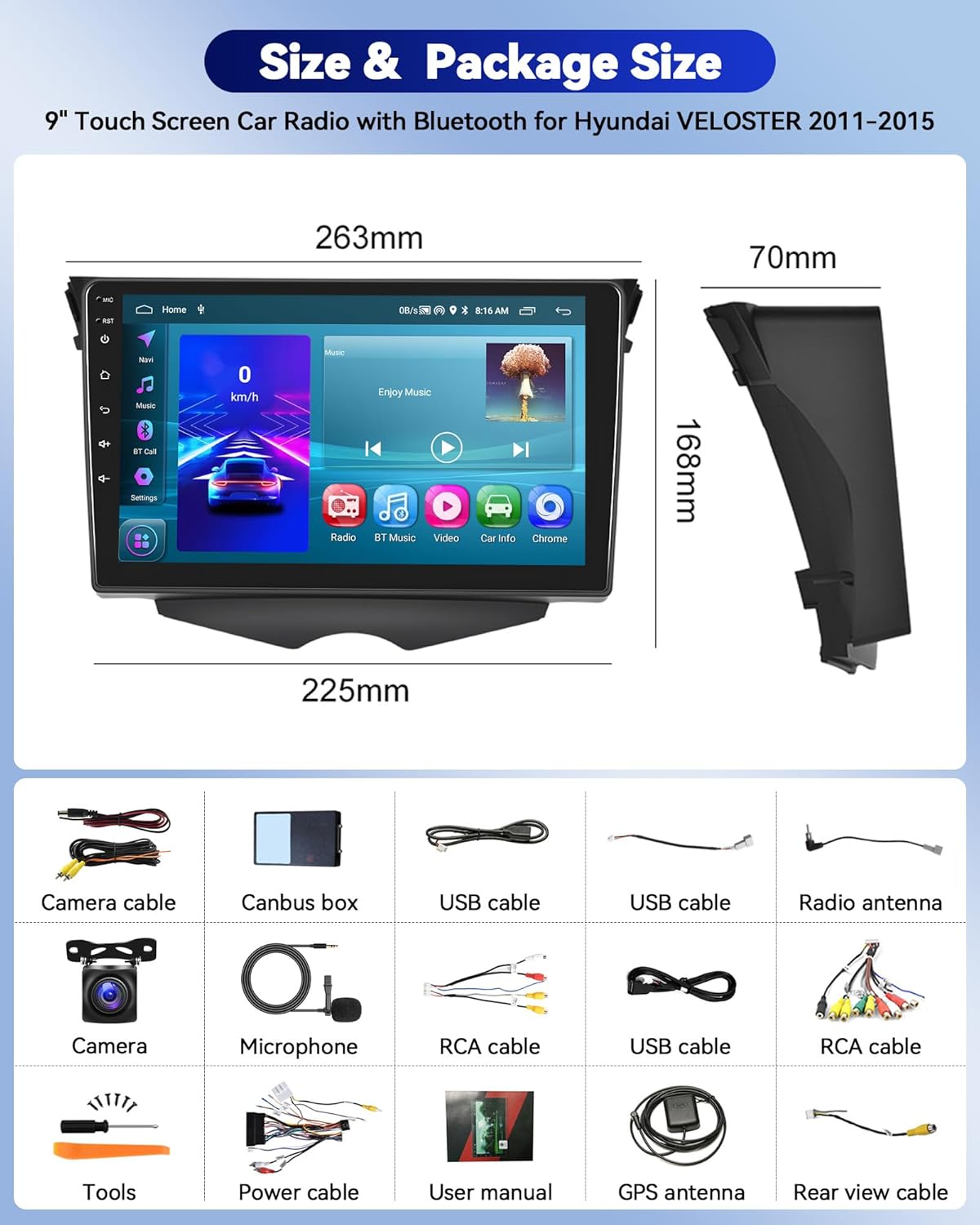
Figure 8.1: Size and Package Contents Diagram.
This image provides detailed dimensions of the head unit and a comprehensive visual list of all components included in the package, such as various cables, antennas, and the backup camera.
9. 保証とサポート
製品には 2年間保証 メーカーの仕様通り。
For technical assistance, troubleshooting, or any inquiries regarding your CAMECHO car radio, please contact our customer support team.
メールサポート: camechovip@126.com
Please provide your product model and a detailed description of your issue when contacting support to ensure a prompt resolution.

図 9.1: カスタマー サポート。
This image depicts a customer service representative, symbolizing the availability of online help and support for the product.