導入
This manual provides essential instructions for the installation, operation, maintenance, and troubleshooting of your new Generic Laptop Backlit Keyboard, designed for various LG 16Z90RS series laptops. Please read this manual carefully before proceeding with installation or use to ensure proper function and longevity of the product.
製品終了view
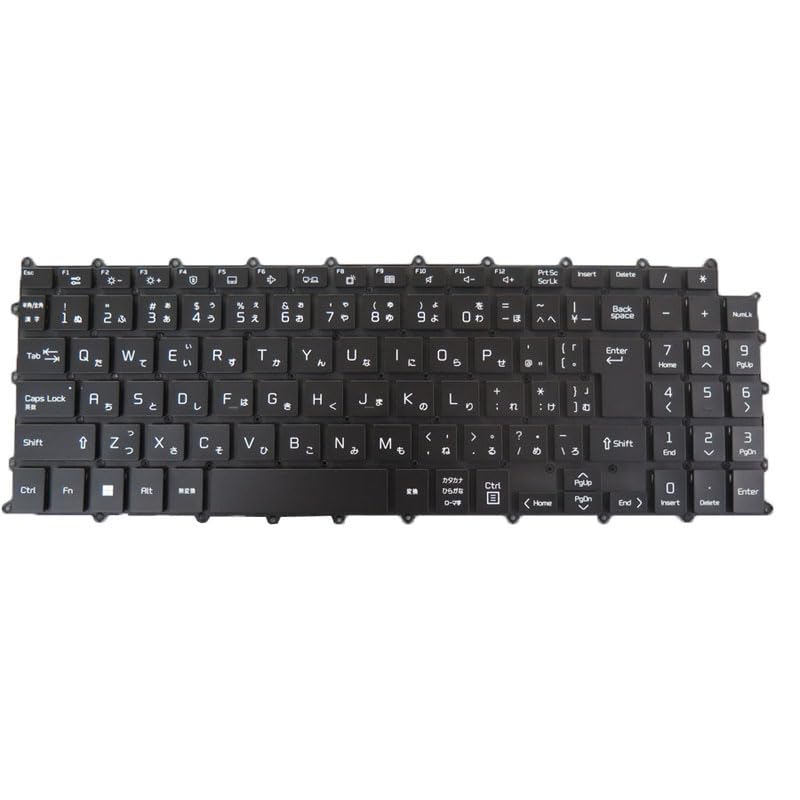
Image: Generic Japanese JP Black Backlit Laptop Keyboard. This image displays the full keyboard layout, highlighting the Japanese character set and the black keycaps, indicating its design for LG 16Z90RS series laptops.
This product is a replacement backlit keyboard for specific LG 16Z90RS series laptop models. It features a Japanese (JP) layout and includes backlighting for improved visibility in low-light conditions. The keyboard is designed without a frame, requiring integration with your laptop's existing frame structure.
主な特徴:
- 互換性: Designed for LG 16Z90RS, 16Z90RS-G, 16Z90RS-G.AD74B, 16Z90RS-GA50K, GA70K, 16Z90RS-K, 16Z90RS-K.ADW8U1, ADC9U1, AAW7U1 models.
- レイアウト: Japanese (JP) keyboard layout.
- バックライト: Integrated backlighting for enhanced usability.
- デザイン: No frame design, intended for direct replacement.
セットアップとインストール
Installing a laptop keyboard requires careful handling and technical knowledge. It is highly recommended that installation be performed by a qualified technician to avoid damage to the keyboard or your laptop.
一般的なインストールガイドライン(専門家向け参考):
- 電源を切る: Ensure the laptop is completely powered off and disconnected from all power sources. Remove the battery if possible.
- 分解: Carefully disassemble the laptop components necessary to access the existing keyboard. This may involve removing the bottom cover, battery, and other internal components.
- 古いキーボードを削除します。 Disconnect the ribbon cables connecting the old keyboard to the motherboard. Carefully unclip or unscrew the old keyboard from its housing.
- 新しいキーボードをインストールします: Position the new keyboard into the laptop's frame. Connect the ribbon cables securely to the motherboard connectors. Ensure all connections are firm and correctly aligned.
- 再組み立て: Reassemble the laptop, ensuring all screws and clips are properly secured.
- テスト: Power on the laptop and test all keys, including the backlight function, to ensure proper operation before full reassembly.
Disclaimer: Improper installation can lead to damage to your laptop or the new keyboard. The manufacturer is not responsible for damages incurred due to incorrect installation.
操作手順
Once installed, your new backlit keyboard operates like a standard laptop keyboard with the added functionality of backlighting.
Basic Keyboard Usage:
- タイピング: Press keys firmly but gently for character input.
- ファンクションキー(Fn): Utilize the 'Fn' key in combination with other keys (e.g., F1-F12) for specific laptop functions such as volume control, screen brightness, or external display toggling. Refer to your laptop's original user manual for specific Fn key combinations.
バックライト制御:
The keyboard backlight can typically be controlled using a specific function key combination. Common combinations include:
- Fn+F8 キー
- Fn+F9 キー
- Fn + スペースバー
Pressing the combination repeatedly may cycle through different backlight brightness levels or turn the backlight on/off. Consult your LG laptop's documentation for the exact key combination for backlight control.
メンテナンス
適切なメンテナンスを行うことで、キーボードの寿命が長くなり、最適なパフォーマンスが確保されます。
クリーニング:
- ほこりの除去: Use a can of compressed air to remove dust and debris from between the keys. Hold the can upright and spray in short bursts.
- 表面洗浄: キーキャップとキーボードの表面を、柔らかく糸くずの出ない布で軽く拭いてください。ampened with water or a mild, non-abrasive electronic cleaner. Avoid excessive moisture.
- 避ける: Do not use harsh chemicals, abrasive cleaners, or spray liquids directly onto the keyboard.
一般的なケア:
- キーボードに液体をこぼさないようにしてください。
- Do not apply excessive force to the keys.
- ノートパソコンを清潔で乾燥した環境に保管してください。
トラブルシューティング
If you encounter issues with your keyboard, refer to the following common problems and solutions.
一般的な問題と解決策:
- キーが反応しない:
- Ensure the keyboard ribbon cables are securely connected to the motherboard.
- ラップトップを再起動します。
- Check for any physical obstructions under the non-responsive keys.
- Verify that the correct keyboard drivers are installed (usually handled automatically by the operating system).
- バックライトが機能しない:
- Ensure the backlight ribbon cable is properly connected.
- Try the backlight function key combination (e.g., Fn + F8/F9/Spacebar) multiple times to cycle through settings.
- Check your laptop's power settings; some power-saving modes may disable backlighting.
- 誤った文字入力:
- Verify that your operating system's keyboard language setting is set to Japanese (JP).
If these steps do not resolve the issue, consider contacting the seller or a professional technician for further assistance.
仕様
- アイテムの説明:
- Laptop Parts
- 製品寸法:
- 11.81 x 7.87 x 3.94インチ
- 商品の重量:
- 2.2ポンド
- メーカー:
- ジェネリック
- ASIN:
- B0DDB484NK
- 商品型番:
- 16Z90RS Keyboard JP
- 発売日:
- 16年2024月XNUMX日
保証情報
この製品には、 90日間の保証 from the date of purchase. This warranty covers manufacturing defects and ensures the product is free from material and workmanship flaws under normal use.
The warranty does not cover damage caused by improper installation, misuse, accidents, unauthorized repairs, or normal wear and tear. Please retain your proof of purchase for warranty claims.
サポート
For technical assistance, warranty claims, or any questions regarding your Generic Laptop Backlit Keyboard, please contact the seller directly through your purchase platform. Ensure you have your order details and product model number (16Z90RS Keyboard JP) ready when contacting support.
As per the seller's recommendation, please check your registered email after payment for any important communications regarding your order.
公式製品ビデオ
No official product videos from the seller were found to be relevant or useful for inclusion in this manual.


