
GZCRDZ V011
User Manual for GZCRDZ V011 Bluetooth OBD2 Scanner
モデル: V011
1. はじめに
Thank you for choosing the GZCRDZ V011 Bluetooth OBD2 Scanner. This manual provides detailed instructions on how to set up, operate, and maintain your device. Please read this manual thoroughly before using the scanner to ensure proper functionality and to maximize its benefits for vehicle diagnostics.
2.製品オーバーview
The GZCRDZ V011 is a state-of-the-art Bluetooth 5.4 OBD2 diagnostic tool designed to provide comprehensive insights into your vehicle's health. It connects wirelessly to your smartphone or tablet via the 'OBD Home' application, offering a user-friendly interface for various diagnostic functions.

Image: The GZCRDZ V011 Bluetooth OBD2 Scanner, a compact diagnostic device.
主な特徴:
- Bluetooth 5.4接続: Ensures a fast and stable wireless connection to your mobile device.
- 包括的なOBD2診断: Supports all standard OBD2 full modes, including reading and clearing Diagnostic Trouble Codes (DTCs), turning off the Check Engine Light (CEL), MIL status, battery voltage check, freeze frame data, and more.
- Performance Test Function: Analyze speed changes, engine speed, and fuel consumption to assess engine power output.
- Extensive DTC Database: Built-in database of over 35,000 DTCs for accurate fault identification.
- ユーザーフレンドリーなアプリ: Works with the 'OBD Home' app (iOS/Android) for intuitive operation and data visualization.

画像: 上view of the V011's diagnostic capabilities and the 'OBD Home' app interface.
3. パッケージ内容
開梱したらパッケージの内容を確認し、すべてのアイテムが揃っていることを確認してください。
- 1x V011 Device
- ユーザーマニュアル x 1
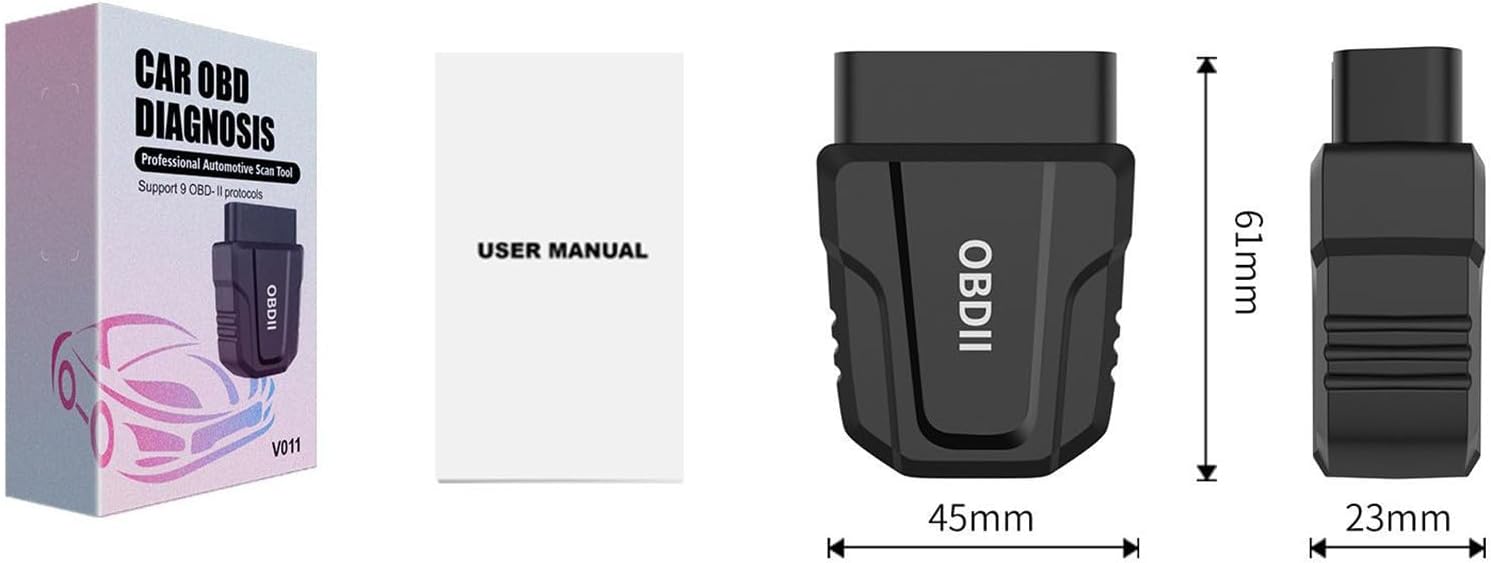
Image: The V011 device, user manual, and product packaging.
4. セットアップ
Follow these steps to set up your GZCRDZ V011 OBD2 Scanner:
- OBD2 ポートを見つけます。 The OBD2 port is typically located under the dashboard on the driver's side, usually near the steering wheel. Refer to your vehicle's owner's manual if you cannot find it.
- Plug in the V011 Device: Firmly insert the V011 scanner into your vehicle's OBD2 port. Ensure it is securely connected. The device will power on automatically.
- Download the 'OBD Home' App: 検索する 'OBD Home' in your device's app store (Google Play Store for Android or Apple App Store for iOS) and install it.
- Bluetoothを有効にする: スマートフォンまたはタブレットで Bluetooth が有効になっていることを確認してください。
- デバイスに接続します: Open the 'OBD Home' app. The app is designed to automatically detect and connect to the V011 device via Bluetooth 5.4. No manual pairing through your phone's Bluetooth settings is typically required.
- 診断を開始: Once connected, the app will display a 'Connection succeeded' message, and you can begin using the diagnostic functions.

Image: The V011 scanner connected and communicating with the 'OBD Home' application on a smartphone.
5. 操作手順
The 'OBD Home' app provides a comprehensive suite of diagnostic functions. Here are the primary operations:
5.1. トラブルコードの読み取りとクリア
This function allows you to identify and clear Diagnostic Trouble Codes (DTCs) that trigger the Check Engine Light (CEL).
- Navigate to the 'Read/Clear Codes' section in the app.
- The scanner will perform a scan and display any active or pending DTCs.
- For each code, the app provides a brief description. You can use the built-in Google search engine within the app for more detailed definitions.
- To clear codes, select the 'Clear Codes' option. This will turn off the Check Engine Light. Ensure you address the underlying issue before clearing codes to prevent recurrence.

Image: Visual representation of diagnosing and clearing a fault, showing the Check Engine Light turning off.
5.2. ライブデータストリーム
View real-time sensor data from your vehicle's engine control unit (ECU). This includes parameters like engine RPM, vehicle speed, coolant temperature, fuel system status, and more. This data is crucial for diagnosing intermittent issues.
5.3. フレームデータのフリーズ
When a DTC is set, the ECU records a snapshot of critical sensor values at that moment. This 'freeze frame' data helps technicians determine the conditions under which the fault occurred.
5.4. I/M準備状況
Check the readiness status of various emission-related monitors. This is essential for vehicle inspections and ensures all systems are functioning correctly.
5.5. パフォーマンステスト
Utilize the performance test function to analyze your vehicle's acceleration, speed changes, engine RPM, and fuel consumption. This feature can help assess the overall power output and efficiency of your engine, particularly useful for evaluating used vehicles.
5.6.バッテリー容量tageチェック
車のバッテリー容量を監視するtage in real-time to ensure it is within optimal operating ranges.
5.7. On-Board Monitoring Test
特定のコンポーネント/システムのオンボード診断モニタリング テストの結果にアクセスします。
5.8. Trip Analysis Reports
Generate reports based on your driving trips, providing insights into fuel efficiency and driving habits.
5.9. Retrieve VIN
Quickly retrieve your vehicle's Vehicle Identification Number (VIN) directly from the ECU.
6. 互換性
The GZCRDZ V011 scanner is compatible with most vehicles manufactured after 1996 (US cars), after 2002 (EU cars), and after 2008 (Asia cars) that support standard OBD2 protocols. Please note that it is generally not compatible with diesel vehicles and new energy vehicles.
サポートされているOBD2プロトコル:
- SAE J1850 PWM(41.6 Kbaud)
- SAE J1850 VPW(10.4 Kbaud)
- ISO 9141-2 (5 ボー初期、10.4 Kボー)
- ISO14230-4 KWP(5ボーイード、10.4Kbaud)
- ISO14230-4 KWP(高速初期化、10.4 Kbaud)
- ISO15765-4 CAN(11bit ID、500 Kbaud)
- ISO15765-4 CAN(29bit ID、500 Kbaud)
- ISO15765-4 CAN(11bit ID、250 Kbaud)
- ISO15765-4 CAN(29bit ID、250 Kbaud)

Image: Details on vehicle compatibility and the list of supported OBDII communication protocols.
7. メンテナンス
V011 スキャナーの寿命を延ばし、最適なパフォーマンスを確保するには、次のメンテナンス ガイドラインに従ってください。
- クリーニング: デバイスの清掃には、柔らかく乾いた布を使用してください。研磨剤入りの洗剤や溶剤は使用しないでください。
- ストレージ: デバイスは直射日光や極端な温度を避け、涼しく乾燥した場所に保管してください。
- 取り扱い: デバイスを落としたり、強い衝撃を与えたりしないでください。
- ファームウェアの更新: Periodically check the 'OBD Home' app for any available firmware updates for the V011 device to ensure you have the latest features and bug fixes.
8。 トラブルシューティング
If you encounter issues with your V011 scanner, refer to the following common troubleshooting steps:
8.1. デバイスの電源が入らない
- Ensure the V011 is firmly plugged into the vehicle's OBD2 port.
- Verify that the vehicle's ignition is in the 'ON' position (engine can be off).
- OBD2 ポートの車両のヒューズを確認してください (車両のマニュアルを参照してください)。
8.2. Bluetooth経由で接続できない
- スマートフォン/タブレットで Bluetooth が有効になっていることを確認します。
- Close and reopen the 'OBD Home' app.
- スマートフォン/タブレットを再起動してください。
- Unplug the V011 from the OBD2 port, wait 10 seconds, and plug it back in.
- 他の Bluetooth デバイスが接続を妨害していないことを確認してください。
8.3. App Not Displaying Data or Errors
- Confirm the V011 is successfully connected to the app.
- Ensure your vehicle is OBD2 compliant and the ignition is on.
- Try connecting the scanner to a different OBD2 compliant vehicle to rule out vehicle-specific issues.
- Update the 'OBD Home' app to the latest version.
9. 仕様
| 特徴 | 仕様 |
|---|---|
| モデル | バージョン011 |
| 接続性 | ブルートゥース5.4 |
| サポートされているプロトコル | SAE J1850 PWM, SAE J1850 VPW, ISO 9141-2, ISO14230-4 KWP, ISO15765-4 CAN |
| オペレーティングシステムの互換性 | iOS, Android (via 'OBD Home' app) |
| 電源 | Vehicle OBD2 Port (Corded Electric) |
| アイテム重量 | 1.98オンス |
| パッケージ寸法 | 4 x 2.4 x 1.2インチ |
| メーカー | 中国 |
| 安全性評価 | FCC: GCT210468050F |
| 欧州連合 | 799748789062 |
10. 保証とサポート
For warranty information and technical support, please refer to the contact details provided with your purchase or visit the official GZCRDZ website. Our customer service team is available to assist you with any questions or issues regarding your V011 OBD2 scanner.
Ask a question about this manual
Ask about setup, troubleshooting, compatibility, parts, safety, or missing instructions. Manuals+ will review the question and use this page’s manual context to help answer it.