
1. はじめに
Thank you for choosing the Tecnock S8915D Remote Control Stunt Car. This 2.4GHz 4WD vehicle is designed for dynamic play, featuring double-sided driving, 360° rotations, and exciting flips. Its robust design and easy USB-C charging make it an ideal toy for children aged 6-12, providing hours of entertainment both indoors and outdoors.

Figure 1: Tecnock S8915D Remote Control Stunt Car (Purple variant shown).
2. 安全情報
Please read and understand all safety instructions before operating the product. Failure to follow these instructions may result in injury or damage to the product.
- 窒息の危険: 小さな部品。 3歳未満の子供には適していません。
- 操作中は大人の監督をお勧めします。
- Do not operate the vehicle near people, pets, or obstacles to prevent accidents.
- 電気的損傷を防ぐため、濡れた状態や水の近くでの操作は避けてください。
- Do not modify or disassemble the product, as this may cause malfunction or injury.
- 付属の充電ケーブルと推奨バッテリーのみを使用してください。
- Ensure the vehicle is turned off when not in use or during charging.
3. 箱の中身
パッケージには次のコンポーネントが含まれています。
- Tecnock S8915D RC Stunt Car
- リモートコントロール
- USB-C充電ケーブル
- 充電式リチウムイオンバッテリー(プリインストール)
- 製品マニュアル
- Screwdriver (for remote control battery compartment)
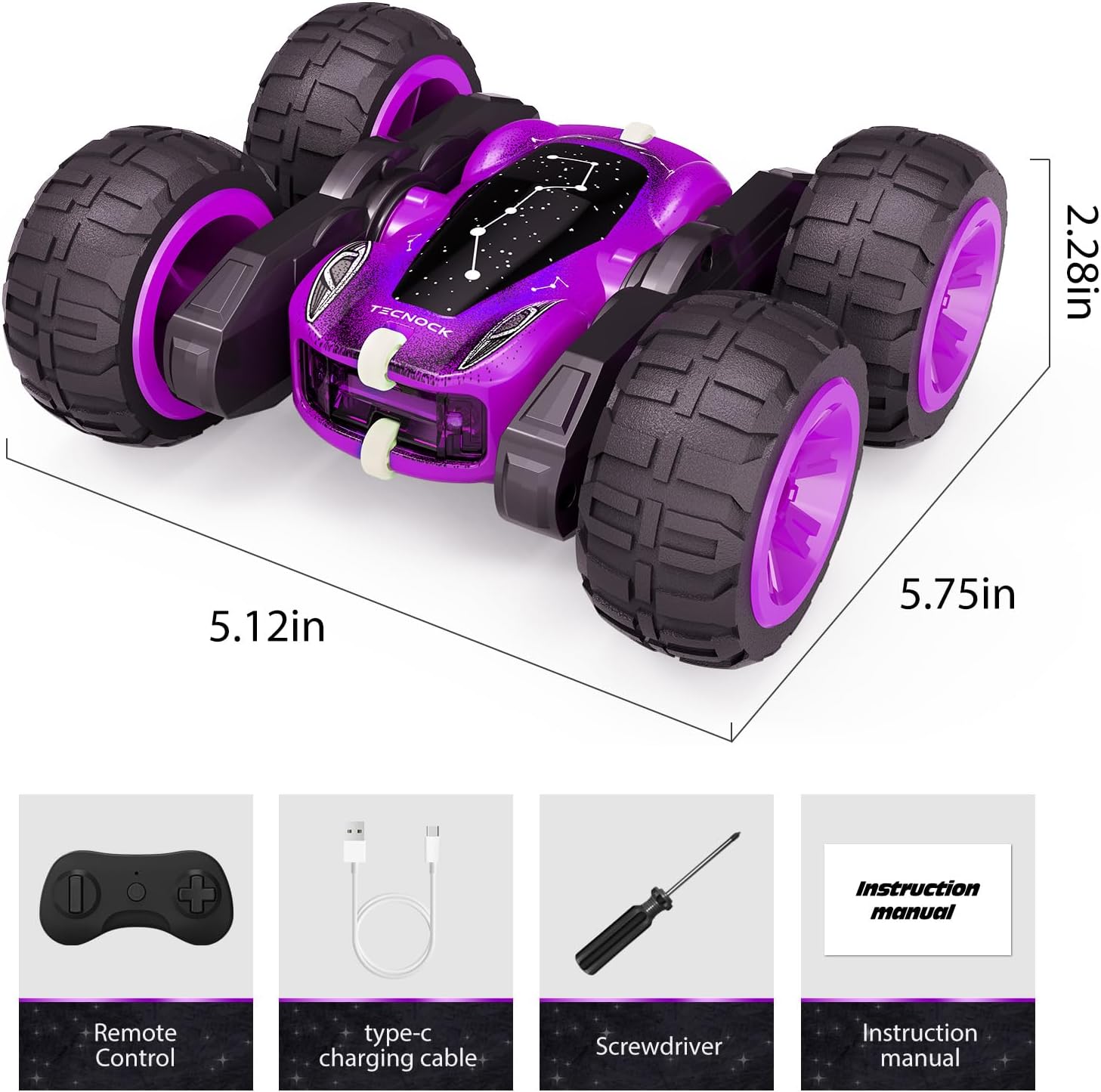
Figure 2: All items included in the Tecnock S8915D package.
4. セットアップ
4.1. RCカーの充電
- Locate the USB-C charging port on the side of the RC car.
- Connect the provided USB-C charging cable to the car's port.
- Plug the other end of the USB-C cable into a compatible USB power adapter (not included) or a USB port on a computer.
- The LED indicator on the car will light up during charging and change color or turn off when fully charged. A full charge typically takes approximately 60 minutes.

Figure 3: Connecting the USB-C charging cable to the RC car.
4.2. リモコンに電池を入れる
- Use the included screwdriver to open the battery compartment on the back of the remote control.
- 正しい極性 (+/-) を確認して、単 4 電池 2 本 (別売) を挿入します。
- 電池ボックスを閉じてネジで固定します。
4.3. 電源を入れてペアリングする
- Ensure the RC car is fully charged.
- Press and hold the power button on the RC car for approximately 3 seconds until the LED lights illuminate.
- Press and hold the power button on the remote control for approximately 3 seconds until its LED indicator lights up.
- The car and remote will automatically pair. The LED lights on both devices will stop blinking and remain solid once paired.
5. 操作手順
The Tecnock S8915D RC Stunt Car offers intuitive controls for various maneuvers.
5.1. 基本的な操作
- 前方後方: 左のジョイスティック/ボタンを使用して車を前進または後退させます。
- 左/右: 右のジョイスティック/ボタンを使用して車を左または右に操縦します。
5.2. スタント機能
- 360°回転: The car can perform continuous 360-degree spins. Experiment with joystick combinations to achieve this.
- 180° Flips & Double-Sided Driving: The unique design allows the car to flip 180 degrees and continue driving on its other side, making it highly resilient to crashes and obstacles.
- Agile Stunt Movements: The independent wheel axles enable dynamic movements and quick changes in direction.

Figure 4: Demonstrating 360° rotation and double-sided flip capabilities.
5.3. 高度な機能
- 2.4GHz Anti-Interference: The advanced 2.4GHz remote control technology allows multiple cars to operate simultaneously without signal interference, perfect for multiplayer racing.
- All-Terrain Support: Designed with durable wheels, the car can navigate various surfaces including carpet, stone roads, asphalt, and lawns.
- LED Breathing Lights: The car features eye-catching LED lights that simulate twinkling stars, enhancing visibility and fun during nighttime play.

Figure 5: The RC car is capable of operating on various terrains.

Figure 6: Multiple Tecnock RC cars can be operated simultaneously without interference.
ビデオ1: 公式製品ビデオショーasing the Tecnock Remote Control Stunt Car's features and stunts.
6. メンテナンス
- クリーニング: 使用後は、柔らかく乾いた布で車を拭いてください。水や刺激の強い化学薬品の使用は避けてください。
- バッテリーのケア:
- 初めて使用する前に、必ず車のバッテリーを完全に充電してください。
- バッテリーを過充電しないでください。完全に充電されたら取り外してください。
- 長期間使用しない場合は、液漏れを防ぐためにリモコンから電池を取り外してください。
- 車とリモコンは直射日光を避けて涼しく乾燥した場所に保管してください。
7。 トラブルシューティング
| 問題 | 考えられる解決策 |
|---|---|
| 車が始動しません。 | Ensure the car's battery is charged. Press and hold the power button for 3 seconds. |
| リモコンが動作しません。 | Check if AAA batteries are correctly installed and have sufficient power. Press and hold the power button for 3 seconds. |
| Car and remote are not pairing. | Ensure both devices are powered on and within range. Turn both off and on again to re-attempt pairing. |
| 制御範囲が狭い、または干渉がある。 | Ensure no other 2.4GHz devices are causing interference. Move to an open area. |
| Car is slow or unresponsive. | The car's battery may be low. Recharge the car. |
8. 仕様
| 特徴 | 詳細 |
|---|---|
| ブランド | テクノック |
| モデル名 | S8915D |
| モデル番号 | 1801U |
| 制御周波数 | 2.4GHz |
| ドライブタイプ | 4WD(四輪駆動) |
| スタント能力 | 360° Rotations, 180° Flips, Double-Sided Driving |
| 車のバッテリー | 充電式リチウムイオン(付属) |
| 充電ポート | USB-C |
| リモコン電池 | 2 x AAA(含まれません) |
| 材質タイプ | プラスチック |
| 商品の寸法 (長さ x 幅 x 高さ) | 5.75 x 5.12 x 2.28インチ |
| アイテム重量 | 8.8オンス |
| 推奨年齢 | 6~12歳 |
9.保証とサポート
Tecnock products are designed for durability and performance. For specific warranty details, please refer to the product packaging or contact Tecnock customer support.
If you encounter any issues or have questions regarding your Tecnock S8915D Remote Control Stunt Car, please visit the official Tecnock store on Amazon or contact their customer service for assistance. You can find more information at: Tecnock Store