
導入
This manual provides instructions for the installation, operation, and maintenance of your Xtreme Smart Wi-Fi Window & Door Sensor. This device is designed to enhance home security by detecting the opening and closing of windows and doors, sending instant notifications to your smartphone.
安全情報
- デバイスを極端な温度、直射日光、湿気にさらさないでください。
- ご自身でデバイスの分解や修理を試みないでください。保証が無効になります。
- 電池はお子様の手の届かないところに保管してください。 飲み込んだ場合は、直ちに医師の診察を受けてください。
- 電池は地域の条例に従って廃棄してください。古い電池と新しい電池を混ぜて使用しないでください。
- Ensure the installation surface is clean and dry for proper adhesive attachment.
パッケージ内容
パッケージにすべてのアイテムが含まれていることを確認します。
- Xtreme Smart Wi-Fi Window & Door Sensor (Main Unit)
- Xtreme Smart Wi-Fi Window & Door Sensor (Magnetic Contact)
- ユーザーマニュアル(このドキュメント)

Image: The main sensor unit and the smaller magnetic contact unit.
セットアップガイド
1. バッテリーの取り付け
- Gently slide open the battery cover on the main sensor unit.
- 正しい極性 (+/-) に注意しながら、単 4 電池 2 本 (別売) をコンパートメントに挿入します。
- 電池カバーをしっかりと閉じてください。
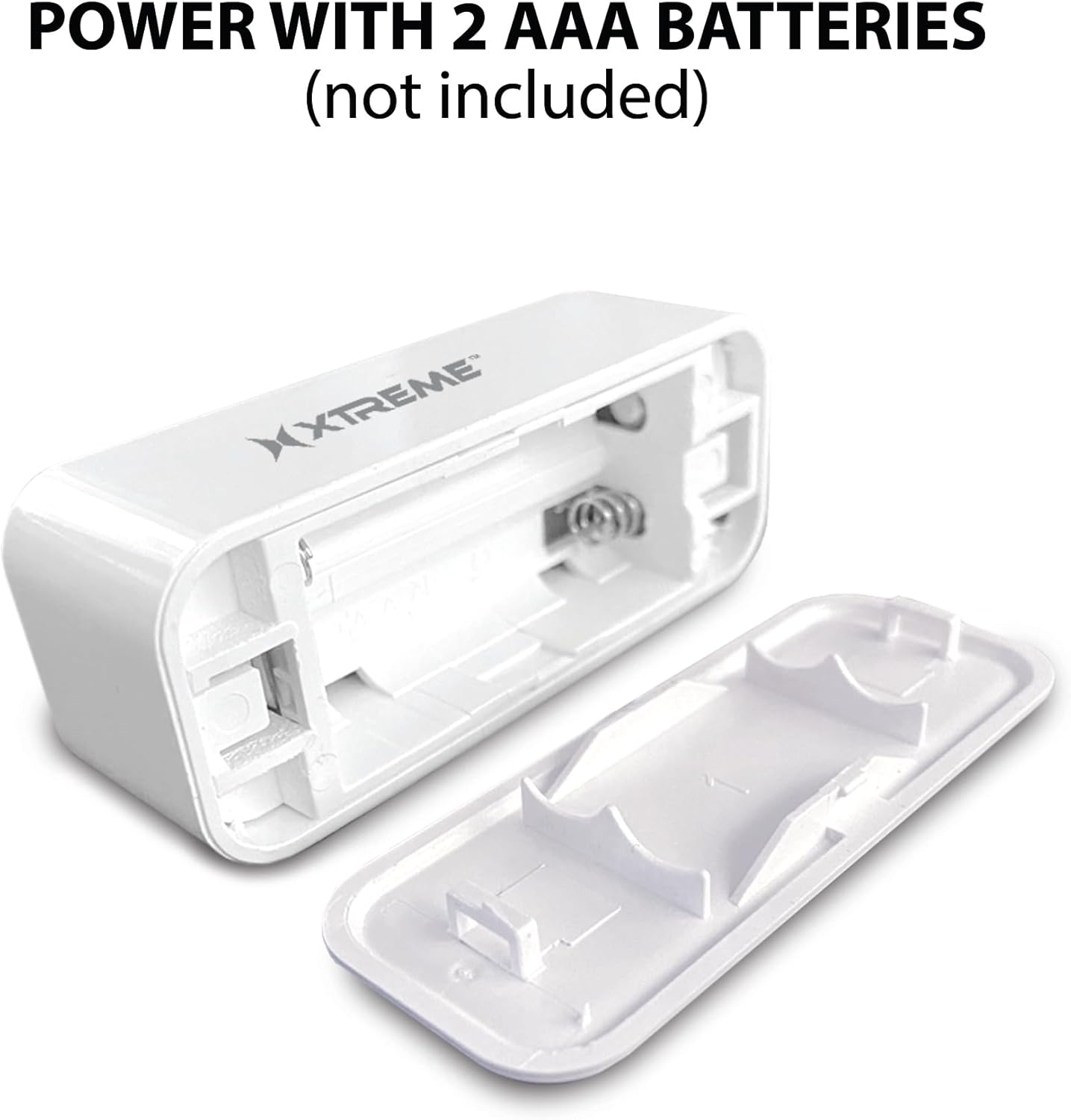
Image: The main sensor unit with its battery compartment open, showing where to insert two AAA batteries.
2. アプリのダウンロードとアカウント作成
- ダウンロード Xtreme Connect Home App from the Apple App Store (for iOS 11 or higher) or Google Play Store (for Android 7.0 or higher).
- アプリを開き、画面の指示に従って新しいアカウントを作成するか、既にアカウントをお持ちの場合はログインします。

Image: The product box illustrating the Xtreme Connect Home App download options for both iOS and Android devices.
3.デバイスのペアリング
- Ensure your smartphone is connected to a 2.4GHz Wi-Fi network. The sensor does not support 5GHz networks.
- In the Xtreme Connect Home App, tap the "+" icon to add a new device.
- Select "Sensor" or "Door/Window Sensor" from the device list.
- Follow the app's instructions to put the sensor into pairing mode (usually involves pressing and holding a button on the sensor until an indicator light flashes).
- Confirm the Wi-Fi network and enter the password in the app. The sensor will then connect to your home network.
- Once successfully paired, you can name your sensor within the app (e.g., "Front Door," "Bedroom Window").
4. 物理的な設置
The sensor consists of two parts: a main unit and a smaller magnetic contact. These two parts must be installed close to each other (within 1 cm) on a door or window frame.
- Choose a clean, dry, and flat surface on your door or window frame.
- Peel off the protective backing from the adhesive on both the main unit and the magnetic contact.
- 本体をドア・窓枠の固定部分に取り付けます。
- Attach the magnetic contact to the moving part of the door/window (the door or window itself), aligning it with the main unit so they are no more than 1 cm apart when the door/window is closed.
- Test the installation by opening and closing the door/window. The app should register the change in status.


Image: Left: The sensor installed on a window sill with the window closed. Right: The sensor detecting an open window, with the magnetic contact separated from the main unit.
手術
Monitoring Door/Window Status
Once installed and paired, the Xtreme Smart Wi-Fi Window & Door Sensor will continuously monitor the open/closed status of your designated entry point. When the magnetic contact separates from the main unit (door/window opens), the sensor will detect this change.
即時通知
Upon detecting an open or close event, the sensor will send an instant notification to your smartphone via the Xtreme Connect Home App. Ensure app notifications are enabled in your phone's settings to receive these alerts.
リモートアクセス
あなたはできる view the current status of your sensor (open or closed) and review event history from anywhere using the Xtreme Connect Home App, provided your smartphone has an internet connection.
Smart Scenes Integration
The Xtreme Connect Home App allows you to create "Smart Scenes" to automate actions based on sensor activity. For examp上:
- "If door opens, then turn on living room lights."
- "If window opens after 10 PM, then send an alert to family members."
Explore the "Smart Scenes" section within the app to customize your home automation.
メンテナンス
バッテリー交換
The sensor is powered by two AAA batteries. When the battery level is low, you may receive a notification via the Xtreme Connect Home App. To replace batteries:
- Gently slide open the battery cover on the main sensor unit.
- 古い電池を取り外します。
- 正しい極性 (+/-) を確認して、新しい AAA アルカリ電池 2 本を挿入します。
- 電池カバーをしっかりと閉じてください。
Note: The sensor is designed for up to four months of battery life under normal usage conditions.
クリーニング
センサーは柔らかく乾いた布で拭いてください。液体クリーナーや研磨剤は使用しないでください。デバイスを損傷する恐れがあります。
トラブルシューティング
| 問題 | 考えられる原因 | 解決 |
|---|---|---|
| センサーが Wi-Fi に接続できません。 | Incorrect Wi-Fi password; 5GHz network used; sensor too far from router. | Ensure correct 2.4GHz Wi-Fi network and password. Move sensor closer to the router. Re-attempt pairing. |
| 通知を受信しませんでした。 | App notifications disabled; sensor offline; app not running in background. | Check phone's notification settings for the Xtreme Connect Home App. Verify sensor status in the app. Ensure app is allowed to run in the background. |
| センサーが開閉を検知しません。 | Sensor parts misaligned; dead batteries. | Ensure the main unit and magnetic contact are within 1 cm when closed. Replace batteries if low. |
| バッテリー寿命が短い。 | Frequent activations; poor quality batteries. | Use high-quality alkaline batteries. Reduce unnecessary activations if possible. |
仕様
| 特徴 | 詳細 |
|---|---|
| モデル番号 | XHS7-2001-WHT |
| 電源 | 2 x AAA電池(別売) |
| 電池のタイプ | アルカリ |
| 巻tage | 1.5 ボルト (DC) |
| 接続性 | 2.4GHz 802.11n Wi-Fi, Bluetooth 4.0 (optional) |
| 制御方法 | App (Xtreme Connect Home) |
| 対応OS | Android 7.0以降、iOS11以降 |
| 取り付けタイプ | 粘着式/壁掛け式 |
| 製品寸法 | 2.7 x 2.4 x 4.6インチ |
| アイテム重量 | 2.39オンス |
| 色 | 白 |
| 欧州連合 | 805106232399 |
保証とサポート
For warranty information and technical support, please refer to the documentation included with your purchase or visit the official Xtreme Digital Lifestyle Accessories website. Do not attempt to return the product to the retailer without first contacting customer support, as per manufacturer guidelines.
メーカー: エクストリーム
ブランド: エクストリームデジタルライフスタイルアクセサリー