
導入
This manual provides detailed instructions for the installation, operation, and maintenance of your Desktronic Dual Monitor Support. Please read this manual thoroughly before installation to ensure correct setup and safe use of the product. Keep this manual for future reference.
安全情報
- 組み立てる前に、すべてのコンポーネントが揃っていて損傷がないことを確認してください。
- Do not exceed the maximum weight capacity of 8 kg (17.6 lbs) per monitor.
- Do not exceed the maximum monitor size of 34 inches.
- Ensure the desk surface is stable and strong enough to support the combined weight of the monitor arm and monitors.
- すべてのネジをしっかりと締めますが、締めすぎないでください。
- 設置中は子供やペットを近づけないでください。
- Always use two people for lifting and positioning heavy monitors.
- Adjust the gas spring tension carefully to match your monitor's weight.
パッケージ内容
パッケージにすべての部品が含まれていることを確認してください。
- Monitor Arm Assembly (2 arms, 1 base)
- デスクClamp
- グロメットベース
- VESAプレート (2)
- ハードウェアキット(ネジ、ワッシャー、六角レンチ)
- ケーブル管理クリップ

Image: All components of the Desktronic Dual Monitor Support, including the base, two arms, VESA plates, desk clamp, grommet mount, and various screws and tools.
セットアップ手順
The Desktronic Dual Monitor Support offers two installation methods: Desk Clamp グロメットマウント。
1. 取り付け方法を選択する
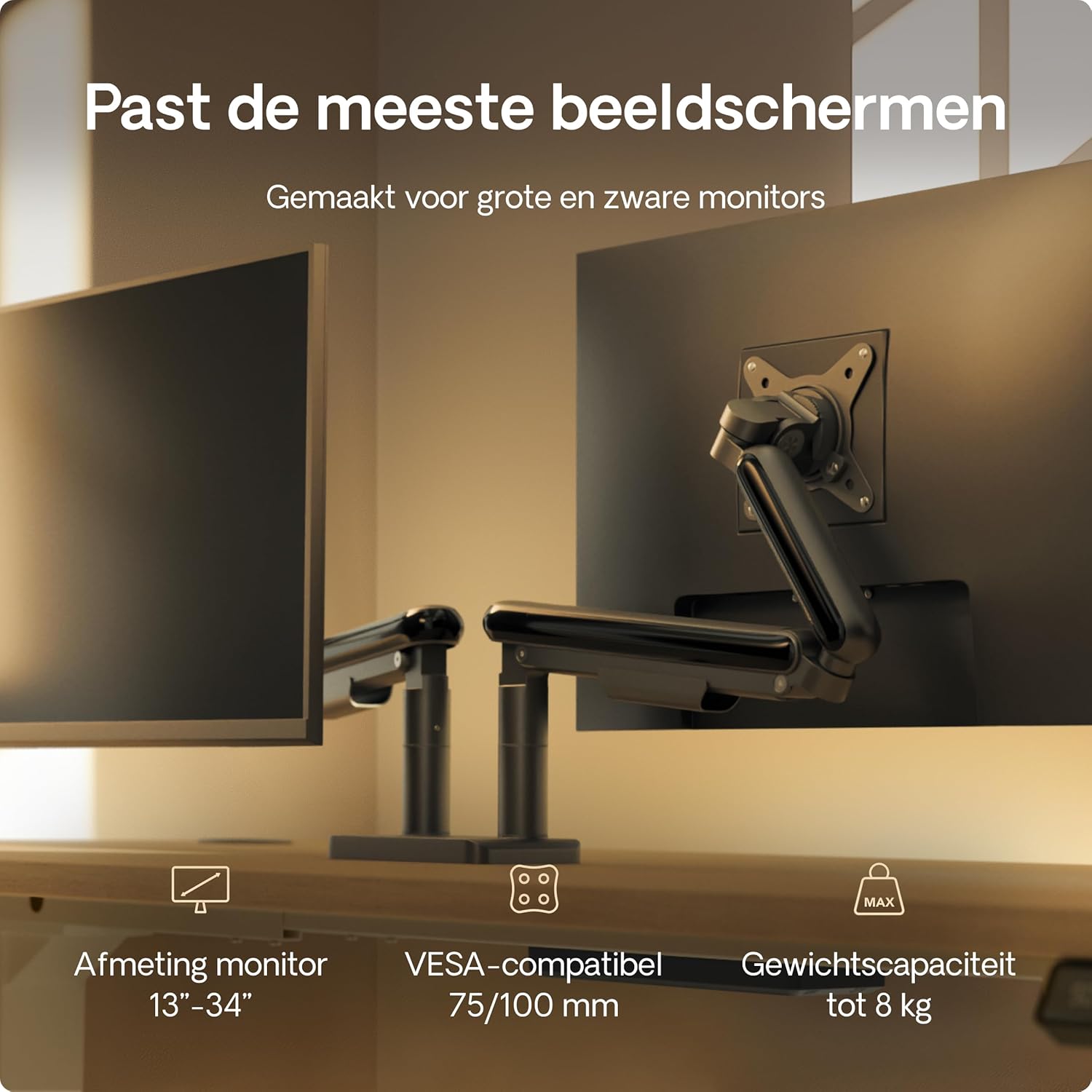
Image: Illustration showing the two installation options: a desk clamp for the edge of a desk and a grommet mount for desks with a pre-drilled hole. The desk thickness range of 10-40mm is indicated.
デスクClamp Installation (for desk edges 10-40mm thick)
- デスクclを取り付けるamp 付属のネジを使用してメインポールに固定します。
- Position the monitor arm base on the edge of your desk.
- 締めるamp アームが机にしっかりと固定されるまでねじ込みます。
Grommet Mount Installation (for desks with a hole)
- デスクにグロメット穴がある場合は、グロメットベースを穴に挿入します。
- Secure the grommet base from underneath the desk using the provided plate and screw.
- Attach the monitor arm base to the grommet base.
2. Attach Monitor Arms to Base
Slide the monitor arms onto the central pole of the base. Ensure they are at the desired height before tightening the locking mechanism.
3. VESAプレートをモニターに取り付ける
- Locate the VESA mounting holes on the back of your monitors (75x75mm or 100x100mm).
- Attach the VESA plates to the back of each monitor using the appropriate screws from the hardware kit. Do not overtighten.

Image: A VESA plate being attached to the back of a monitor using screws, demonstrating the connection point for the monitor arm.
4. アームにモニターを取り付ける
- Carefully lift each monitor (preferably with assistance) and slide the VESA plate attached to the monitor onto the VESA head of the monitor arm.
- モニターがしっかりと固定されていることを確認してください。
5.ケーブル管理
Route your monitor cables through the integrated cable management channels on the arms and central pole to maintain a tidy workspace.
操作手順と調整
The Desktronic Dual Monitor Support offers extensive adjustability for an ergonomic setup.

Image: A diagram illustrating the range of motion for the monitor arm, including 360-degree rotation at the base and VESA plate, 180-degree swivel, and 90-degree tilt for optimal positioning.
高さ調整
The gas spring mechanism allows for smooth vertical adjustment. Gently push or pull the monitor to the desired height. If the monitor sags or springs up, adjust the gas spring tension using the provided Allen key (refer to the tension adjustment screw on the arm).
傾斜調整
Tilt your monitor up or down to reduce glare and optimize viewing angles. Loosen the tilt screw, adjust the monitor, and then retighten the screw.
スイベル調整
Swivel your monitor left or right to share your screen with others or to find your preferred view角度。
Rotation (Landscape/Portrait)
Rotate your monitor 360 degrees to switch between landscape and portrait orientations as needed for different tasks.
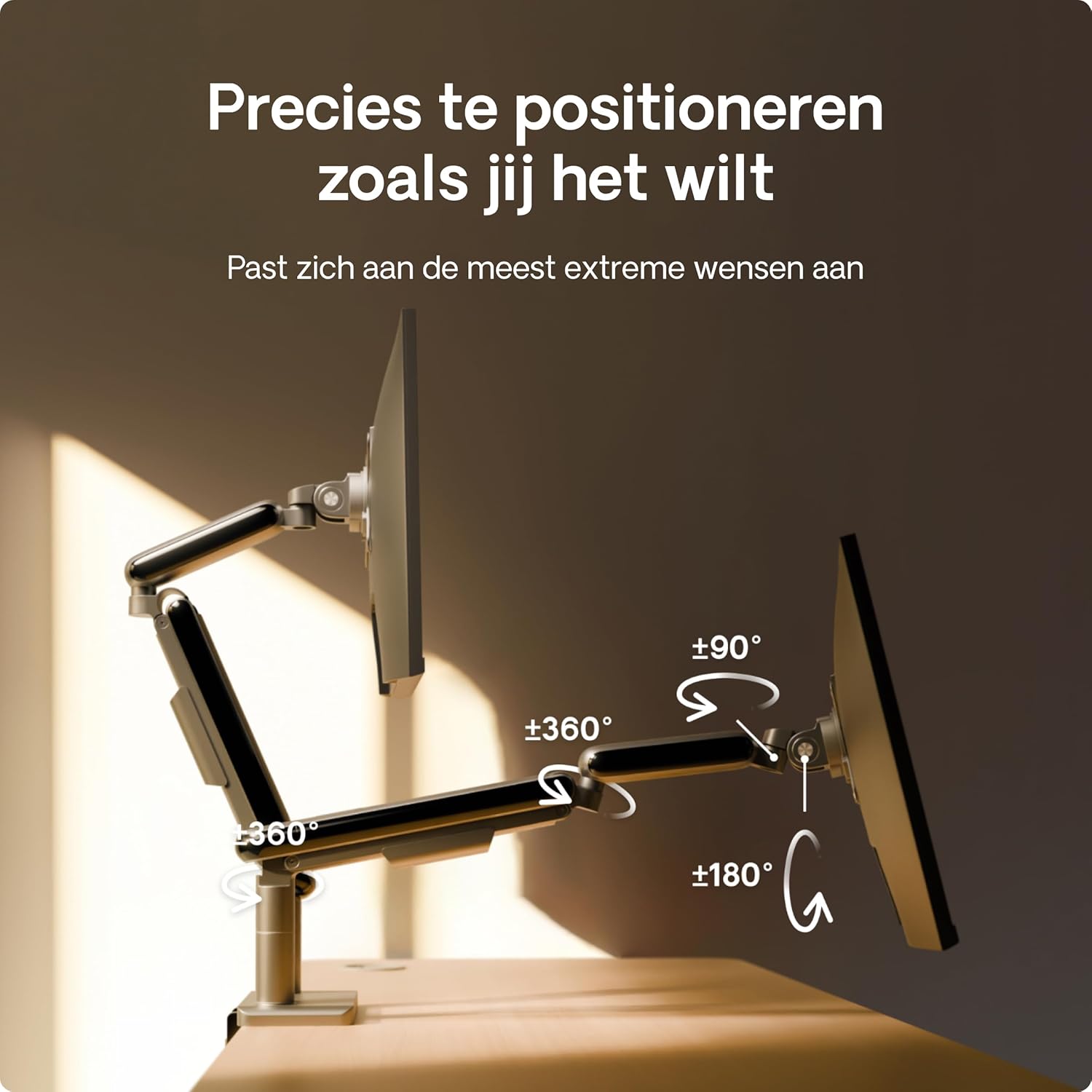
Image: A user effortlessly switching a monitor from a horizontal (landscape) orientation to a vertical (portrait) orientation, highlighting the flexibility of the monitor arm.
人間工学に基づいたポジショニング
Position your monitors so that the top of the screen is at or slightly below eye level, and your arms are comfortable when typing. This helps reduce neck and eye strain.

Image: A person working comfortably at a desk with two monitors mounted on the Desktronic arm, illustrating the ergonomic benefits of proper monitor positioning.
メンテナンス
To ensure the longevity and optimal performance of your Desktronic Dual Monitor Support:
- クリーニング: d 柔らかい布で表面を拭きますamp 布で拭いてください。研磨剤入りの洗剤や溶剤は使用しないでください。
- 定期点検: すべてのネジと接続部がしっかりと固定されているか定期的に確認してください。
- ガススプリング調整: If your monitor's weight changes, or if the arm starts to sag or rise unexpectedly, re-adjust the gas spring tension.
トラブルシューティング
- モニターがたわんだり、希望の高さに維持されない場合:
- The gas spring tension may be too low for your monitor's weight. Use the provided Allen key to increase the tension (turn clockwise). Test the adjustment until the monitor stays in place.
- Monitor Springs Upwards:
- The gas spring tension may be too high. Use the provided Allen key to decrease the tension (turn counter-clockwise). Test the adjustment until the monitor stays in place.
- モニターが水平ではありません:
- Check the VESA plate attachment to the monitor and the arm. Ensure all screws are tightened evenly. Some VESA heads allow for minor leveling adjustments.
- 腕が不安定に感じる:
- デスクの清潔さを確保するamp or grommet mount is securely tightened to the desk. Verify that the desk itself is stable and not wobbling.

Image: A visual comparison highlighting the stability of the Desktronic monitor arm against a less stable competitor, emphasizing the robust design.
仕様
| 特徴 | 詳細 |
|---|---|
| ブランド | デスクトロニック |
| モデル番号 | デュアル |
| 色 | 黒 |
| 対応デバイス | モニター |
| 材料 | Metal (High-strength steel, Aircraft-grade aluminum) |
| 取り付けタイプ | Table Mount (Clamp またはグロメット) |
| 移動タイプ | Rotational, Tilt, Swivel, Height Adjustable (Gas Spring) |
| 最大傾斜角度 | 90度 |
| VESA互換性 | 75x75mm、100x100mm |
| モニターサイズの互換性 | 13~34インチ |
| 耐荷重(片腕あたり) | 最大 8 kg (17.6 ポンド) |

Image: A visual summary of the monitor arm's compatibility, indicating support for monitors between 13 and 34 inches, VESA standards of 75/100mm, and a maximum weight capacity of 8 kg per arm.
保証とサポート
For warranty information or technical support, please contact Desktronic directly through their official website or the retailer where the product was purchased. Please have your purchase receipt and product model number (DUAL) ready when contacting support.