
1. はじめに
The IDUINO PC1080 is a high-performance dual-channel 6S LiPo charger specifically designed for industrial application drones. It offers reliable, safe, and user-friendly operation with a comprehensive set of functionalities. These include a battery voltage meter, internal resistance meter, LiHV charging mode, and a time-saving synchronization mode. Its robust design ensures stable performance in various environments.
2. パッケージ内容
以下にリストされているすべてのアイテムがパッケージに含まれていることを確認してください。
- 1 x PC1080 Dual Channel LiPo Charger
- AC電源コード x 1
- 1 x Synchronous data connectors
- 英語マニュアル(本書)1冊
3. 主な特徴
The IDUINO PC1080 charger incorporates several advanced features for efficient and safe battery management:
- High-Frequency Capacitor: Utilizes high-specification large capacitors to ensure prolonged and stable operation.
- アクティブPFC: Features Active Power Factor Correction circuitry for optimal power draw, achieving high efficiency (93%) and reducing interference to the power grid.
- Switched-mode Power Supply: Designed to accept power from mains supplies globally.
- コンフォーマルコーティング: Electronic components are protected with a conformal coating, enhancing resistance to moisture, dust, chemicals, corrosion, and temperature extremes, ensuring stable field performance.
- Automatic Sequential Charging: When paired with G630 charging hubs, the PC1080 can automatically charge up to 12 LiPo battery packs in sequence, prioritizing batteries with the highest remaining capacity.
- One-Key Start: Simplifies the charging process with a single button press (default 20A current).
- Unique Synchronization Function: Allows one charger to control multiple other chargers for streamlined operation.
- バッテリー状態の監視: リアルタイムのバッテリー残量を表示tage and internal resistance detection.
- 包括的な保護: Includes short circuit maintenance, reverse polarity protection, over-temperature protection, and a built-in anti-fire protection circuit to prevent sparking during battery connection.
4. 仕様
| パラメータ | 価値 |
|---|---|
| ブランド | IDUINO |
| メーカー | SKYRC |
| モデル | SKYRC PC1080 |
| 入力ボリュームtage | 100-240 V AC |
| 出力電力 | 1080 W(540 W x 2) |
| 放電パワー | 100 W(50 W x 2) |
| 充電電流 | 1.0-20.0 A x 2 |
| 現在のバランス | 1.2A |
| 電池のタイプ | リポ/リ水素電池 |
| バッテリーセル数 | 6S x 2 |
| 充電モード | Balance Charge Mode / Storage Mode / Charge Mode |
| 製品寸法 | 5 x 3 x 4 cm |
| アイテム重量 | 1キロ |
| 原産国 | 中国 |
5.製品オーバーview
5.1フロント View
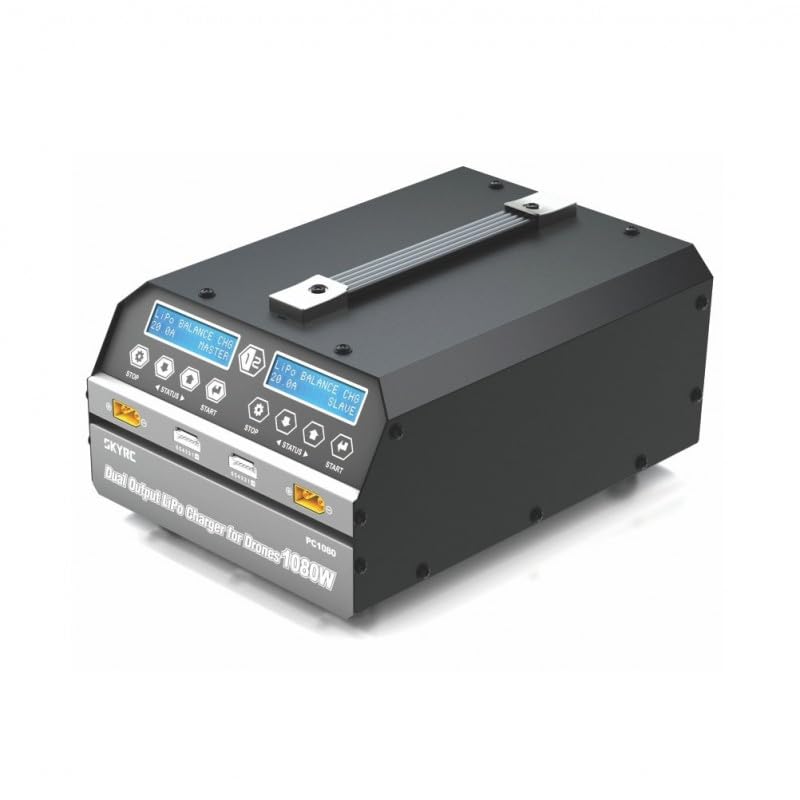
This image displays the front of the IDUINO PC1080 charger, highlighting its dual charging channels, each with its own display screen, control buttons (STOP, STATUS, START), and battery connection ports. The robust handle for portability is also visible.
5.2 リア View
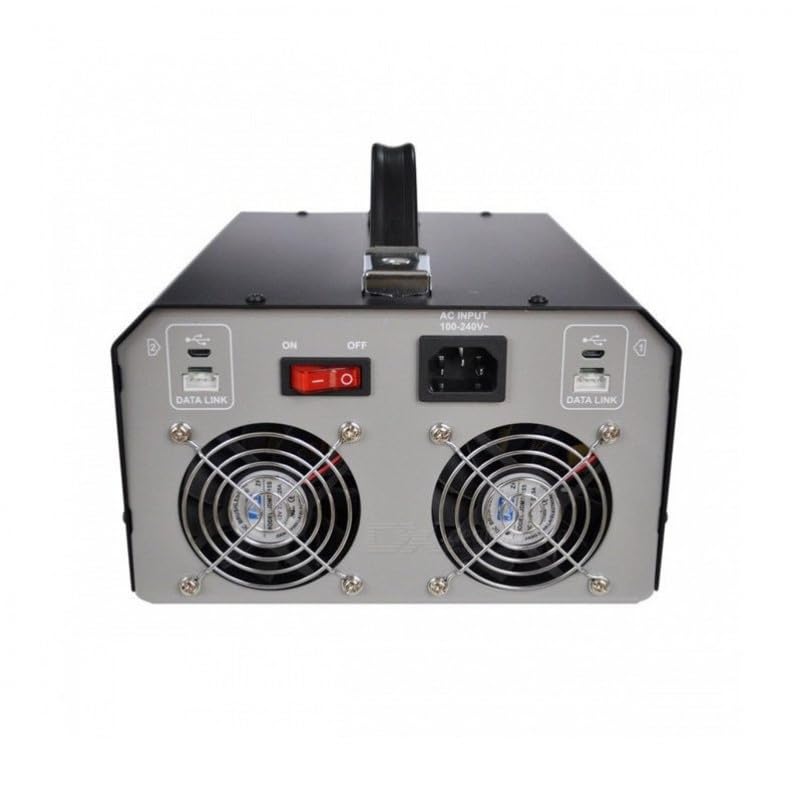
The rear panel of the charger features the AC input port (100-240V), the main ON/OFF power switch, and two cooling fans to dissipate heat during operation. Data Link ports are also present for synchronization with other units.
5.3 Charger in Operation
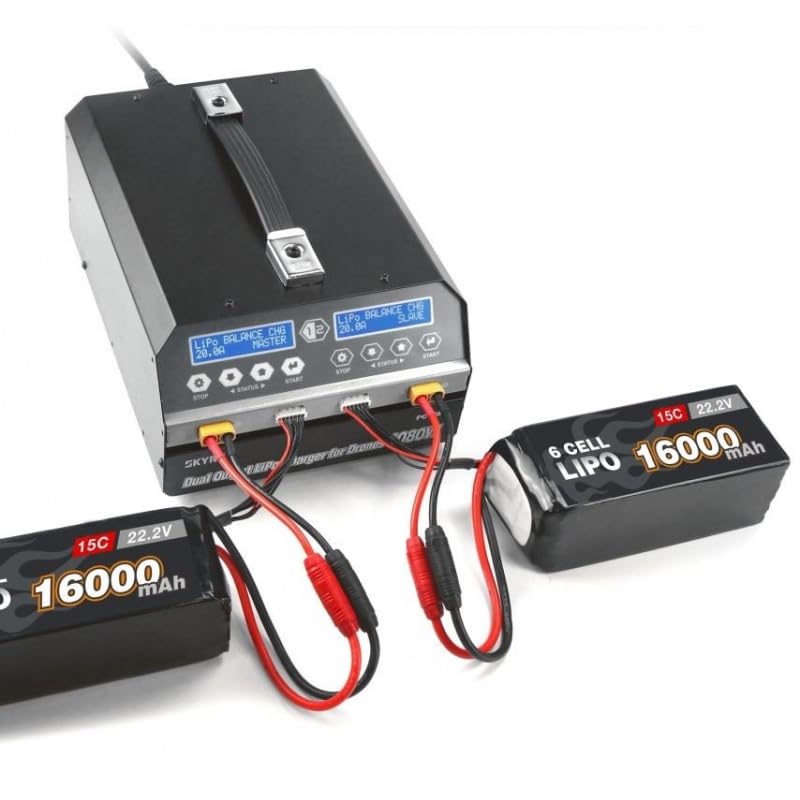
This image shows the IDUINO PC1080 charger actively charging two 6S 16000mAh LiPo batteries. The display screens indicate the charging status, demonstrating the dual-channel capability of the device.
6. セットアップ
Follow these steps for initial setup of your PC1080 charger:
- 充電器を開梱します。 充電器とすべての付属品をパッケージから慎重に取り出します。
- AC 電源を接続します。 Plug the supplied AC power cord into the AC input port on the rear of the charger. Connect the other end to a suitable 100-240V AC power outlet.
- 電源オン: Flip the main ON/OFF switch on the rear panel to the 'ON' position. The display screens on the front will illuminate.
- 電池を準備します: Ensure your LiPo/LiHV batteries are in good condition and within their safe operating temperature range.
- バッテリーを接続する: Connect your battery's main discharge lead to the corresponding output port on one of the charger channels. Then, connect the battery's balance lead to the balance port. Ensure correct polarity for all connections.
7. 操作手順
7.1 基本的な充電
To initiate a basic charge cycle:
- チャンネルを選択: Identify the channel (Master or Slave) you wish to use.
- バッテリーを接続します: As described in the Setup section, connect your battery to the chosen channel.
- One-Key Start: Press the 'START' button on the desired channel. The charger will automatically begin charging with a default current of 20A.
- 進捗状況を監視する: The display screen will show real-time charging parameters such as voltage、電流、充電容量。
- 充電を停止: To stop charging at any time, press the 'STOP' button on the active channel.
7.2 Advanced Charging Modes
The PC1080 supports various charging modes:
- Balance Charge Mode: Recommended for LiPo/LiHV batteries to ensure all cells are charged to the same voltage、バッテリー寿命の延長。
- ストレージモード: バッテリーを特定の容量まで充電または放電するtage level suitable for long-term storage, preventing degradation.
- 充電モード: Standard charging without balancing. Use with caution and only when balancing is not required.
To select a specific mode, navigate through the menu using the 'STATUS' button before pressing 'START'.
7.3同期機能
The unique synchronization function allows you to control multiple PC1080 chargers from a single master unit. Connect the synchronous data connectors between the chargers as per the diagram in the full manual (not provided here). Once connected, operations initiated on the master charger will be replicated on the slave chargers.
7.4 Battery Status Monitoring
During charging or when a battery is connected, you can press the 'STATUS' button to cycle through various battery parameters displayed on the screen, including:
- 総電池容量tage
- 個々の細胞体積tages
- Internal resistance of each cell
- Charging current and capacity
8. メンテナンス
適切なメンテナンスを行うことで、充電器の寿命が長くなり、安全に動作させることができます。
- クリーニング: Regularly wipe the charger's exterior with a soft, dry cloth. Do not use solvents or abrasive cleaners. Ensure ventilation openings are free from dust and debris.
- ストレージ: 充電器は、直射日光、湿気、極端な温度を避け、涼しく乾燥した場所に保管してください。
- ケーブル検査: すべてのケーブルとコネクタに摩耗、損傷、腐食の兆候がないか定期的に点検してください。損傷したケーブルは直ちに交換してください。
- 換気: Ensure adequate airflow around the charger during operation. Do not block the cooling fans.
9。 トラブルシューティング
If you encounter issues with your PC1080 charger, refer to the table below for common problems and their solutions:
| 問題 | 考えられる原因 | 解決 |
|---|---|---|
| 充電器の電源が入らない | No AC power; Power switch off; Faulty power cord | Check AC outlet; Ensure power switch is ON; Try a different power cord |
| 充電が始まらない | Battery not connected properly; Incorrect battery type selected; Safety error triggered | Reconnect battery (main and balance leads); Verify battery type and cell count; Check display for error messages (e.g., 'Connection Break', 'Cell Error') |
| Charger displays 'Over Temperature' | Poor ventilation; Ambient temperature too high; Internal fault | Ensure clear ventilation around charger; Move to a cooler environment; If problem persists, contact support |
| Battery not balancing correctly | Balance lead not connected; Damaged balance lead; Faulty battery cell | Ensure balance lead is fully inserted; Inspect balance lead for damage; Test battery with another device if possible |
| Synchronization not working | Data link cables not connected; Incorrect master/slave setup | Verify data link cable connections; Ensure one unit is set as master and others as slaves |
これらの解決策を試しても問題が解決しない場合は、カスタマー サポートにお問い合わせください。
10. 安全情報
Always observe the following safety precautions when operating the IDUINO PC1080 charger:
- Never leave the charger unattended while in operation, especially when charging LiPo/LiHV batteries.
- Always charge batteries on a non-flammable surface, away from flammable materials.
- 過熱を防ぐために適切な換気を確保してください。
- Do not attempt to charge damaged, swollen, or leaking batteries.
- Always connect the battery to the charger before connecting the charger to AC power. Disconnect AC power before disconnecting the battery.
- 充電器は水、湿気、高湿度から遠ざけてください。
- 充電器を分解したり改造したりしないでください。修理は必ず資格のある専門家にご依頼ください。
- お子様の手の届かない場所に保管してください。
11. 保証とサポート
The IDUINO PC1080 Dual Channel LiPo Battery Charger comes with a standard manufacturer's warranty. For specific warranty terms and conditions, please refer to the warranty card included with your product or visit the official IDUINO website. For technical support, troubleshooting assistance, or warranty claims, please contact IDUINO customer service through the contact information provided on their official webサイトまたは購入領収書をご覧ください。