
アジャズ AKP03
AJAZZ AKP03 ストリームコントローラー ユーザーマニュアル
モデル: AKP03
1. はじめに
This manual provides detailed instructions for the setup, operation, and maintenance of your AJAZZ AKP03 Stream Controller. Please read this manual thoroughly before using the device to ensure proper functionality and to maximize your user experience. Keep this manual for future reference.
2.製品オーバーview
The AJAZZ AKP03 is a versatile stream controller designed to enhance desktop productivity and control. It features customizable buttons, knobs, and an LCD screen for efficient management of applications, streaming, and system monitoring.
2.1 パッケージ内容
- AJAZZ AKP03 ストリームコントローラー
- タイプCのUSBケーブル
- 取扱説明書(本書)
2.2 デバイスコンポーネント
The AKP03 Stream Controller includes the following key components:
- 6 Visual Buttons: Customizable buttons with LCD displays for various functions.
- 3 Metal Knobs: For precise control over settings like volume or scrolling.
- 3つのスイッチボタン: 追加のプログラム可能なボタン。
- タイプ C インターフェイス: パソコンとの接続用。
- 取り外し可能な40°滑り止めスタンド: Provides an ergonomic viewingと動作角度。

図1:上 view of the AJAZZ AKP03 Stream Controller, showing the 6 visual buttons, 3 metal knobs, and 3 switch buttons.
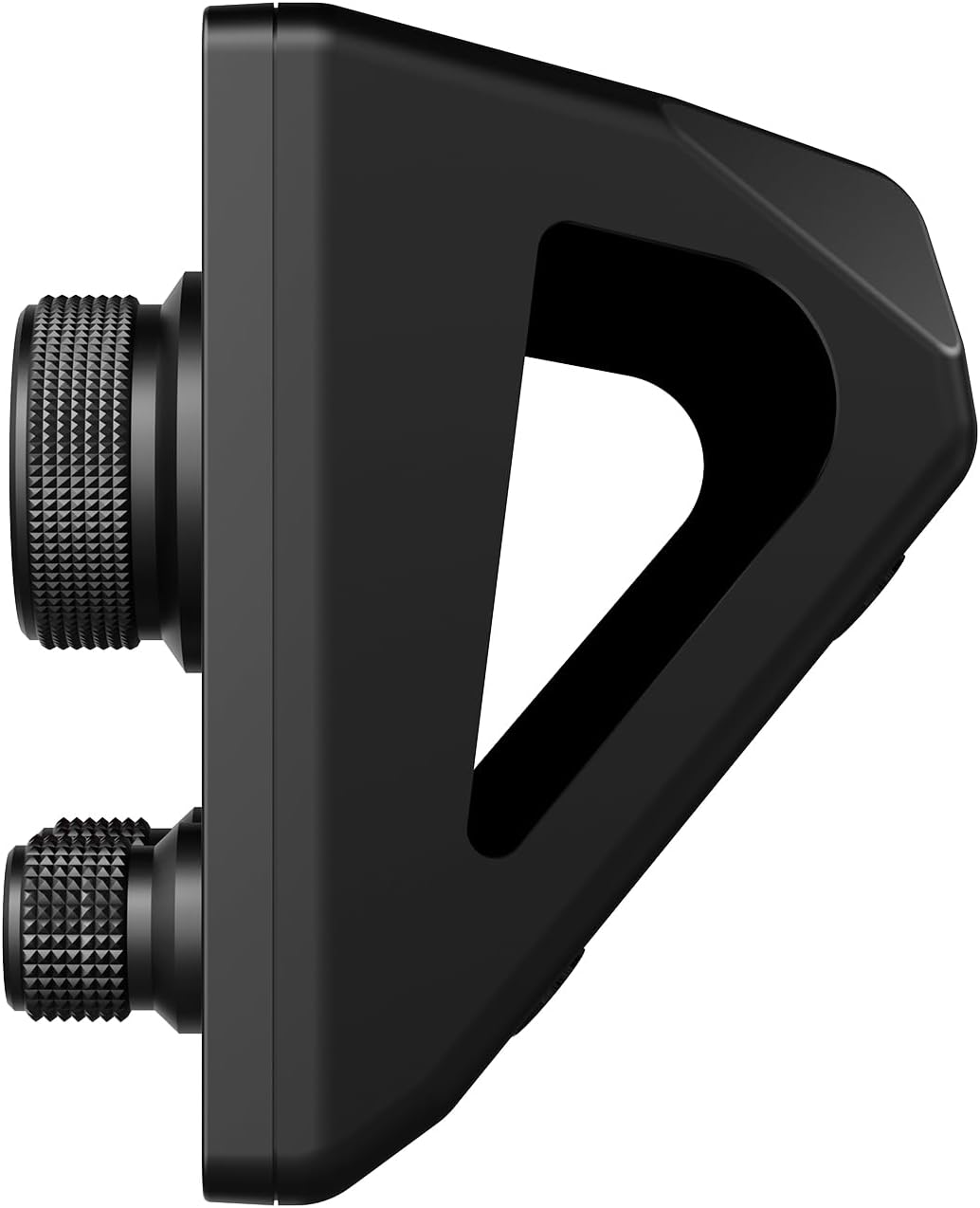
図2:側面 view of the AJAZZ AKP03 Stream Controller, illustrating the detachable 40-degree anti-slip stand and the profile of the knobs.
3. セットアップ
3.1 システム要件
- Windows 7以上
- macOS 10.13以上
- 利用可能なUSB 3.0ポート(最適なパフォーマンスを得るには推奨)
3.2デバイスの接続
- Connect one end of the provided Type-C USB cable to the Type-C port on the AJAZZ AKP03 Stream Controller.
- Connect the other end of the USB cable to an available USB port on your computer. For best results, use a USB 3.0 port (often identified by a blue interior).
- デバイスはオペレーティング システムによって認識されるはずです。
3.3 スタンドの取り付け
The detachable 40° anti-slip stand can be easily attached to the controller. Align the stand with the slots on the bottom of the controller and gently push until it snaps securely into place. This provides an ergonomic angle for use.
3.4 ソフトウェアのインストール
To fully customize and utilize the features of the AKP03 Stream Controller, dedicated software is required. Please visit the official AJAZZ website to download the latest version of the control software compatible with your operating system. Follow the on-screen instructions for installation.
Note: Ensure you download software only from the official AJAZZ web互換性の問題やセキュリティ上のリスクを回避するために、サイトを閉鎖してください。
4. 操作手順
Once the software is installed and the device is connected, you can begin customizing and operating your AKP03 Stream Controller.
4.1 ボタンとノブのカスタマイズ
- コンピュータで AJAZZ コントロール ソフトウェアを起動します。
- Within the software interface, you will find options to assign functions to the 6 visual buttons, 3 metal knobs, and 3 switch buttons.
- ビジュアルボタン: These buttons can be programmed for various actions such as launching applications, triggering macros, controlling streaming software, or executing editing shortcuts in programs like Adobe Photoshop. Customizable icons can be assigned for visual identification.
- Metal Knobs: The knobs can be configured for functions such as media control (play/pause, next/previous track), master Windows volume adjustment, or assigning hotkeys.
- スイッチボタン: These provide additional programmable inputs for quick actions.
4.2 LCD Side Screen Functions
The integrated LCD side screen can display real-time information about your computer's performance, such as CPU utilization and memory usage. This feature helps you monitor your system's health during intensive tasks.
4.3 Enhancing Productivity
The AKP03 Stream Controller is designed to streamline workflows in various applications, including:
- Managing desktop applications and webサイト。
- Controlling streaming media and chat platforms.
- Executing editing shortcuts in photo and video editing software.
- Assisting in game production, medical imaging, and music production.
5. メンテナンス
To ensure the longevity and optimal performance of your AJAZZ AKP03 Stream Controller, follow these maintenance guidelines:
- クリーニング: 柔らかく乾いた布でデバイスの表面を拭いてください。頑固な汚れには、軽く湿らせた布で拭いてください。amp 中性洗剤を含ませた布で拭き、液体がデバイス内に入らないようにしてください。研磨剤入りの洗剤や溶剤の使用は避けてください。
- ストレージ: 使用していないときは、コントローラーを直射日光や極端な温度を避け、清潔で乾燥した環境に保管してください。
- ケーブルのお手入れ: Handle the Type-C USB cable gently. Avoid bending or twisting it excessively to prevent damage.
6。 トラブルシューティング
If you encounter issues with your AKP03 Stream Controller, refer to the following troubleshooting steps:
6.1 デバイスが応答しない
- USB接続を確認してください: Ensure the Type-C USB cable is securely connected to both the controller and your computer. Try a different USB port, preferably a USB 3.0 port.
- コンピューターを再起動: 場合によっては、コンピューターを再起動するだけで接続の問題が解決することがあります。
- ケーブルを確認してください: Try using a different Type-C USB cable to rule out a faulty cable.
6.2 ソフトウェアの問題
- ソフトウェアを再インストールする: If the software is not functioning correctly, uninstall it and download the latest version from the official AJAZZ website, then reinstall.
- 互換性: Verify that your operating system meets the minimum requirements (Windows 7+ / macOS 10.13+).
- 管理者権限: Ensure the software is run with administrator privileges during installation and operation if necessary.
6.3 Knobs Not Performing Desired Functions
- ソフトウェア構成: Confirm that the knobs are correctly configured within the AJAZZ control software for the desired actions (e.g., media control, master volume, hotkeys).
- アプリケーションの焦点: Ensure the target application is in focus when attempting to use knob functions that interact with specific software.
If problems persist after attempting these steps, please contact AJAZZ customer support for further assistance.
7. 仕様
| モデル | AKP03 |
| 製品寸法 | 130 x 80 x 60 mm (5.12 x 3.15 x 2.36 インチ) |
| アイテム重量 | 160g(5.64オンス) |
| ボタンの数 | 6つのビジュアルボタン + 3つの金属ノブ + 3つのスイッチボタン |
| インタフェース | TypeーC USB |
| システム互換性 | Windows 7以降、macOS 10.13以降 |
| 材料 | プラスチック |
| 色 | 黒 |
| 特集 | Customizable Display Keys, Macro Keys, LCD Side Screen |
8. 保証とサポート
8.1 保証情報
AJAZZ provides a 12-month service guarantee for the AKP03 Stream Controller from the date of purchase. This warranty covers manufacturing defects under normal use. It does not cover damage caused by misuse, accidents, unauthorized modifications, or improper installation.
8.2 カスタマーサポート
If you have any questions, require technical assistance, or experience issues not covered in the troubleshooting section, please contact AJAZZ customer support. Refer to the official AJAZZ web連絡先の詳細とサポート リソースについては、サイトをご覧ください。
Ask a question about this manual
Ask about setup, troubleshooting, compatibility, parts, safety, or missing instructions. Manuals+ will review the question and use this page’s manual context to help answer it.