
ロジクール 920-012670
Logitech G915 X Lightspeed Wireless Mechanical Gaming Keyboard User Manual
モデル: 920-012670 | ブランド: Logitech
導入
This manual provides comprehensive instructions for the setup, operation, maintenance, and troubleshooting of your Logitech G915 X Lightspeed Wireless Mechanical Gaming Keyboard. Designed for high-performance gaming and versatile connectivity, this keyboard features LIGHTSPEED wireless technology, GL mechanical switches, customizable G-keys, and LIGHTSYNC RGB lighting. Please read this manual thoroughly to ensure optimal use and longevity of your device.

画像: トップダウン view of the Logitech G915 X Lightspeed Wireless Mechanical Gaming Keyboard, showcasinフルレイアウトと RGB バックライトを備えています。
箱の中身
Upon unboxing your Logitech G915 X Lightspeed keyboard, verify that all the following components are present:
- Logitech G915 X Lightspeed Wireless Mechanical Gaming Keyboard
- LIGHTSPEED USBレシーバー
- USBエクステンダー
- USB-Cデータ/充電ケーブル
- ユーザードキュメント(このマニュアル)

Image: All components included in the Logitech G915 X keyboard packaging, including the keyboard, USB-A to USB-C cable, USB extender, and USB wireless receiver.
設定
初期充電
初めて使用する前に、キーボードを完全に充電することをお勧めします。
- Connect the supplied USB-C data/charging cable to the USB-C port on the keyboard (located on the top edge).
- Connect the other end of the cable (USB-A) to a powered USB port on your computer or a USB wall adapter.
- The battery indicator light on the keyboard will show charging status. A full charge typically takes approximately 4 hours.
キーボードの接続
The G915 X offers three connectivity options: LIGHTSPEED Wireless, Bluetooth, and Wired USB.

Image: Close-up of the Logitech G915 X keyboard's connectivity buttons (LIGHTSPEED, Bluetooth, Wired) located above the F5-F8 keys.
LIGHTSPEED Wireless (Recommended for Gaming)
- Locate the LIGHTSPEED USB receiver. For optimal signal, use the USB extender to position the receiver closer to the keyboard.
- Plug the LIGHTSPEED USB receiver into an available USB-A port on your computer.
- On the keyboard, slide the power switch to the ON position (located on the top right).
- Press the LIGHTSPEED button (indicated by a wireless signal icon) on the keyboard. The indicator light above the button will turn solid cyan when connected.
Bluetooth接続
- キーボードの電源がオンになっていることを確認してください。
- Press and hold the Bluetooth button (indicated by a Bluetooth icon) on the keyboard until the indicator light above it starts blinking blue rapidly. This indicates pairing mode.
- On your computer or device, navigate to Bluetooth settings and select "G915 X" from the list of available devices.
- ペアリングが成功すると、インジケーター ライトが青色に点灯します。
有線USBモード
- Connect the USB-C data/charging cable to the keyboard and the USB-A end to your computer.
- キーボードは自動的に有線モードに切り替わり、充電を開始します。
操作手順
主な特徴view
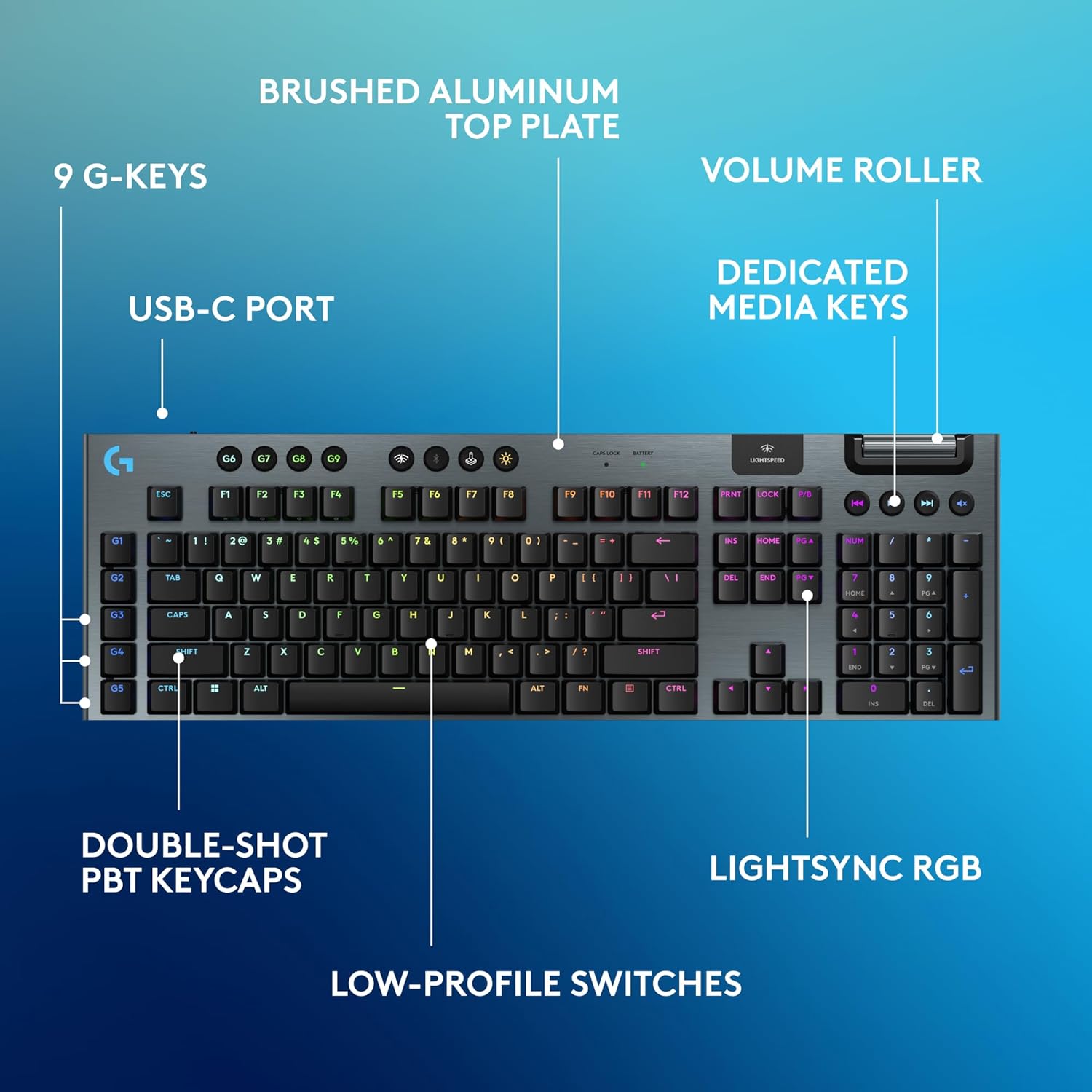
Image: Diagram highlighting key features of the Logitech G915 X keyboard, including G-keys, USB-C port, double-shot PBT keycaps, low-profile switches, brushed aluminum top plate, volume roller, dedicated media keys, and LIGHTSYNC RGB.
- GL Mechanical Switches: ロープロfile switches designed for speed, precision, and comfort with a 1.3mm actuation point.
- LIGHTSPEEDワイヤレス: Pro-grade wireless technology for ultra-fast and reliable connection.
- ブルートゥース: For connecting to other devices that support Bluetooth.
- 専用メディアキー: Control audio and video playback with ease.
- ボリュームローラー: Smoothly adjust audio volume.
- LIGHTSYNC RGB: Customizable per-key RGB lighting with approximately 16.8 million colors.
- G-Keys (G1-G5): Five dedicated programmable macro keys on the left side of the keyboard.
- ダブルショットPBTキーキャップ: Durable keycaps resistant to wear and shine.
Customizing with G HUB Software
To unlock the full potential of your G915 X keyboard, download and install the Logitech G HUB software from the official Logitech website. G HUB allows for extensive customization.
- G-Key Programming: Assign custom macros, commands, or system functions to the G1-G5 keys. You can create multiple profileさまざまなゲームやアプリケーション向けです。
- LIGHTSYNC RGB Customization: Personalize lighting effects, colors, and animations. Sync lighting with other Logitech G devices.
- ゲームモード: Disable specific keys (e.g., Windows key) during gaming to prevent accidental interruptions.
- KEYCONTROL: Set up to 15 functions per key for advanced control.

Image: Screenshot of the Logitech G HUB software interface showing options for customizing commands and assigning functions to G-keys on the G915 X keyboard.
Media Controls and Volume
Dedicated media controls and a volume roller are located on the top right of the keyboard for quick access.
- ボリュームローラー: Roll up to increase volume, roll down to decrease.
- メディアボタン:
- 前のトラック
- 再生/一時停止
- 次のトラック
- ミュート
バッテリー管理
The Logitech G915 X keyboard provides up to 36 hours of continuous battery life with lighting enabled. Battery life may vary based on usage and lighting intensity.
- バッテリーインジケーター: A dedicated battery indicator light is located near the LIGHTSPEED logo on the top right. It changes color to indicate battery level.
- 充電: Connect the USB-C cable to the keyboard and a powered USB port. You can continue to use the keyboard in wired mode while it charges.
- 節電: The keyboard will enter a low-power state after a period of inactivity to conserve battery.
メンテナンス
適切なメンテナンスを行うことで、キーボードの寿命とパフォーマンスが向上します。
- キーキャップのクリーニング: 柔らかく糸くずの出ない布で軽く拭き取ってください。amp水または中性洗剤で洗ってください。刺激の強い化学薬品は使用しないでください。
- Removing Dust/Debris: 圧縮空気を使用して、キーキャップとスイッチの間のほこりやゴミを取り除きます。
- 表面洗浄: Wipe the aluminum top plate with a soft, dry cloth.
- ストレージ: 長期間使用しない場合は、キーボードを直射日光を避けて乾燥した涼しい場所に保管してください。
トラブルシューティング
If you encounter issues with your Logitech G915 X keyboard, refer to the following common troubleshooting steps.
| 問題 | 考えられる解決策 |
|---|---|
| キーボードが反応しない(ワイヤレス) |
|
| Bluetooth接続の問題 |
|
| キーが認識されない、または二重入力される |
|
| RGB照明が機能しない、または正しくない |
|
| G-keys or macros not working |
|
仕様
| 特徴 | 詳細 |
|---|---|
| モデル番号 | 920-012670 |
| 接続性 | LIGHTSPEED Wireless (2.4 GHz RF), Bluetooth, Wired USB-C |
| スイッチタイプ | GL Tactile Mechanical Switches (Low-Profile) |
| 作動点 | 1.3ミリメートル |
| 総走行距離 | 3.2ミリメートル |
| キーキャップ | ダブルショットPBT |
| 点灯 | LIGHTSYNC RGB (Per-key customizable) |
| プログラム可能なキー | 5 dedicated G-keys, up to 15 functions per key via KEYCONTROL |
| バッテリー寿命 | Up to 36 hours (with lighting) |
| 充電時間 | 約4時間 |
| 寸法(長さx幅x高さ) | 18.7 x 5.91 x 0.87 インチ (47.5 x 15 x 2.2 cm) |
| 重さ | 2.38ポンド(1.08kg) |
| 材料 | アルミトッププレート |
| オペレーティングシステムの互換性 | PC、Mac OS |
保証とサポート
Logitech products are designed for durability and performance. For information regarding warranty coverage, technical support, and frequently asked questions, please visit the official Logitech support webサイト。
Logitechサポート Webサイト: https://support.logi.com/
さらなる保護のために購入を検討してくださいasing an extended protection plan available at the time of purchase.
Ask a question about this manual
Ask about setup, troubleshooting, compatibility, parts, safety, or missing instructions. Manuals+ will review the question and use this page’s manual context to help answer it.