
Zinwell ZAT-600B
Zinwell ZAT-600B NextGen TV Box ユーザーマニュアル
Model: ZAT-600B
導入
The Zinwell ZAT-600B NextGen TV Box is an advanced external tuner designed to bring the latest ATSC 3.0 (NextGen TV) and traditional ATSC 1.0 broadcast signals to your television. It is ideal for TVs that do not have a built-in ATSC 3.0 tuner, allowing you to access enhanced features such as 4K resolution broadcasts, superior Dolby Audio, and interactive broadcaster applications without needing to upgrade your existing television.
This manual provides comprehensive instructions for setting up, operating, and maintaining your ZAT-600B NextGen TV Box to ensure optimal performance and enjoyment of free over-the-air television.
主な特徴
- NextGen TV Ready: Decodes and tunes ATSC 1.0 and 3.0 broadcast signals, providing access to the latest NextGen TV features.
- 4K Broadcast Support: Capable of supporting 4K broadcasts, delivering stunning visual clarity (when available).
- Upconverts HD to 4K: Enhances HD broadcasts by upconverting them to 4K, improving picture quality and detail.
- Enhanced Dolby Audio: Equipped with Dolby AC4 decoding for superior audio quality, supporting features like Voice + Dialogue Enhancement, Consistent Volume, Personalized Audio, and Dolby Atmos.
- Broadcaster Apps: Launches interactive applications provided by broadcasters, merging broadcast TV with internet content, including sports scores, weather alerts, and more.
- On-Screen TV Guide: Features an easy-to-use on-screen guide for convenient channel browsing.
- Universal Learning Remote: Includes a universal learning remote control that can be programmed to control your TV and/or sound bar.
- 将来に備える: Designed to be upgradeable, ensuring compatibility with future NextGen TV advancements.
パッケージ内容
パッケージにすべてのアイテムが揃っていることを確認します。
- Zinwell ZAT-600B 次世代テレビボックス
- Universal Learning Remote Control
- 電源アダプター
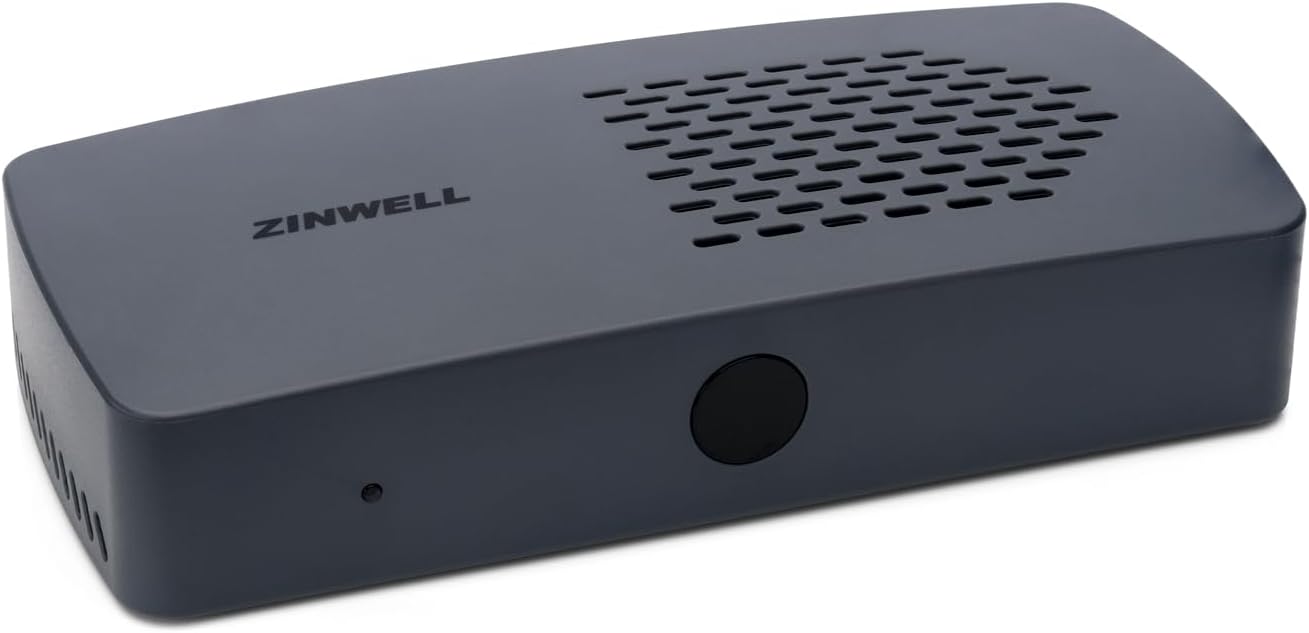
画像: 正面 view of the Zinwell ZAT-600B NextGen TV Box. This image displays the compact, gray rectangular device with the "ZINWELL" logo on top and a small indicator light on the front.

Image: The universal learning remote control included with the ZAT-600B. The remote is black with various buttons for power, channel, volume, navigation, and app access.
設定
Follow these steps to connect your Zinwell ZAT-600B NextGen TV Box to your television and antenna.
1. Connect the Antenna
Connect your digital antenna's coaxial cable to the "ANT IN" port on the back of the ZAT-600B box. Ensure the connection is secure.

画像: 背面 view of the Zinwell ZAT-600B NextGen TV Box, highlighting the various connection ports including ANT (antenna), HDMI, LAN, USB, and DC IN.
2.テレビに接続する
Connect one end of an HDMI cable (not included) to the "HDMI" port on the ZAT-600B box and the other end to an available HDMI input on your television.
3.電源に接続します
Plug the included power adapter into the "DC IN" port on the ZAT-600B box, then plug the adapter into a standard electrical outlet.
4. ネットワーク接続(オプション)
For software updates and future broadcaster app functionality, you can connect the ZAT-600B to your home network:
- 有線接続: Connect an Ethernet cable from your router to the "LAN" port on the ZAT-600B.
- ワイヤレス接続: The device supports Wi-Fi. You can configure the wireless connection through the on-screen settings menu after initial power-up.
5. 初期設定とチャンネルスキャン
Turn on your television and select the correct HDMI input connected to the ZAT-600B. The device will guide you through an initial setup process, which typically includes language selection and an automatic channel scan. Allow the scan to complete to find all available ATSC 1.0 and ATSC 3.0 channels in your area.

Image: An installation diagram illustrating how to connect the Zinwell NextGen TV Box. It shows an antenna connected to the box via a coaxial cable, and the box connected to a TV via an HDMI cable. An optional Wi-Fi router connection is also depicted.
操作手順
リモコンの使用
The included universal learning remote control allows you to operate the ZAT-600B and can be programmed to control your TV or sound bar. Familiarize yourself with the main functions:
- 電源ボタン: Turns the ZAT-600B on or off.
- チャンネルアップ/ダウン: チャンネルを変更します。
- 音量を上げる/下げる: 音量を調整します。
- ガイドボタン: 電子番組ガイド (EPG) にアクセスします。
- App Button: Launches interactive broadcaster applications.
- ナビゲーション ボタン (上/下/左/右/OK): メニューを移動したりオプションを選択したりするために使用します。
- 数字ボタン: チャンネル番号を直接入力します。
電子番組ガイド(EPG)
を押す ガイド リモコンのボタンを押して view the on-screen program guide. The EPG displays current and upcoming programs for all scanned channels, including details like program title, time, and description. Use the navigation buttons to browse through channels and program listings.

Image: A screenshot of the Electronic Program Guide (EPG) displayed on a television screen, showing channel listings, program titles, and broadcast times.
Broadcaster Applications
The ZAT-600B supports interactive applications provided by broadcasters via NextGen TV. These apps can offer additional content, such as sports scores, weather alerts, or on-demand video clips. Press the アプリ button on the remote to access these features when available on a broadcast channel.

Image: A channel information overlay on a television screen, indicating the channel number, program title, broadcast time, and displaying the NextGen TV and Dolby Audio logos.
4K Upconversion and Enhanced Audio
The ZAT-600B automatically upconverts HD (1080p) broadcasts to 4K resolution for compatible 4K televisions, enhancing picture quality. It also processes Dolby AC4 audio, providing features like Voice + Dialogue Enhancement and Consistent Volume for a richer audio experience.
メンテナンス
- クリーニング: Use a soft, dry cloth to clean the exterior of the ZAT-600B. Do not use liquid cleaners or aerosols.
- ソフトウェアアップデート: Ensure the ZAT-600B is connected to the internet (via Wi-Fi or Ethernet) to receive automatic software updates. These updates provide new features, performance improvements, and compatibility with future NextGen TV advancements. Check the system settings menu for manual update options.
- 換気: Ensure the device is placed in a well-ventilated area. Do not block the ventilation slots on the top or sides of the unit.
トラブルシューティング
| 問題 | 考えられる原因 | 解決 |
|---|---|---|
| 画像も音声も出ない |
|
|
| チャンネルが見つかりません |
|
|
| リモコンが動作しない |
|
|
| Broadcaster apps not loading |
|
|
仕様
| 特徴 | 詳細 |
|---|---|
| モデル番号 | ZAT-600B |
| 寸法(長さ×幅×高さ) | 6.25 x 3.5 x 1.25インチ |
| 重さ | 1ポンド |
| 色 | グレー |
| チューナータイプ | ATSC 1.0 / ATSC 3.0 (NextGen TV) |
| ビデオ出力 | HDMI (up to 4K) |
| オーディオデコード | ドルビーAC4 |
| 接続性 | Wi-Fi、イーサネット、同軸 |
| 対応デバイス | TVs, Monitors, Projectors |
保証とサポート
For warranty information and technical support, please refer to the official Zinwell website or contact their customer service. Specific warranty terms and support contact details may vary and are typically provided with your product purchase documentation.
You can often find support resources, FAQs, and contact information by visiting the manufacturer's webサイト:
Ask a question about this manual
Ask about setup, troubleshooting, compatibility, parts, safety, or missing instructions. Manuals+ will review the question and use this page’s manual context to help answer it.