
導入
This manual provides comprehensive instructions for the ECONTROLLY EUR7729KE0 Replacement Remote Control. This remote is designed to function as a direct replacement for various Panasonic DVD HDD TV Recorders, offering full functionality without the need for complex programming.
対応機種:
- UR7729KE0
- EUR7721X10
- DMR-EH50
- DMR-E55K
- DMR-EH50S
- DMR-E55P9
- DMR-E55S
- DMR-ES10
- DMR-EH50P
- DMR-EH60
This replacement remote control covers all functions of the original remote, ensuring a seamless user experience.
設定
バッテリーの取り付け
The EUR7729KE0 remote control requires two AAA batteries (not included) for operation. Please follow these steps to install the batteries:
- リモコンの背面にある電池収納部を見つけます。
- 電池ケースのカバーを下方向にスライドさせて持ち上げて取り外します。
- 単 4 電池 2 本を挿入し、プラス (+) とマイナス (-) の端子がコンパートメント内のマークと正しく揃っていることを確認します。
- 電池ボックスのカバーを、カチッと音がするまで元の位置に戻してしっかりと閉めます。

後方 view of the ECONTROLLY EUR7729KE0 remote control with the battery cover removed, showing the compartment for two AAA batteries.
注記: 必ず両方の電池を同時に新しい電池に交換してください。古い電池と新しい電池、または異なる種類の電池を混ぜて使用しないでください。
操作手順
To operate the remote control, point it directly at the infrared sensor on your Panasonic DVD HDD TV Recorder. Ensure there are no obstructions between the remote and the device.
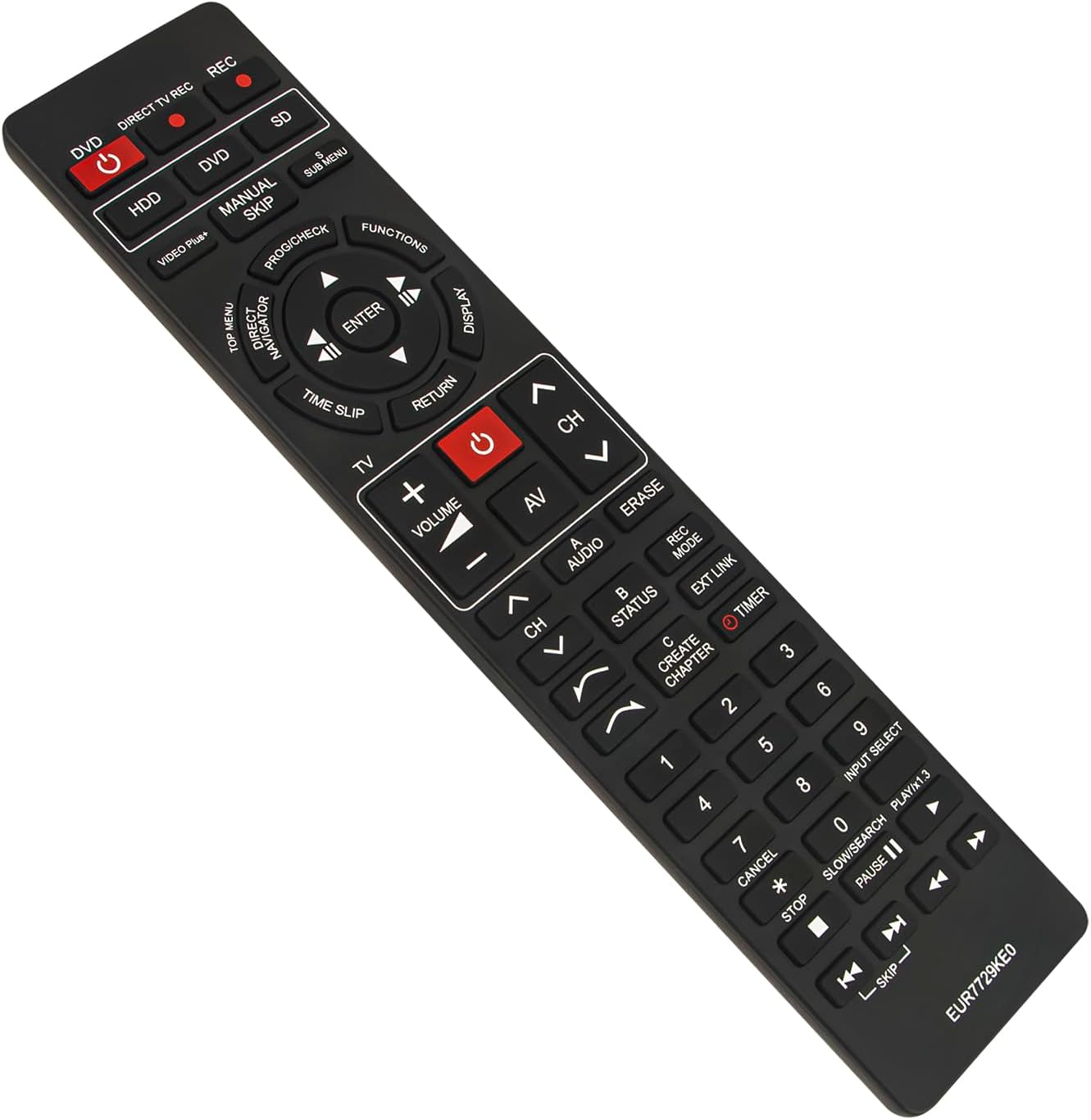
フロント view of the ECONTROLLY EUR7729KE0 replacement remote control, showing all buttons and their labels.
主な機能view:
- Power Buttons (DVD, HDD, DIRECT TV REC, REC, SD): Used to power on/off or select specific modes for the respective components.
- 数字ボタン(0-9): For direct channel selection, inputting numbers, or menu navigation.
- ボリューム(+/-): オーディオの音量を調整します。
- Channel (CH ^/v): チャンネルを上または下に変更します。
- ナビゲーション パッド (上、下、左、右、ENTER): メニューを移動したり選択を確定したりするために使用します。
- Playback Controls (PLAY/x1.3, PAUSE, STOP, SKIP, SLOW/SEARCH): メディア再生用の標準コントロール。
- MENU Buttons (TOP MENU, SUB MENU, DIRECT NAVIGATOR): Access various menu options for DVD, HDD, or TV functions.
- Special Function Buttons (PROG/CHECK, FUNCTIONS, DISPLAY, TIME SLIP, RETURN, AV, AUDIO, ERASE, STATUS, REC MODE, EXT LINK, CREATE CHAPTER, TIMER): These buttons provide access to advanced features specific to your Panasonic recorder, such as recording options, chapter creation, and display settings. Refer to your recorder's manual for detailed use of these functions.

Comparison image showing the ECONTROLLY EUR7729KE0 replacement remote control on the left and an original Panasonic remote control on the right, highlighting their similar button layouts.
メンテナンス
クリーニング
リモコンを清掃するには、柔らかく乾いた布を使用してください。頑固な汚れには、軽くamp布に水または中性洗剤を含ませて拭いてください。研磨剤入りの洗剤、アルコール、溶剤はリモコンの表面や内部部品を傷める可能性があるため、使用しないでください。
ストレージ
リモコンは、直射日光や極端な温度を避け、涼しく乾燥した場所に保管してください。リモコンを長期間使用しない場合は、液漏れや損傷を防ぐため、電池を取り外しておくことをお勧めします。
トラブルシューティング
- リモコンが応答しない:
- 電池が正しい極性 (+/-) で正しく挿入されているかどうかを確認します。
- 新しい電池と交換してください。
- リモコンとデバイスの赤外線センサーの間に障害物がないことを確認してください。
- Make sure you are pointing the remote directly at the device.
- 一部のボタンが機能しません:
- This remote is designed to replicate all functions of the original. If specific buttons are not working, ensure your device is in the correct mode (e.g., DVD mode for DVD functions).
- Clean the remote's surface, as dirt or debris might be interfering with button presses.
If the issue persists after following these steps, please refer to the support section for further assistance.
仕様
| ブランド | Eコントロール |
| モデル名 | EUR7729KE0 |
| 色 | 黒 |
| 特集 | プログラミングは不要 |
| 対応デバイス | DVD HDD TV Recorder (Panasonic DMR-EH50, etc.) |
| 接続技術 | 赤外線 |
| コントローラータイプ | ボタンコントロール |
| 最大範囲 | 33フィート |
| アイテム重量 | 1オンス |
| 商品の寸法 (長さ x 幅 x 高さ) | 長さ5インチ x 幅2インチ x 高さ0.6インチ (約22.4 cm x 5 cm x 1.5 cm) |

Image displaying the dimensions of the ECONTROLLY EUR7729KE0 remote control: approximately 22.4 cm (8.82 inches) in length and 5 cm (1.97 inches) in width.
保証とサポート
This ECONTROLLY product has been tested to ensure proper functionality before shipping. As a replacement remote control, it is designed for immediate use without additional setup.
For further assistance, compatibility inquiries, or troubleshooting that is not covered in this manual, please contact ECONTROLLY customer support through the retailer's platform where the product was purchased. Provide your product model number (EUR7729KE0) and a detailed description of your issue for efficient support.


