
1. はじめに
This manual provides detailed instructions for the safe and effective use of your pxton 666S two-way radio. Please read this manual thoroughly before operating the device and retain it for future reference. The pxton 666S is a reliable communication device designed for various applications, featuring 16 memory channels, privacy codes, and multiple functions such as VOX, noise reduction, and a flashlight.
FCC ID: 2AX68GTR8. This device complies with Part 15 of the FCC Rules. Operation is subject to the condition that this device does not cause harmful interference.

Image 1.1: A set of ten pxton 666S two-way radios, each with its charging dock and an earphone, illustrating the complete package.
2. パッケージ内容
パッケージにすべてのアイテムが含まれていることを確認します。
- 10 x pxton 666S Two-Way Radios
- USB充電ドック10個
- 1500mAhリチウム電池10個
- 10 xベルトクリップ
- イヤホン x 10
- ユーザーマニュアル x 5

Image 2.1: An illustration of the individual components included in the pxton 666S package: the radio unit, charging dock, battery, belt clip, earphone, and user manual.
3.製品オーバーview
3.1 主な特徴
- 16のメモリチャネル
- 165プライバシーコード(50 CTCSS / 210 DCS)
- 5 Levels of VOX Sensitivity Adjustment
- タイムアウトタイマー(TOT)
- 緊急警報
- ノイズ低減
- 自動スケルチ
- 低バッテリー警告
- 省電力モード
- スキャン機能
- 監視機能
- LED懐中電灯
- Durable PC+ABS material construction
3.2 無線コンポーネント
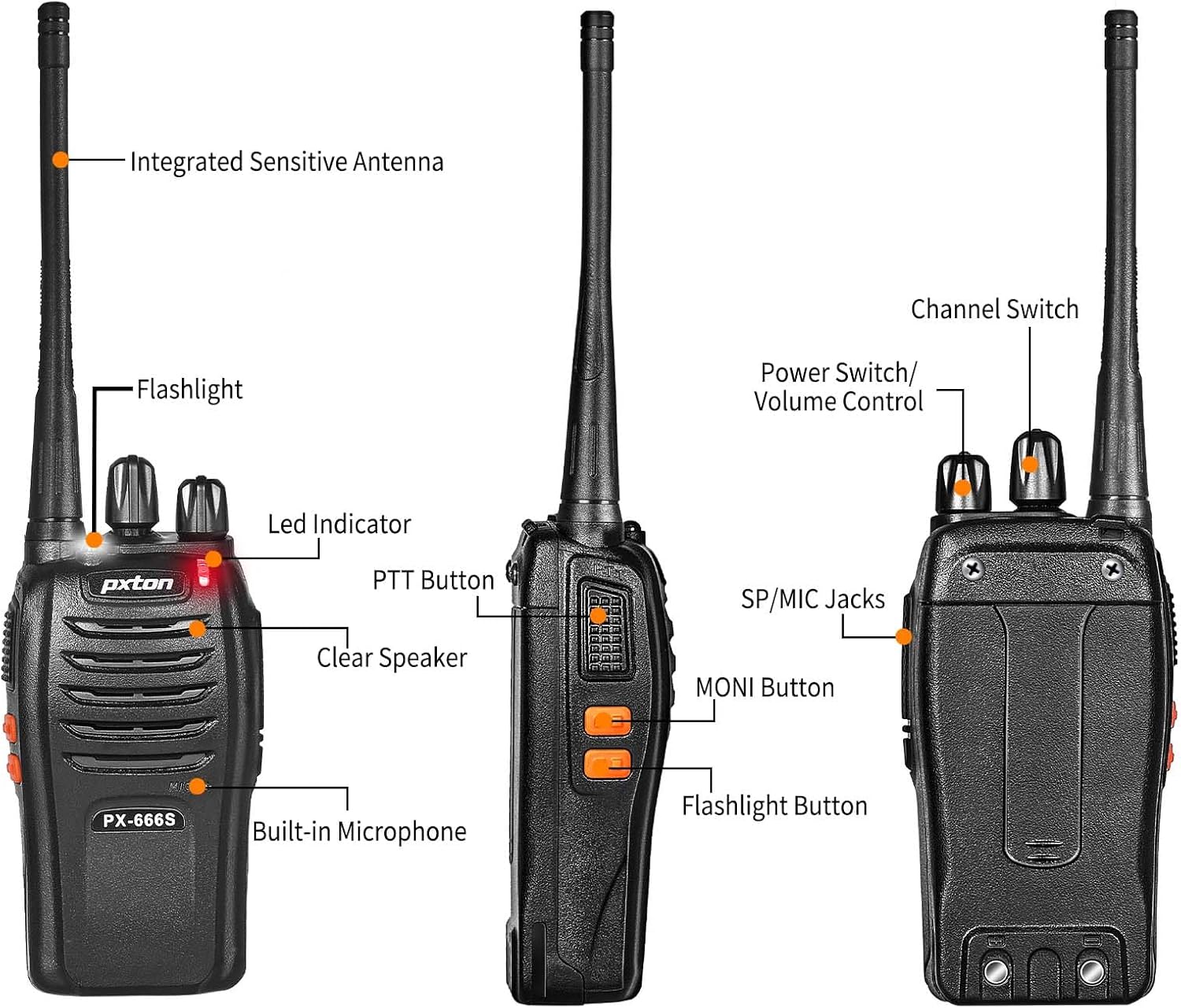
Image 3.1: Detailed diagram labeling the external components of the pxton 666S radio, including the integrated sensitive antenna, flashlight, LED indicator, PTT button, clear speaker, built-in microphone, SP/MIC jacks, MONI button, flashlight button, channel switch, and power switch/volume control.
- 統合型高感度アンテナ: 信号の送受信に使用します。
- 懐中電灯: 照明を提供します。
- LEDインジケーター: Displays status (e.g., transmitting, receiving, low battery).
- PTT ボタン (プッシュ ツー トーク): 押すと送信、離すと受信します。
- クリアなスピーカー: オーディオ出力用。
- 内蔵マイク: 音声入力用。
- SP/MICジャック: For connecting external earphones or microphones.
- MONI Button (Monitor): Temporarily disables squelch to hear weak signals.
- 懐中電灯ボタン: LED 懐中電灯を点灯します。
- チャンネルスイッチ: Rotates to select desired communication channel.
- 電源スイッチ/ボリュームコントロール: 回すとラジオのオン/オフや音量の調整ができます。

Image 3.2: The pxton 666S radio resting on rocks, emphasizing its rugged PC+ABS durable material, anti-fall, and anti-vibration design for extended service life.
4. セットアップ
4.1 バッテリーの取り付け
- バッテリー パックをラジオの背面にある溝に合わせます。
- バッテリー パックをカチッと音がするまで上方にスライドさせます。
- 取り外すには、リリース ラッチ (ある場合) を押して、バッテリーを下にスライドします。
4.2 バッテリーの充電
The pxton 666S uses a 1500mAh Li-ion battery. A full charge takes approximately 3-4 hours.
- Connect the USB charging dock to a power source.
- ラジオ(バッテリーを装着した状態)を充電ドックに置きます。
- The LED indicator on the radio or charger will show charging status (e.g., red for charging, green for fully charged).

Image 4.1: Two pxton 666S radios placed in their respective charging docks, with earphones connected, demonstrating the charging setup.
4.3 ベルトクリップの取り付け
持ち運びに便利なように、付属のネジを使用してベルト クリップを無線機の背面に固定します。
4.4 イヤホンの接続
Insert the earphone plug into the SP/MIC jacks on the side of the radio. Ensure it is fully inserted for proper audio transmission and reception.
5. 操作手順
5.1 電源のオン/オフと音量調節
- ラジオをオンにするには、 電源スイッチ/音量調節 knob clockwise. You will hear a "click" and a tone.
- To turn off the radio, rotate the knob counter-clockwise until you hear a "click".
- To adjust the volume, rotate the 電源スイッチ/音量調節 ノブを時計回りに回すと音量が上がり、反時計回りに回すと音量が下がります。
5.2チャンネルの選択
回転する チャンネルスイッチ ノブを回して、利用可能な16チャンネルから1つを選択します。グループ内のすべての無線機が同じチャンネルに設定されていることを確認してください。
5.3 送信と受信
- 送信するには、 PTTボタン. Speak clearly into the microphone. The LED indicator will typically glow red.
- 受け取るには、 PTTボタン. The LED indicator will typically glow green when receiving a signal.
5.4 VOX機能(音声操作による送信)
The VOX function allows hands-free operation. When activated, the radio will automatically transmit when it detects your voice, without needing to press the PTT button. The pxton 666S offers 5 levels of VOX sensitivity adjustment.

Image 5.1: A security guard using the pxton 666S radio, illustrating the VOX/Handsfree function for clear and bright sound quality, allowing hands-free communication.
5.5 懐中電灯
を押す 懐中電灯ボタン to turn the LED flashlight on or off. This feature is useful in low-light conditions.

Image 5.2: The pxton 666S radio's flashlight feature in use, illuminating a campsite at night, demonstrating its utility in dark environments.
5.6 監視機能
を押し続けます MONIボタン to temporarily disable the squelch function. This allows you to hear very weak signals that might otherwise be blocked by the squelch, or to check if a channel is clear before transmitting.
5.7 スキャン機能
The scanning function allows the radio to automatically scan through all programmed channels to detect activity. Refer to the full user manual (if provided separately) for specific instructions on activating and managing the scanning feature.
5.8その他の機能
- ノイズ低減: バックグラウンドノイズを低減して音声の明瞭度を高めます。
- 緊急警報: Activates an audible alarm to signal for help.
- タイムアウトタイマー (TOT): Prevents accidental prolonged transmissions by limiting the duration of each transmission.
- 省電力モード: Automatically reduces power consumption when no activity is detected, extending battery life.
- 低バッテリー警告: Provides an audible or visual warning when the battery level is low, indicating it's time to recharge.
6. 通信範囲
The actual communication range of the pxton 666S can vary significantly based on environmental factors, terrain, and obstructions. General estimates are:
- Open Areas (flat terrain, mountain peaks): 最大3マイル。
- Suburban/Countryside Areas: Approximately 1.2 miles.
- City Limits (with buildings and obstructions): Around 0.6 miles.

Image 6.1: Visual representation of the pxton 666S communication range, indicating up to 1-3 miles in open areas, 1.2 miles in rural settings, and 0.6 miles in urban environments.
7.バッテリー情報
The pxton 666S is powered by a rechargeable 1500mAh Lithium-Ion battery (Model: BL-1, 5.55Wh, Voltage:3.7V)。
- 一般的な用途: Up to 12 hours of continuous talk time.
- 待機時間: Up to 120 hours (5-7 days).
- フル充電時間: 約3〜4時間。
Important Battery Safety Information:
- バッテリーを分解しないでください。
- 火中に廃棄しないでください。
- 指定された充電器のみを使用してください。
- 端子をショートさせないでください。
- 涼しく乾燥した場所に保管してください。

Image 7.1: The pxton 666S radio alongside its 1500mAh Li-ion battery, detailing battery model (BL-1), capacity (1500mAh), voltage (3.7V), and safety warnings.
8. 仕様
| 特徴 | 仕様 |
|---|---|
| モデル番号 | PX-666S-0004 |
| ブランド | ピクセルトン |
| チャンネル数 | 16 |
| 周波数範囲 | 超短波 |
| 通話範囲最大 | 3 Miles (line of sight) |
| 電池のタイプ | 1500mAhリチウムイオン(付属) |
| 巻tage | 3.7ボルト |
| アイテム重量 | 7.05ポンド(10パック) |
| 製品寸法 | 9.9 x 11 x 6.9インチ(パッケージ寸法) |
| 耐水性レベル | 耐水性 |
| 特集 | Automatic Squelch, Battery Saver Mode, Long Range, Rechargeable, Voice Operated Transmission (VOX) |

Image 8.1: A size comparison of the pxton 666S radio next to a smartphone (iPhone 14 Pro), illustrating its compact dimensions for portability.
9。 トラブルシューティング
If you encounter issues with your pxton 666S radio, please refer to the following common problems and solutions:
| 問題 | 考えられる原因 | 解決 |
|---|---|---|
| 電源なし | バッテリーが正しく取り付けられていないか、放電しています。 | バッテリーが正しく装着されていることを確認してください。バッテリーを完全に充電してください。 |
| 送信も受信もできない | Incorrect channel, out of range, low battery, squelch too high. | Verify all radios are on the same channel. Move closer to other radios. Recharge battery. Press MONI button to check for weak signals. |
| 音質が悪い / 雑音 | Weak signal, interference, radio too far apart. | Move to an area with fewer obstructions. Adjust volume. Ensure antenna is clear. |
| VOXが機能しない | VOX sensitivity too low, feature disabled. | Adjust VOX sensitivity to a higher level. Ensure VOX is enabled (refer to full manual for programming). |
| 電池寿命が短い | Frequent transmission, battery degradation, power-saving mode off. | Reduce transmission time. Ensure power-saving mode is active. Consider replacing old batteries. |
For further assistance, please contact pxton customer support.
10. メンテナンス
- クリーニング: 柔らかくてamp ラジオの外装を拭く際は布を使用してください。刺激の強い化学薬品や研磨剤入りの洗剤は使用しないでください。
- ストレージ: 長期間使用しない場合は、電池を取り外してラジオを涼しく乾燥した場所に保管してください。
- バッテリーのケア: Fully charge batteries before long-term storage and recharge them every 3-6 months to maintain optimal performance.
- アンテナ: パフォーマンスに影響する可能性があるため、アンテナを曲げたり変更したりしないでください。
- 耐水性: While water-resistant, avoid submerging the radio in water. Ensure all covers (e.g., earphone jack cover) are securely closed.
11. 保証とサポート
pxton offers a 30-day no-questions-asked replacement and refund policy from the date of purchase. Additionally, the product comes with 生涯アフターサービス.
If you encounter any issues or require support, please contact pxton customer service. They are committed to assisting you with any concerns.
互換性に関する注意: The pxton 666S walkie talkie is compatible with PX-888S, PX-777S, and PX-888S Pro models. They can utilize the same programming tools and cables (programming cable sold separately).


