
1.製品オーバーview
The Peakeep MHP6060 Digital Alarm Clock features a large, easy-to-read display, showing time, date, and day of the week. It includes adjustable brightness, multiple alarm volume settings, automatic Daylight Saving Time (DST) adjustment, a USB charging port, and battery backup for power outages。

画像1.1:正面 view of the Peakeep MHP6060 Digital Alarm Clock, displaying time, day, and date.
2. パッケージ内容
- Peakeep MHP6060 Digital Alarm Clock
- Type-C Power Adapter (included)
- ユーザーマニュアル
Video 2.1: Unboxing the Peakeep Digital Alarm Clock, showing the clock, user manual, and power adapter.
3. セットアップ
3.1 クロックの電源供給
The clock operates via a corded electric connection using the included Type-C adapter. For continuous operation and to retain settings during power outages, install 4 AAA batteries (not included) as a backup.
- Connect the Type-C power adapter to the 'Type C 5V IN' port on the back of the clock.
- Plug the adapter into a standard 120V AC power outlet.
- Open the battery compartment on the back and insert 4 AAA batteries (not included), observing polarity. These batteries will save your settings and trigger the alarm during a power interruption.

Image 3.1: Illustration of connecting the Type-C power adapter and the battery backup feature.
3.2 初期時刻と日付の設定
Upon first power-up or after a full power loss without battery backup, you may need to set the time and date.
- 時間の設定: Hold the 'TIME SET' button for 2 seconds until the hour digits blink. Release the button, then use the '+' or '-' buttons to adjust the hour.
- 分を設定: Press 'TIME SET' again. The minute digits will blink. Use the '+' or '-' buttons to adjust the minutes.
- 設定年: Press 'TIME SET' again. The year digits will blink. Use the '+' or '-' buttons to set the current year (e.g., 2025).
- 月を設定: Press 'TIME SET' again. The month digits will blink. Use the '+' or '-' buttons to set the current month.
- 設定日: Press 'TIME SET' again. The day digits will blink. Use the '+' or '-' buttons to set the current day.
- Press 'TIME SET' one last time to confirm all settings and exit time setting mode. The day of the week will synchronize automatically once the year, month, and day are set.
Video 3.2: Demonstrates setting the time, year, month, and day on the Peakeep Digital Alarm Clock.
4. 操作手順
4.1 表示モード(日/温度)
The clock can display either the day of the week or the indoor temperature. Press the 'DAY/TEMP' button on the back to toggle between these two display modes.
4.2 明るさ調整
The display brightness can be adjusted to 5 levels or turned completely off. Press the 'DIMMER' button on the back repeatedly to cycle through the brightness levels (L5 to L1) and off.

Image 4.1: Visual representation of the 6 customizable brightness settings for the clock display.
4.3 Alarm Setting and Volume
The alarm features 5 adjustable volume levels and a 9-minute snooze function.
- アラーム時間の設定: Hold the 'ALARM SET' button for 2 seconds until the alarm hour digits blink. Use the '+' or '-' buttons to set the desired alarm hour. Press 'ALARM SET' again to set the minutes.
- アラーム音量を調整する: While in alarm setting mode, or when the alarm is sounding, press the 'VOLUME' button to cycle through 5 volume levels (U01 to U05).
- アラームのオン/オフ: Press the 'ON/OFF' button to activate or deactivate the alarm. An alarm icon will appear on the display when active.
- スヌーズ機能: When the alarm sounds, press the 'SNOOZE/LIGHT' button on top to activate a 9-minute snooze.
- アラーム停止: To stop the alarm for the day, press any button on the back of the clock. The alarm will reset for the next day.

Image 4.2: Depicts the 5 adjustable volume levels for the alarm, catering to different sleep preferences.
4.4 自動夏時間(DST)
The clock features an automatic DST function, eliminating the need for manual adjustments.
- Press the 'DST ON/OFF' button on the back to toggle the automatic DST feature. When active, 'AUTO DST' will be displayed.
- When 'AUTO DST' is enabled, the clock will automatically adjust for Spring Forward and Fall Back time changes.
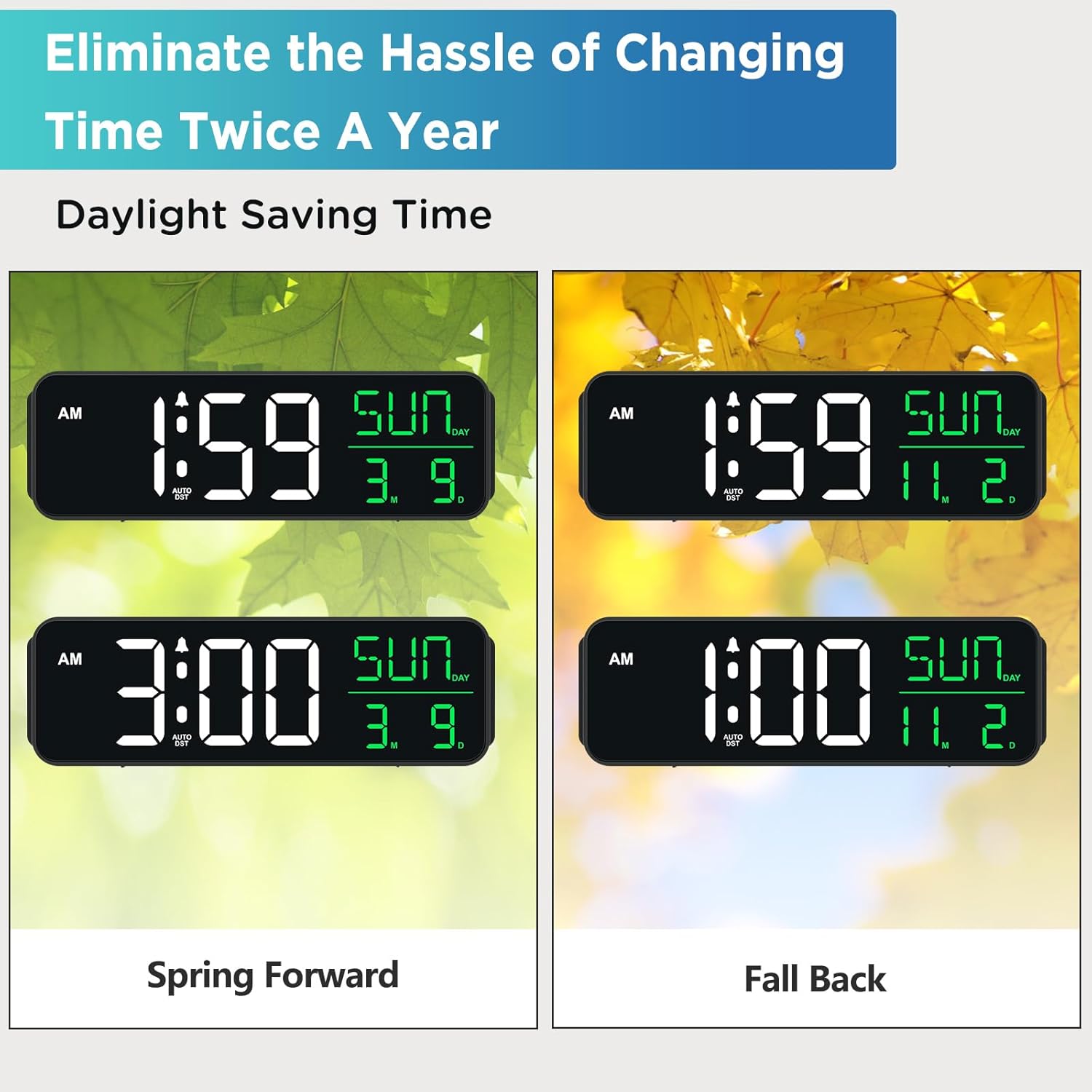
Image 4.3: Shows how the clock automatically adjusts for Daylight Saving Time changes.
4.5USB充電ポート
A USB-A output port is located on the back of the clock, allowing you to charge small electronic devices like smartphones or smartwatches.
- Connect your device's USB charging cable to the 'USB OUT' port on the back of the clock.
- Ensure the clock is powered via the Type-C adapter for the USB charging port to function.
5. メンテナンス
- 時計は柔らかく乾いた布で拭いてください。研磨剤入りの洗剤や溶剤は使用しないでください。
- 時計は直射日光、極端な温度、高湿度を避けて保管してください。
- 過熱を防ぐために、24時間適切な換気を確保してください。
6。 トラブルシューティング
| 問題 | 考えられる原因 | 解決 |
|---|---|---|
| 時計の表示が空白または暗い。 | 電源なし、電源オフtage, or brightness set to OFF. | Check power connection. Ensure batteries are installed for backup. Press 'DIMMER' button to adjust brightness. |
| アラームは鳴りません。 | アラームが作動していないか、音量が低すぎます。 | Press 'ON/OFF' to activate alarm. Adjust 'VOLUME' to a higher setting. |
| Clock does not adjust for DST automatically. | Auto DST feature is turned off. | Press 'DST ON/OFF' to enable the automatic DST feature. Ensure the year, month, and day are correctly set. |
| USB充電ポートが機能しません。 | Clock is not powered by the Type-C adapter. | Ensure the clock is properly connected to the power outlet via the Type-C adapter. |
7. 仕様
- ブランド: ピーキープ
- モデル番号: MHP3129
- 表示タイプ: デジタルLED
- 電源: Corded Electric (Type-C adapter included)
- バッテリーバックアップ: 単4電池XNUMX本(別売)
- 製品寸法: 幅9インチ x 高さ2.6インチ
- 特別な機能: Large Display with Date Day of Week, Auto DST, 6 Dimmer levels (including OFF), 5 Alarm Volume levels, 1 USB-A Charging Port
- 材料: プラスチック
- 入力ボリュームtage: 120ボルト(AC)
8. 保証とサポート
For product support or warranty inquiries, please contact Peakeep customer service at: sales@us-myhome.com.