
Next YE-65GFSG8-QLED
Next YE-65GFSG8-QLED 65-inch UHD 4K QLED Google TV User Manual
Model: YE-65GFSG8-QLED
1. はじめに
ご購入ありがとうございますasing the Next YE-65GFSG8-QLED 65-inch UHD 4K QLED Google TV. This manual provides essential information for setting up, operating, and maintaining your new television. Please read it thoroughly before use and keep it for future reference.

画像1.1:正面 view of the Next YE-65GFSG8-QLED 65-inch QLED Google TV.
2. 安全情報
Please observe the following safety precautions to prevent damage and ensure safe operation:
- テレビを雨や湿気にさらさないでください。
- 換気口をふさがないでください。
- 電気接続の場合は適切な接地を確保してください。
- テレビを直射日光、熱源、火気に近づけないでください。
- テレビに付属の電源コードのみを使用してください。
- テレビの修理はご自身で行わないでください。修理はすべて資格を持った専門家にお任せください。
- テレビを安定した水平な場所に置くか、壁にしっかりと取り付けてください。
3. パッケージ内容
パッケージにすべてのアイテムが揃っていることを確認します。
- Next YE-65GFSG8-QLED 65-inch UHD 4K QLED Google TV
- リモートコントロール
- 電源コード
- ユーザーマニュアル(このドキュメント)
- テレビスタンドのコンポーネント(該当する場合)
- Screws for Stand Assembly (if applicable)
4. セットアップ
4.1. スタンドの組み立て(オプション)
テレビを壁に取り付けない場合は、次のようにスタンドを取り付けます。
- 画面の損傷を防ぐため、テレビを画面を下にして柔らかく清潔な表面に慎重に置いてください。
- スタンドコンポーネントをテレビの下部にある取り付け穴に合わせます。
- 付属のネジを使用してスタンドを固定してください。締めすぎないでください。
- テレビを慎重に持ち上げて、安定した面の上に直立させます。
4.2.デバイスの接続
外部デバイスをテレビ背面の適切なポートに接続します。
画像4.1:リア view of the TV with connection ports labeled.
- HDMI (3 ports, one with ARC): Connect Blu-ray players, game consoles, set-top boxes, etc. Use the HDMI (ARC) port for audio return channel functionality with compatible sound systems.
- USB(2ポート): メディアの再生やソフトウェアの更新のために USB ストレージ デバイスを接続します。
- DVB-S / DVB-T (TV 1, TV 2): Connect satellite (DVB-S) or terrestrial (DVB-T) antenna cables for broadcast TV reception.
- CI Module: 暗号化されたデジタル TV サービス用の条件アクセス モジュール (CAM) を挿入します。
- Mini AV-IN: Connect older devices using an AV adapter cable (not always included).
- オプティカルアウト: デジタルオーディオ出力のためにサウンドバーまたはオーディオレシーバーに接続します。
- イーサネット: 有線インターネット接続用のイーサネット ケーブルを接続します。
4.3. 電源接続
電源コードをテレビの電源入力に差し込み、次に壁のコンセントに差し込みます。テレビはスタンバイモードになります。
5. 操作手順
5.1. 初回セットアップ
When you power on the TV for the first time, follow the on-screen instructions to:
- 言語と地域を選択します。
- Connect to a Wi-Fi network or use the wired Ethernet connection.
- Sign in with your Google account to access Google TV features.
- Scan for available TV channels (if using antenna/satellite).

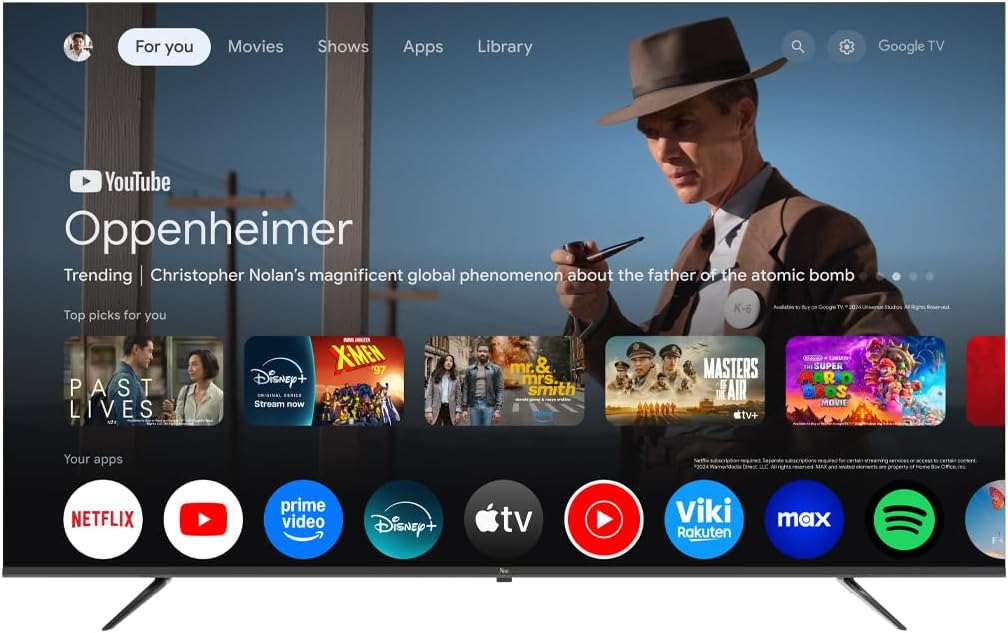
Image 5.1: Google TV interface on the Next QLED TV.
5.2. Google TVの機能
Your TV runs on Google TV, providing access to a wide range of content and smart features:
- パーソナライズされた推奨事項: Get suggestions based on your viewingの歴史。
- 音声コントロール: Use the built-in Google Assistant via the remote control to search for content, control smart home devices, and more.
- アプリアクセス: Download and stream from popular services like YouTube, Netflix, Disney+, and more via the Google Play Store.
- Chromecastビルトイン: 互換性のあるモバイル デバイスからテレビに直接コンテンツをキャストします。
5.3. QLEDディスプレイ技術
The QLED display technology in your TV offers enhanced picture quality:
- 鮮やかな色: Quantum Dot technology produces a wider color gamut and higher color saturation.
- 高輝度: Experience brighter images with improved contrast.
- HDRサポート: High Dynamic Range (HDR) content delivers greater detail in both bright and dark scenes.

Image 5.2: Visual representation of QLED technology's enhanced color saturation.

Image 5.3: Visual representation of HDR technology's improved dynamic range.
5.4. リモートコントロール
The included remote control allows you to navigate the TV's interface, adjust settings, and access smart features. Refer to the remote control diagram (if available in the physical manual) for specific button functions.
5.5.製品オーバーview ビデオ
このビデオで簡単に概要をご覧くださいview of the Next QLED Google TV's key features, including QLED technology, Ultra HD quality, Google TV integration, and frameless design.
ビデオ5.1: 終了view of Next QLED Google TV features.
6. メンテナンス
テレビの寿命を延ばし、最適なパフォーマンスを確保するには:
- 画面の掃除: 柔らかく糸くずの出ない布で画面を優しく拭いてください。頑固な汚れには、画面に直接拭くのではなく、布に画面専用の洗浄液をつけてご使用ください。
- キャビネットのクリーニング: テレビキャビネットの汚れを拭く際は、柔らかく乾いた布をご使用ください。研磨剤入りの洗剤や溶剤は使用しないでください。
- 換気: 過熱を防ぐために、通気口にほこりや障害物がないか確認してください。
- 電源を切る: Disconnect the TV from the power outlet during electrical storms or when it will be unused for extended periods.
7。 トラブルシューティング
テレビで問題が発生した場合は、次の一般的な解決策を参照してください。
| 問題 | 考えられる解決策 |
|---|---|
| 電源なし | 電源コードがテレビと壁のコンセントの両方にしっかりと接続されているか確認してください。コンセントが正常に機能していることを確認してください。 |
| 映像はないが、音声はある | 正しい入力ソースが選択されていることを確認してください。外部デバイスへのケーブル接続を確認してください。 |
| 音はないが、映像は表示される | Check the volume level and mute status. Ensure audio cables are correctly connected. Check TV audio output settings. |
| リモコンが動作しない | 電池を交換してください。リモコンとテレビの赤外線センサーの間に障害物がないことを確認してください。 |
| 画質が悪い | アンテナ/ケーブルの接続を確認してください。画質設定(明るさ、コントラスト、シャープネス)を調整してください。ソースコンテンツが高品質であることを確認してください。 |
| Wi-Fiに接続できません | Restart your router. Ensure the Wi-Fi password is correct. Move the TV closer to the router or use a wired Ethernet connection. |
これらの解決策を試しても問題が解決しない場合は、カスタマー サポートにお問い合わせください。
8. 仕様
Key technical specifications for the Next YE-65GFSG8-QLED 65-inch UHD 4K QLED Google TV:
| 特徴 | 詳細 |
|---|---|
| モデル | YE-65GFSG8-QLED |
| 画面サイズ | 65インチ(165 cm) |
| ディスプレイ技術 | クォリティLED |
| 解決 | 4K UHD (Ultra High Definition) |
| リフレッシュレート | 60Hz |
| オペレーティング·システム | Google TV |
| 接続性 | Bluetooth、イーサネット、HDMI(3ポート)、USB(2ポート)、Wi-Fi |
| アスペクト比 | 16:9 |
| 製品寸法(奥行き×幅×高さ) | 奥行き27.8cm x 幅144.6cm x 高さ88.9cm |
| 製品重量 | 16.3キログラム |
| 含まれるコンポーネント | リモートコントロール |
| 特集 | フレームレスデザイン |
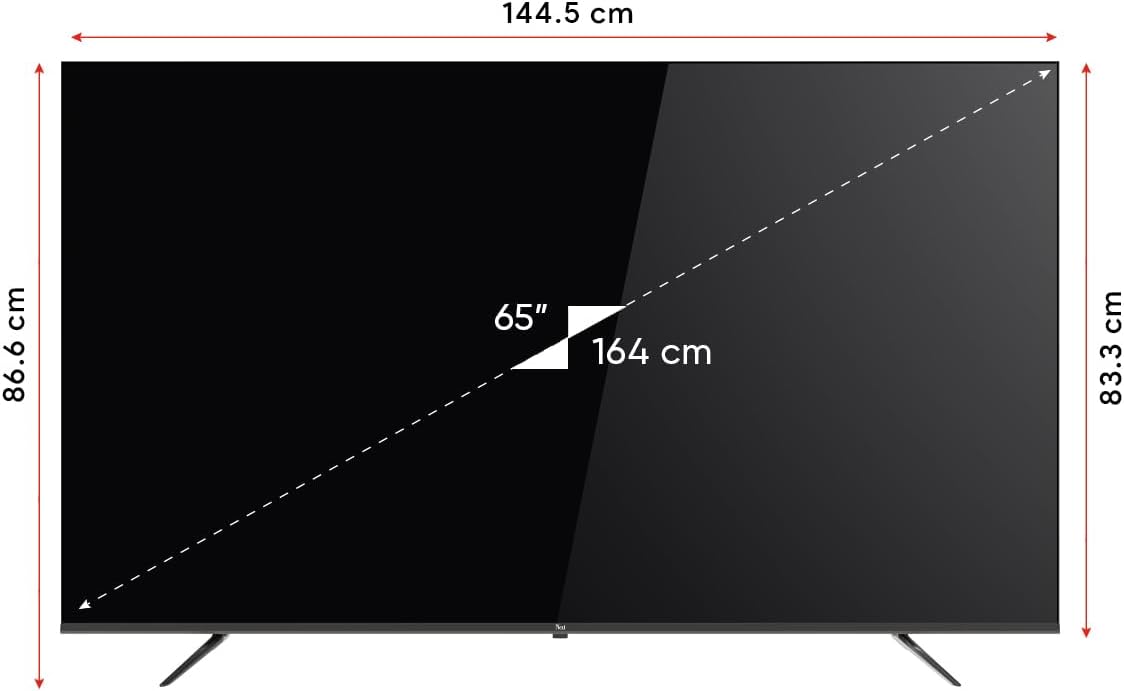
Image 8.1: TV dimensions (144.5 cm width, 86.6 cm height, 65" / 164 cm diagonal).
9. 保証とサポート
Your Next YE-65GFSG8-QLED TV comes with a manufacturer's warranty:
- 保証期間: メーカー保証2年。
- サポート: For technical assistance, warranty claims, or further inquiries, please refer to the contact information provided in your warranty card or visit the official Next webサイト。
Ask a question about this manual
Ask about setup, troubleshooting, compatibility, parts, safety, or missing instructions. Manuals+ will review the question and use this page’s manual context to help answer it.