
1. はじめに
This manual provides essential information for the safe and efficient operation of your OMTech Galvo 50W Fiber Laser Engraver Cutter. This all-metal body fiber laser engraver is designed for precision marking and cutting on various materials, offering high accuracy and speed.
Key features include a 0.01 mm spot diameter, a 5.9''x5.9'' workbed, and a maximum engraving speed of up to 10,000 mm/s. The laser is classified as Class 2 with an output power of 0.874 mW.

Figure 1: OMTech Galvo 50W Fiber Laser Engraver Cutter unit.
2. 安全情報
Always prioritize safety when operating the laser engraver. Failure to follow safety guidelines can result in serious injury or damage to the equipment.
- 目の保護: Always wear appropriate laser safety glasses to protect your eyes from laser radiation.
- 換気: Ensure adequate ventilation in the work area to remove fumes and particles generated during engraving or cutting.
- 材料の適合性: Only engrave or cut materials approved for fiber lasers. Avoid materials that produce toxic fumes or are highly flammable.
- 緊急停止: 緊急停止ボタンの位置と操作方法をよく理解しておいてください。
- 監督: 運転中は絶対に機械から離れないでください。
3. セットアップ
3.1 初期配置と接続
Place the laser engraver on a stable, level surface. Connect the power cable and ensure all necessary peripheral connections are secure.
3.2 ソフトウェアのインストールと互換性
The OMTech Galvo 50W is compatible with LightBurn software and comes pre-loaded with EZCad. Install the required software on your computer (Windows 7, 8, 10, 11, or macOS) to control the laser engraving operations.

Figure 2: The laser engraver is compatible with LightBurn and EZCad on multiple operating systems.
3.3 Focusing with Red Dot Pointer
The engraver is equipped with a red dot indicator to assist in adjusting the laser focus. To activate or deactivate the red dot guider, press the dedicated focus button.

Figure 3: Red dot pointer for precise focus adjustment.
3.4 Rotary Axis Connection
For engraving on curved surfaces such as rings and bracelets, the unit includes a rotary axis connection port. Connect a compatible rotary axis accessory to this port as per the accessory's instructions.

Figure 4: The laser engraver supports a rotary axis for cylindrical objects.
4. 操作手順
4.1 彫刻と切断のプロセス
- Prepare your design in LightBurn or EZCad software.
- Place the material on the workbed. For curved items, use the rotary axis.
- Use the red dot pointer to adjust the focus for optimal results.
- Set the appropriate laser parameters (power, speed, frequency) for your material.
- ソフトウェアから彫刻または切断プロセスを開始します。
- Monitor the process and ensure proper ventilation.
4.2 High Accuracy and Speed
The laser engraver offers high accuracy at 0.01 mm, allowing for detailed engravings. Its maximum engraving speed of 10,000 mm/s significantly boosts productivity.
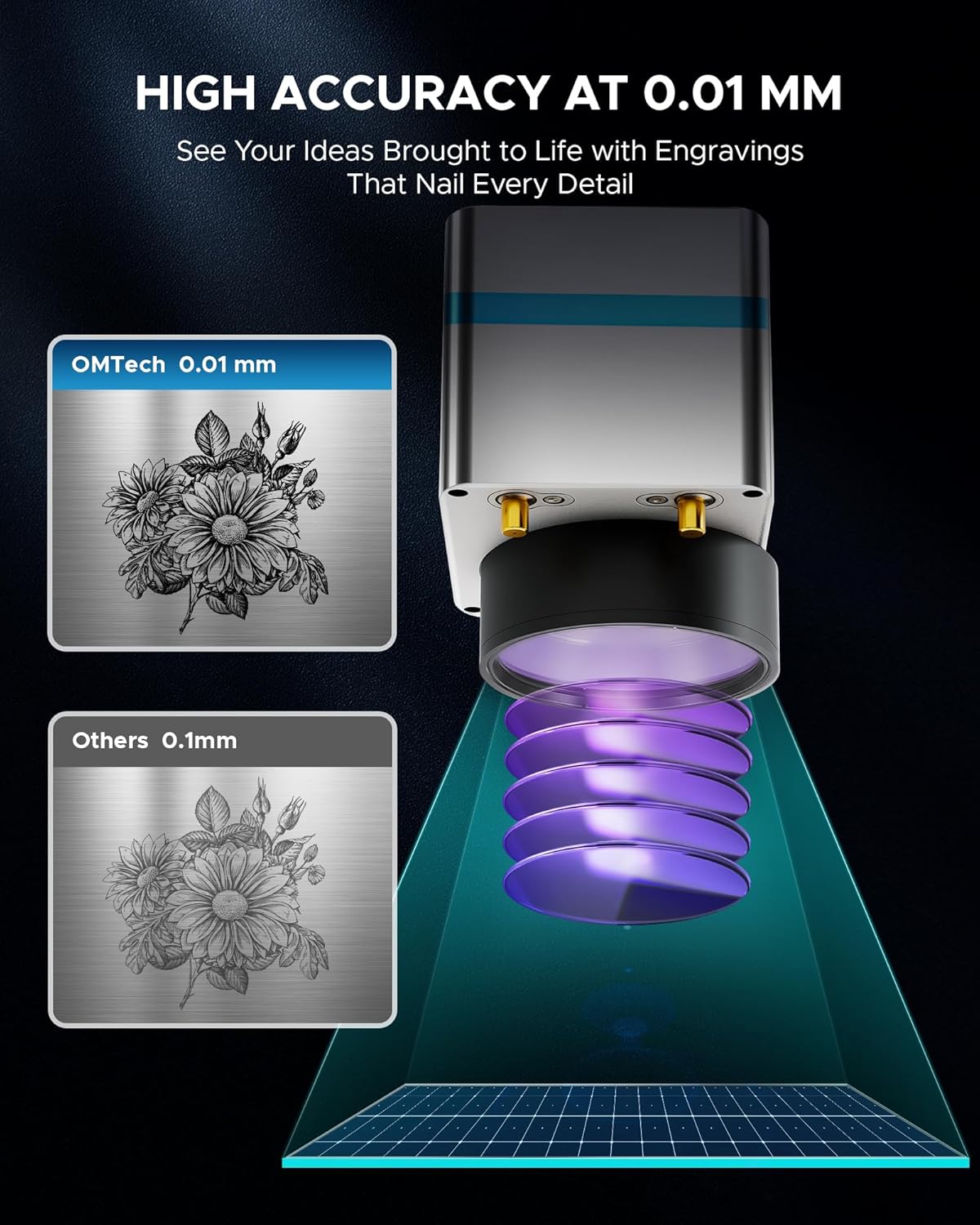
図5:例ample of high-accuracy engraving.

Figure 6: Speed comparison highlighting the fiber laser's performance.
4.3 材料の適合性
The OMTech Galvo 50W Fiber Laser Engraver Cutter is suitable for marking and etching a wide range of materials, including but not limited to:
- 金属: Brass, Aluminum, Silver, Tungsten, Titanium, Gold, Stainless Steel, Cast Aluminum, Copper.
- 非金属: Brick, Granite, Tile, Marble, Stone, Acrylic, Leather, Paper, Plastic, Wood, Glass.

Figure 7: Various materials suitable for engraving with the OMTech 50W Fiber Laser.
5. メンテナンス
定期的なメンテナンスにより、レーザー彫刻機の寿命が長くなり、最適なパフォーマンスが確保されます。
- レンズクリーニング: ビーム品質を維持するために、専用のレンズ洗浄液と布を使用してレーザー レンズを定期的に洗浄してください。
- 作業台の清掃: Keep the workbed clean from debris and residue to prevent interference with engraving and ensure proper material placement.
- 接続チェック: Regularly inspect all cables and connections for any signs of wear or looseness.
- 換気システム: Ensure the ventilation system is clear and functioning effectively to extract smoke and particles.
6。 トラブルシューティング
このセクションでは、発生する可能性のある一般的な問題について説明します。
6.1 Laser Not Engaging
If the red laser pointer is active but the fiber laser does not engage, check the internal connections. A common issue can be a loose flat control cable from the mainboard to the fiber laser source. If accessible and you are comfortable, carefully open the case and ensure this cable is securely plugged in. If the issue persists or you are unsure, contact customer support.
6.2 ソフトウェア接続の問題
If the software (LightBurn or EZCad) fails to connect to the engraver, ensure:
- The engraver is powered on.
- The USB cable is securely connected to both the engraver and the computer.
- The correct drivers are installed on your computer.
- No other software is attempting to communicate with the engraver simultaneously.
7. 仕様
| 特徴 | 仕様 |
|---|---|
| モデル番号 | LYF-60W (Galvo 50W) |
| レーザーパワー | 50W |
| レーザークラス | 2 |
| 出力電力 | 0.874mW |
| 作業エリア | 5.9インチ x 5.9インチ (150mm x 150mm) |
| スポット径 | 0.01ミリメートル |
| 最大彫刻速度 | 10,000mm/秒 |
| マーキング精度 | ±0.001mm |
| Max. Single Pass Marking Depth | 0.1ミリメートル |
| レーザー波長 | 1064 nm |
| Estimated Laser Service Life | 100,000時間以上 |
| 互換性のあるソフトウェア | LightBurn, EZCad |
| サポートされている画像形式 | .bmp, .gif, .jpg, .jpeg, .dxf, .dst, .ai |
| Rotary Axis Compatibility | はい |
| 正味重量 | 40ポンド |
| 寸法(長さ×幅×高さ) | 15.8インチ x 13.4インチ x 21.3インチ |
| メーカー | OMテック |
| 初回利用可能日 | 2年2024月XNUMX日 |

図8:以上view 主要な製品仕様。
8. 保証とサポート
OMTech provides comprehensive customer service and support for its products.
- 保証: A 2-year support period is provided for this product.
- 顧客サービス: A 24-hour service team is available in the US, Philippines, and China.
- テクニカルサポート: Professional pre-sales and after-sales service, technical support, and on-site experience (by appointment) are offered.
連絡先:
電話: +1 (949) 438-4949
メールサポート: SUPPORT@OMTECHLASER.COM
Email Tech Support: TECHSUPPORT@OMTLASER.COM
9. 製品ビデオ
No relevant product videos created by the seller were found in the provided data for the OMTech Galvo 50W Fiber Laser Engraver Cutter. The available videos pertain to a different product (WIFI Backup Camera) and have therefore not been embedded.