
1.製品オーバーview
The Nikon Z6III Mirrorless Camera is designed for professionals in photography and filmmaking. It features a 24.5MP partially-stacked CMOS sensor and the EXPEED 7 image processor, delivering high-quality stills and internal 6K60 and 4K120 video recording. The camera offers precise autofocus, a bright 5.76M-dot electronic viewfinder, and a durable, weather-sealed magnesium alloy body.

図1.1: フロント view of the Nikon Z6III Mirrorless Camera, showcasing the Z-mount and the partially-stacked CMOS sensor.
2. 箱の中身
Your Nikon Z6III Mirrorless Camera bundle includes the following items:
- Nikon Z6III Mirrorless Camera Body
- Nikon NIKKOR Z MC 105mm f/2.8 VR S Macro Lens
- Nikon EN-EL15c Rechargeable Lithium-Ion Battery
- 64GBメモリーカード
- USB-A - USB-Cケーブル
- HDMIケーブル
- ハンドストラップ
- レンズキャップキーパー
- クリーニングキット
- メモリーカードウォレット
- USBカードリーダー(SD/microSD)
- ビデオ三脚 72インチ
- フレキシブルなVlog用三脚
- Photo, Video, & Art Suite Deluxe Software
- 62mm Filter Kit
- 旅行用バッグ
- Wireless Shutter Release - Universal
3. 初期設定
3.1. バッテリーの充電
Before first use, fully charge the Nikon EN-EL15c Lithium-Ion Battery using the provided USB-A to USB-C cable and a compatible USB power adapter (not always included, check packaging). The charging indicator on the camera or charger will show the charging status.
3.2. メモリーカードの挿入
The Z6III supports SD and SDXC memory cards. Open the memory card slot cover, insert the 64GB memory card until it clicks into place. Ensure the card is inserted correctly to avoid damage.

図3.1: Memory card slots on the Nikon Z6III, showing insertion of SD cards.
3.3. レンズの取り付け
Align the mounting mark on the NIKKOR Z MC 105mm f/2.8 VR S Macro Lens with the mounting mark on the camera body. Rotate the lens clockwise until it clicks into place. To remove, press the lens release button and rotate counter-clockwise.
4. カメラの操作
4.1. 電源のオン/オフ
カメラの電源を入れるには、シャッターボタンの横にある電源スイッチを「ON」の位置に回します。電源を切るには、「OFF」の位置に回します。

図4.1: トップ view of the Nikon Z6III, highlighting the power switch and mode dial.
4.2. Sensor and Image Processing
The Z6III features a 24.5MP partially-stacked CMOS sensor, which allows for faster data readout, reduced rolling shutter, and improved noise performance. Coupled with the EXPEED 7 image processor, it ensures rapid performance for both stills and video.
4.3. Autofocus and Continuous Shooting
The camera utilizes an enhanced 493-point phase-detection AF system covering the full sensor area for fast and accurate focusing. It supports continuous shooting at up to 20 fps in raw, 60 fps in full-frame JPEG, and 120 fps in DX crop mode with full AF/AE. The Pre-Release Capture function records frames up to 120 fps just before the shutter is fully pressed.
The autofocus system can detect 9 subject types and offers reliable performance even in backlit scenes, detecting human faces in silhouettes. It also features small face detection for video tracking.
4.4. Video Recording Capabilities
The Z6III supports internal 6K60 and 4K120 video recording with full pixel readout. It offers 12-bit N-RAW and ProRes RAW formats for maximum post-production flexibility, along with ProRes and H.265 10-bit recording for professional color grading. Full HD/240p in 10-bit H.265 allows for dramatic 10x slow-motion effects.
ビデオ4.1: 公式製品ビデオショーasing the Nikon Z6III's advanced features, including sensor technology, autofocus, and video capabilities. This video highlights the camera's performance in various shooting scenarios.
4.5.電子 Viewfinder (EVF) and LCD
The camera features a bright 5.76M-dot electronic viewfinder, offering a clear and sharp view of details, even in bright outdoor conditions (4000 cd/m²). It also includes a four-axis tilting touchscreen LCD for flexible shooting angles.

図4.2: 後方 view of the Nikon Z6III, showing the tilting touchscreen LCD and control layout.
4.6. Portrait Shooting Features
The Z6III includes Rich Tone Portrait Picture Control for radiant and beautiful rendering of skin textures. Skin softening features smoothen skin while keeping hair and eyes sharp. Combined with NIKKOR Z prime lenses, these features enhance portrait photography.
4.7. Durability and Weather Sealing
The robust magnesium alloy body is cold-resistant down to -10°C/14°F and offers excellent dust- and drip-resistant performance, making it suitable for challenging outdoor environments.
4.8. Connectivity and Image Transfer
The camera features Wi-Fi connectivity for direct and automatic image transfer to cloud storage services via Nikon Imaging Cloud. It also includes USB-C and HDMI ports for versatile connectivity.
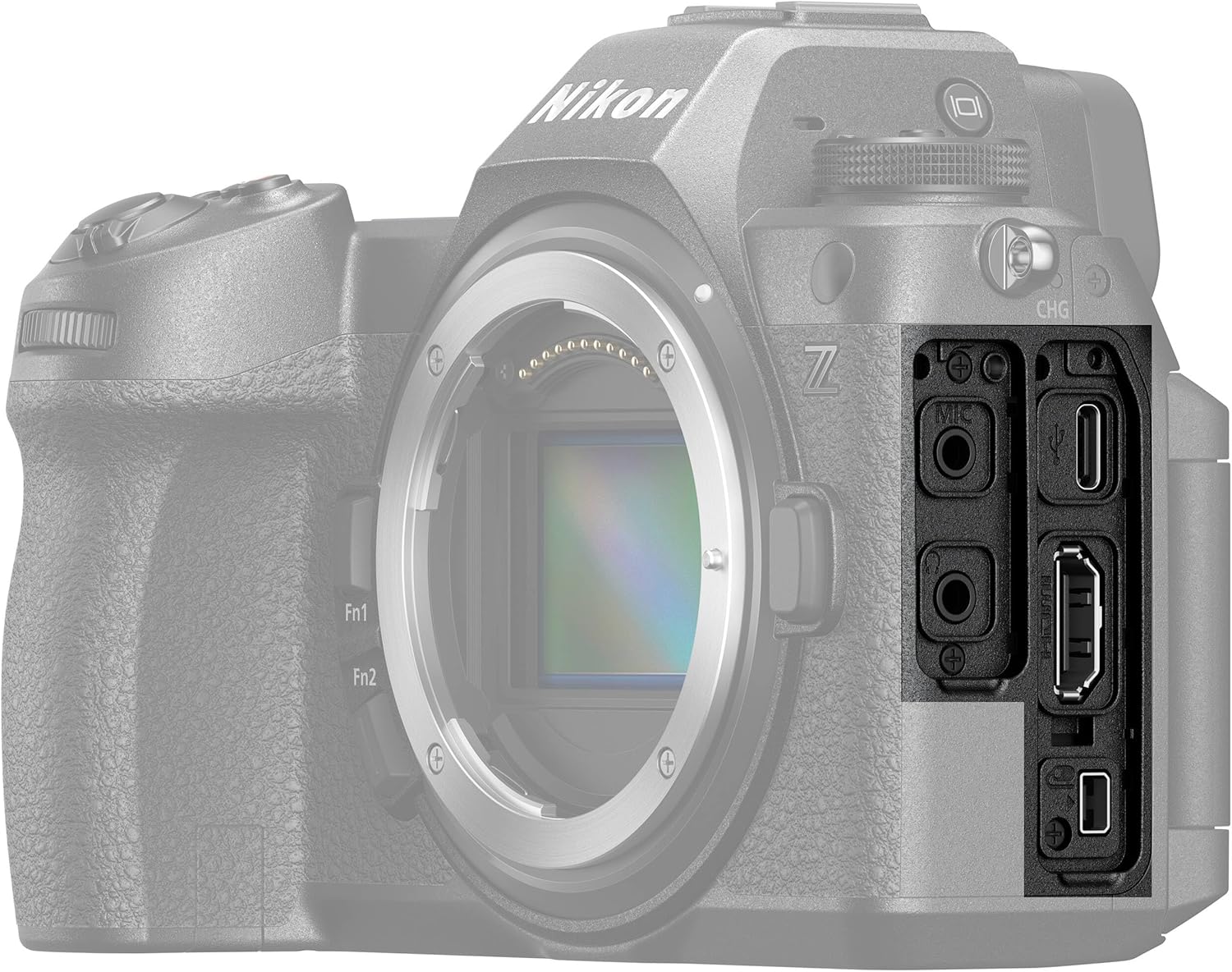
図4.3: 側 view of the Nikon Z6III, showing the various input/output ports.
4.9. 画像安定化
The Z6III incorporates sensor-shift image stabilization. It also features Electronic VR for handheld video shooting and 8.0-stop in-camera VR (when using specific lenses like the NIKKOR Z 24-120mm f/4 S) to expand shooting opportunities in low-light conditions.
5. メンテナンス
To ensure the longevity and optimal performance of your Nikon Z6III camera, follow these maintenance guidelines:
- カメラ本体のクリーニング: カメラ本体は柔らかく乾いた布で拭いてください。頑固な汚れには、軽くamp布を水または専用のカメラ洗浄液で拭いてください。
- レンズの掃除: Use a lens brush to remove dust, then gently wipe with a microfiber lens cloth. For smudges, use a lens cleaning solution. Avoid touching the lens glass directly.
- センサーのクリーニング: If dust spots appear on images, the sensor may need cleaning. This is a delicate procedure; it is recommended to have it performed by a professional Nikon service center.
- バッテリーのケア: Store batteries in a cool, dry place. Do not expose them to extreme temperatures. Fully charge batteries before extended storage and recharge every six months to maintain battery health.
- ストレージ: When not in use, store the camera in a dry, dust-free environment, preferably in a camera bag or case. Remove the battery if storing for long periods.
6。 トラブルシューティング
If you encounter issues with your Nikon Z6III, refer to the following common troubleshooting tips:
- カメラがオンにならない:
- バッテリーが完全に充電され、正しく挿入されていることを確認してください。
- バッテリーの接点が清潔かどうか確認してください。
- 画像がぼやけている:
- Verify that the lens is properly attached and clean.
- Check autofocus settings and ensure the camera is focusing on the intended subject.
- Increase shutter speed in low light or use image stabilization.
- メモリカードエラー:
- メモリカードを再度挿入します。
- 互換性のある別のメモリ カードを試してください。
- メモリ カードをフォーマットします (注意: これによりすべてのデータが消去されます)。
- ビデオ録画の問題:
- Ensure sufficient memory card speed and capacity for the selected video format.
- Check video settings (resolution, frame rate).
- Connectivity Problems (Wi-Fi/USB):
- カメラと接続されたデバイスの両方を再起動します。
- Ensure Wi-Fi settings are correctly configured on both devices.
- 別の USB ケーブルまたはポートを試してください。
For more complex issues, consult the full user manual available on the Nikon support webサイトをご覧いただくか、ニコンのカスタマー サポートにお問い合わせください。
7. 仕様
| 特徴 | 仕様 |
|---|---|
| モデル名 | ニコン Z6III |
| 実効静止画解像度 | 24.5 MP |
| センサータイプ | BSI CMOS (Partially-Stacked) |
| 画像プロセッサ | エクスピード7 |
| オートフォーカスポイント | 493ポイント位相検出 |
| 連続撮影 | Up to 120 FPS (DX crop), 60 FPS (full-frame JPEG), 20 FPS (RAW) |
| ビデオ解像度 | 6K60, 4K120, 2160p |
| ビデオキャプチャフォーマット | N-RAW, ProRes RAW, MP4 |
| 画像安定化 | Sensor-shift (5-axis), Electronic VR |
| 電子 Viewファインダー(EVF) | 5.76M-dot, 4000 cd/m² brightness |
| 画面サイズ | 3.2 Inches (Tilting Touchscreen LCD) |
| 互換性のある取り付け | ニコンZ |
| メモリストレージ容量 | 64GB(付属) |
| 接続技術 | Wi-Fi、USB-C、HDMI |
| 耐水性レベル | Water Resistant (Dust- and Drip-resistant) |
| アイテム重量 | 7.9ポンド(約) |
| モデル番号 | 1890-AG2 |
| 欧州連合 | 703670501791 |
8. 保証とサポート
8.1. 保証情報
The Nikon Z6III Mirrorless Camera comes with a 90-day limited warranty. Please retain your proof of purchase for warranty claims. For detailed terms and conditions, refer to the warranty card included in your product packaging or visit the official Nikon webサイト。
8.2. カスタマーサポート
For technical assistance, troubleshooting, or service inquiries, please contact Nikon customer support through their official website or the contact information provided in your product documentation. Online resources, including FAQs and software downloads, are also available on the Nikon support portal.