
1. はじめに
This manual provides detailed instructions for the installation, operation, and maintenance of your AWESAFE Car Radio Stereo. This unit is designed to upgrade your vehicle's infotainment system with modern features and enhanced functionality.
対象車種:
- Jeep Wrangler/Unlimited: 2007-2018
- Jeep Compass: 2009-2016
- Jeep Patriot: 2009-2016
- ジープ グランドチェロキー: 2005-2011
- Jeep Liberty: 2008-2011
- Jeep Commander: 2008-2011
- Chrysler Sebring: 2007-2010
- Town&Country: 2007-2010
- Dodge Grand Caravan: 2011-2014
- Dodge Charger: 2008-2010
- Dodge Ram Pickup 1500/2500/3500: 2009-2012
2 製品の特徴
Android 13システム
The unit operates on an Android 13 system with 2GB RAM and 64GB ROM, ensuring smooth performance and quick response times. It supports various free applications available via Wi-Fi connectivity.
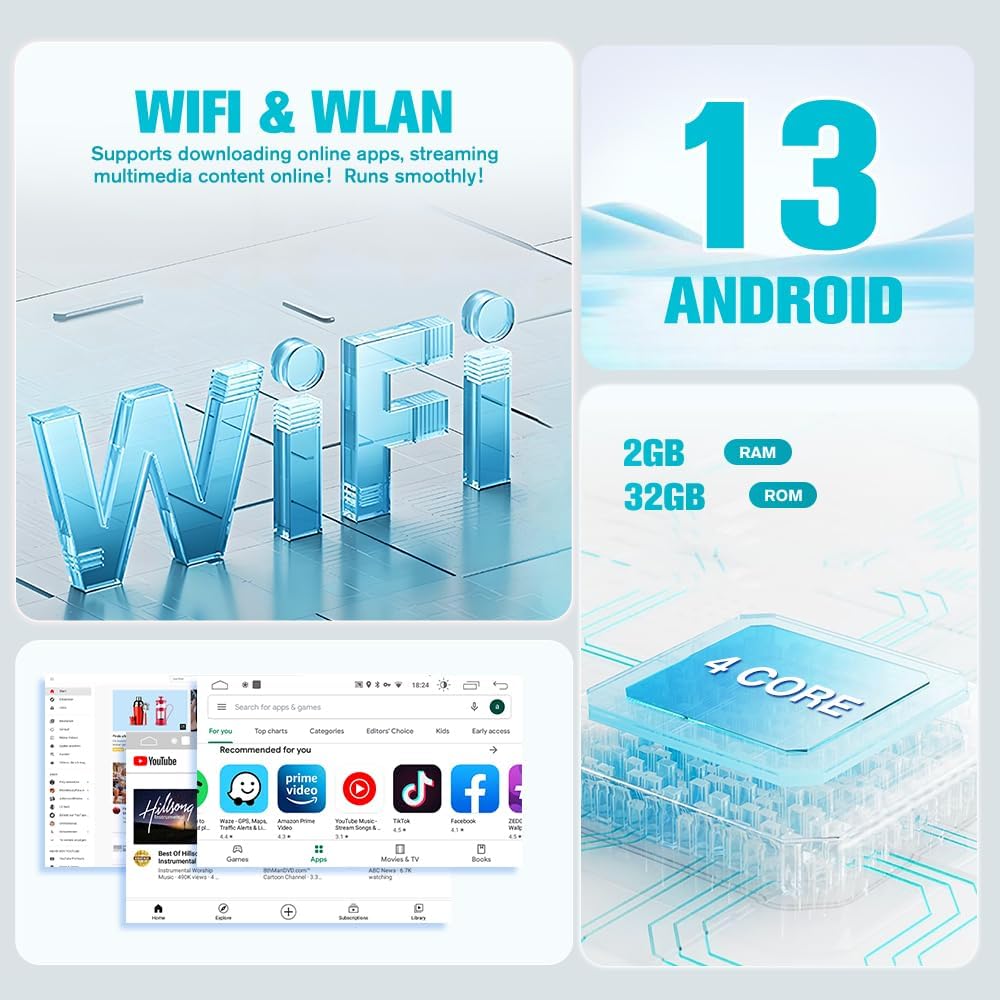
Image: Display showing Android 13 system, 2GB RAM, and 32GB ROM (Note: The product is specified as 64GB ROM). It highlights the 4-core processor and Wi-Fi capabilities for online apps and streaming.

Image: The car radio screen displaying various Wi-Fi applications such as YouTube, Spotify, and other social media and utility apps, indicating broad app compatibility.
ワイヤレス CarPlay & Android Auto
Connect your iPhone or Android phone wirelessly via Bluetooth or USB to access CarPlay or Android Auto. This allows for smart voice assistant use, navigation, calls, messages, and music playback, enhancing safety and entertainment while driving.

Image: A split image showing the car radio display with Apple CarPlay on the top half and Android Auto on the bottom half, demonstrating seamless integration with both smartphone platforms.
GPSナビゲーション
The unit supports online maps and includes built-in offline North American maps. Connect to Wi-Fi to use GPS navigation anywhere, similar to a smartphone.

Image: The car radio screen showing a detailed GPS navigation map with route information, current location, and estimated travel time, emphasizing its navigational capabilities.
バックアップカメラ
A backup camera is included with the car radio. When shifting into reverse gear, the reverse line will automatically appear on the screen, aiding in safe parking and maneuvering.

Image: The car radio screen displaying a rear-view camera feed with dynamic parking guidelines, showing a clear view behind the vehicle for safe reversing.
ステアリングホイールコントロール(SWC)
The unit supports your vehicle’s original steering wheel controls, allowing for easy navigation of menus and functions without taking your hands off the wheel. This ensures a safer driving experience.

Image: The car radio screen showing the Steering Wheel Control (SWC) learning interface, with various button functions like volume, track skip, and call controls, alongside an image of a steering wheel.
Built-in DSP Sound Processing
Experience superior in-car entertainment with advanced Digital Sound Processing (DSP). This feature provides full control over EQ settings and audio balance, allowing you to customize sound for high-fidelity audio.

Image: The car radio screen displaying the Built-in DSP (Digital Sound Processor) interface, showing an equalizer with adjustable frequency bands and options for sound field settings, enhancing audio customization.
ブルートゥース5.0
Bluetooth 5.0 allows for quick matching with your mobile phone for hands-free calls, playing Bluetooth music, and more, ensuring a safer driving experience.

Image: The car radio screen showing the Bluetooth interface with options for making calls and playing music, highlighting the seamless wireless connectivity.
FMラジオ
The unit is compatible with FM radio functions, allowing you to listen to live radio, weather forecasts, and news. This improves driving comfort and provides a better experience.

Image: The car radio screen displaying the FM radio interface, showing frequency tuning, preset stations, and a visual representation of sound waves, indicating radio functionality.
分割画面機能
The split-screen feature allows you to run two applications side-by-side. This is useful for simultaneous navigation and music playback, or other combinations of apps.

Image: The car radio screen showing a split-screen view, with a navigation map on one side and a music player on the other, demonstrating the multitasking capability.
3. 含まれるコンポーネント
The AWESAFE Car Radio Stereo package includes the following items:
- Car Radio Main Unit
- Dash Installation Mount Trim Kit
- Direct Wiring Harness with CANBUS compatibility
- ラジオアンテナアダプターケーブル
- Backup Microphone
- HDバックカメラ
- Reversing Camera Extension Cable
- 2 x USBケーブル
- GPSアンテナ
- RCA Cable & Backup Mic Interface
- 後方 View Signal Cable & WLAN Antenna
- 電源ケーブル

Image: A comprehensive layout of all components included in the package, such as the 10-inch display, mounting frame, screwdriver, camera, cables (USB, antenna, reversing, RCA, power), microphone, GPS module, and Can Bus.
4. セットアップとインストール
Proper installation is crucial for optimal performance. It is recommended to consult a professional if you are unsure about any steps. Ensure the vehicle's power is disconnected before beginning installation.
インストール終了view (Jeep Wrangler JK)
Video: A detailed installation guide for the AWESAFE car radio stereo in a Jeep Wrangler JK. It demonstrates the steps from removing the original radio to connecting the new unit and its components.
Unboxing & Component Overview
Video: An unboxing video for the radio upgrade for Jeep and Dodge RAM, showcasing the main unit, dash installation mount trim kit, wiring harness, radio antenna, backup mic, HD reversing camera, USB cables, GPS antenna, RCA cables, and WLAN antenna.
Dodge Ram Installation Preview
ビデオ: 短い事前view demonstrating the plug-and-play installation of the car radio in a Dodge Ram, highlighting the seamless fit and initial power-up with Wireless Apple CarPlay and Android Auto.
5. 操作手順
This section covers the basic operation of your AWESAFE Car Radio Stereo.
ワイヤレス CarPlay 接続
Video: Instructions on how to connect your smartphone for wireless CarPlay. It shows opening the Zlink5 app, confirming the Bluetooth name, pairing via Bluetooth, and connecting to Wi-Fi for full functionality, including online maps and music.
Function Display (Jeep Wrangler)
Video: A demonstration of various functions of the car radio in a Jeep Wrangler, including the main interface, app navigation, and responsiveness of the touchscreen.
Changing UI Theme (Dodge Ram)
Video: A short demonstration showing how to change the user interface (UI) theme on the Android car stereo in a Dodge Ram, highlighting customization options.
6. メンテナンス
To ensure the longevity and optimal performance of your AWESAFE Car Radio Stereo, follow these general maintenance guidelines:
- クリーニング: 画面と外装の清掃には、柔らかく乾いた布をご使用ください。研磨剤入りの洗剤や溶剤の使用は避けてください。
- ソフトウェアアップデート: システムが効率的かつ安全に実行されるように、ソフトウェアの更新を定期的に確認してインストールします。
- 温度: ユニットを長時間極端な温度にさらさないでください。
- 接続: すべてのケーブルと接続が安全であり、損傷がないことを確認してください。
7。 トラブルシューティング
If you encounter any issues with your car radio stereo, consider the following basic troubleshooting steps:
- 電源なし: すべての電源接続を確認し、車両のイグニッションがオンになっていることを確認してください。ヒューズが破損していないことを確認してください。
- 音が出ない: Check volume levels, audio source selection, and speaker connections. Ensure the DSP settings are correctly configured.
- タッチスクリーンが反応しない: 本体を再起動してください。問題が解決しない場合は、工場出荷時設定にリセットしてください(設定メニューを参照)。
- Bluetooth/CarPlay/Android Auto 接続の問題: Ensure Bluetooth and Wi-Fi are enabled on your phone and the car stereo. Forget and re-pair the device. Check for any app-specific settings.
- バックアップカメラが表示されない: Verify the camera connection and ensure the reverse gear is engaged. Check camera settings in the unit's menu.
For persistent issues or advanced troubleshooting, please contact AWESAFE customer support.
8. 仕様
| 特徴 | 詳細 |
|---|---|
| ブランド | 素晴らしい |
| モデル | 2+64GB |
| オペレーティング·システム | アンドロイド13 |
| ラム | 2GB |
| ROM (Memory Storage) | 64GB |
| 画面サイズ | 10インチ |
| スクリーンタイプ | Capacitive Touchscreen, LED Display |
| 接続技術 | USB, Wi-Fi, Bluetooth 5.0 |
| 特集 | Touchscreen, Wireless CarPlay, Android Auto, GPS Navigation, Backup Camera, DSP Sound Processing, Steering Wheel Control |
| マップタイプ | 北米(オフラインマップ) |
| オーディオ出力モード | ステレオ |
| 取り付けタイプ | ダッシュボードマウント |
| サポートされている衛星ナビゲーションシステム | GPS |
9. 保証とサポート
AWESAFE is committed to providing excellent customer service and support.
保証情報:
- 製品には 1年間保証.
- お楽しみください 30-day hassle-free return and exchange policy.
テクニカルサポート:
We offer after-sales technical support to assist you with installation and operational issues.

Image: A customer support representative wearing a headset, with text indicating '24 Hours Customer Support' and the email address 'us.support@awesafeinc.com'.
サポートが必要な場合は、以下までご連絡ください。 us.support@awesafeinc.com