
1. はじめに
This manual provides detailed instructions for the setup, operation, maintenance, and troubleshooting of your mooas Multi-Hexagon Clock Timer (Yellow Ver.2) and mooas Visual Timer Clock. Please read this manual thoroughly before using the products to ensure proper functionality and to maximize your user experience.
2.製品オーバーview
2.1 mooas Multi-Hexagon Clock Timer
The Multi-Hexagon Clock Timer is a versatile, compact device designed for efficient time management. Its unique hexagonal shape allows for quick selection of preset timers by simply rotating the device. It features a backlit display for visibility in various lighting conditions and offers both sound and vibration alarm modes.

Image: The yellow mooas Multi-Hexagon Clock Timer, showing the current time.

Image: A comparison of three Multi-Hexagon Timers in different colors, illustrating various timer presets.
2.2 mooas Visual Timer Clock
The Visual Timer Clock is a multi-functional device that displays time, date, temperature, and humidity. It features a large, clear backlit LCD display and is waterproof (IPX5 rated), making it suitable for use in bathrooms and kitchens. It offers flexible placement options including tabletop, wall-mounted, or magnetic attachment.
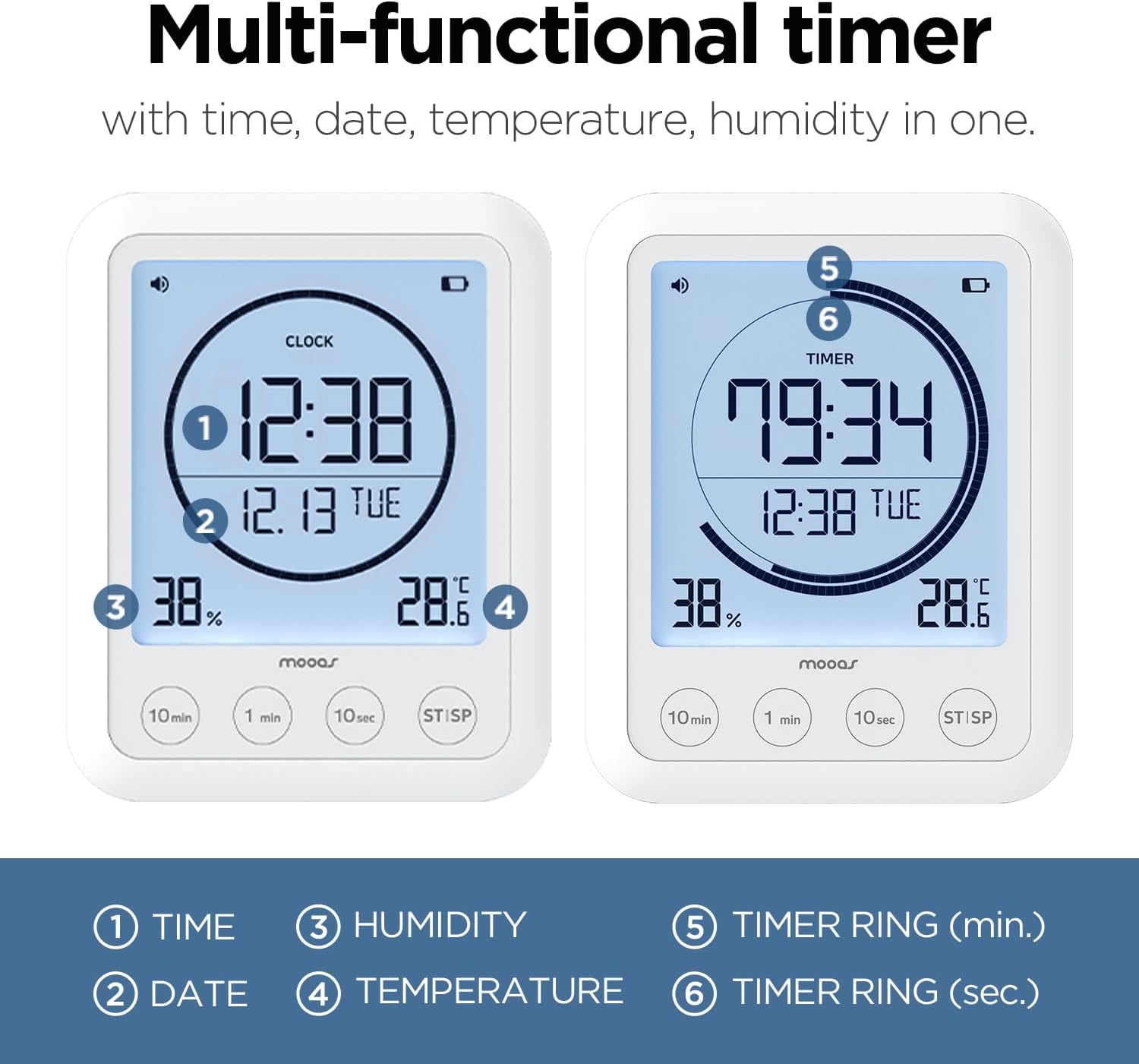
Image: The mooas Visual Timer Clock display, highlighting its various informational readouts.
3. セットアップ
3.1 バッテリーの取り付け
Both the Multi-Hexagon Clock Timer and the Visual Timer Clock are battery-powered. Locate the battery compartment on the back or bottom of each device. Insert the required batteries (typically AAA or AA, refer to the compartment label) ensuring correct polarity (+/-). Close the battery compartment securely.
3.2 Initial Setup - Multi-Hexagon Clock Timer
- 電源オン: After battery installation, the display should activate.
- 時計の設定: Refer to the small buttons on the side or bottom of the device. Typically, a 'SET' or 'MODE' button allows you to cycle through time settings (hour, minute). Use '+' or '-' buttons to adjust values.
- アラーム設定: Access alarm settings via the 'SET' or 'ALARM' button. Adjust alarm time and select between sound, vibration, or both.
- バックライト: The backlight usually activates automatically when the device is moved or a button is pressed.
3.3 Initial Setup - Visual Timer Clock
- 電源オン: The large LCD display will activate upon battery installation.
- 時刻と日付の設定: Use the 'SET' or 'MODE' button to enter time and date adjustment mode. Use the adjustment buttons (e.g., '10min', '1min', '10sec') to change values for hour, minute, year, month, and day.
- 温度単位: Look for a small button (often on the back or inside the battery compartment) to switch between Celsius (°C) and Fahrenheit (°F).
- 取り付け: Decide on your preferred placement. The Visual Timer Clock can stand on a flat surface using its integrated kickstand, be mounted on a wall using a nail or screw (not included), or attached to a metallic surface via its built-in magnets.
4. 操作手順
4.1 Using the Multi-Hexagon Clock Timer
This timer is designed for intuitive operation by rotating its sides.
- Selecting a Preset Timer: Simply rotate the timer so that the desired preset time (e.g., 5, 10, 25, 30, 50, 60 minutes) faces upwards. The timer will automatically start counting down.
- Start/Pause/Reset:

Image: Demonstrating the Start, Pause, and Reset functions of the Multi-Hexagon Timer.
- 始める: Once a side is facing up, the timer starts automatically.
- 一時停止: To pause the countdown, place the timer on a neutral side (often indicated by a blank face or a specific icon) or press a designated button.
- リセット: To reset the timer, turn it to a different preset or press the reset button if available.
- アラーム機能: When the timer reaches zero, the alarm will activate according to your settings (sound, vibration, or both). To stop the alarm, simply pick up or rotate the timer.
- バックライト: The display features a backlight for improved visibility, especially in low-light conditions. It typically activates with movement or button press.
- Pomodoro Technique: The 25-minute preset is ideal for implementing the Pomodoro Technique for focused work intervals.
4.2 Using the Visual Timer Clock
This timer offers a clear display and button-based operation.
- 情報を表示します。 The large LCD continuously shows:
- Current Time (1)
- 日付(2)
- 湿度 (3)
- 温度 (4)
- タイマーの設定: Use the dedicated buttons (e.g., '10min', '1min', '10sec') to set your desired countdown time. Pressing these buttons adds the respective time increments.
- タイマーの開始/停止: Press the 'ST/SP' (Start/Stop) button to begin or pause the countdown. When the timer reaches zero, an alarm will sound. Press 'ST/SP' again to stop the alarm.
- 調節可能な音量: The timer features adjustable alarm volume. Refer to the side or back of the device for volume control buttons or a switch.
- カウントアップタイマー: If no countdown time is set and 'ST/SP' is pressed, the device may function as a count-up timer.
- バックライト: The display is backlit for easy reading. The backlight typically activates when buttons are pressed.

画像: Examples of the Visual Timer Clock in various daily activities.
5. メンテナンス
- クリーニング: Wipe the devices with a soft, dry, or slightly damp 布で拭いてください。研磨剤や溶剤は使用しないでください。
- バッテリー交換: Replace batteries when the display dims or functions become erratic. Always use new batteries of the specified type and dispose of old batteries responsibly.
- ストレージ: Store the timers in a cool, dry place away from direct sunlight and extreme temperatures when not in use for extended periods.
6。 トラブルシューティング
- ディスプレイが空白または暗い場合: Check battery installation. Replace with fresh batteries.
- Timer not starting/responding: Ensure batteries are correctly installed. For the Multi-Hexagon Timer, ensure a preset side is fully facing upwards. For the Visual Timer, ensure 'ST/SP' button is pressed.
- Inaccurate temperature/humidity readings (Visual Timer): Ensure the device is not placed near heat sources, vents, or in direct sunlight, which can affect sensor accuracy.
- アラームが鳴らない/振動しない: Check alarm settings to ensure the desired mode is selected. For the Visual Timer, check volume settings.
7. 仕様
| 特徴 | 詳細 |
|---|---|
| ブランド | ムーアス |
| 表示タイプ | デジタル |
| スタイル | モダンな |
| 特集 | Adjustable Volume (Visual Timer) |
| 製品寸法 | 2.46"W x 2.36"H (Multi-Hexagon Timer) |
| 電源 | 電池駆動 |
| 部屋タイプ | Bathroom, Kitchen, Study |
| 形 | Hexagonal (Multi-Hexagon Timer) |
| 屋内/屋外での使用 | 屋内 |
| 電池付属 | はい |
| 取り付けタイプ | Tabletop, Wall Mount (Visual Timer) |
| 目覚まし時計 | はい |
| 操作モード | 電気 |
| フレーム素材 | プラスチック |
| クロックフォーム | マルチディスプレイ |
| 防水等級 | IPX5 (Visual Timer) |
8. 保証とサポート
For warranty information or technical support, please refer to the product packaging or contact mooas customer service through the retailer's platform where the product was purchased. Keep your purchase receipt for warranty claims.