
1. はじめに
The APEX VR70 Pro FPV Drone Kit is designed for both beginners and experienced pilots, offering an immersive First-Person View (FPV) flight experience. This manual provides essential information for safe operation, setup, and maintenance of your drone kit. Please read it thoroughly before first use.
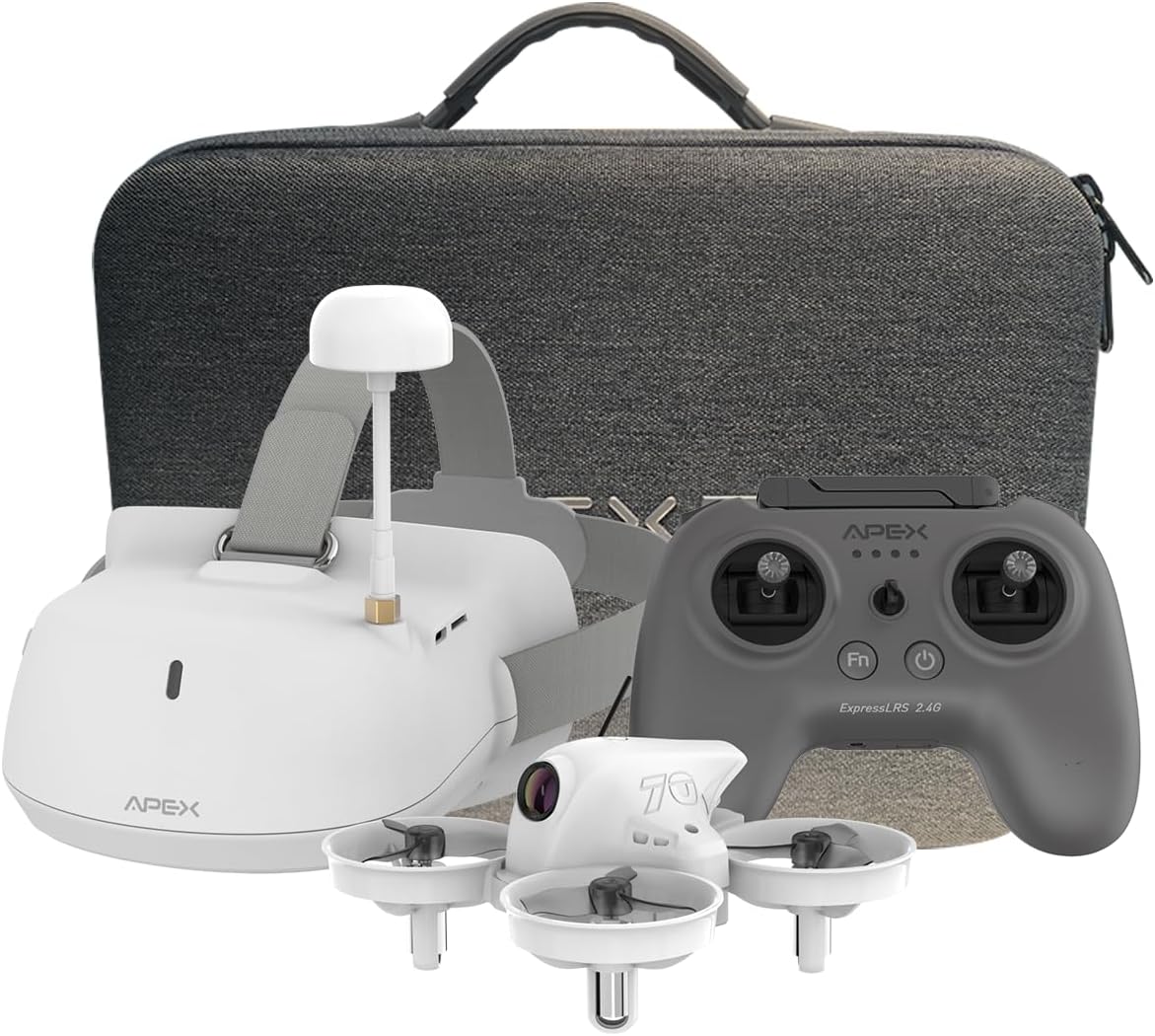
Image: The APEX VR70 Pro FPV Drone Kit, showcasing the drone, remote control, and FPV goggles.
2. 箱の中身
Your APEX VR70 Pro FPV Drone Kit includes the following components:
- 1 x VR70 Pro Brushless Quadcopter
- 1 x ELRS Edition Remote Control
- 1 x FPV VR Goggles
- 3.75V 400mAh LiPoバッテリー 2個
- USB充電ケーブル(タイプC)×1
- 1 x 3.5mm Male-to-Male AUX Audio Cable
- 1 x Propeller Removal Tool
- 4 x 3-Blade Propellers (spare)
- 充電ケース x 1
- ユーザーマニュアル x 1
- ポータブルキャリーバッグ x 1。

Image: All components of the APEX VR70 Pro FPV Drone Kit neatly arranged in the carrying case.
3 製品の特徴
- FPV VR70 Pro Kit: Designed for beginners and teenagers, offering stable hovering capabilities for safe and easy flight.
- High-Precision Barometer: Integrated for altitude detection and automatic hovering, ensuring high stability.
- Head Tracking Motion Control: FPV VR goggles allow control of drone direction by tilting the head, providing an immersive experience.
- タートルモード: Advanced technology to flip the drone back upright if it lands upside down.
- Enhanced Transmitter: Offers extended range, joystick calibration, and firmware updates. Supports FPV simulator practice.
- 5.8G Video Transmission: High-power, low-latency video transmission for stable real-time FPV.
- Multifunctional Drone: Features include image/video transmission, one-button takeoff/landing, headless mode, one-button return, altitude hold, 3 speeds, and 3 flight modes (Beginner, ATTI, Manual).
- 内蔵ブザー: Helps locate the drone if connection is lost or it lands in tall grass.

Image: The APEX VR70 Pro drone hovering indoors, demonstrating its stable flight capabilities.
4. 安全ガイドライン
Always prioritize safety when operating the APEX VR70 Pro FPV Drone Kit. Failure to follow these guidelines may result in injury, damage to property, or legal issues.
- 飛行前チェック: Ensure all components are in good working order, batteries are charged, and propellers are securely attached.
- 環境への意識: 人、動物、建物、電線から離れた、開けた場所で飛行させてください。強風や悪天候での飛行は避けてください。
- 視線: FPV ゴーグルを使用する場合でも、常にドローンの視線を保ってください。
- バッテリーの安全性: 指定された充電器とバッテリーのみを使用してください。バッテリーを過充電したり、穴を開けたりしないでください。
- プライバシーを尊重: Be mindful of privacy laws and avoid flying over private property without permission.
- 推奨年齢: This product is recommended for teenagers and above. Adult supervision is advised for younger users.
5. セットアップ
5.1 バッテリーの充電
Ensure all batteries (drone, remote control, FPV goggles) are fully charged before use.
- Connect the USB charging cable to the charging case.
- Insert the drone batteries into the charging case. The indicator light will show charging status.
- Plug the USB charging cable into the remote control's charging port. The display light will indicate charging status.
- Plug the USB charging cable into the FPV VR goggles' charging port. The indicator light will show charging status.
Note: The display light on the remote control will be solid green when fully charged. The FPV VR goggles will show a red light during charging and turn off when fully charged.
5.2 ドローンとリモコンのペアリング
- Connect the drone battery power cord into the drone interface. The LED lights on the drone will flash.
- Press and hold the power-on key on the remote control to turn it on.
- The drone and remote control will automatically pair. The drone's LED lights will stop flashing and remain solid when paired.
5.3 ドローンのキャリブレーション
The drone must be calibrated on a horizontal plane to ensure stable flight. Otherwise, it may affect flight performance.
- ドローンを平らで水平な面に置きます。
- Simultaneously push both joysticks of the remote control to the lower right for calibration. The drone's lights will flash rapidly during calibration.
- Once calibration is complete, the drone's lights will become solid.
- If the drone's lights continue to flash, gently shake the drone several times to enter the calibrate state (LED lights flashing). Then, long press the calibrate key on the remote control to re-proofread.
5.4 FPV VR Goggles Setup
- Press and hold the power-on key on the FPV VR goggles to start them.
- Use the "+" and "-" keys to manually change the channel until you find the drone's video feed.
- Alternatively, long press the "-" key to automatically search for channels. Wait a moment for the calibration to complete.
Video: A comprehensive tutorial demonstrating unboxing, function of keys, charging procedures, flight operation, and FPV VR glasses tutorial for the APEX VR70 Pro FPV Drone Kit.
6. 操作手順
6.1 離陸と着陸
- After pairing and calibration, pull down both joysticks and press the FN key simultaneously. The drone will take off.
- To land, press the one-button landing key on the remote control.
6.2 基本的な飛行制御
- Fly Upward/Downward: Use the left joystick to control altitude.
- Fly Left/Right: Use the right joystick to move the drone horizontally left or right.
- 左/右に曲がる: 左のジョイスティックを使用してドローンを左または右に回転させます。
6.3 Flight Modes and Speed
The drone offers 3 flight modes and 3 speed settings:
- 初心者モード: For new pilots, offering maximum stability and ease of control.
- ATTIモード: Provides altitude hold but allows more manual control over horizontal movement.
- 手動モード: For experienced pilots, offering full manual control without stabilization assistance.
Press the speed key on the remote control to cycle through the 3 available speeds.

Image: Illustration of the drone's 360-degree rotation capability.
6.4 特殊関数
- フリップ機能: Long press the speed key, then push the direction joystick down to perform a flip.
- Head Tracking Control: When wearing the FPV VR goggles, tilt your head to control the drone's direction.
- タートルモード: If the drone lands upside down, activate Turtle Mode via the transmitter to flip it back over.
- 内蔵ブザー: If the drone loses connection, it will emit a beeping sound to assist in locating it.
6.5 Recording and Photography (FPV Goggles)
- In video recording mode, press the "OK" key to start recording. Press "OK" again to stop.
- Press and hold the "OK" key to switch to photo mode. Press "OK" to take a photo.
- Press the "M" key for 3 seconds to enter the photo album to view photos and videos. Use "+" and "-" keys to select. Press "OK" to confirm.
- Press the "M" key to return to the main menu.
Video: A dynamic demonstration of the APEX VR70 Pro FPV Drone in flight, showcasing its features like head tracking, turtle mode, and OSD interface upgrade.
7. メンテナンス
- クリーニング: Use a soft, dry cloth to clean the drone, remote control, and FPV goggles. Avoid using harsh chemicals.
- プロペラの検査: Regularly check propellers for damage. Replace any bent or broken propellers using the provided tool.
- バッテリーストレージ: Store batteries in a cool, dry place, partially charged (around 50%) if not used for extended periods.
- ファームウェアの更新: メーカーの web最適なパフォーマンスを得るには、利用可能なファームウェア アップデートをサイトから確認してください。

Image: Illustration emphasizing the drone's 360-degree protection against impacts.
8。 トラブルシューティング
- ドローンの電源が入らない: Ensure the battery is fully charged and correctly connected to the drone.
- リモコンが接続されない: Ensure both the drone and remote control are powered on and within range. Re-attempt the pairing process.
- 不安定な飛行: Perform a drone calibration on a flat surface. Check for damaged propellers and replace if necessary.
- No FPV video feed: Ensure FPV VR goggles are powered on and correctly tuned to the drone's channel (manual or auto-search).
- Drone lands upside down: Activate Turtle Mode via the remote control to flip the drone.
- Lost drone: Listen for the built-in buzzer if the drone loses connection.
9. 仕様
| 特徴 | 仕様 |
|---|---|
| ブランド | 頂点 |
| モデル名 | VR70プロ |
| 年齢範囲(説明) | ティーンエイジャー |
| 色 | ビアンコ(ホワイト) |
| ビデオキャプチャ解像度 | 720p |
| 接続技術 | Wi-Fi, Radio Frequency (Remote Control), 5.8G (Wireless Communication) |
| スキルレベル | 初心者 |
| Max Battery Power | 400ミリamper-hour (mAh) |
| ビデオキャプチャフォーマット | MP4 |
| コントロールタイプ | ジェスチャーコントロール |
| バッテリーセルの構成 | リチウムポリマー |
| 対応画像フォーマット | JPEG |
| ビデオ出力解像度 | 720p |
| 光センサー技術 | シーモス |
| メディアタイプ | マイクロSD |
| 材料 | アブソリュート |
| アイテム重量 | 1400グラム |
| 商品の寸法 (長さ x 幅 x 高さ) | 8L x 8l x 5H cm |
10. 保証とサポート
The APEX VR70 Pro FPV Drone Kit is designed for durability and performance. For any product issues, please contact our customer support team immediately. We are committed to resolving any problems you may encounter.
具体的な保証条件については、ご購入時の書類をご参照ください。保証請求の際は、購入証明書を保管してください。