
導入
Thank you for choosing the Calypso K5855 X-Trem Analog-Digital Watch. This watch combines the classic appeal of analog timekeeping with the versatility of digital functions, making it suitable for daily wear, sports, and various activities. This manual provides detailed instructions to help you set up, operate, and maintain your watch for optimal performance.
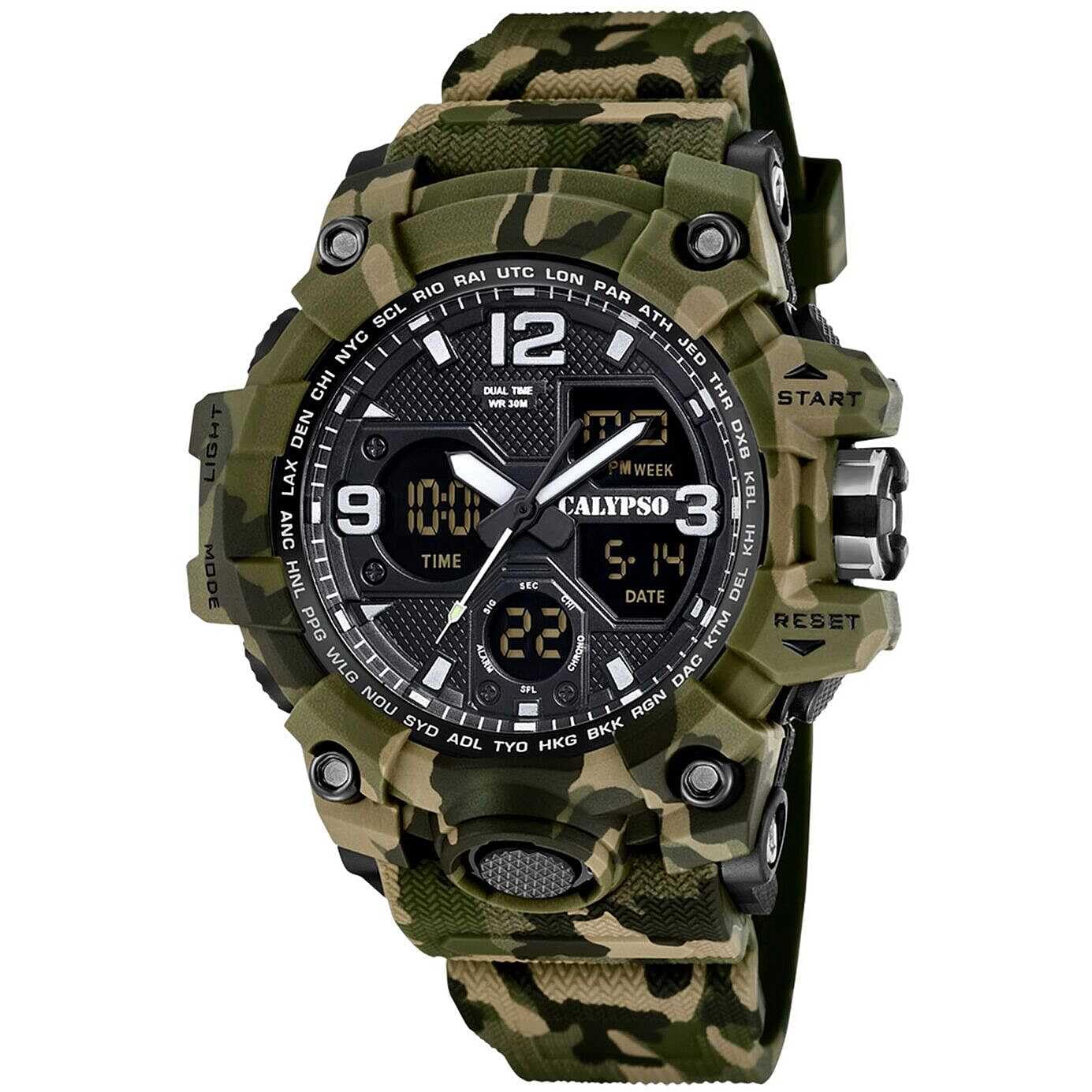
Image: Calypso K5855 X-Trem Analog-Digital Watch (Green Variant).
設定
初期検査
Upon unboxing, inspect your watch for any visible damage. Ensure all buttons are functional and the display is clear.

Image: Calypso watch packaging box.
デジタル時刻と日付の設定
- モードボタン: 時間設定モード(通常は数字が点滅して示されます)になるまで、MODE ボタンを繰り返し押します。
- 調整ボタン: Use the ADJUST button to select the digit you wish to change (e.g., seconds, hours, minutes, year, month, day).
- 設定ボタン: Use the SET button to increase the selected value. Hold it down for faster adjustment.
- 確認する: すべての設定が正しければ、MODE ボタンをもう一度押して設定モードを終了します。
アナログ時計の設定
The analog hands are typically set independently.
- クラウンを引く: Gently pull the crown (the knob on the side of the watch) out to the first or second click position (refer to specific model instructions if available, as some watches have multiple crown positions).
- クラウンを回転: Turn the crown to move the analog hands to the correct time.
- プッシュクラウン: 設定が完了したら、リューズを元の位置に押し戻し、アナログの動きを開始します。
操作手順
モード機能
Your Calypso K5855 X-Trem watch features multiple digital modes. Press the モード ボタンをクリックして、これらを循環表示します。
- 時間表示: 現在の時刻、日付、曜日を表示します。
- クロノグラフ(ストップウォッチ): 経過時間を測定します。
- アラーム: To set daily alarms.
- デュアルタイム: To display a second time zone.
クロノグラフ(ストップウォッチ)
- クロノグラフモードに入る: Press the MODE button until "CHRONO" or "STW" appears.
- 開始/停止: Press the START/STOP button (often labeled "ST/SP" or "ADJ") to begin timing. Press again to stop.
- ラップ/スプリットタイム: While timing, press the LAP/RESET button (often labeled "RESET" or "LIGHT") to record a lap time without stopping the main timer.
- リセット: With the stopwatch stopped, press the LAP/RESET button to reset the time to zero.
アラーム機能
- アラームモードに入る: Press the MODE button until "ALARM" or "AL" appears.
- 目覚ましを設定する: Use the ADJUST button to select hours or minutes, and the SET button to change the values.
- 有効化/無効化: In Alarm Mode, press the START/STOP button to toggle the alarm ON/OFF. An alarm icon will typically appear when active.
- アラーム停止: アラームが鳴ったら、いずれかのボタンを押してアラームを停止してください。
デュアルタイム
- デュアルタイムモードに入る: Press the MODE button until "DUAL TIME" or "DT" appears.
- Set Second Time: Use the ADJUST button to select hours or minutes, and the SET button to change the values for the second time zone.
Backlight (Light Function)
を押す ライト button (usually located on the top left or bottom right) to illuminate the digital display for a few seconds, allowing visibility in low-light conditions.
12/24時間形式
In the Time Setting mode, you can usually toggle between 12-hour (with AM/PM indicator) and 24-hour formats using the SET or ADJUST button when the hour digits are flashing.

Image: Calypso K5855 X-Trem watch (Orange Variant) displaying digital time.

Image: Calypso K5855 X-Trem watch (Green-Yellow Variant) displaying digital time, day, and date.
メンテナンス
防水性(5気圧)
Your watch is water-resistant up to 5 ATM (50 meters). This means it is suitable for everyday use and can withstand splashes, rain, and brief immersion in water, such as showering. It is ない 水泳、ダイビング、または長時間の水上活動には適していません。時計が濡れているときや水中に沈んでいるときは、ボタンを操作しないでください。
クリーニング
時計のケースとストラップは、柔らかく乾いた布で定期的に拭いてください。頑固な汚れには、軽く湿らせた布で拭いてください。amp 布で拭いて乾燥させてください。化学洗剤は時計の素材を傷める可能性があるため、使用しないでください。
バッテリー交換
The watch is powered by a quartz movement and requires a battery (1 C battery is listed in specifications). When the display dims or the watch stops functioning, it's time for a battery replacement. It is recommended to have the battery replaced by a qualified watch technician to ensure proper sealing and maintain water resistance.
トラブルシューティング
- Watch Not Running / Display Blank:
Check if the battery needs replacement. Ensure the crown is pushed in completely for analog movement.
- 時刻/日付が正しくありません:
Refer to the "Setting the Digital Time and Date" and "Setting the Analog Time" sections to re-adjust the time and date.
- ボタンが反応しない:
Ensure the watch is not in a locked mode (if applicable, though this model typically does not have one). If the watch is wet, dry it thoroughly before attempting to press buttons. If issues persist, a battery replacement might be necessary, or contact support.
仕様
| ブランド | カリプソ |
| モデル番号 | K5855/3 |
| 表示タイプ | アナログ - デジタル |
| 移動タイプ | 石英 |
| 耐水性評価 | 5 ATM(50メートル) |
| ケース素材 | ポリカーボネート |
| ストラップ素材 | Polycarbonate (Rubber band) |
| クリスタル素材 | プラスチック |
| ケース直径 | 56ミリメートル |
| ケースの厚さ | 18.3ミリメートル |
| バンド幅 | 28ミリメートル |
| バンドの長さ | 21センチメートル |
| アイテム重量 | 65グラム |
| 特集 | 24-hour Display, Chronograph, Dual Time, Light, Alarm, Date, 12/24h format |
| 電源 | 電池(単2電池1本付属) |
保証情報
Your Calypso K5855 X-Trem watch comes with a 2年間のメーカー保証. This warranty covers manufacturing defects under normal use. It does not cover damage resulting from improper use, accidents, unauthorized repairs, or normal wear and tear.
For specific details regarding returns or warranty claims, please refer to the retailer's return policy or contact Calypso customer service.
サポート
Should you encounter any issues not covered in this manual or require further assistance, please contact Calypso customer support or the authorized retailer where you purchased the watch.
You can also visit the official Calypso web追加のリソースと連絡先情報のサイト。