
SKYRC NC1600
SKYRC NC1600 AA/AAA バッテリー充電器 ユーザーマニュアル
Model: NC1600 | Brand: SKYRC
1. はじめに
The SKYRC NC1600 is an advanced AA/AAA battery charger designed for NiMH/NiCD rechargeable batteries. It features four independent charging slots, allowing for simultaneous charging, discharging, or refreshing of 1 to 4 batteries in any combination. Powered conveniently via USB, this charger provides individual battery status monitoring and an easy-to-read LCD display for optimal control and information.
2. 安全情報
- Use only with NiMH or NiCD rechargeable batteries. Do not attempt to charge alkaline, lithium, or other battery types.
- 電池を充電器のスロットに挿入するときは、電池の極性 (+/-) が正しいことを確認してください。
- 充電器を水、湿気、または極端な温度にさらさないでください。
- Avoid operating the charger in direct sunlight or near heat sources.
- 充電器は子供やペットの手の届かないところに保管してください。
- 充電器を分解したり改造したりしないでください。修理は必ず資格のある専門家にご依頼ください。
- 使用していないときや清掃する前には、充電器を電源から抜いてください。
- Monitor batteries during charging, especially if they become excessively hot.
3. パッケージ内容
開封したらパッケージの内容を確認してください:
- 1 x SKYRC NC1600 AA/AAA Battery Charger
- USBケーブル1本
- ユーザーマニュアル x 1
4.製品オーバーview
The SKYRC NC1600 charger features a compact design with four independent battery slots and an intuitive LCD display. Below are key components and their functions.
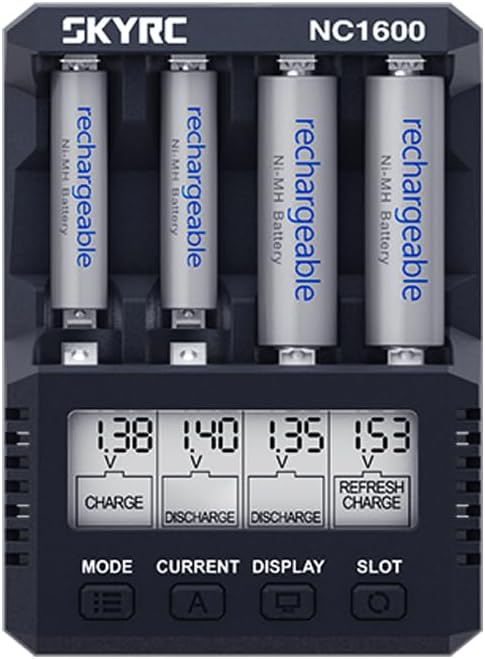
図4.1: 前面 view of the SKYRC NC1600 charger with batteries. The LCD screen displays individual battery status, including voltage とモード。
4.1。 構成部品
- バッテリースロット(1~4): Independent slots for AA or AAA NiMH/NiCD batteries.
- LCDディスプレイ: Shows real-time information for each battery, including voltage, current, capacity, and operating mode.
- モードボタン: Selects the operating mode (CHARGE, DISCHARGE, REFRESH).
- 現在のボタン: Adjusts the charge/discharge current.
- ディスプレイボタン: Toggles through different display parameters on the LCD.
- スロットボタン: Selects individual battery slots for specific settings.
- USB-C 入力ポート: For connecting the charger to a 5V USB power source.
4.2. LCDディスプレイオーバーview
The LCD provides critical information for each battery. Understanding the display is essential for proper operation.

図4.2:詳細 view of the LCD display, showing current settings and mode indicators for each slot.
- 巻tage(V): 現在のボリュームを表示しますtagバッテリーのe。
- 電流 (mA): 充電電流または放電電流を表示します。
- 容量(mAh): Indicates the accumulated capacity during charge or discharge.
- Time (h:mm): Displays the elapsed time for the current operation.
- モードインジケーター: Icons or text indicating CHARGE, DISCHARGE, or REFRESH.
5. セットアップ
- 接続電源: Connect the provided USB cable to the USB-C input port on the charger. Plug the other end into a compatible USB power adapter (5V/2.1A or 5V/3A recommended), smartphone charger, or power bank. The LCD display will illuminate.
- バッテリーの挿入: Carefully insert 1 to 4 AA or AAA NiMH/NiCD batteries into the independent slots. Ensure the correct polarity (+ and -) is observed. The charger will automatically detect the battery type and display initial information.
- 初期チェック: The charger will perform a brief self-check and display the current voltage of the inserted batteries.
6。 動作モード
The SKYRC NC1600 offers three primary operating modes: CHARGE, DISCHARGE, and REFRESH. You can select the mode for each individual slot.
6.1. 充電モード
This mode is used to charge NiMH/NiCD batteries. The charger automatically detects the battery and applies the appropriate charging current.
- 電池をスロットに挿入します。
- を押す スロット button to select the desired battery slot.
- を押す モード button repeatedly until "CHARGE" is displayed.
- を押す 現在 button to adjust the charging current.
- When powered by a 5V/2.1A adapter: 1600mA/slot for 2 batteries; 1000mA/slot for 4 batteries.
- The charger will automatically adjust current based on the number of batteries inserted and power input.
- Charging will begin automatically after a few seconds of inactivity or by pressing the モード button again to confirm. The LCD will show charging progress.
- バッテリーが満タンになると充電は自動的に停止します。
6.2. 放電モード
This mode discharges batteries to a set voltage before automatically switching to charge mode. This helps to reduce memory effect in NiCD batteries and can be used to determine actual battery capacity.
- 電池を入れます。
- プレス スロット 選択します。
- プレス モード until "DISCHARGE" is displayed.
- プレス 現在 to set the discharge current (100-700mA).
- Confirm the setting. The charger will discharge the battery and then automatically proceed to charge it.
6.3. REFRESH Mode
The REFRESH mode cycles the battery through discharge and charge cycles multiple times to optimize its capacity and performance, especially for older or underperforming batteries.
- 電池を入れます。
- プレス スロット 選択します。
- プレス モード until "REFRESH" is displayed.
- プレス 現在 to set the desired current for the refresh cycles.
- Confirm the setting. The charger will begin the refresh process. This process can take several hours depending on battery condition and selected current.
7. 仕様
| 特徴 | 仕様 |
|---|---|
| モデル番号 | SK-100191 (Internal Item NO.) |
| USB入力電源 | 5V / 3A / 2.1A |
| 操作モード | CHARGE, DISCHARGE, REFRESH |
| Charge Current (2 batteries) | 1600mA/slot (with 5V/2.1A adapter) |
| Charge Current (4 batteries) | 1000mA/slot (with 5V/2.1A adapter) |
| 放電電流 | 100~700mA |
| トリクルカレント | 30~70mA |
| 動作温度 | 0~40℃ (32~104°F) |
| 寸法(長さ×幅×高さ) | 108 x 79 x 32.9 mm (4.25 x 3.11 x 1.30 インチ) |
| 正味重量 | 114g(4.02オンス) |
| 互換性のあるバッテリータイプ | NiMH/NiCD (AA, AAA) |
8。 トラブルシューティング
- 充電器の電源が入らない: Ensure the USB cable is securely connected to both the charger and a functional USB power source (5V/2.1A or higher recommended). Try a different USB port or adapter.
- バッテリーが検出されません: Ensure batteries are inserted with correct polarity. Check if the battery is severely over-discharged or damaged. The charger may not detect batteries with extremely low voltage or high internal resistance.
- Batteries Getting Hot During Charge: Some warmth is normal during charging. However, excessive heat may indicate an issue. Ensure the charging current is appropriate for the battery's capacity. If you set a very low charge current, the charger might miss the termination point, leading to overcharging and heat. Conversely, a very high current can also cause excessive heat. Ensure proper ventilation around the charger.
- Inaccurate Capacity Readings (DISCHARGE/REFRESH): Ensure batteries are fully discharged before starting a capacity test. For best results, perform a REFRESH cycle. Repeatedly inserting and removing batteries during a cycle can disrupt readings.
- Difficulty Inserting/Removing Batteries: Due to the compact design, batteries are closely spaced. Insert the negative terminal first, then gently push down the positive end. When removing, pull from the positive end first.
- Charger Displaying Error: Refer to the specific error code (if any) displayed on the LCD. Common errors relate to battery type, short circuit, or damaged battery. Remove the battery and re-insert, or try a different battery.
9. メンテナンス
- クリーニング: Use a soft, dry cloth to wipe the charger's surface. Do not use abrasive cleaners or solvents. Ensure no dust or debris accumulates in the battery slots.
- ストレージ: 充電器を使用しないときは、直射日光や湿気を避けて、涼しく乾燥した場所に保管してください。
- バッテリーのケア: For optimal battery life, avoid fully discharging NiMH batteries frequently. Store batteries with some charge.
10. 保証とサポート
For warranty information and technical support, please refer to the documentation provided with your purchase or visit the official SKYRC webサイトでご確認ください。保証請求に備えて購入証明書を保管してください。
Ask a question about this manual
Ask about setup, troubleshooting, compatibility, parts, safety, or missing instructions. Manuals+ will review the question and use this page’s manual context to help answer it.