
導入
Welcome to the KIDYWOLF Kidyprint Instant Print Camera user manual. This guide provides essential information for the safe and effective use of your new instant camera. The Kidyprint is designed to allow children to capture and instantly print their memories, fostering creativity and exploration.
製品終了view
The KIDYWOLF Kidyprint is an instant print camera for children, featuring thermal printing technology that produces black and white images without the need for ink cartridges. It includes a range of creative tools to enhance the photography experience.
- Thermal Printing System: Prints black and white images instantly without ink or cartridges.
- クリエイティブな機能: Equipped with 21 filters, an 8Mpx selfie camera, and a 2.4-inch LCD screen for viewing とナビゲーション。
- 耐久性に優れたポータブルなデザイン: Lightweight, robust, and rechargeable via USB-C. Includes a safety neck strap for secure carrying.
- 付属品: Comes with thermal paper rolls (including sticker and colored options), magnetic frames, and stickers for photo customization.

The camera's intuitive interface allows for easy navigation and photo capture, making it suitable for young users.
設定
1. 開梱と初期検査
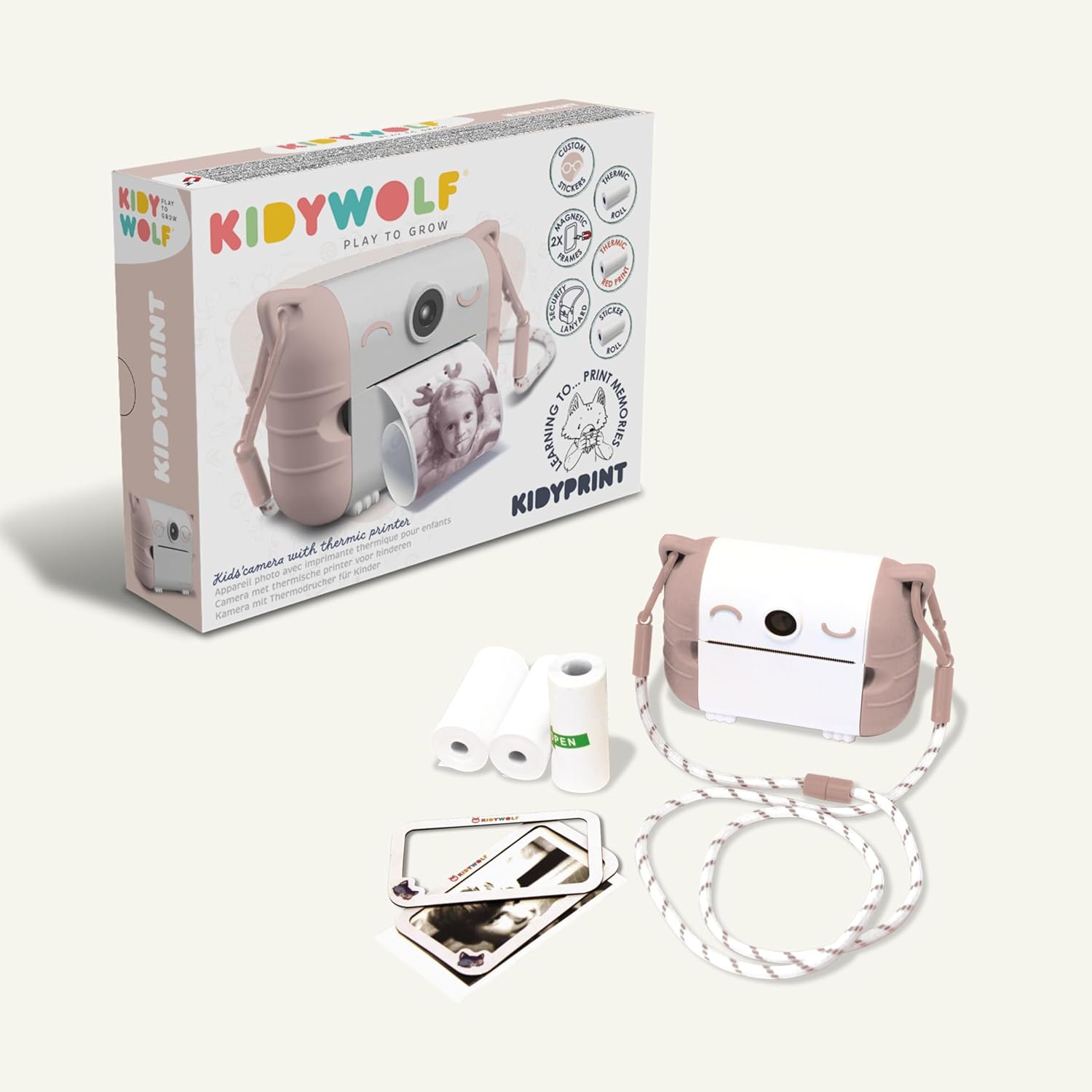
すべての部品をパッケージから慎重に取り出してください。以下のすべての部品が揃っていて、損傷がないことを確認してください。
- KIDYWOLF Kidyprint Camera
- USB-C充電ケーブル
- Thermal Paper Rolls (standard, sticker, colored)
- Magnetic Photo Frames
- ネックストラップ
2. カメラを充電する
Before first use, fully charge the camera. Connect the provided USB-C cable to the camera's charging port and plug the other end into a compatible USB power adapter (not included) or computer. The charging indicator light will show the charging status.
3. Inserting Thermal Paper
- Locate the paper compartment on the camera.
- コンパートメントカバーを開きます。
- Insert a roll of thermal paper, ensuring the paper feeds correctly.
- Close the compartment cover, leaving a small portion of paper extended.
4. ネックストラップの取り付け
Attach the safety neck strap to the designated attachment points on the camera. Ensure it is securely fastened to prevent accidental drops.
操作手順
1.電源のオン/オフ
Press and hold the power button (usually marked with a power symbol) to turn the camera on or off. The 2.4-inch LCD screen will illuminate upon startup.
2. 写真を撮る
Point the camera at your subject. Use the 8Mpx selfie camera for self-portraits. Press the shutter button to capture an image. The camera will display a preview 画面上に表示されます。

3. Navigating Menus and Applying Filters
Use the navigation buttons (up, down, left, right, OK) to browse through the camera's menu options. Select from 21 available filters to add creative effects to your photos before printing.
4. 写真の印刷
After capturing or selecting an image, press the print button. The camera will instantly print the image in black and white using its thermal printing system. Allow the print to fully emerge before tearing it off.

5. Viewing Photos and Connectivity
Access the gallery mode to view previously captured images. The camera supports HDMI and USB connectivity for transferring photos to compatible devices like TVs, computers, smartphones, or tablets.

メンテナンス
1. カメラのクリーニング
Use a soft, dry cloth to clean the exterior of the camera. Do not use liquid cleaners or solvents. For the lens and screen, use a specialized lens cleaning cloth.
2. Replacing Thermal Paper
When the paper roll is depleted, replace it with a new KIDYWOLF thermal paper roll. Follow the instructions in the 'Inserting Thermal Paper' section.

3. バッテリーのお手入れ
The camera uses an Alkaline battery. To prolong battery life, avoid fully discharging the camera frequently. Recharge the camera using the USB-C cable when the battery level is low. Store the camera in a cool, dry place when not in use for extended periods.
4. 耐水性
The KIDYWOLF Kidyprint camera is 防水ではありません. Avoid exposure to water or excessive moisture to prevent damage.
トラブルシューティング
- カメラがオンにならない: Ensure the battery is charged. Connect the camera to a power source using the USB-C cable and try again.
- 印刷品質が悪い: Check if the thermal paper is correctly inserted and not damaged. Ensure the camera lens is clean.
- 紙詰まり: Open the paper compartment and carefully remove any jammed paper. Reinsert a new roll if necessary.
- 画面が応答しない: Try restarting the camera by holding the power button. If the issue persists, contact customer support.
仕様
| ブランド | キディウルフ |
| モデル | KIDYPRINTPAR |
| 色 | 薔薇 |
| 画面 | 2.4インチ液晶 |
| 接続技術 | HDMI、USB |
| ビデオ解像度 | 720p |
| バッテリー構成 | アルカリ |
| 製品寸法(長さ x 幅 x 高さ) | 23.8 x 5.5 x 17.5 cm |
| 製品重量 | 610グラム |
| 画像安定化 | なし |
| バーストモード速度 | 30FPS |
| ISO範囲 | 100-3200 |
| サポート File 形式 | JPEG |
| 耐水性レベル | 防水ではありません |
| 対応デバイス | TV, computer, smartphone, tablet |
保証とサポート
保証情報
The KIDYWOLF Kidyprint camera comes with a 2年間のメーカー保証この保証は、通常の使用状況における材料および製造上の欠陥を対象としています。保証請求の際は、購入証明書を保管してください。
カスタマーサポート
For any questions, technical assistance, or warranty claims, please contact KIDYWOLF customer service. Our team is available to provide reactive support and ensure your satisfaction.