
1. はじめに
Thank you for choosing the ALONEFIRE X66 LED Mini Flashlight. This compact and powerful flashlight is designed for everyday carry (EDC) and various utility purposes, featuring multiple light modes, USB-C recharging, and a magnetic base. Please read this manual carefully to ensure proper use and maintenance of your device.
2. 安全情報
- バッテリーの安全性: Use only the specified rechargeable battery. Do not attempt to disassemble, puncture, or expose the battery to extreme temperatures or fire.
- 目の保護: 高いルーメン出力により一時的な視力障害を引き起こす可能性があるため、懐中電灯を目に直接当てないでください。
- 耐水性: The flashlight is water-resistant, not waterproof. Avoid submerging it in water. Ensure the USB-C port cover is securely closed to prevent water ingress.
- 熱: 長時間使用する場合、特に高輝度設定で使用した場合、懐中電灯が熱くなることがありますが、これは正常です。
- 子供たち: お子様の手の届かない場所に保管してください。
3. パッケージ内容
パッケージにすべてのアイテムが含まれていることを確認します。
- ALONEFIRE X66 LED Mini Flashlight
- 充電式バッテリー(プリインストールまたは別売)
- USB-A - USB-C 充電ケーブル
4.製品オーバーview
The ALONEFIRE X66 is a compact and versatile flashlight designed for portability and functionality.
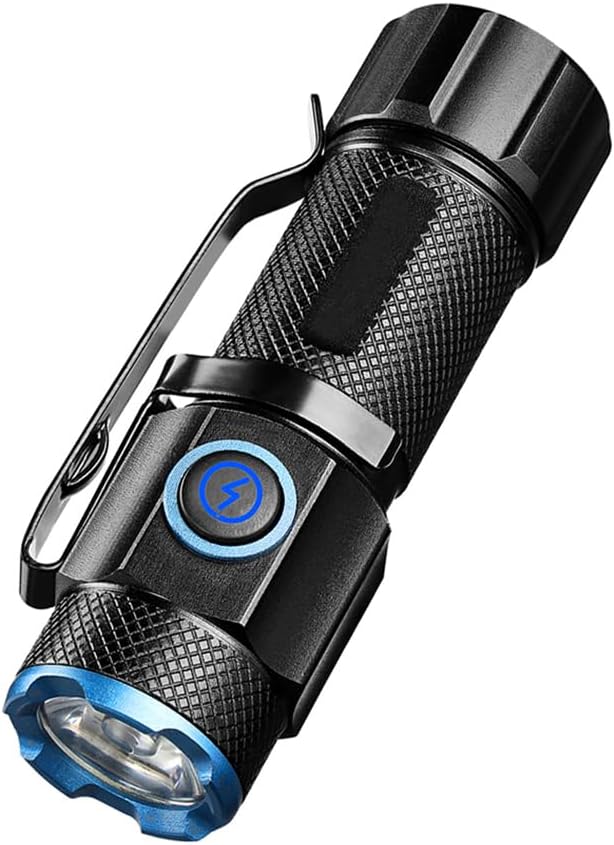
図4.1: The ALONEFIRE X66 LED Mini Flashlight, showcasing its compact design, textured body for grip, integrated pocket clip, and blue accent ring around the lens and power button.

図4.2: 詳細な view of the P50 LED emitter, highlighting the powerful light source responsible for the flashlight's bright output.

図4.3: The flashlight emitting a bright beam, demonstrating its capability to cycle through 5 distinct light modes: High, Medium, Low, Strobe, and Super Bright.

図4.4: The flashlight connected to a laptop via its USB-C charging port, illustrating convenient and fast recharging from various power sources.

図4.5: The flashlight securely attached to a metallic surface by its strong magnetic tail cap, demonstrating its hands-free utility.
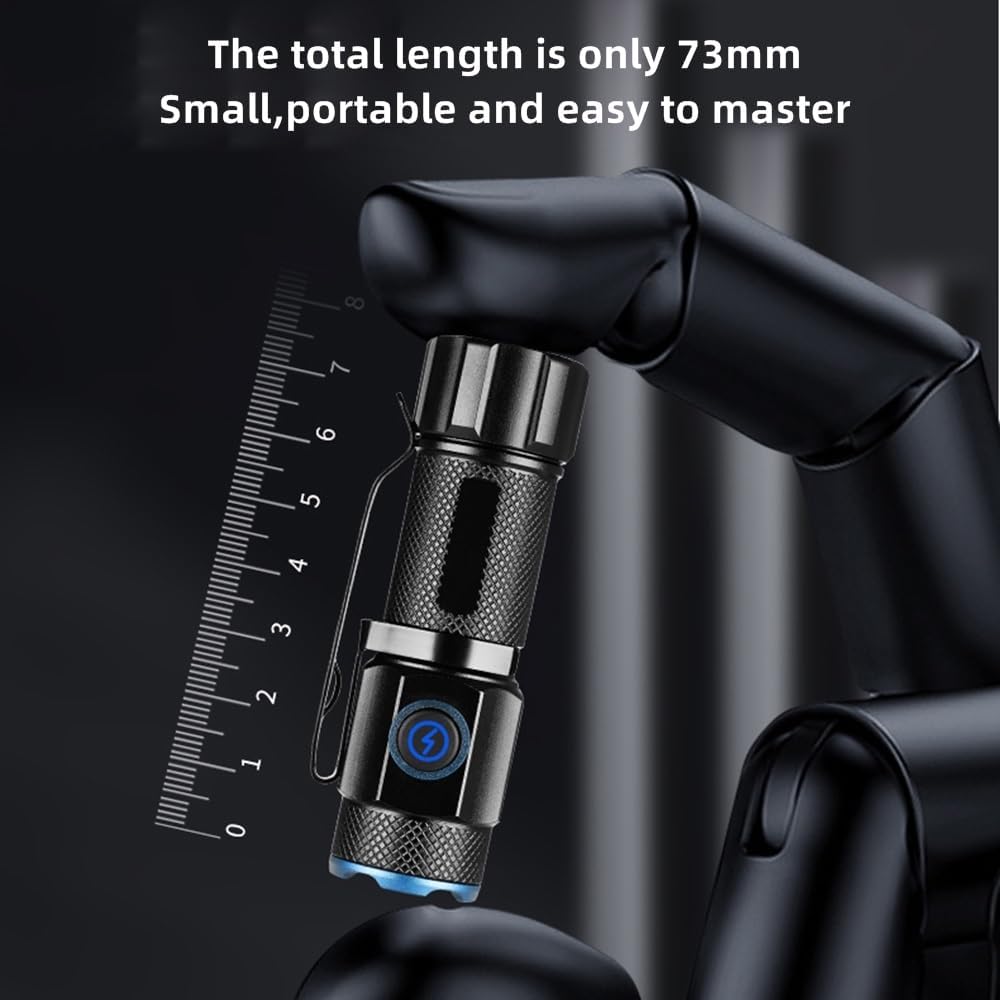
図4.6: The compact size of the flashlight, measuring only 73mm in length, making it highly portable and easy to carry.

図4.7: The flashlight resting on a wet, rocky surface, illustrating its water-resistant design suitable for various outdoor conditions.

図4.8: The ALONEFIRE X66 Flashlight displayed alongside its included USB-A to USB-C charging cable.
5. Setup (Charging)
Before first use, or when the battery is low, charge the flashlight using the provided USB-C cable.
- 懐中電灯本体にあるUSB-C充電ポートを見つけます。通常はゴム製のフラップで覆われています。
- Gently open the rubber flap to expose the USB-C port.
- Connect the small end of the USB-C cable to the flashlight's port.
- Connect the larger USB-A end of the cable to a compatible USB power source (e.g., computer, wall adapter, power bank).
- The charging indicator light around the power button will illuminate 赤 充電しながら回す 緑 完全に充電されると。
- 充電が完了したら、ケーブルを外し、ゴム製のフラップをしっかりと閉じて耐水性を維持します。
6. 操作手順
6.1 電源オン/オフ
- スイッチをつける: Press the power button once. The flashlight will turn on in the last used mode (excluding Strobe and Super Bright).
- 電源を切るために: Press the power button once while the flashlight is on.
6.2 ライトモードの変更
The ALONEFIRE X66 features 5 distinct lighting modes:
- High-Medium-Low: With the flashlight on, single-press the power button repeatedly to cycle through High, Medium, and Low brightness modes.
- ストロボモード: Press and hold the power button for approximately 2-3 seconds from any mode (on or off) to activate Strobe mode. Release the button to return to the previous mode or turn off.
- スーパーブライトモード: Double-click the power button quickly from any mode (on or off) to activate Super Bright mode. Double-click again to return to the previous mode or turn off.
6.3 磁気ベース関数
The flashlight is equipped with a strong magnet in its tail cap. This allows it to be securely attached to any ferrous metal surface, providing hands-free illumination for tasks such as vehicle maintenance, working in workshops, or during power outages。
6.4 ポケットクリップの使用
The integrated pocket clip allows for convenient carrying and versatile attachment. You can clip it to your pocket, belt, backpack strap, or even the brim of a hat for use as a makeshift headlamp.
7. メンテナンス
- クリーニング: 懐中電灯本体を柔らかくて乾いた布で拭いてください。amp 布で拭いてください。研磨剤や溶剤は使用しないでください。
- ストレージ: 懐中電灯は直射日光や極端な温度を避け、涼しく乾燥した場所に保管してください。長期間保管する場合は、寿命を延ばすために3~6ヶ月ごとにバッテリーを充電してください。
- バッテリー交換: If the rechargeable battery needs replacement, ensure you use a compatible battery type. Refer to the specifications section for details.
- Oリング: Periodically inspect the O-rings for wear and tear. Lubricate them with silicone grease if necessary to maintain water resistance.
8。 トラブルシューティング
If you encounter issues with your ALONEFIRE X66 flashlight, refer to the table below:
| 問題 | 考えられる原因 | 解決 |
|---|---|---|
| 懐中電灯が点灯しません。 | バッテリー残量が少なくなりました。 バッテリーが正しく挿入されていません。 接続が緩んでいます。 | バッテリーを充電してください。 電池が正しい極性で挿入されていることを確認してください。 Tighten all parts of the flashlight body. |
| 懐中電灯が充電されません。 | 充電ケーブルに不具合があります。 Power source faulty. USB-C port obstructed. | 別の USB-C ケーブルを試してください。 別の USB 電源を試してください。 Check USB-C port for debris. |
| 光出力が暗いです。 | バッテリー残量が少なくなりました。 レンズが汚れています。 | バッテリーを充電してください。 レンズは柔らかい布で拭いてください。 |
| Magnetic base is weak. | Surface is not ferrous metal. Magnet is dirty. | Ensure attachment to a suitable metal surface. Clean the magnet surface. |
9. 仕様
| 特徴 | 詳細 |
|---|---|
| ブランド | アローンファイア |
| モデル番号 | X66 |
| 光源の種類 | 導かれた |
| 電源 | 電池駆動 |
| 電池のタイプ | 充電式リチウムイオン |
| 充電ポート | USB-C |
| 材料 | アルミニウム |
| アイテム重量 | 35グラム |
| 耐水性レベル | 耐水性 |
| 特集 | Rechargeable, Magnetic Base, Pocket Clip, 5 Light Modes |
10. 保証とサポート
For warranty information or technical support, please refer to the product packaging or contact the ALONEFIRE customer service directly through the retailer's platform where the product was purchased. Keep your purchase receipt as proof of purchase.