
導入
ご購入ありがとうございますasing the KOKKO KMF-1 Multi-Effects Guitar Pedal. This versatile pedal combines 18 speaker models, a drum machine, and a looper, offering a comprehensive solution for guitarists. Please read this manual carefully to ensure proper operation and to fully utilize all features.
主な特徴
- 18 Speaker Models: Features 18 high-fidelity speaker models, developed with advanced DSP algorithms and IR technology for world-renowned speaker simulations.
- IRキャビネットシミュレーション: Ensures superior sound quality with high-fidelity cabinet modeling.
- Drum Machine & Looper: Includes a drum machine with 6 styles and over 40 rhythms, and a looper with 30 seconds of non-overdub recording capability, enabling one-man band performances.
- 柔軟な電源オプション: Can be powered by AA batteries or an adapter.
- 複数のインターフェース: Equipped with external signal input, USB output, and headphone output for easy plug-and-play use.
パッケージ内容
開梱の際には、以下に挙げる品目がすべて揃っており、良好な状態であることを確認してください。
- 1 x KOKKO KMF-1 Multi-Effects Pedal
- (Note: Power adapter and AA batteries are typically sold separately and not included in the standard package.)
製品終了view
Familiarize yourself with the various parts and controls of your KMF-1 pedal.

図1: トップダウン view of the KOKKO KMF-1 Multi-Effects Pedal, showing the expression pedal on the left and the control panel with display, knobs, and footswitches on the right.
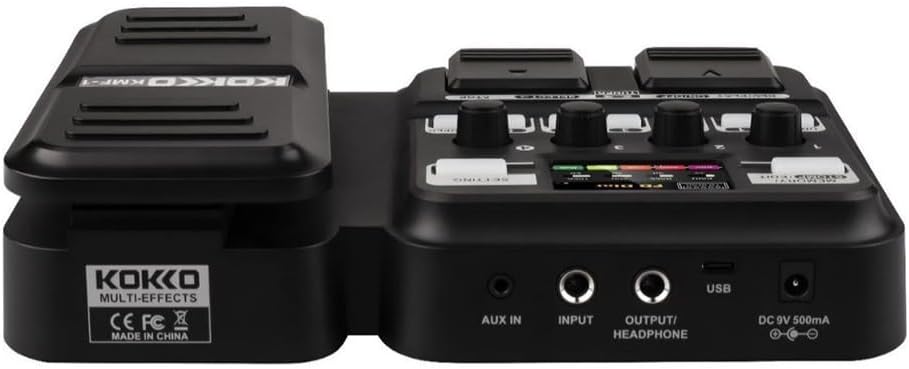
図2: 後方 view of the KOKKO KMF-1 Multi-Effects Pedal, highlighting the AUX IN, INPUT, OUTPUT/HEADPHONE, USB, and DC 9V power input ports.
コントロールと接続:
- エクスプレッションペダル: Used for volume control or wah effects.
- 表示画面: Shows current settings, effects, and modes.
- Knobs (1-4): Control various parameters depending on the selected effect or mode.
- Footswitches (DRUM, REC/PLAY ON/OFF, TUNER, SELECT, STOP, LOOPER): For activating/deactivating functions and navigating presets.
- MEMORY/STOMP EDIT Button: Toggles between memory and stompbox modes, or enters edit mode.
- 設定ボタン: システム設定にアクセスします。
- AUX入力: 3.5mm input for connecting external audio sources (e.g., MP3 player).
- 入力: 1/4" input for connecting your guitar.
- 出力/ヘッドフォン: 1/4" output for connecting to an amplifierまたはヘッドフォン。
- USBポート: For connecting to a computer for recording or software updates.
- DC 9V電源入力: 9V DC電源アダプター(センターマイナス)を接続します。
設定
電源オン:
- バッテリー電源: Open the battery compartment on the underside of the pedal and insert 4 x AA batteries (not included), ensuring correct polarity.
- ACアダプタ電源: Connect a 9V DC (center negative) power adapter (not included) to the DC 9V input jack.
Connecting Your Gear:
- ギターをに接続します 入力 jack using a 1/4" instrument cable.
- 接続する 出力/ヘッドフォン ギターのジャック amplifier's input or to headphones using a 1/4" cable.
- (Optional) Connect an external audio source (e.g., smartphone, MP3 player) to the AUX IN 3.5mmステレオケーブルを使用してジャックに接続します。
- (オプション)を接続します USB port to your computer for direct recording or firmware updates.
操作手順
基本操作:
- 電源オン/オフ: The unit powers on automatically when connected to power. Disconnect power to turn off.
- 音量コントロール: Use the expression pedal to control the overall output volume.
- プリセットのナビゲーション: Use the SELECT footswitch to cycle through different presets or effects.
Using Speaker Models:
The KMF-1 features 18 high-quality speaker models. These models simulate the sound characteristics of various guitar cabinets.
- Enter the speaker model selection mode (refer to display).
- Use the SELECT footswitch or corresponding knobs to browse and choose your desired speaker model.
- Adjust parameters like gain, tone, and volume using the numbered knobs (1-4) as indicated on the display.
ドラムマシン:
The built-in drum machine offers 6 styles and over 40 rhythms to practice or jam along with.
- を押す ドラム footswitch to activate the drum machine.
- Use the SELECT footswitch or knobs to choose a drum style and rhythm.
- Adjust the drum volume using the appropriate knob.
- プレス ドラム again to stop the drum machine.
Looper Function:
The looper allows you to record up to 30 seconds of audio without overdubbing, perfect for creating backing tracks.
- を押す 録音/再生オン/オフ footswitch once to start recording. The display will indicate recording status.
- Play your guitar part.
- プレス 録音/再生オン/オフ again to stop recording and immediately start playback of the recorded loop.
- 再生を停止するには、を押します 停止 足踏みスイッチ。
- To clear the loop, press and hold the 停止 足踏みスイッチ。
チューナー機能:
The integrated tuner allows for accurate guitar tuning.
- を押す チューナー footswitch to activate the tuner. The output signal will be muted.
- Play a single note on your guitar. The display will show the note and indicate if it is sharp, flat, or in tune.
- Adjust your guitar's tuning until the display indicates the note is in tune.
- を押す チューナー footswitch again to exit the tuner and unmute the output.
Memory/Stomp Edit Mode:
This mode allows you to switch between saved presets (Memory mode) and individual stompbox effects (Stomp mode), as well as edit parameters.
- を押す MEMORY/STOMP EDIT button to toggle between Memory and Stomp modes.
- In Stomp mode, individual effects can be turned on/off using their dedicated footswitches or by selecting them.
- To edit parameters, press and hold the MEMORY/STOMP EDIT button to enter edit mode. Use the knobs and footswitches to adjust settings as displayed.
- Save your changes by following the on-screen prompts (usually by pressing a specific footswitch or button).
システム設定:
Access system settings to configure global parameters.
- を押す 設定 ボタンを押してシステム設定メニューに入ります。
- Use the footswitches or knobs to navigate through the menu options.
- Adjust settings such as display brightness, factory reset, etc.
- を押す 設定 ボタンをもう一度押すとメニューが終了します。
メンテナンス
- クリーニング: ペダルの清掃には、柔らかく乾いた布をご使用ください。研磨剤入りの洗剤や溶剤は使用しないでください。
- ストレージ: ペダルは直射日光や極端な温度を避け、涼しく乾燥した場所に保管してください。
- バッテリー交換: If using batteries, replace them when the low battery indicator appears or when the pedal's performance degrades. Remove batteries if the pedal will not be used for an extended period.
- 湿気を避ける: ペダルを水やその他の液体から遠ざけてください。
- 取り扱いにはご注意ください: ペダルを落としたり、強い衝撃を与えたりしないでください。
トラブルシューティング
| 問題 | 考えられる原因 | 解決 |
|---|---|---|
| 音声出力がありません。 | Incorrect cable connections; Low battery; Tuner is active; Amplifierはオフです。 | Check all cables are securely connected. Replace batteries or use AC adapter. Deactivate tuner. Ensure ampライターがオンになっていて、音量が上がっています。 |
| 音質が歪んだり悪かったりする。 | Input level too high; Incorrect effect settings; Damaged cable. | Adjust guitar volume or pedal input level. Check and adjust effect parameters. Try a different cable. |
| ペダルの電源が入りません。 | No power source; Dead batteries; Faulty adapter. | Ensure power adapter is connected or batteries are inserted correctly. Replace batteries. Try a different compatible power adapter. |
| ルーパーが録音されません。 | Incorrect looper mode; Memory full. | Ensure you are in the correct looper recording mode. Clear previous loops if memory is full. |
仕様
| 特徴 | 詳細 |
|---|---|
| モデル名 | KMF-1 |
| 製品寸法(長さ x 幅 x 高さ) | 31 x 20 x 7 cm(12.2 x 7.9 x 2.8インチ) |
| アイテム重量 | 900 g (1.98 ポンド) |
| 電源 | 9V DC (center negative) adapter or 4 x AA batteries |
| ハードウェアインターフェイス | USB |
| スピーカーモデル | 18 (IR technology) |
| ルーパー録音時間 | 30 seconds (non-overdub) |
| ドラムのリズム | Over 40 rhythms across 6 styles |
| メーカー型番 | 43ST9NRST131F1P8K5GRJ7 |
保証とサポート
KOKKO products are designed and manufactured to the highest quality standards. For information regarding warranty coverage, technical support, or service, please refer to the warranty card included with your product or visit the official KOKKO webサイトでご確認ください。保証請求の際に必要となりますので、購入証明書を保管してください。
さらにサポートが必要な場合は、カスタマー サポート チームにお問い合わせください。