
1. はじめに
Thank you for choosing the TONGVEO PTZ HDMI Camera. This manual provides essential information for the proper installation, operation, and maintenance of your camera. Please read this manual thoroughly before using the product to ensure optimal performance and to prevent damage. This camera is designed for high-quality video capture in various settings, including live streaming, video conferencing, education, and worship services.
2.製品オーバーview
2.1 主な特徴
- 高解像度ビデオ: 1080p resolution at 60 frames per second (fps) for clear and smooth video.
- 光学ズーム: 3x optical zoom lens with a 55.8° field of view, allowing for detailed close-ups without loss of quality.
- Pan/Tilt/Zoom (PTZ) Functionality: Silent movement with 350° pan and 180° tilt capabilities, controllable remotely.
- 複数の出力: HDMI and USB 3.0 for versatile connectivity.
- 簡単なセットアップ: Plug and Play functionality, automatically recognized by computers without driver installation.
- 幅広い互換性: Compatible with Windows, Mac, and popular conferencing software like Zoom, Skype, OBS, Google Hangouts, Cisco WebEx, and Microsoft Teams.
- 高度な画像処理: Superior white balance and exposure modes, supporting YUV, MJPG, and H.264 video compression formats.
- リモートコントロール: Includes an infrared (IR) remote control with 10 presets for quick camera positioning.
- ジョイスティックコントロール: Supports external joystick control via RS485 or RS232 interfaces.
2.2 パッケージ内容
パッケージにすべてのアイテムが揃っていることを確認します。
- TONGVEO USB PTZ Camera
- 9.8フィートUSB 3.0ケーブル
- DC 12V 電源アダプター
- 赤外線リモコン
- ネジ付き壁掛けマウント
- ユーザーマニュアル(このドキュメント)

Image: Package contents including the camera, USB cable, power adapter, remote, wall mount, and user manual.
3. セットアップ
3.1物理的な設置
The TONGVEO PTZ camera offers flexible mounting options to suit various environments:
- デスクトップの配置: カメラを安定した平らな面に設置してください。
- モニターの取り付け: Securely attach to the top of a monitor.
- 壁掛け: Use the provided wall mount and screws to fix the camera to a wall.
- 三脚取り付け: Attach the camera to a standard tripod using the tripod screw hole at the base.
- 天井取り付け: Install the camera upside down on the ceiling using a compatible mount (sold separately or included if specified).
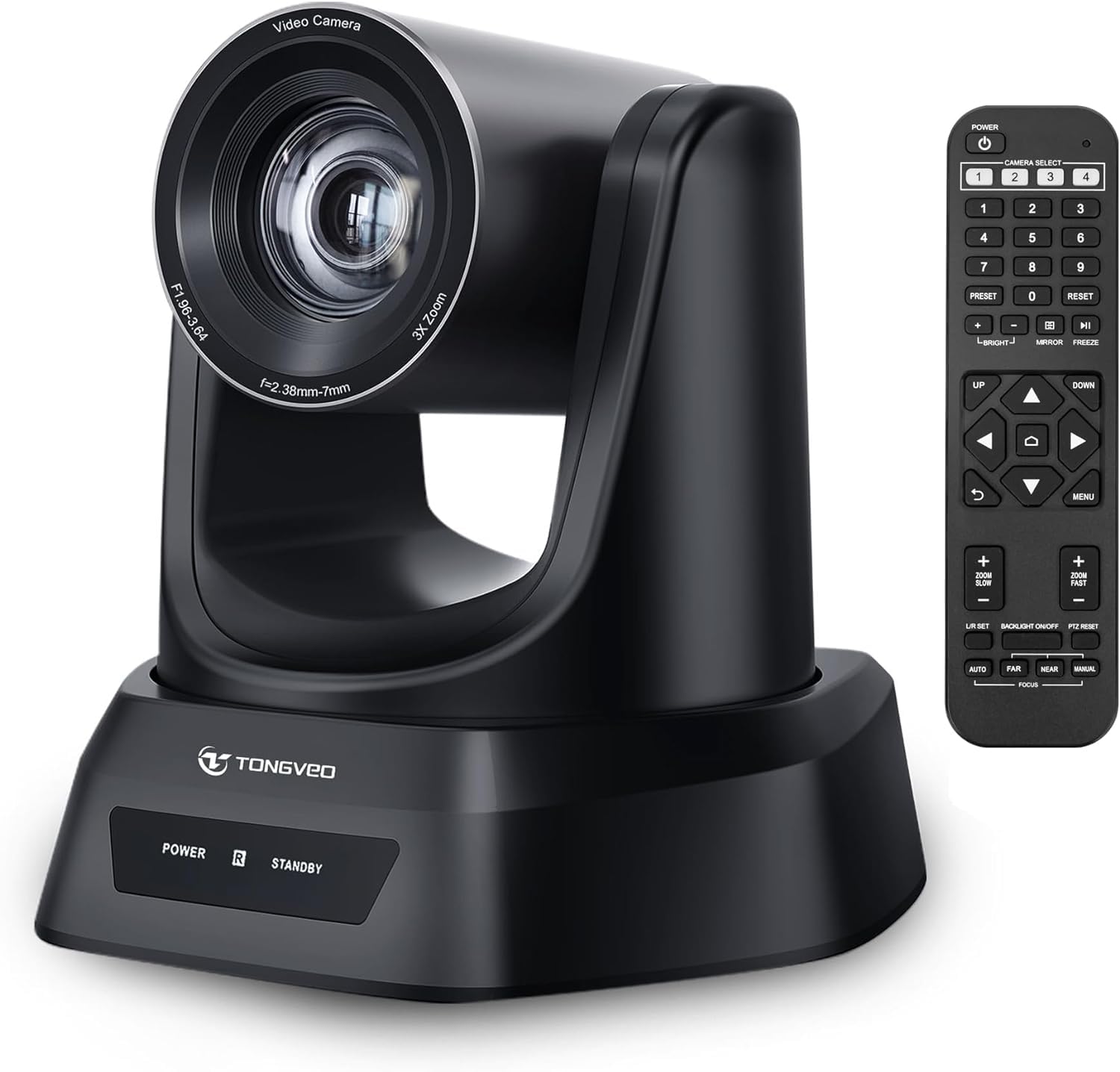
画像: 上view of the TONGVEO PTZ camera highlighting 3x optical zoom, 1080p 60fps, and pan/tilt capabilities.
3.2 接続
Connect the camera to your devices using the ports on the rear panel:
- DC 12V電源: Connect the included power adapter to the DC 12V port and then to a power outlet.
- USB3.0: Connect the USB 3.0 cable from the camera to your computer (PC/Mac) for video and control.
- HDMI: Connect an HDMI cable from the camera to a display (TV/Monitor) or a video switcher (e.g., Blackmagic ATEM) for video output.
- RS232/RS485: These ports are for connecting an external joystick controller for advanced PTZ control. RS485 supports daisy-chaining multiple cameras.

Image: Rear panel of the TONGVEO PTZ camera showing DC 12V, RS485, RS232, USB, and HDMI ports.
3.3 ソフトウェアのインストール
The TONGVEO PTZ camera is a Plug and Play device. No specific drivers are required for most operating systems. Your computer should automatically recognize the camera when connected via USB. It supports the UVC1.1 standard.
4. 操作
4.1リモコン
Use the included IR remote control to manage camera functions:
- PTZ Movement: Use the directional buttons to pan (left/right) and tilt (up/down) the camera.
- ズーム: Adjust the optical zoom in and out. The remote typically offers fast and slow zoom options.
- プリセット: The remote allows you to save and recall up to 10 preset positions. To save a preset, move the camera to the desired position, then press the 'SET' button followed by a number (1-10). To recall a preset, press the corresponding number button.
- カメラ選択: If multiple TONGVEO cameras are connected, use the camera select buttons to control a specific unit.
4.2 画像設定
Access the On-Screen Display (OSD) menu via the remote control to adjust image parameters:
- 集中: The camera features auto-focus by default. Manual focus adjustment is available through the OSD menu.
- ホワイトバランス: Adjust for accurate color reproduction under different lighting conditions.
- 暴露: Control brightness and contrast to optimize image visibility.
4.3 ソフトウェアの互換性
The camera is compatible with a wide range of operating systems and video conferencing applications:
- オペレーティング システム: Windows XP, Vista, 7, 8, 8.1, 10, 11; Mac 10.4 or higher.
- 用途: Zoom, Skype, Google Hangouts, Cisco WebEx, Microsoft Teams, GoToMeeting, BlueJeans, OBS, and other UVC-compliant software.

Image: Diagram illustrating the TONGVEO PTZ camera's compatibility with various devices and software platforms.
5. メンテナンス
To ensure the longevity and optimal performance of your TONGVEO PTZ camera, follow these maintenance guidelines:
- クリーニング: カメラ本体のクリーニングには、柔らかく乾いた布をご使用ください。レンズのクリーニングには、専用のレンズクリーニングクロスと洗浄液をご使用ください。研磨剤入りのクリーナーや溶剤は使用しないでください。
- ストレージ: 長期間使用しない場合は、カメラを直射日光や極端な温度を避け、涼しく乾燥した場所に保管してください。
- 取り扱い: Handle the camera with care. Avoid dropping or subjecting it to strong vibrations.
- 力: Disconnect the power adapter when the camera is not in use or during electrical storms.
6。 トラブルシューティング
If you encounter issues with your TONGVEO PTZ camera, refer to the following common problems and solutions:
- 電源なし:
- 電源アダプターがカメラと電源コンセントにしっかりと接続されていることを確認します。
- 電源コンセントが機能していることを確認します。
- ビデオ出力なし:
- Check all cable connections (USB, HDMI) are secure.
- Ensure the correct input source is selected on your display or video switcher.
- Verify the camera is selected as the video input device in your software (e.g., Zoom, OBS).
- 画像がぼやけている/焦点が合っていない:
- Allow the camera's auto-focus to adjust.
- Access the OSD menu to manually adjust the focus if needed.
- レンズがきれいで汚れがないことを確認してください。
- リモコンが動作しない:
- リモコンの電池を確認し、必要に応じて交換してください。
- リモコンとカメラの IR 受信機の間に障害物がないことを確認してください。
- PTZ Movement is Unresponsive:
- Verify the camera is powered on and the remote control is functioning.
- If using a joystick, ensure it is correctly connected via RS232/RS485.
7. 仕様
Detailed technical specifications for the TONGVEO PTZ HDMI Camera (Model TV-NV3H-UK):
| 特徴 | 仕様 |
|---|---|
| モデル番号 | TV-NV3H-UK (819988df-b012-4f6a-b3ce-5c96af8001c3) |
| ブランド | トンベオ |
| 光学ズーム | 3x |
| 有効なビデオ解像度 | 1080 Pixels (1080p 60fps) |
| フォトセンサー技術 | シーモス |
| 光学センサーサイズ | 1/2.7インチ |
| 最大焦点距離 | 10ミリメートル |
| 最小焦点距離 | 5ミリメートル |
| ビデオキャプチャフォーマット | MP4 (Supports YUV, MJPG, H.264) |
| パンの動き | 350° |
| 傾斜運動 | 180° |
| 接続性 | HDMI, USB 3.0, RS232, RS485 |
| 電源 | DC12V |
| 画像安定化 | いいえ |
| 動作温度 | -10°C ~ +50°C |
| パッケージ寸法 | 28 x 21 x 19 cm |
| 重さ | 2キログラム |

画像: 下 view of the TONGVEO PTZ camera showing model number (TV-V3H) and other regulatory information.
8. 保証とサポート
The TONGVEO PTZ HDMI Camera comes with a 3年間保証. For any questions, technical assistance, or warranty claims, please contact TONGVEO customer service. Our support team is available to respond to your inquiries within 24 hours.
Please refer to the contact information provided on the TONGVEO official web最新のサポート チャネルについては、サイトまたは購入ドキュメントをご覧ください。