導入
The Dayton Audio M6 6-1/2" Powered Desktop Speakers are designed to deliver high-fidelity audio for various applications, including desktop use, music playback, and home audio systems. Featuring Bluetooth 5.0 with Qualcomm AptX, a built-in USB DAC, and multiple input options, these speakers offer versatile connectivity and rich stereo sound. This manual provides essential information for the proper setup, operation, and maintenance of your M6 speakers.
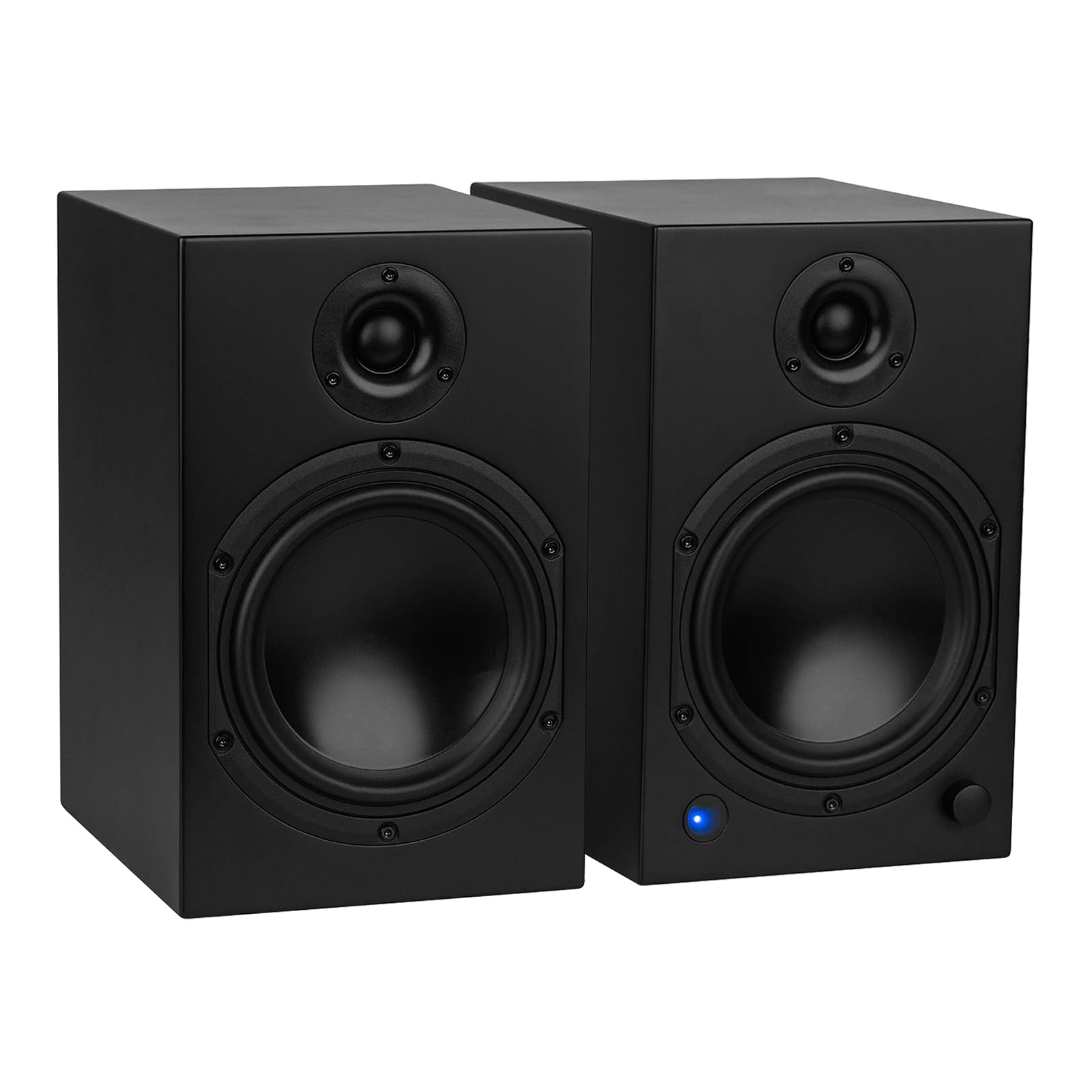
箱の中身
Carefully unpack your Dayton Audio M6 speakers and ensure all components are present:
- Dayton Audio M6 Powered Desktop Speakers (Pair)
- 電源ケーブル
- USB-Cケーブル
- Speaker Cable (for connecting passive speaker)
- 3.5mm AUX-RCAケーブル
- リモートコントロール
- ゴム足

セットアップ手順
1. スピーカーの配置
Position your M6 speakers on a stable, flat surface. The sealed cabinet design allows for flexible placement, including closer to walls, without significant changes in sound. For optimal stereo imaging, place the speakers equidistant from your listening position.
2. スピーカーの接続
- Identify Active and Passive Speakers: One speaker is active (contains the amplifier and controls) and the other is passive.
- パッシブスピーカーを接続する: Use the included speaker cable to connect the active speaker's "OUTPUT TO PASSIVE SPEAKER" terminals to the passive speaker's input terminals. Ensure correct polarity (red to red, black to black).
- Set Powered Speaker Position: On the rear of the active speaker, use the L/R switch to designate whether the active speaker will be on the left or right side of your setup.
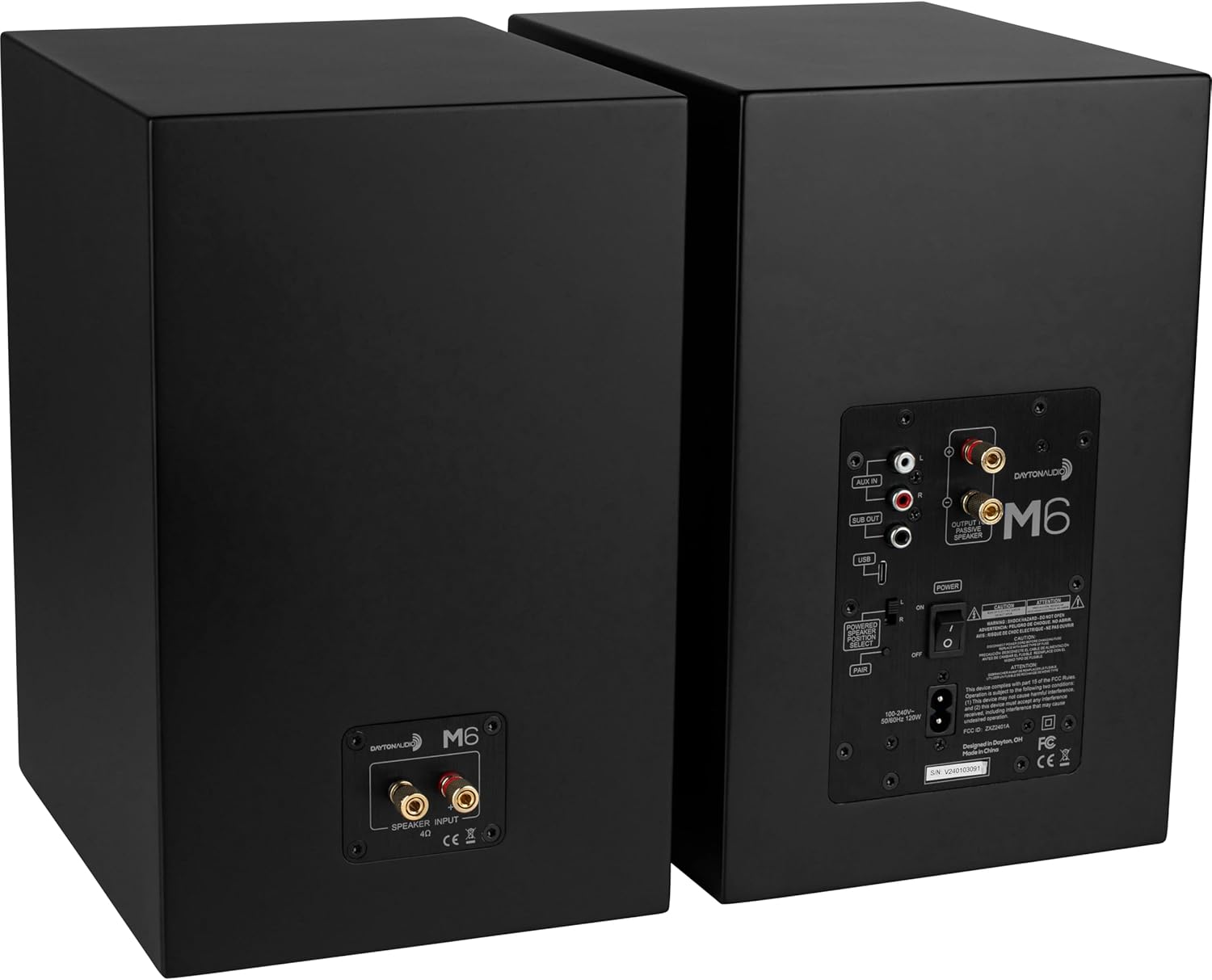
3.オーディオソース接続
The M6 speakers offer multiple input options:
- USB DAC: Connect the included USB-C cable from your computer to the USB input on the active speaker for high-resolution audio playback (up to 192 kHz/32 Bit).
- AUX入力: Use the included 3.5mm AUX to RCA cable to connect devices with a 3.5mm output (e.g., smartphones, tablets) to the RCA "AUX IN" ports.
- ブルートゥース: For wireless audio streaming, pair your device via Bluetooth 5.0 with Qualcomm AptX.
- サブウーファー出力: An RCA "SUB OUT" port is available for connecting an optional powered subwoofer.

4. 電源接続
Connect the power cable to the active speaker's power input and then to a wall outlet. Ensure the power switch on the rear panel is in the OFF position before connecting to power.
操作手順
1. 電源のオン/オフ
Use the main power switch on the rear panel of the active speaker to turn the unit ON or OFF. The speakers will retain the last selected input and volume setting when powered off and on via this switch.
2. 入力選択
The multi-function knob on the front of the active speaker or the remote control can be used to cycle through inputs (Bluetooth, USB, Line In). The LED indicator on the front will change color to indicate the active input:
- 青: ブルートゥース
- 緑: AUX In (Line)
- オレンジ: 待機する

3. 音量コントロール
Rotate the multi-function knob on the front of the active speaker to adjust the volume. Alternatively, use the VOL+ and VOL- buttons on the remote control.
4.Bluetoothペアリング
- Select the Bluetooth input using the multi-function knob or the Bluetooth button on the remote. The LED will flash blue, indicating pairing mode.
- On your device (smartphone, tablet), search for Bluetooth devices and select "Dayton Audio M6".
- Once connected, the LED will glow solid blue.
5. Bass Boost Feature
To activate the bass boost, press the ベースブースト button on the included remote. The indicator LED on the front of the speaker will flash twice to confirm bass boost is active. Press the ベースブースト button again to return to the normal EQ setting; the LED will flash once to indicate bass boost is inactive. This setting will remain enabled after the speaker returns from standby.
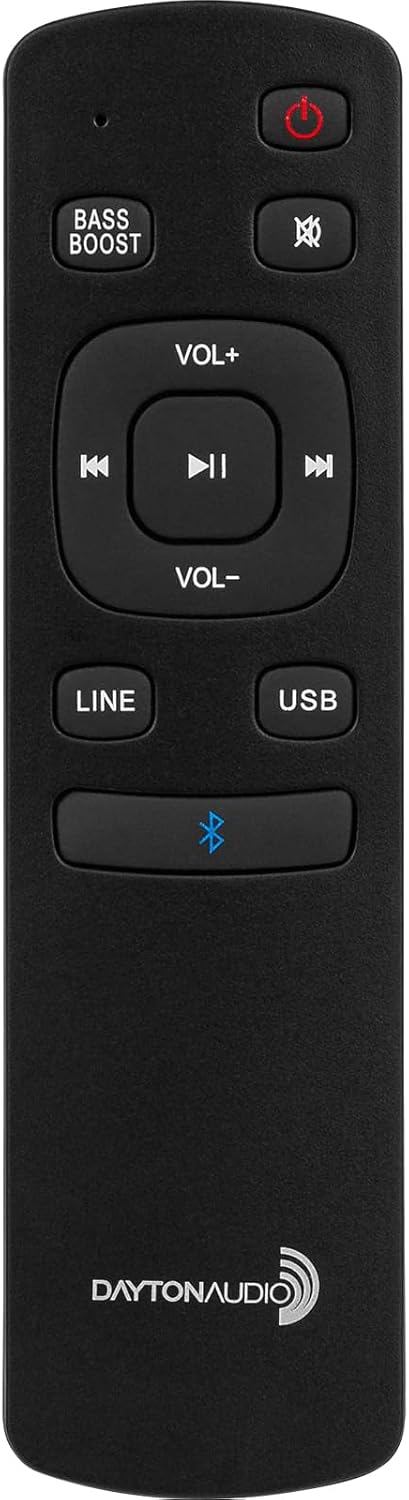
6.リモコン機能
付属のリモコンを使用すると、さまざまな機能に簡単にアクセスできます。
- 電源オン/スタンバイ
- ミュート
- 音量を上げる/下げる
- Track Skip (Previous/Next)
- 再生/一時停止
- Input Selection (LINE, USB, Bluetooth)
- 低音ブーストのオン/オフ
7. Sleep/Standby
The speakers will automatically enter standby mode after 1 hour of inactivity. To manually put the speakers into standby, press the power button on the remote control. To wake from standby, press the power button on the remote or select an input.
メンテナンス
To ensure the longevity and optimal performance of your Dayton Audio M6 speakers, follow these maintenance guidelines:
- クリーニング: Use a soft, dry cloth to wipe the speaker cabinets. Avoid abrasive cleaners or solvents.
- ほこり: 蓄積を防ぐために、スピーカーのグリルと表面のほこりを定期的に取り除いてください。
- 環境: Keep speakers away from direct sunlight, excessive heat, moisture, and extreme temperatures.
- ダイヤフラム保護: The speaker diaphragms are exposed. Exercise caution to prevent physical damage, especially in environments with small children or pets.
- ケーブル接続: すべてのケーブル接続が安全であるかどうかを定期的に確認してください。
トラブルシューティング
If you encounter issues with your M6 speakers, refer to the following common problems and solutions:
| 問題 | 考えられる原因 | 解決 |
|---|---|---|
| スピーカーから音が出ない | Power off; incorrect input; loose cables; low volume. | Ensure power switch is ON. Select correct input. Check all audio and speaker cables. Increase volume on speakers and source device. |
| Bluetoothが接続されない | ペアリングモードではありません。デバイスが遠すぎます。干渉があります。 | Ensure speakers are in Bluetooth pairing mode (flashing blue LED). Move device closer. Disconnect other Bluetooth devices. Try re-pairing. |
| 音質が歪んでいる、または悪い | Poor source quality; damaged cables; incorrect settings. | Test with a different audio source. Replace damaged cables. Ensure source volume is not too high, causing clipping. |
| Speakers unresponsive (DSP freeze) | 一時的なソフトウェアの問題です。 | Turn off the active speaker using the physical power switch on the rear panel, wait a few seconds, then turn it back on. |
| No dedicated light for Bass Boost | Misunderstanding of indicator. | The front LED indicator flashes twice for ON and once for OFF when the Bass Boost button is pressed on the remote. |
仕様
| 特徴 | 仕様 |
|---|---|
| モデル名 | M6 |
| スピーカータイプ | Bookshelf, Powered |
| スピーカーサイズ | 6.5インチ |
| ウーファー直径 | 6インチ |
| スピーカー最大出力 | 150 ワット (ピーク) |
| 周波数応答 | 40 – 20,000 Hz |
| 接続技術 | Bluetooth 5.0 with Qualcomm AptX, RCA, USB-C DAC |
| USB-C DAC Support | Up to 192 kHz/32 Bit |
| オーディオ出力モード | ステレオ(2.0) |
| 制御方法 | Remote, Multi-function Knob |
| 製品寸法(スピーカー1台あたり) | 奥行き7.5インチ x 幅11.75インチ x 高さ9インチ |
| 商品重量(ペア) | 35ポンド |
| 材料 | 金属、プラスチック |
公式製品ビデオ
For visual guidance on setup and features, please refer to the following official product videos:
Video 1: Dayton Audio M6 Product Overview (2:28)
このビデオでは、view of the Dayton Audio M6 Powered Desktop Speakers, highlighting key features and design elements.
Video 2: M6 Connectivity and Features (1:46)
This video demonstrates the various connectivity options and operational features of the M6 speakers, including Bluetooth pairing and input selection.
保証情報
The Dayton Audio M6 Powered Desktop Speakers come with a 5年間保証 covering parts and labor. Please retain your proof of purchase for warranty claims. For detailed warranty terms and conditions, refer to the documentation included with your product or visit the official Dayton Audio webサイト。
サポート
For further assistance, technical support, or service inquiries regarding your Dayton Audio M6 speakers, please visit the official Dayton Audio support webメーカーのウェブサイトをご覧いただくか、カスタマーサービス部門にお問い合わせください。連絡先は通常、メーカーのウェブサイトに記載されています。 webサイトまたは製品のパッケージ内。