
導入
This manual provides essential information for the safe and efficient use of your Candy RapidÓ Inverter Washer Dryer Combo. Please read these instructions carefully before installing and operating the appliance. Keep this manual for future reference.

図1: フロント view of the Candy RapidÓ Inverter Washer Dryer Combo. This image shows the appliance with its dark grey finish, large circular door, and control panel located at the top front.
安全情報
火災、感電、人への傷害のリスクを減らすために、電気製品を使用するときは常に基本的な安全上の注意事項に従ってください。
- アプライアンスが適切に接地されていることを確認してください。
- 子供がアプライアンスの上や中で遊ばないようにしてください。
- 梱包材は子供の手の届かないところに保管してください。
- 風雨にさらされる場所にアプライアンスを設置または保管しないでください。
- コードやプラグが損傷している機器は操作しないでください。
- 清掃またはメンテナンスを行う前に、必ずアプライアンスのプラグを抜いてください。
- このマニュアルで特に推奨されていない限り、機器のいかなる部品も修理または交換しないでください。
セットアップとインストール
1. 開梱
- Remove all packaging materials, including the polystyrene base and any inserts inside the drum.
- Remove the transport bolts located at the rear of the appliance. Keep these bolts for future transport.
- Cover the holes left by the transport bolts with the plastic caps provided.
2. 位置とレベル
- Place the appliance on a firm, flat floor.
- Adjust the feet to ensure the appliance is perfectly level. A level appliance reduces vibration and noise during operation.
3. 水の接続
- 給水ホースを 3/4 インチのネジが付いた冷水蛇口に接続します。
- 漏れを防ぐためにホースがしっかりと締められていることを確認してください。
- 古い給水ホースは再利用しないでください。必ず機器に付属の新しいホースを使用してください。
4. 排水接続
- 排水ホースは床から60cm~100cmの高さに設置してください。
- 排水ホースが曲がったり詰まったりしていないことを確認してください。
5。 電気接続
- 電源プラグを適切に接地された電源コンセントに接続します。
- ボリュームを確保するtage と周波数は、機器の定格プレートの仕様と一致します。
- 延長コードや複数のアダプタを使用しないでください。
6. 初回使用
- Before the first wash, run a short cycle without laundry and detergent to clean the drum.
操作手順
1.コントロールパネルオーバーview

図2: 詳細 view of the control panel. This image highlights the digital display showing temperature, spin speed, and program selection, along with various function buttons.
The control panel features a program selector dial, a digital display, and various function buttons for temperature, spin speed, delay start, and special options. Refer to the detailed diagram in your printed manual for specific button functions.
2. 洗濯物を干す
- ドアを開けて、洗濯物をドラムに入れます。詰め込みすぎに注意してください。衣類が自由に回転するのに十分なスペースがあることを確認してください。
- For washing, the maximum capacity is 9kg. For drying, the maximum capacity is 6kg.
- ドアをしっかり閉めてください。
3. 洗剤を追加する
- 洗剤ディスペンサーの引き出しを引き出します。
- メインの洗濯槽に洗剤を入れ、指定の槽に柔軟剤を入れます。
- Refer to detergent packaging for recommended dosages.
- ディスペンサーの引き出しを完全に押し戻します。
4. プログラムの選択

図3: Program selector dial with various cycle options. This image shows the dial with icons for different fabric types and rapid wash times, indicating the machine's versatility.
Turn the program selector dial to choose the desired wash or wash & dry program. The machine offers 16 standard programs, including 9 rapid programs that complete in less than 1 hour. Additional programs are available via the Simply-Fi App.
- 迅速なプログラム: Utilize the 9 rapid programs for quick washing needs.
- 温度と回転速度: Adjust these settings using the dedicated buttons if desired.
- 遅延開始: Use the delay start function to postpone the cycle start by up to 24 hours.
5. サイクルの開始
- 選択したプログラムを開始するには、「開始/一時停止」ボタンを押します。
- ディスプレイに残り時間が表示されます。
6. Using Drying Functions
- After a wash cycle, you can select a drying program.
- Ensure the load size is appropriate for drying (max 6kg).
- Choose the desired drying level (e.g., iron dry, cupboard dry) or time.
- 開始/一時停止ボタンを押して、乾燥を開始します。
7. 特別な機能
スチーム機能
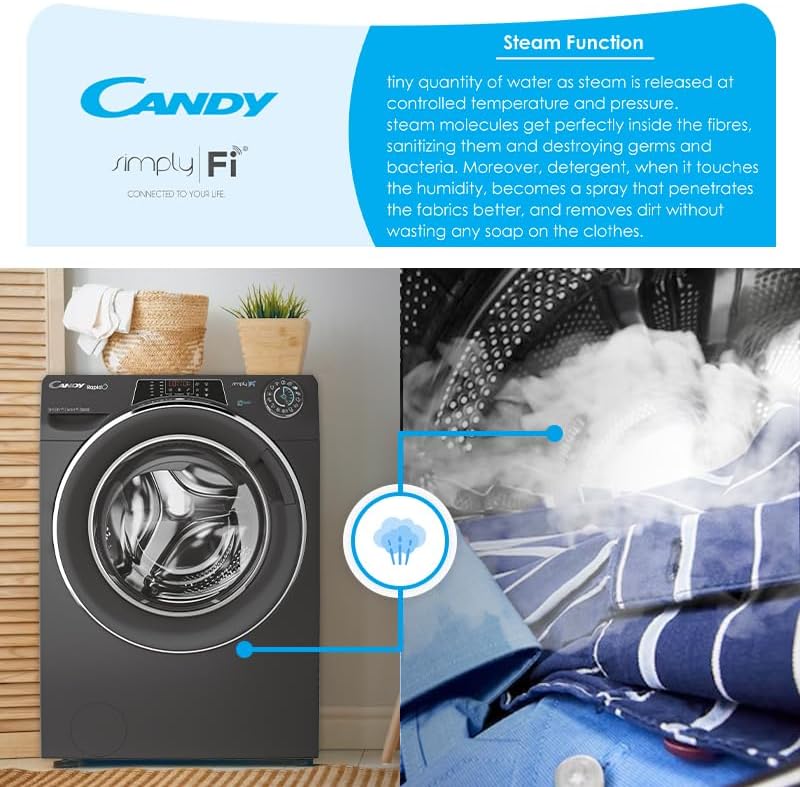
図4: Visual representation of the steam function in action. This image shows steam being released into the drum, illustrating its sanitizing and wrinkle-reducing benefits.
The steam function helps to sanitize clothes, reduce wrinkles, and refresh garments. Select programs with steam options for enhanced fabric care.
Simply-Fi App (WiFi & Bluetooth Connectivity)
Connect your appliance to the Candy Simply-Fi App via WiFi or Bluetooth for advanced remote control and additional features:
- Snap & Wash: Take a photo of your laundry, and the app will suggest the best program, temperature, and spin speed.
- Access over 40 additional programs.
- Receive washing tips and support.
- Monitor cycle status and energy consumption.
メンテナンス
Regular maintenance ensures optimal performance and extends the lifespan of your appliance. Always unplug the machine before performing any maintenance.
1. 洗剤ディスペンサーの清掃
- リリースレバーを押してディスペンサー引き出しを取り外します。
- 流水で洗い流し、洗剤の残留物を除去します。
- ディスペンサー引き出しのハウジングをブラシで掃除します。
- 引き出しを再度挿入します。
2.フィルターの清掃
- 機器の前面下部にあるフィルターを見つけます。
- 水を溜めるために、下に浅い容器を置きます。
- Carefully unscrew the filter cover and remove the filter.
- Clean the filter under running water and remove any lint or debris.
- Reinsert the filter and screw the cover back on securely.
3. ドラムのクリーニング
- 臭いや水垢の蓄積を防ぐために、メンテナンス洗浄サイクル(例:洗濯物を入れずにスケール除去剤を入れた高温洗浄)を定期的に実行します。
- Wipe the inside of the drum and the door seal after each use to prevent mold growth.
4. 外装クリーニング
- 外側の表面を柔らかい布で拭きます。amp 布。
- 研磨剤や溶剤は使用しないでください。
トラブルシューティング
カスタマー サービスに連絡する前に、次の一般的な問題と解決策を確認してください。
| 問題 | 考えられる原因 | 解決 |
|---|---|---|
| アプライアンスが起動しない | Power plug not inserted; door not closed; program not selected; Start/Pause button not pressed. | Check power connection; ensure door is firmly closed; select a program; press Start/Pause. |
| 水が溜まらない | 水道の蛇口が閉まり、給水ホースが折れ曲がり、給水が止まりました。 | 蛇口を開け、ホースをまっすぐにし、家庭内の給水を確認します。 |
| 水が流れない | 排水ホースが曲がったり詰まったりしている、またはフィルターが詰まっている。 | Straighten drain hose; clean the filter (refer to Maintenance section). |
| 過度の振動/騒音 | Transport bolts not removed; appliance not level; load unbalanced. | 輸送ボルトを外し、水平調整脚を調整し、ドラム内の洗濯物を再分配します。 |
| 悪い洗浄結果 | Incorrect detergent dosage; wrong program selected; overloading. | Adjust detergent amount; select appropriate program; reduce load size. |
仕様
- モデル番号: 31010249
- 洗浄能力: 9キロ
- 乾燥能力: 6キロ
- エネルギー定格: B
- モータータイプ: Inverter BPM motor
- 回る速さ: 1400 回転
- 接続性: WiFi + Bluetooth (Simply-Fi App compatible)
- プログラム: 16 standard programs, 9 rapid programs, 40+ additional via app
- 特別な機能: Steam function, Snap & Wash, 6D LED Display
- ドラム素材: ステンレス鋼
- 騒音レベル: 80dBA
- 商品の重量: 70キロ
保証とサポート
保証情報
This Candy RapidÓ Inverter Washer Dryer Combo comes with a 3年間保証. Please retain your proof of purchase for warranty claims. The warranty covers manufacturing defects under normal household use. For full terms and conditions, refer to the warranty card included with your appliance or contact Candy customer service.
カスタマーサポート
If you encounter issues that cannot be resolved using the troubleshooting guide, or for any service inquiries, please contact Candy customer support. Contact details can typically be found on the manufacturer's webサイトまたはアプライアンスに付属のドキュメントを参照してください。


