
導入
Thank you for choosing the Zipro Wave Elliptical Trainer. This manual provides essential information for the safe and effective assembly, operation, and maintenance of your new fitness equipment. Please read this manual thoroughly before using the elliptical trainer and keep it for future reference.

Figure 1: Zipro Wave Elliptical Trainer Overview
安全情報
エクササイズプログラムを開始する前に、必ず医師にご相談ください。怪我を防ぎ、機器を正しく作動させるために、以下の安全ガイドラインに従うことが非常に重要です。
- Always place the elliptical trainer on a flat, stable surface. Ensure there is sufficient clear space around the equipment for safe operation.
- The maximum user weight for this elliptical trainer is 120 kg (264 lbs). Do not exceed this limit.
- 動作中は子供やペットを装置に近づけないでください。
- Wear appropriate athletic clothing and footwear when using the elliptical trainer. Avoid loose clothing that could get caught in moving parts.
- Inspect the equipment before each use for any loose parts, damage, or wear. Do not use if any components are damaged.
- Do not attempt to modify the equipment. Use only original replacement parts if needed.
- めまい、吐き気、胸痛、またはその他の異常な症状が現れた場合は、直ちに運動を中止し、医師に相談してください。
コンポーネントリスト
Please ensure all components listed below are present in your package before beginning assembly. If any parts are missing or damaged, contact customer support.
- メインフレーム
- フロントベース
- リアベース
- ハンドルバー(固定式と可動式)
- 接続ケーブル
- Allen screws (M8 x 15)
- Resistance adjustment knob and cover
- Flat washers (d5, d8)
- Screws (M5 x 40, M10 x 57)
- 脈拍測定ケーブル
- Arc support discs
- Nylon nuts (M8, M10)
- ハンドルバーフォーム
- Computer/Console
- ハンドルカバー
- プラスネジ
- プラスチックスリーブ
- タオルホルダー
- 取扱説明書
- ペダル
- クランク
- フロントベースカバー
- Rear base balancing plate
- 抵抗調整ケーブル
- コンピュータケーブル

図2:例ample of Elliptical Trainer Components
セットアップと組み立て
Assembly typically involves attaching the front and rear bases to the main frame, installing the handlebars, pedals, and connecting the console. Follow the detailed instructions provided in the included instruction manual for step-by-step assembly. Ensure all bolts and nuts are securely tightened before use.

Figure 3: The elliptical trainer features transport wheels for easy relocation after assembly.

Figure 4: Detail of the integrated transport wheels for convenient movement.
操作手順
コンソール機能
The integrated console displays key workout metrics such as time, distance, speed, calories burned, and heart rate. Use the buttons on the console to navigate through modes, adjust settings, and select programs.
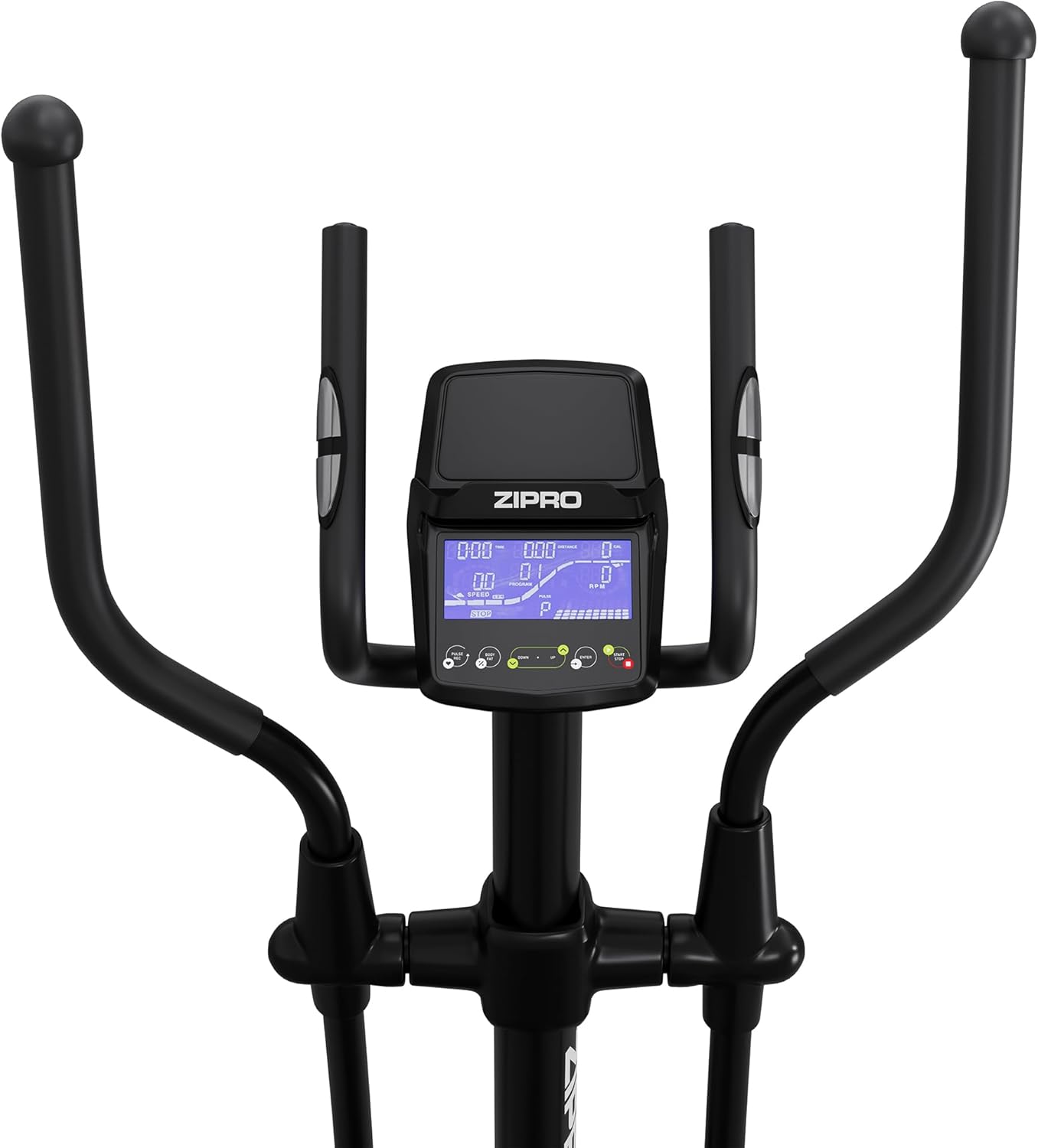
図 5: 拡大図 view of the elliptical trainer's digital console.
抵抗調整
The Zipro Wave Elliptical Trainer offers 32 levels of electromagnetic resistance. Adjust the resistance level via the console to increase or decrease the intensity of your workout. Higher levels provide a more challenging exercise.
プリセットプログラム
The elliptical trainer includes 16 pre-set workout programs designed for various fitness goals, such as endurance, fat burning, and interval training. Refer to the console's user guide for details on each program and how to select them.
心拍数モニタリング
Grip the pulse sensors on the fixed handlebars to monitor your heart rate during your workout. The console will display your current heart rate, allowing you to stay within your target heart rate zone. The HRC (Heart Rate Control) programs automatically adjust resistance based on your heart rate.
アプリ接続(Bluetooth)
Connect your smartphone or tablet to the elliptical trainer via Bluetooth to use compatible fitness apps like Kinomap and Zwift. These apps can provide interactive training experiences, virtual routes, and track your progress.

Figure 6: User interacting with the console and a tablet mounted on the elliptical trainer.

Figure 7: The console features a dedicated holder for tablets or smartphones.

Figure 8: Proper posture and movement during elliptical exercise.
メンテナンス
定期的なメンテナンスにより、エリプティカル トレーナーの寿命が長くなり、安全に操作できるようになります。
- クリーニング: 機器を広告で拭くamp 使用後は毎回布で汗やほこりを拭き取ってください。研磨剤入りの洗剤や溶剤の使用は避けてください。
- 潤滑: Periodically check moving parts for friction. Apply a silicone-based lubricant to joints and pivot points as recommended in the detailed assembly manual.
- 検査: Regularly check all bolts, nuts, and connections to ensure they are tight. Tighten any loose fasteners. Inspect cables and wires for any signs of wear or damage.
- ストレージ: Store the elliptical trainer in a dry, cool place away from direct sunlight and extreme temperatures.
トラブルシューティング
このセクションでは、発生する可能性のある一般的な問題について説明します。ここに記載されていない問題については、カスタマーサポートにお問い合わせください。
| 問題 | 考えられる原因 | 解決 |
|---|---|---|
| Console not turning on/displaying | Loose power connection; Dead batteries (if applicable) | Ensure power adapter is securely plugged in. Replace console batteries if battery-operated. |
| 動作中に異音がする | 緩んだボルト、潤滑不足、摩耗した部品 | Check and tighten all assembly bolts. Apply lubricant to moving joints. Inspect for worn components and replace if necessary. |
| 抵抗は変化しない | Resistance cable disconnected or damaged; Console malfunction | Check the resistance adjustment cable connection. Ensure it is not pinched or damaged. If the problem persists, contact customer support. |
| 不正確な心拍数測定 | Improper hand placement; Dry hands; Sensor malfunction | Ensure hands are firmly and fully gripping the pulse sensors. Lightly moisten hands if they are too dry. Clean sensors. |
仕様
| 特徴 | 詳細 |
|---|---|
| モデル名 | 波 |
| モデル番号 | 13112327 |
| 色 | 黒 |
| 主な材質 | Aluminum, Polyethylene, Metal |
| 製品寸法(長さ x 幅 x 高さ) | 117 x 67 x 163 cm(46.1 x 26.4 x 64.2インチ) |
| アイテム重量 | 41 kg (90.4 ポンド) |
| 最大ユーザー重量 | 120 kg (264 ポンド) |
| 抵抗メカニズム | 磁気 |
| 抵抗レベルの数 | 32 |
| 最大歩幅 | 30 cm (11.8 インチ) |
保証とサポート
For warranty information, please refer to the warranty card included with your product or visit the official ZIPRO website. If you require technical assistance, have questions about assembly, operation, or need to order replacement parts, please contact ZIPRO customer support through their official channels. Keep your purchase receipt as proof of purchase for any warranty claims.