導入
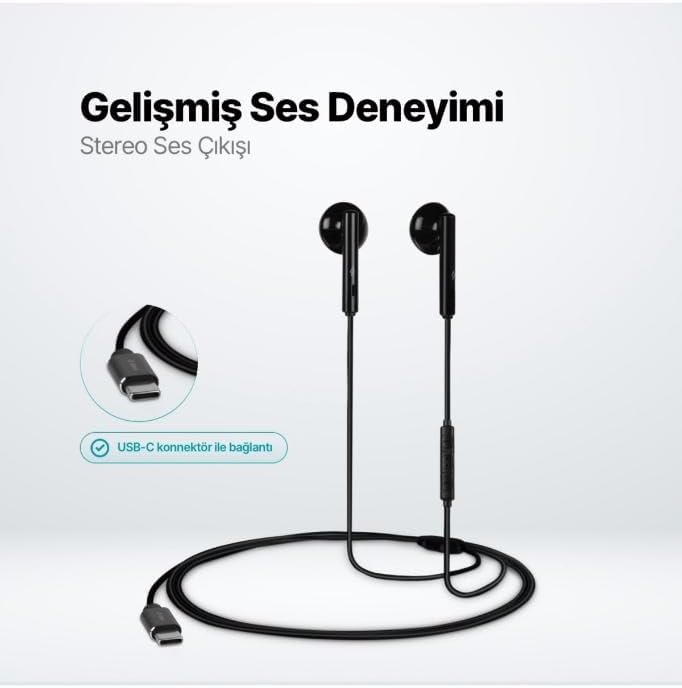
The TTEC Rio 2 Stereo USB-C Headset with Microphone is designed to provide a high-quality audio experience for music and calls. Its comfortable, lightweight design ensures a perfect fit and effective ambient noise isolation, allowing for hands-free communication and entertainment.
主な特徴:
- Advanced stereo sound output for an immersive audio experience.
- Integrated microphone for clear phone calls.
- Smart inline controller for easy management of volume, calls, and music playback.
- Lightweight and ergonomic design for extended comfort.
- Universal USB-C connection.
設定
To begin using your TTEC Rio 2 headset, follow these simple steps:
- ヘッドセットを接続します: Locate the USB-C port on your device (smartphone, tablet, laptop, etc.). Insert the USB-C connector of the TTEC Rio 2 headset firmly into the device's USB-C port.
- デバイス認識: Your device should automatically recognize the headset. If prompted, select the TTEC Rio 2 as the audio output and input device.
- フィットを調整: Place the earbuds comfortably in your ears. The ergonomic design ensures a snug fit for optimal sound quality and noise isolation.
操作手順
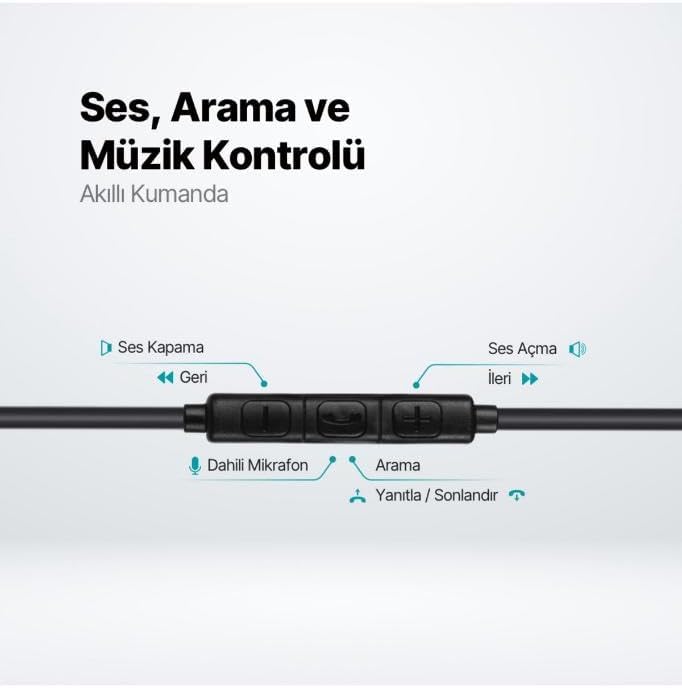
The TTEC Rio 2 headset features an inline smart controller for convenient management of your audio and calls.
Inline Controller Functions:
- ボリュームアップ(+): 押すと音量が上がります。
- ボリュームダウン (-): 押すと音量が下がります。
- Play/Pause/Answer/End Call (Center Button):
- 1 回押すと、音楽が再生または一時停止されます。
- Single press to answer an incoming call.
- Single press to end an active call.
- 着信を拒否するには長押しします。
- Next Track (Forward Button): 押すと次の曲にスキップします。
- Previous Track (Backward Button): Press to go back to the beginning of the current song or to the previous song.
- 内蔵マイク: Located on the inline controller, it captures your voice for calls and voice commands.
メンテナンス
Proper care will extend the life and performance of your TTEC Rio 2 headset.
- クリーニング: イヤホンとケーブルは、柔らかく乾いた布で優しく拭いてください。刺激の強い化学薬品や研磨剤は使用しないでください。
- ストレージ: When not in use, store the headset in a clean, dry place. Avoid extreme temperatures. The included cable organizer clip can help prevent tangling.
- 湿気を避ける: ヘッドセットを水や過度の湿気にさらさないでください。
- 取り扱いにはご注意ください: Avoid pulling on the cable or applying excessive force to the connectors.

トラブルシューティング
If you encounter issues with your TTEC Rio 2 headset, refer to the following common solutions:
| 問題 | 考えられる解決策 |
|---|---|
| ヘッドセットから音が出ません。 |
|
| マイクが機能しません。 |
|
| 音質が悪い、または歪んでいる。 |
|
| シューという音や静電気のノイズ。 |
|
仕様
| 特徴 | 詳細 |
|---|---|
| ブランド | TTEC |
| モデル番号 | 2KMM14S |
| 接続性 | USB-C |
| ヘッドフォンのフォームファクター | インイヤー |
| 耳の位置 | インイヤー |
| マイクロフォン | 内蔵 |
| パッケージ寸法 | 19.8 x 8.5 x 3.1 cm |
| アイテム重量 | 40グラム |
| ASIN | B0D3XJ5SP7 |
保証とサポート
For warranty information and customer support, please refer to the documentation included with your purchase or visit the official TTEC webサイトでご確認ください。保証請求に備えて購入証明書を保管してください。