
1.製品オーバーview
The QRD Maestro S3 is a versatile wireless leverless arcade stick designed for fighting game enthusiasts. It offers broad compatibility across multiple platforms and features advanced functionalities for an optimized gaming experience.
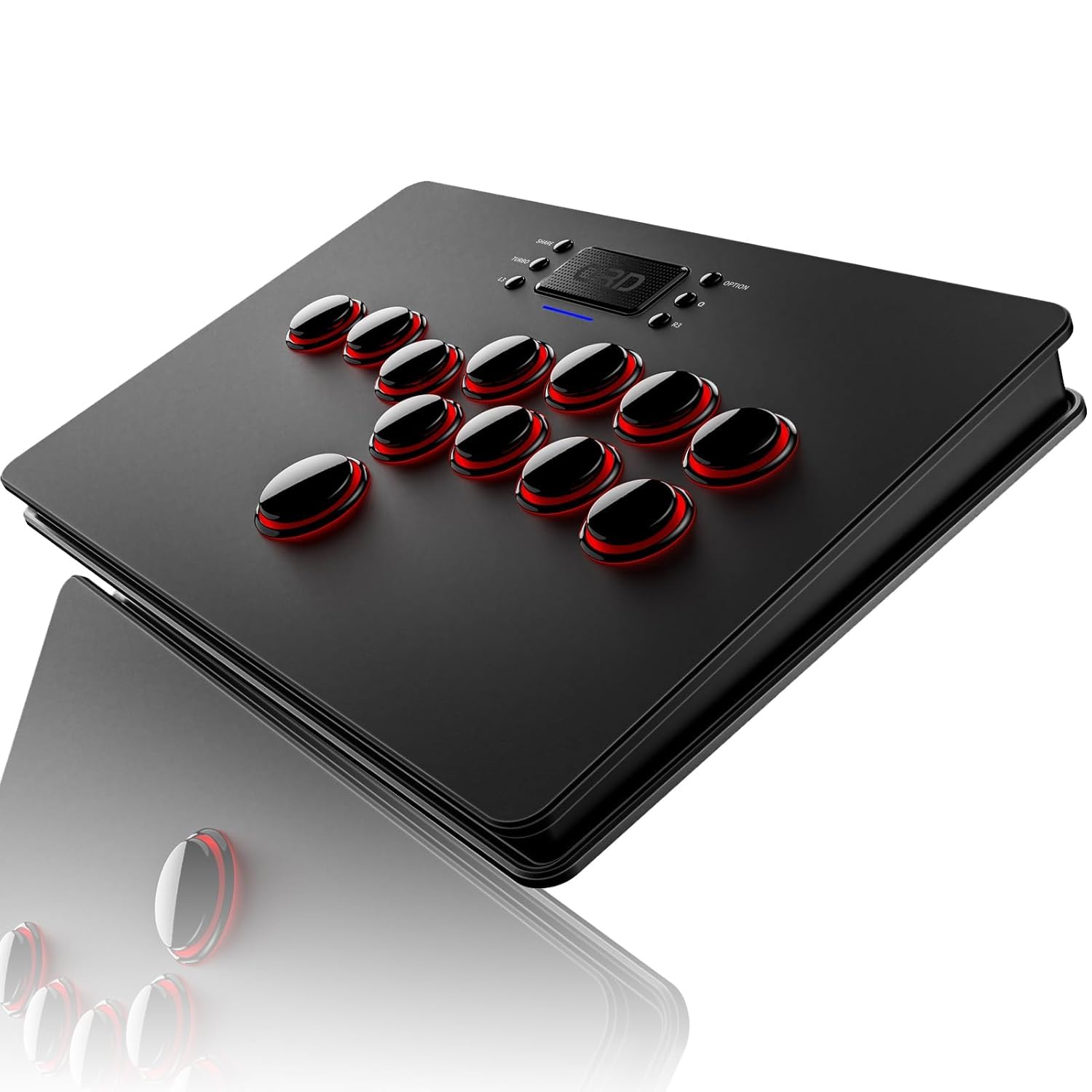
図1.1: 前面 view of the QRD Maestro S3 Wireless Arcade Stick.
2. 主な特徴
- 幅広い互換性: Supports Nintendo Switch, PS4, PS3, PS2, Xbox 360, PC (Windows, macOS), iOS, and Android TV box.
- ワイヤレス接続: Integrated Bluetooth 5.3 for stable wireless connection.
- タッチパッド機能: Features a sensitive touchpad for PS4 functions and mouse control on other supported platforms.
- Silent Micro Switch Buttons: Hot-swappable mechanical buttons designed for quiet operation and precise input.
- 3.5mmオーディオポート: Allows direct connection of headphones for immersive audio.
- Customizable Latency Modes: Five distinct latency modes (Low, Medium, High, Highest, Automatic) to optimize performance across various game types.
- 9 LED Backlight Colors: カスタマイズ可能な RGB 照明で、自分だけの美観を実現。
- SOCD & EZ Modes: Two standard SOCD modes and one EZ mode for simplified combo execution.
- ポータブルデザイン: Slim, lightweight, and constructed from premium materials for easy transport.
3. 互換性
The Maestro S3 is engineered for extensive compatibility across a wide range of gaming systems and devices. For PS5 games, a separate QRD Wireless Converter is required.

Figure 3.1: The Maestro S3 is compatible with Nintendo Switch, PS4, PS3, PS2, Xbox 360, PC, Windows, macOS, iOS, and Android TV box.
サポートされているプラットフォーム:
- Nintendo Switch (including Switch OLED, Switch Lite)
- プレイステーション4(PS4)
- プレイステーション3(PS3)
- プレイステーション2(PS2)
- マイクロソフト
- PC (Windows 7/8/10 and later)
- macOS
- iOSデバイス
- Android TV Box and smartphones
Note: For PS5 game compatibility, a QRD Wireless Converter (sold separately) is necessary. For Xbox Series consoles, an Xbox Converter (sold separately) is required.

Figure 3.2: Connection diagrams for Xbox Series (via Xbox Converter), PS5 (via PS5 Converter), and Nintendo Switch (direct USB-C connection for initial pairing).
4. セットアップと接続
ワイヤレス接続(Bluetooth 5.3):
- Ensure the Maestro S3 is charged.
- Turn on the Maestro S3.
- On your device (e.g., Nintendo Switch, PC, Android), enable Bluetooth and search for available devices.
- Select "QRD Maestro S3" from the list to pair.

Figure 4.1: The Maestro S3 utilizes Bluetooth 5.3 for a robust wireless connection.
有線接続(USB-C):
A 2.5M USB-C cable is included for wired connection. When connected via USB-C, the Maestro S3 defaults to D-input mode. X-input mode is available for USB-C connections only.
- Connect one end of the USB-C cable to the Maestro S3.
- Connect the other end to your gaming console or PC.
- デバイスはアーケードスティックを自動的に認識するはずです。
Note: For Nintendo Switch, use a USB-C to USB-C data cable to connect. Once the S3 is recognized, you can disconnect the cable, and it will connect wirelessly.
5. 操作
基本的なコントロール:
The Maestro S3 features a leverless button layout for directional inputs and action buttons. The layout is optimized for fighting games, providing precise and responsive input.

Figure 5.1: The Maestro S3 features a touchpad and a standard fighting game button layout.
タッチパッド機能:
The integrated touchpad functions as a touchpad for PS4-related features and as a mouse on other compatible platforms. The touchpad button acts as a confirmation button.
オーディオポート:
A 3.5mm audio port is located on the device, allowing users to connect headphones or external speakers directly to the arcade stick for audio output.

図5.2:以上view of additional functions including X-input/D-input modes, SOCD mode, and the 3.5mm audio jack.
Cellphone Holder:
The package includes a specialized smartphone mount clamp. This allows you to attach your cellphone to the arcade stick, turning it into a mobile game controller or providing a convenient screen for game information or streaming.

Figure 5.3: The Maestro S3 with an attached cellphone holder, demonstrating its use for mobile gaming or secondary screen display.
6.詳細設定
Latency Modes:
The Maestro S3 offers five adjustable latency modes to match different game requirements and player preferences. These modes help synchronize the arcade stick's response with various game engines and platforms.
- 低遅延: Ideal for classic or emulator games.
- Medium Latency: Suitable for most emulator games.
- 高レイテンシ: Recommended for modern games.
- Highest Latency: For the latest and most demanding games.
- 自動モード: Automatically adjusts latency based on platform and device identification.

Figure 6.1: Visual representation of the five latency modes and their recommended use cases for emulator and modern fighting games.
SOCD & EZ Modes:
The Maestro S3 includes two standard Simultaneous Opposing Cardinal Directions (SOCD) modes and one EZ mode to assist with complex inputs and combos.
- Standard SOCD Mode: Left + Right = Neutral, Up + Down = Up.
- Special SOCD Mode: Left + Right = Neutral, Up + Down = Neutral.
- EZモード: Simplifies combo execution, particularly useful for new players or difficult inputs.

Figure 6.2: Explanation of the two SOCD modes and their directional input resolutions.
LEDバックライト:
The Maestro S3 features 9 customizable RGB LED backlight colors. These can be adjusted to personalize the appearance of your arcade stick.

Figure 6.3: The Maestro S3 with its customizable RGB LED backlighting, showcasinさまざまなカラーオプション。
7.お手入れとメンテナンス
To ensure the longevity and optimal performance of your QRD Maestro S3, follow these care and maintenance guidelines:
- クリーニング: アーケードスティックの表面を拭く際は、柔らかく乾いた布を使用してください。研磨剤入りの洗剤や溶剤は使用しないでください。
- ストレージ: デバイスは直射日光や極端な温度を避け、涼しく乾燥した場所に保管してください。
- ボタンのメンテナンス: The micro switch buttons are hot-swappable. If a button's performance degrades, it can be replaced. Refer to specialized guides for button replacement procedures.
- バッテリーのケア: Charge the device using a standard 5V/1A power source. Avoid overcharging or completely draining the battery for extended periods.

Figure 7.1: Battery charging and playtime indicators. Charging takes approximately 2.5 hours for up to 10 hours of playtime.

図 7.2: 分解 view showing the hot-swappable microswitch buttons, allowing for easy replacement and customization.
8。 トラブルシューティング
This section addresses common issues you might encounter with your QRD Maestro S3.
| 問題 | 考えられる原因 | 解決 |
|---|---|---|
| デバイスの電源が入りません。 | バッテリー残量が少ない、または充電されていません。 | Connect the device to a power source using the USB-C cable and allow it to charge. |
| ワイヤレス接続できません。 | Bluetooth is off on the device or Maestro S3. Pairing issue. | Ensure Bluetooth is enabled on both devices. Try re-pairing the Maestro S3 by going into your device's Bluetooth settings and selecting the arcade stick. |
| ボタンが反応しないか、固着しています。 | Dust/debris under buttons, or worn-out micro switches. | Clean around the buttons. If the issue persists, consider replacing the micro switches (refer to section 7 for button maintenance). |
| No audio from 3.5mm port. | Headphones not properly connected or audio settings issue. | Ensure headphones are fully plugged in. Check audio output settings on your console/PC to ensure audio is routed through the arcade stick. |
| Input lag experienced. | Incorrect latency mode selected for the game. Environmental interference. | Adjust the latency mode (refer to section 6). Minimize wireless interference by moving closer to the console or reducing other wireless devices. Try wired connection. |
| Not recognized by PS5/Xbox Series. | Requires a separate converter. | Ensure you have the correct QRD Wireless Converter for PS5 or Xbox Converter for Xbox Series consoles. |
9. 技術仕様
| 特徴 | 仕様 |
|---|---|
| モデル番号 | Maestro S3 |
| 寸法(長さ×幅×高さ) | 11.81 x 7.68 x 1.22 インチ (30 x 19.5 x 3.1 cm) |
| 重さ | 2.33ポンド(1.06kg) |
| 接続性 | Bluetooth 5.3, USB-C (wired) |
| 電池のタイプ | 1 リチウムポリマー電池 (付属) |
| メーカー | QRD |
| 初回利用可能日 | 9年2024月XNUMX日 |
10. 保証とサポート
QRD products are designed for durability and performance. For any issues or support needs, please refer to the following information:
返品規則:
This product is eligible for a refund or replacement within 30 days of purchase, in accordance with standard return policies.
メーカーサポート:
For technical assistance, troubleshooting beyond this manual, or warranty inquiries, please contact QRD customer support. Contact information can typically be found on the official QRD webサイトまたは購入プラットフォームを通じて購入できます。
保証請求のために購入証明書を保管してください。