
SecuFirst CWL401S
SecuFirst 2K 屋外監視カメラキット(屋内モニター付き)ユーザーマニュアル
Model: CWL401S
1. はじめに
This manual provides detailed instructions for the installation, operation, and maintenance of your SecuFirst 2K Outdoor Surveillance Camera Kit. This system includes a 7-inch touchscreen monitor and an outdoor camera, designed for reliable security monitoring without requiring an internet connection for basic functions. It can also be used as a baby monitor, pet camera, or for elderly care.
2. 安全情報
- すべての電源接続が安全であり、指定された電圧を満たしていることを確認してください。tage (12 ボルト)。
- Do not place the camera near metal objects as this may reduce wireless range.
- モニターを極端な温度や直射日光にさらさないでください。
- The outdoor camera is IP66 waterproof, but avoid submerging it in water.
- 製品はお子様の手の届かない場所に保管してください。
- 付属の電源アダプターのみを使用してください。
3. パッケージ内容
パッケージの内容をよくご確認ください。不足品や破損品がございましたら、カスタマーサポートまでご連絡ください。
- 1x 7-inch Touchscreen Monitor
- 1x Outdoor Camera with Multi-position Mounts
- 2x AC Power Adapters (1.8m cable)
- 1x Power Extension Cable (1.8m)
- 1x 64GB MicroSD Card (pre-installed in monitor)

Image: SecuFirst 2K Outdoor Surveillance Camera Kit showing the monitor and camera.
4.製品オーバーview
4.1. 7-inch Touchscreen Monitor

Image: Diagram of the 7-inch touchscreen monitor, highlighting its components and ports.
- タッチスクリーンディスプレイ: 7-inch interface for live view、再生、設定など。
- 電源ボタン: 電源をオン/オフするには、3秒間押し続けます。
- アンテナポート: For connecting the monitor's antenna to ensure stable wireless connection.
- USBポート: For connecting external storage (up to 2TB HDD/USB drive).
- スピーカー: オーディオ出力用。
- SDカードスロット: For the included 64GB MicroSD card (supports up to 128GB).
- 電源ポート: For connecting the monitor's power adapter.
- イーサネットポート: For optional wired internet connection.
- リセットボタン: 工場出荷時の状態にリセットします (ピンを使用)。
- 記録インジケーター: Lights up when recording.
- 電源インジケーター: 電源の状態を表示します。
- マイクロフォン: 双方向の音声通信用。
4.2.屋外カメラ

Image: Diagram of the outdoor camera, showing its features and connection points.
- アンテナ: For wireless signal transmission to the monitor.
- Adjustable Camera Mount: Allows for flexible positioning.
- AC電源ケーブル: For connecting the camera to power.
- 電源ステータスインジケーター: カメラの動作状態を表示します。
- 光センサー: 周囲の光を検出して自動的に夜間視力を起動します。
- IR LED: Infrared lights for clear night vision up to 300 meters.
- PIRモーションセンサー: Passive Infrared sensor for accurate thermal motion detection.
- オーディオスピーカー: 双方向の音声通信用。
- マイクロフォン: Located behind the camera's swivel support for audio input.
- アンテナコネクタ: For attaching the camera's antenna.
5. セットアップ
5.1. 初回電源投入とペアリング
- モニターに電源を接続します。 Plug one AC power adapter into the monitor's power port and then into a power outlet.
- カメラに電源を接続します: Plug the second AC power adapter into the camera's power cable and then into a power outlet. If needed, use the included power extension cable.
- 自動ペアリング: The camera and monitor are pre-paired at the factory. Once both are powered on, the live video feed from the camera should appear on the monitor within a few seconds.
- ポジショニング: Place the monitor in a convenient indoor location. Mount the camera outdoors using the provided mounts. Ensure the camera is not near large metal objects to maintain optimal wireless range (up to 200 meters in open space, reduced by walls/windows).

Image: Illustrates the wireless, internet-free operation of the system, showing a user viewing the monitor and the camera mounted outdoors.
5.2. Expanding the System (Optional)
The system supports up to 4 cameras. Additional cameras can be purchased separately and easily paired with your existing monitor.

Image: Depicts how the system can be expanded to include up to four cameras, showing different monitor views with multiple camera feeds.
6. 操作手順
6.1.ライブ View and Basic Functions
Once powered on, the monitor will display the live feed from the connected camera(s). Use the touchscreen to navigate the interface.
- 切り替え Views: If multiple cameras are connected, tap the channel numbers (CH1, CH2, etc.) at the top of the screen to switch between individual camera views or a multi-camera view.
- 双方向オーディオ: Tap the microphone icon on the screen to speak through the camera's speaker. Tap again to end.
- 録音: The system automatically records motion-triggered events to the installed 64GB MicroSD card. The REC indicator light on the monitor will illuminate during recording.
- ナイトビジョン: カメラは暗い場所では自動的に暗視モードに切り替わり、鮮明な白黒画像を提供します。
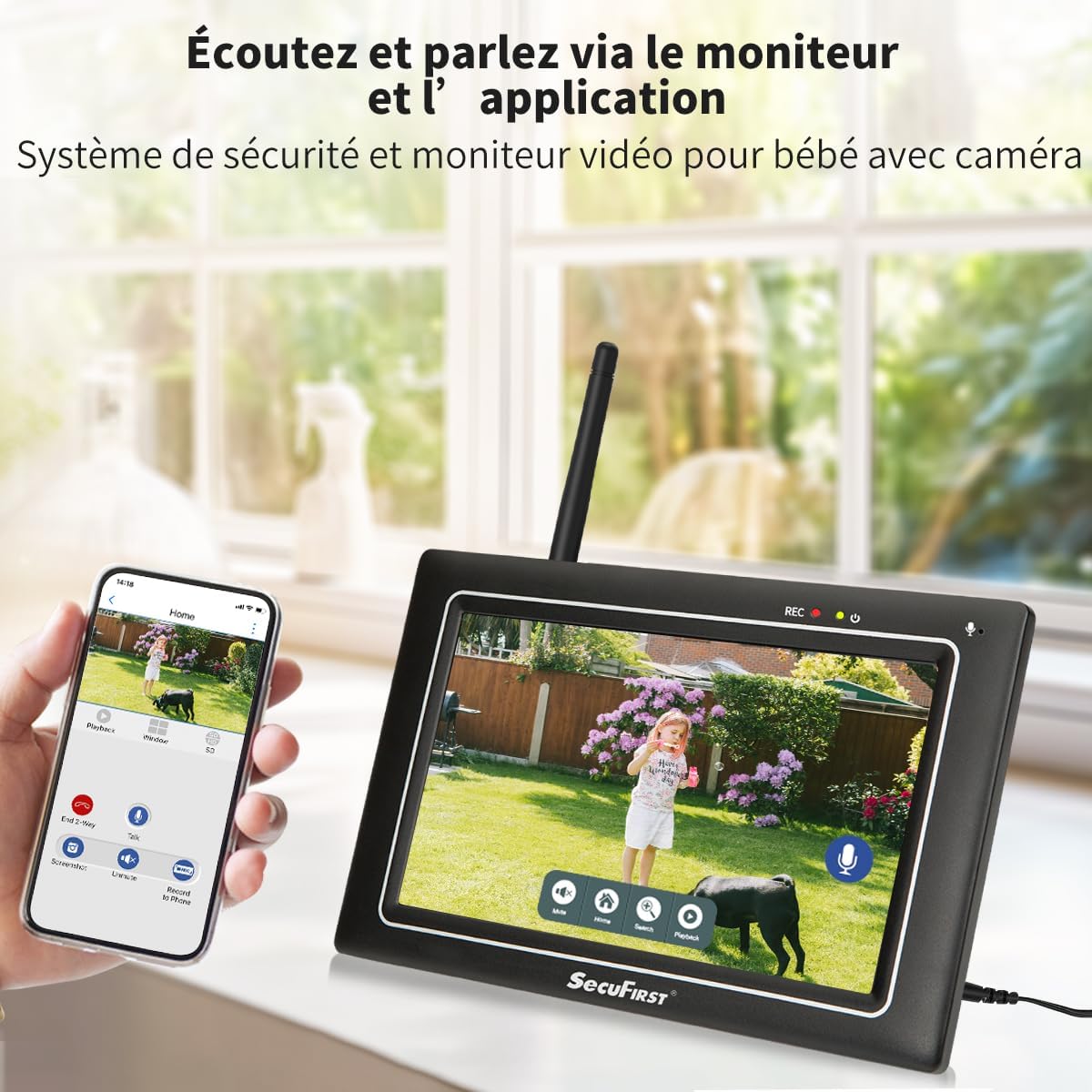
Image: Shows the monitor displaying a live feed, with icons for two-way audio and other functions.
6.2. 録音したFooを再生するtage
再するためにview recorded events:
- ライブから view, tap the playback icon (usually a play symbol or calendar icon) on the monitor's touchscreen.
- Select the desired date and time from the interface.
- The monitor will display a list of recorded events. Tap on an event to play it back.
- Use the on-screen controls (play, pause, fast forward, rewind) to navigate the footage.

Image: The monitor's interface showing recorded events and playback controls.
6.3. Advanced Settings (via Monitor)
The monitor allows for various personal settings adjustments:
- モーション検出ゾーン: カメラ内の特定の領域を定義する view モーション検出をアクティブにする場所。
- プライバシーマスキング: Block out specific areas in the camera's view プライバシーのため。
- アラーム音量: Adjust the volume of alarms triggered by motion.
- スリープモード: Activate "sleep mode" to save energy, turning the screen into a digital clock.
- ストレージ管理: The included 64GB MicroSD card can be replaced with up to a 128GB MicroSD card, or an external HDD/USB drive up to 2TB can be connected via the USB port for extended storage.
6.4. Smartphone App Connectivity (Optional)
For remote access and advanced features, connect the monitor to the internet via Ethernet cable or Wi-Fi. Then download the "Observer HD+" app.
- Connect Monitor to Internet: Plug an Ethernet cable into the monitor's Ethernet port or configure Wi-Fi settings on the monitor.
- アプリをダウンロードする: 検索する "Observer HD+" in your smartphone's app store and install it.
- ペアデバイス: Follow the in-app instructions to add your SecuFirst system. This typically involves scanning a QR code displayed on the monitor.
- リモート アクセス: ペアリングすると、次のことができます view live video, listen and speak through the camera, and play back recordings from your smartphone or tablet anywhere.

Image: Shows the monitor and a smartphone displaying the "Observer HD+" app interface for remote viewingと制御。
7. メンテナンス
- クリーニング: Use a soft, dry cloth to clean the monitor screen and camera lens. Do not use liquid cleaners or aerosols directly on the devices.
- ファームウェアの更新: Check the SecuFirst web最適なパフォーマンスとセキュリティを確保するために、サイトまたはアプリを定期的にチェックしてファームウェアを更新してください。
- ストレージ管理: Regularly back up important recordings from the MicroSD card or external storage to prevent data loss. The system will overwrite the oldest recordings when storage is full.
- ケーブル検査: Periodically inspect all power cables for any signs of wear or damage. Replace immediately if damage is found.
8。 トラブルシューティング
| 問題 | 考えられる原因 | 解決 |
|---|---|---|
| モニターに画像が表示されません。 | Monitor or camera not powered on; camera out of range; pairing lost. | Ensure both monitor and camera are plugged in and powered. Move camera closer to monitor. If still no image, try re-pairing the camera (refer to advanced settings in monitor menu). |
| 画質が悪い、または信号が干渉される。 | Obstructions (walls, metal objects); too far from monitor; interference from other wireless devices. | Relocate camera or monitor to minimize obstructions. Ensure antennas are properly attached. Reduce interference by moving other wireless devices away. |
| モーション検出が機能していないか、敏感すぎます。 | Incorrect sensitivity settings; detection zone not configured; environmental factors (e.g., swaying trees). | Adjust motion detection sensitivity and configure detection zones via the monitor settings. Ensure camera lens is clean. |
| スマートフォンアプリに接続できません。 | Monitor not connected to internet; incorrect app settings; network issues. | Ensure monitor is connected to Wi-Fi or Ethernet. Verify app settings and device pairing. Check your internet connection. |
| 双方向オーディオが不明瞭、または機能しません。 | Microphone/speaker blocked; volume too low; signal interference. | Ensure nothing is obstructing the microphone or speaker on both devices. Adjust volume settings on the monitor. Check for signal interference. |
9. 仕様
| 特徴 | 詳細 |
|---|---|
| モデル番号 | CWL401S |
| ビデオ録画解像度 | 2K(3MP) |
| モニター画面サイズ | 7インチ(タッチスクリーン) |
| 無線通信技術 | Wi-Fi (for optional app connectivity) |
| 無線範囲(オープンスペース) | 最大200メートル |
| 暗視範囲 | 最大300メートル |
| カメラ素材 | 金属Casing |
| 資料の監視 | Matte Black Plastic Casing |
| 防水性能(カメラ) | IP66 |
| 電源入力 | 12ボルト |
| 消費電力 | 12ワット |
| 寸法(長さ×幅×高さ) | 20 x 14.2 x 7.8 cm |
| 重さ | 1.58キログラム |
| 付属ストレージ | 64GB MicroSDカード |
| 最大ストレージ容量 | 128GB MicroSD / 2TB External HDD/USB |
| 特集 | Local Recording, Night Vision, App Control, Motion Detector (AI + PIR), Plug and Play, Pre-paired, Two-way Audio |
10. 保証とサポート
SecuFirst products are designed for reliability and performance. For warranty information and technical support, please refer to the contact details provided with your purchase or visit the official SecuFirst webサイト。
メーカー: ALCエレクトロニクスBV
For further assistance, please contact SecuFirst customer service.
Ask a question about this manual
Ask about setup, troubleshooting, compatibility, parts, safety, or missing instructions. Manuals+ will review the question and use this page’s manual context to help answer it.