
導入
This manual provides comprehensive instructions for the ProtoArc EK01 Plus Ergonomic Wireless Backlit Keyboard. Please read this guide carefully to ensure proper setup, operation, and maintenance of your device. Keep this manual for future reference.
パッケージ内容
パッケージにすべてのアイテムが揃っていることを確認します。
- ProtoArc EK01 Plus Ergonomic Wireless Backlit Keyboard
- リストレスト
- USB-C充電ケーブル
- 2.4G USBレシーバー
- ユーザーマニュアル
製品終了view
The ProtoArc EK01 Plus is a full-size ergonomic keyboard designed to enhance typing comfort and reduce muscle strain. Its split and curved keyframe design promotes a natural hand and wrist posture.
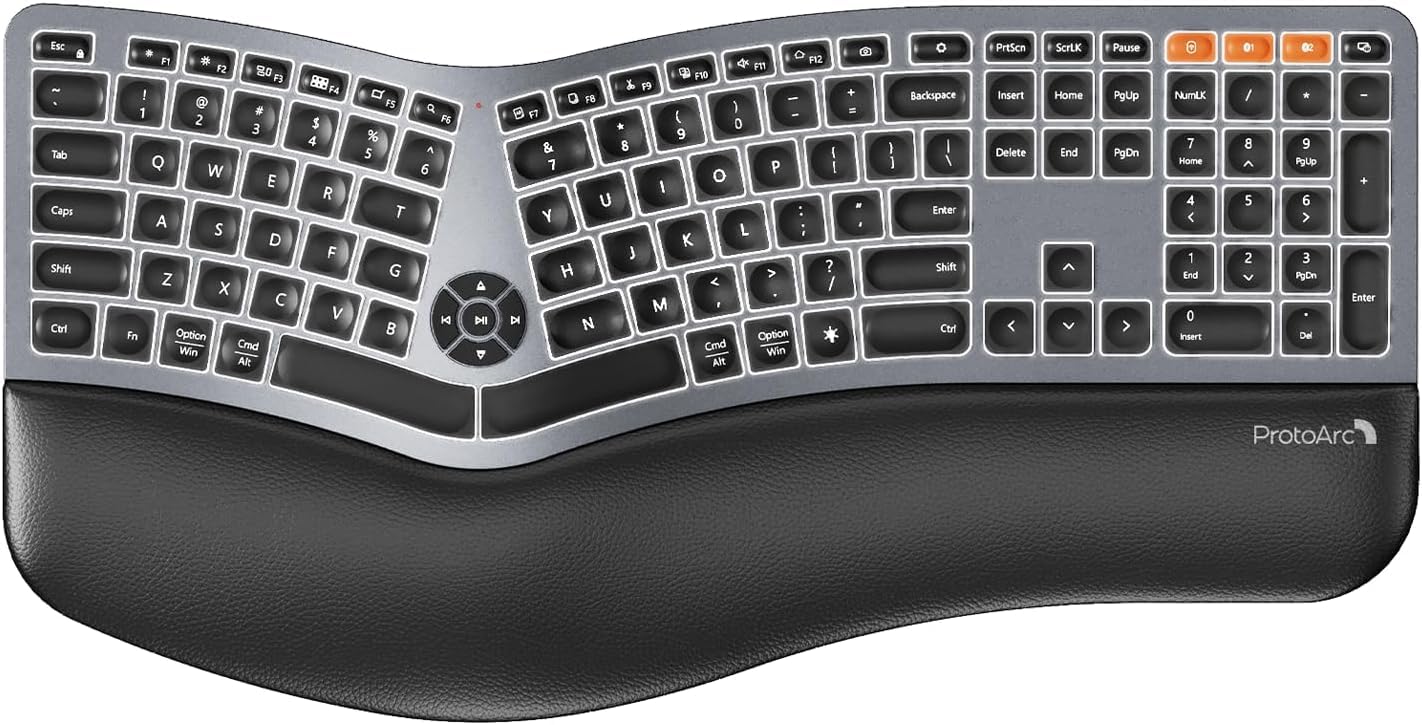
Image 1: ProtoArc EK01 Plus Ergonomic Wireless Backlit Keyboard. This image displays the full keyboard with its split design, integrated wrist rest, and key layout.
主な特徴:
- Ergonomic Full-Size Design: Features a split, curved keyframe and integrated wrist rest to minimize muscle fatigue and promote proper posture.
- 調整可能な傾斜脚: Four adjustable tilt feet allow customization of the keyboard angle for optimal comfort.
- 調整可能なバックライト: Soft white LED backlighting with three adjustable brightness levels (low-medium-high) for comfortable typing in various lighting conditions.
- マルチデバイス接続: Connects to up to three devices simultaneously via Bluetooth and 2.4G USB. Easily switch between devices with a dedicated key.
- USB-C充電式: Equipped with a 2000 mAh rechargeable lithium battery for extended use.
- 自動スリープモード: Enters sleep mode after 60 minutes of inactivity to conserve power, waking up within 3 seconds upon key press.
- 互換性: Widely compatible with Windows 7/8/10, Mac OS X 10.12 or higher, and Android 4.3 or higher.
設定
1. キーボードの充電
- キーボード上の USB-C 充電ポートを見つけます。
- Connect the provided USB-C cable to the keyboard and the other end to a USB power source (e.g., computer USB port, wall adapter).
- 充電インジケーターライトが点灯します。充電が完了すると、ライトの色が変わったり消灯したりすることがあります。
2. デバイスへの接続
The keyboard supports both 2.4G USB and Bluetooth connectivity.
2.1. 2.4G USB接続
- Locate the 2.4G USB receiver (dongle). It is usually stored in a compartment on the keyboard or in the packaging.
- USBレシーバーをコンピューターの使用可能なUSBポートに接続します。
- 電源スイッチを使用してキーボードの電源をオンにします。
- キーボードは自動的にデバイスに接続されます。
2.2. Bluetooth接続(最大3台のデバイス)
- キーボードをオンにします。
- Bluetoothチャンネルキーの1つ(例: BT1, BT2、 または BT3)を 3 ~ 5 秒間押し続けます。インジケーター ライトが点滅し、ペアリング モードを示す状態になります。
- デバイス(コンピューター、タブレット、スマートフォン)で Bluetooth を有効にし、新しいデバイスを検索します。
- Select "ProtoArc EK01 Plus" (or similar name) from the list of available devices.
- 画面の指示に従ってペアリングを完了してください。接続されると、インジケーターライトの点滅が停止します。
- Repeat these steps for up to two additional Bluetooth devices using the other Bluetooth channel keys.
手術
1. デバイス間の切り替え
接続されているデバイスを切り替えるには、対応する接続キーを押すだけです。
- プレス 2.4G USB レシーバー経由で接続されたデバイスに切り替えます。
- プレス BT1 最初の Bluetooth デバイスに切り替えます。
- プレス BT2 2番目のBluetoothデバイスに切り替えます。
- プレス BT3 to switch to the third Bluetooth device.
2. バックライトの調整
The keyboard features a soft white LED backlight with three brightness levels.
- To cycle through brightness levels (low, medium, high, off), press the dedicated backlight key (refer to keyboard layout for specific key).
3. Sleep Mode and Power Saving
To conserve battery life, the keyboard will automatically enter sleep mode after 60 minutes of inactivity. To wake the keyboard, press any key. The keyboard will be ready for use within 3 seconds.
4. Adjustable Tilt
The keyboard includes four adjustable tilt feet. Extend or retract these feet to customize the typing angle to your preference, ensuring comfortable wrist positioning whether sitting or standing.
メンテナンス
1. キーボードのクリーニング
- クリーニングする前に、キーボードをすべてのデバイスおよび電源から取り外してください。
- 柔らかく糸くずの出ない布で軽く拭き取ってください。ampキーボードの表面を水または中性洗浄液で拭いてください。
- キーボードの表面を傷める可能性があるため、刺激の強い化学薬品、研磨剤入りの洗剤、溶剤の使用は避けてください。
- キー間の清掃には、圧縮空気を使用してほこりやごみを除去します。
2. バッテリーのお手入れ
- バッテリーの状態を維持するために、キーボードを定期的に充電してください。
- バッテリーを頻繁に完全に放電することは避けてください。
- キーボードを長期間保管する場合は、保管前に約 50% まで充電してください。
トラブルシューティング
| 問題 | 考えられる原因 | 解決 |
|---|---|---|
| キーボードが反応しない | Low battery; Keyboard off; Incorrect connection mode; USB receiver not plugged in (2.4G); Bluetooth not paired. | Charge the keyboard; Turn on the keyboard; Switch to the correct connection mode (2.4G, BT1/2/3); Ensure USB receiver is securely plugged in; Re-pair Bluetooth. |
| 遅延または遅延入力 | 干渉、受信機/デバイスからの距離、バッテリー残量が少ない。 | Move closer to the receiver/device; Ensure no strong interference sources nearby; Charge the keyboard. |
| バックライトが動作しない | バックライトがオフになっています。電池残量が少なくなっています。 | Press the backlight key to adjust brightness; Charge the keyboard. |
| Bluetooth経由で接続できません | Keyboard not in pairing mode; Device Bluetooth off; Already connected to 3 devices. | Ensure keyboard is in pairing mode (flashing indicator); Enable Bluetooth on your device; Disconnect from an existing Bluetooth device if maximum reached. |
仕様
| ブランド | プロトアーク |
| モデル番号 | EK01プラス |
| 接続技術 | ブルートゥース、2.4G USB |
| キーボードの説明 | Ergonomic, Full Size, Split Design |
| 特集 | Ergonomic, Full Size, Wrist Rest, Backlit, Rechargeable |
| 色 | スペースグレイ |
| バックライトカラーのサポート | Monochromatic (White LED) |
| 材料 | プラスチック |
| 電源 | バッテリー駆動(2000mAhリチウム電池) |
| スイッチタイプ | 膜 |
| キーボードレイアウト | QWERTY (UK layout for this variant) |
| キーの数 | 117 |
| 対応デバイス | Laptop, PC, Tablet, Windows/Mac/Android |
| アイテム重量 | 1.6キログラム |
| 寸法(約) | 48cm(長さ)x 25cm(幅) |
保証とサポート
For warranty information and technical support, please refer to the ProtoArc official website or contact their customer service. Details are typically provided on the product packaging or the official brand store.
ProtoArc Official Store: Visit ProtoArc Store on Amazon