
1. はじめに
Thank you for choosing the JOOM JU011-12 Contactless Kitchen Faucet. This manual provides essential information for the safe installation, operation, and maintenance of your new kitchen faucet. Please read these instructions thoroughly before installation and keep them for future reference.
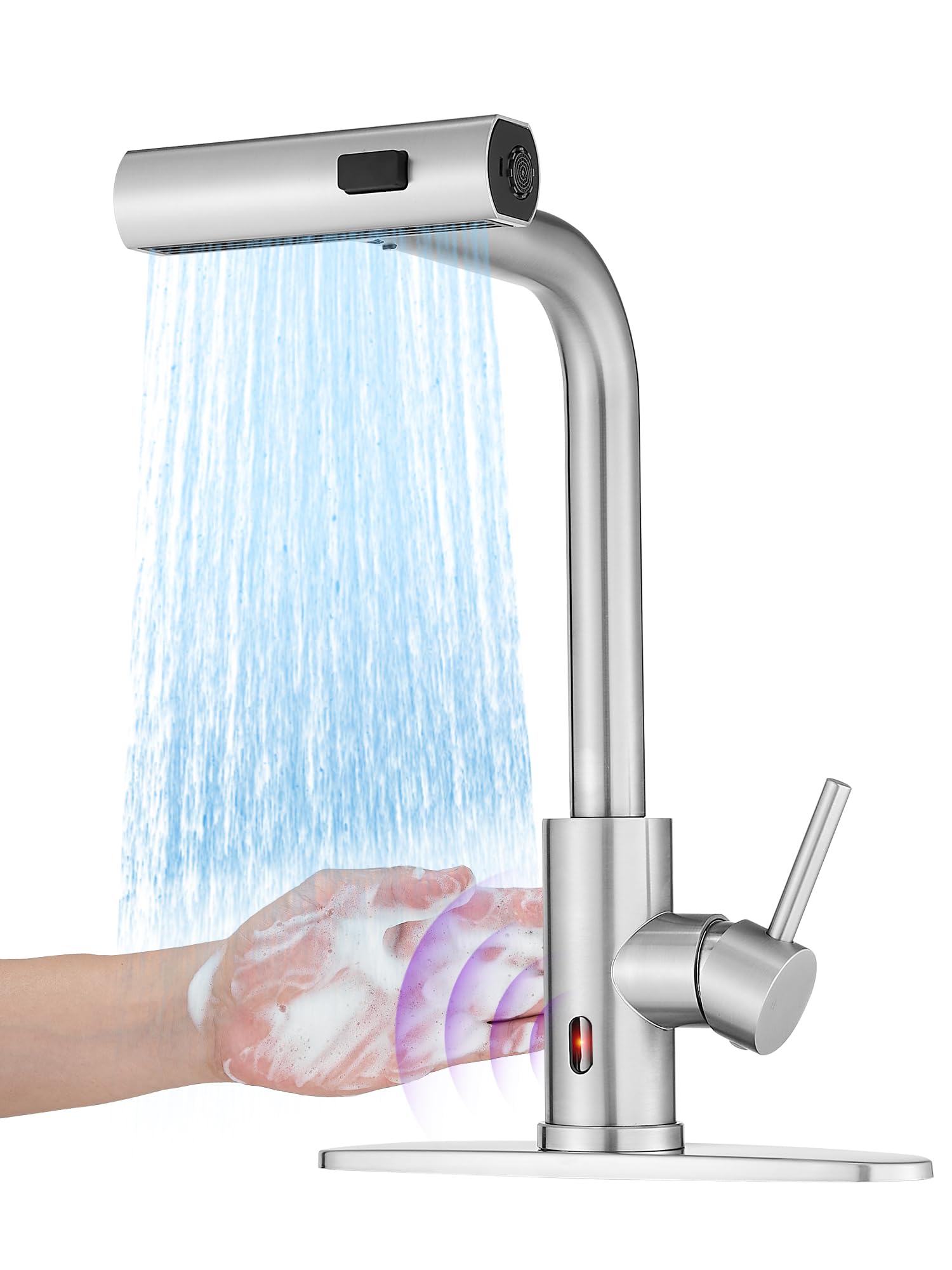
Image: The JOOM JU011-12 Contactless Kitchen Faucet, showcasing its modern design and brushed stainless steel finish.
2 製品の特徴
- 非接触操作: Equipped with intelligent chips and a responsive sensor for hands-free water activation.
- 3-in-1 Multi-mode Sprayer: Features Stream, Broom, and Rain spray modes for versatile cleaning tasks.
- プルダウン式スプレー: Includes a 24-inch braided hose with 360° rotation for extended reach and flexibility.
- Auto-Retraction Technology: Ensures the sprayer hose smoothly retracts back into place after use.
- ウォーターフォール機能: Provides a unique cascade water flow option.
- 耐久性のある構造: Made from high-quality stainless steel with a brushed finish.
- シングルハンドルコントロール: Allows for easy adjustment of water temperature and flow.
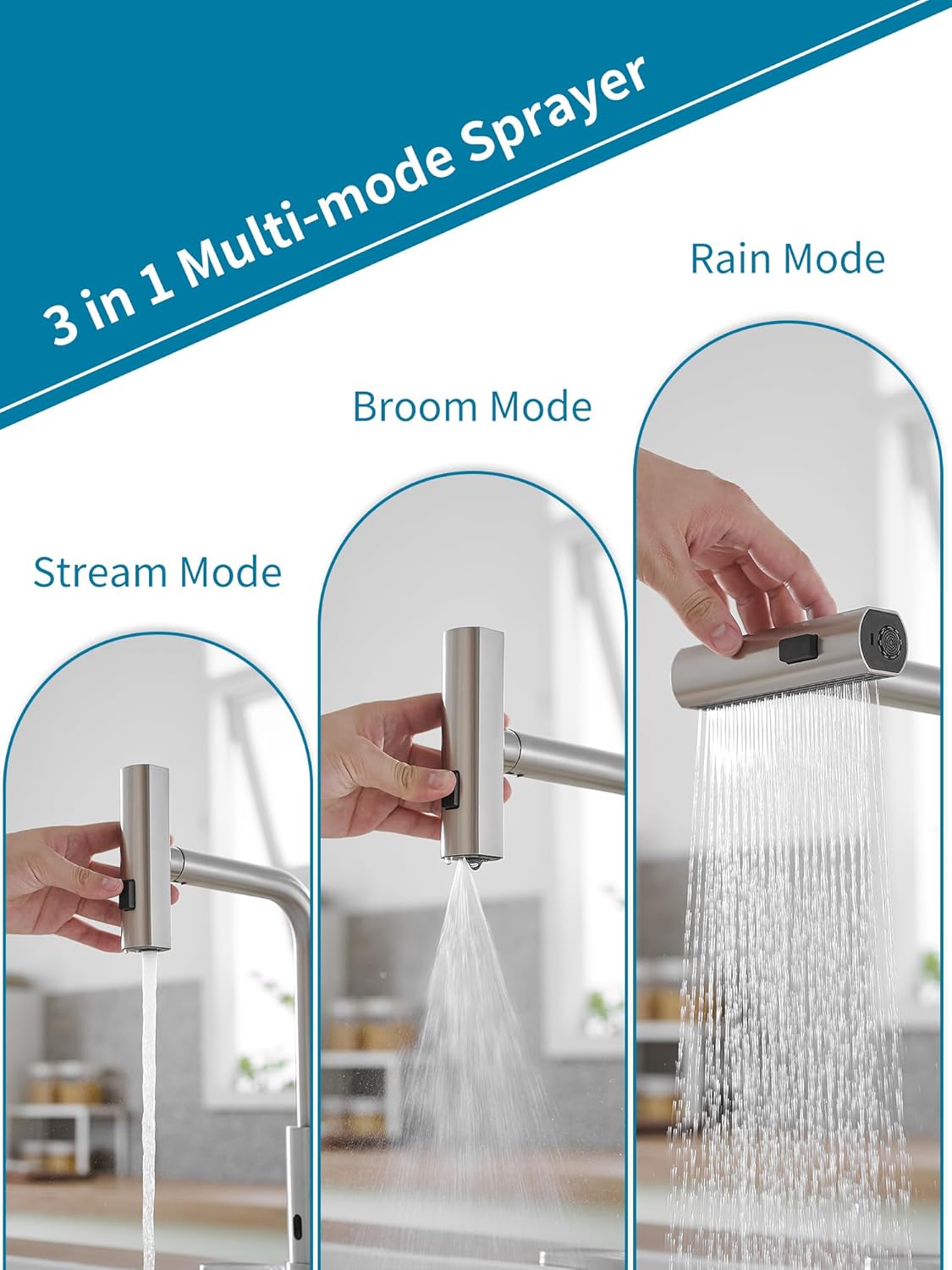
Image: The faucet's sprayer head demonstrating the three distinct water modes: Stream, Broom, and Rain.

Image: The pull-down sprayer extended from the faucet, highlighting the 24-inch braided hose and 360-degree swivel capability, along with the auto-retraction weight.

画像: クローズアップ view of the faucet's intelligent chip sensor, indicating fast response for contactless operation.

Image: A hand activating the contactless sensor on the faucet, showing water flowing in response to the gesture.
3. 仕様
| ブランド | ジョーム |
| モデル番号 | JU011-12 |
| 推奨用途 | 台所 |
| 取り付けタイプ | デッキマウント |
| 仕上げタイプ | ブラシ仕上げ |
| 材料 | ステンレス鋼 |
| ハンドル数 | 1 |
| 特集 | Pull-down Sprayer, Contactless Sensor, Waterfall Function |
| 取付穴径 | 3.2-3.5 cm (1-3/10" ~ 1-3/8") |
| Max Countertop Thickness | 5 cm(2インチ) |
| Hose Sizes Supported | M 10x1, G3/8 |

Image: Detailed diagram showing the faucet's dimensions in centimeters and inches, along with mounting hole diameter and maximum countertop thickness requirements.
4. 安全情報
- 設置やメンテナンスを始める前に、必ず主給水を停止してください。
- 取り付け中は、安全メガネや手袋などの適切な個人用保護具を着用してください。
- 漏れを防ぐため、すべての接続が確実に固定されていることを確認してください。締めすぎないでください。
- 設置手順のいずれかの部分について不明な点がある場合は、資格のある配管工に相談してください。
- 窒息の危険を防ぐため、小さな部品はお子様の手の届かないところに保管してください。
5.インストールガイド
Follow these steps for proper installation of your JOOM kitchen faucet:

Image: A four-panel diagram illustrating the initial installation steps: 1) Installing the nut kit from below, 2) Tightening the nut kit with a screwdriver, 3) Connecting hot and cold water pipes to the valve, and 4) Installing the hose load-bearing ball.
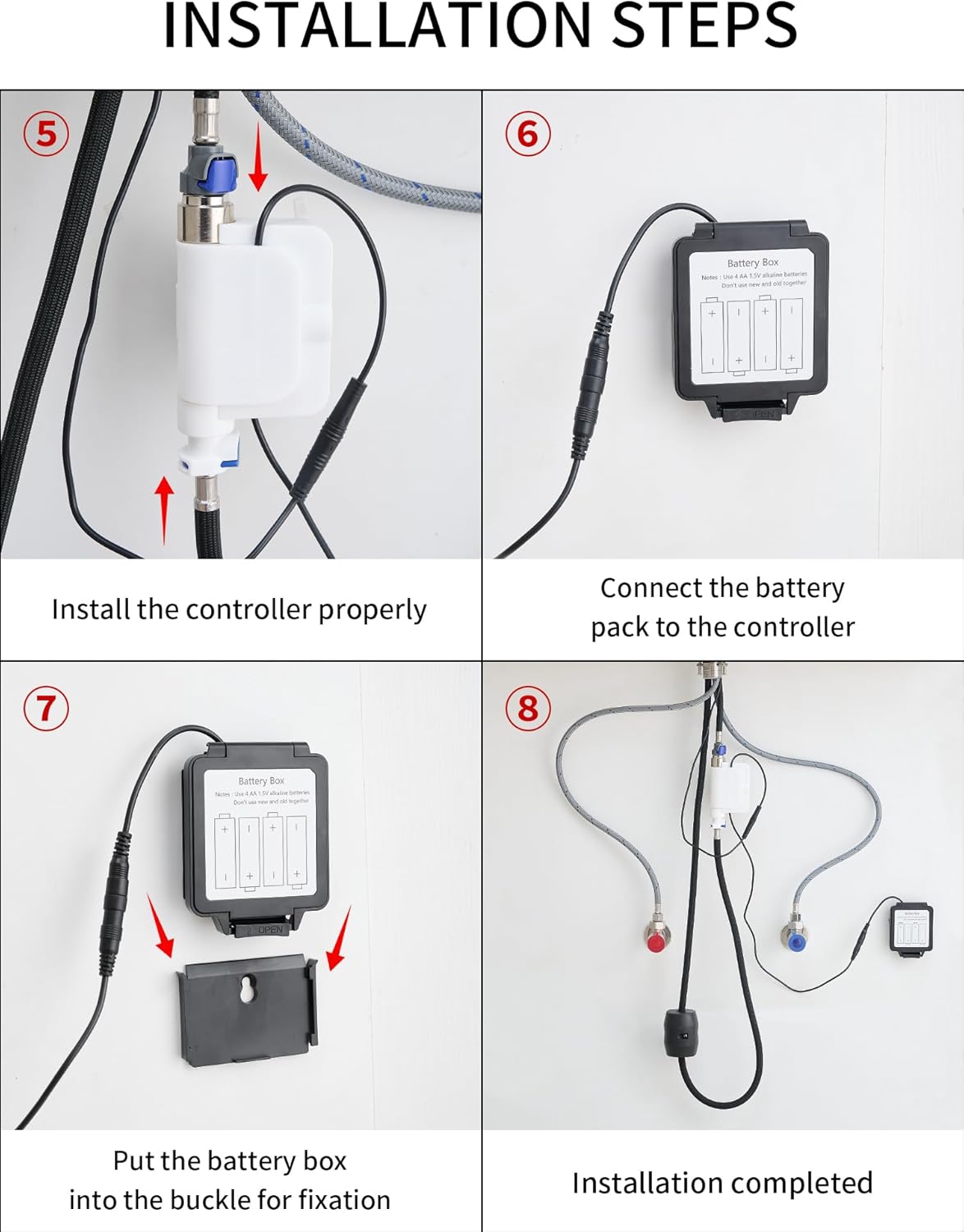
Image: A four-panel diagram illustrating the final installation steps: 5) Installing the controller, 6) Connecting the battery pack to the controller, 7) Securing the battery box into its buckle, and 8) A view of the completed installation under the sink.
- 取り付け穴を準備します。 Ensure your countertop has a suitable mounting hole (3.2-3.5 cm diameter) and is not thicker than 5 cm.
- 蛇口を取り付けます。 蛇口本体を取り付け穴に挿入します。
- Secure the Faucet (Step 1 & 2): From underneath the sink, install the nut kit onto the faucet shank and tighten it securely using a screwdriver until the faucet is stable.
- Connect Water Lines (Step 3): Connect the hot and cold water supply lines to the corresponding inlets on the faucet's valve. Ensure a tight, leak-free connection.
- Install Hose Load-Bearing Ball (Step 4): Attach the load-bearing ball to the pull-down hose underneath the sink. This provides the necessary weight for hose retraction.
- Install the Controller (Step 5): Mount the electronic controller unit in an accessible location under the sink.
- Connect Battery Pack (Step 6 & 7): Connect the battery pack to the controller. Insert the battery box into its designated buckle for fixation. Ensure batteries are correctly inserted (typically 4 AA batteries, not included).
- 漏れのテスト: Turn on the main water supply and check all connections for any leaks.
6. 操作
- 手動ハンドル操作: Use the single handle to control water flow and temperature. Lift the handle to turn on/off water and move it left/right for hot/cold water.
- Contactless Sensor Operation: Wave your hand near the sensor located on the faucet body to activate or deactivate water flow. The intelligent chip ensures a fast response.
- Changing Sprayer Modes: Press the button on the sprayer head to cycle through the Stream, Broom, and Rain modes.
- プルダウン式スプレーの使用: Gently pull the sprayer head from the spout for extended reach. The 24-inch braided hose and 360° rotation allow for flexible use. When finished, the auto-retraction technology will pull the hose back into place.
- ウォーターフォール機能: The faucet also features a waterfall mode, providing a broad, gentle flow of water.

Image: A person using the pull-down sprayer to rinse fruits in a colander, demonstrating the practical application of the sprayer function.
7. メンテナンスとケア
- クリーニング: Clean the faucet regularly with a soft cloth and mild soap. Avoid abrasive cleaners, harsh chemicals, or scouring pads, as these can damage the brushed stainless steel finish.
- センサーのメンテナンス: Keep the sensor area clean and free from obstructions to ensure proper contactless operation.
- エアレーターの清掃: 定期的にエアレーターを外して清掃し(該当する場合)、ミネラルの堆積物を除去し、最適な水の流れを維持します。
- ホースの検査: Regularly check the pull-down hose for any signs of wear or damage.
- バッテリー交換: If the contactless function becomes unresponsive or intermittent, replace the batteries in the battery pack.
8。 トラブルシューティング
| 問題 | 考えられる原因 | 解決 |
|---|---|---|
| 水の流れが少ない | Partially closed water supply valves, clogged aerator, debris in water lines. | Ensure hot and cold water supply valves are fully open. Clean or replace the aerator. Flush water lines. |
| Contactless sensor not working | Dead batteries, obstructed sensor, sensor malfunction. | Replace batteries in the battery pack. Clean the sensor area. If problem persists, contact customer support. |
| 接続からの漏れ | 接続が緩んでいる、O リング/ワッシャーが損傷している。 | Tighten connections carefully. Inspect and replace any damaged O-rings or washers. |
| Sprayer hose does not retract fully | Obstruction under the sink, incorrect weight placement. | Clear any obstructions around the hose under the sink. Ensure the load-bearing ball is correctly positioned. |
9. 保証とサポート
This JOOM product is covered by a standard manufacturer's warranty. For specific warranty details, please refer to the documentation included with your purchase or contact JOOM customer service.
For technical support, replacement parts, or any questions regarding your JOOM JU011-12 faucet, please contact our customer support team through the retailer where you purchased the product or visit the official JOOM webサイト。