
KALI AUDIO IN-8W V2
Kali Audio IN-8W V2 8インチ パワード 3ウェイ スタジオモニター ユーザーマニュアル
Model: IN-8W V2
1. はじめに
The Kali Audio IN-8W V2 is a 3-way powered studio monitor designed for critical listening and mixing applications. It features an 8-inch woofer, a 4-inch midrange driver, and a 1-inch soft dome tweeter, with the midrange and tweeter arranged coaxially for precise imaging. These near-field monitors deliver accurate, extended low frequencies and detailed high frequencies with low distortion, suitable for monitoring at various volume levels. With a flat frequency response and neutral tonality, the IN-8W V2 allows users to hear subtle details in their mixes. Its balanced XLR and 1/4" TRS inputs, along with RCA inputs, ensure easy integration into any studio setup.

フロント view of the Kali Audio IN-8W V2 8-inch powered 3-way studio monitor in white, showcasing the coaxial midrange and tweeter above the main woofer.
2. 重要な安全上の注意事項
- 製品を操作する前に、これらの手順をよくお読みください。
- 今後の参照用にこれらの手順を保管してください。
- 製品および取扱説明書のすべての警告に注意してください。
- Follow all instructions for safe use and operation.
- この装置を水や湿気の近くで使用しないでください。
- 乾いた布でのみ清掃してください。
- 通気口を塞がないでください。メーカーの指示に従って設置してください。
- ラジエーター、暖房レジスター、ストーブ、その他の機器(以下を含む)などの熱源の近くに設置しないでください。 amp熱を発生する装置。
- 有極プラグまたはアース プラグの安全上の目的を無効にしないでください。有極プラグには、片方がもう片方よりも幅広の 2 つの刃があります。アース プラグには、2 つの刃と 3 つ目のアース プロングがあります。幅広の刃または 3 つ目のプロングは、安全のために用意されています。用意されたプラグがコンセントに合わない場合は、電気技師に相談して、古いコンセントを交換してください。
- 特にプラグ、コンセント、および装置から出ている部分で、電源コードが踏まれたり挟まれたりしないように保護してください。
- メーカー指定のアタッチメント/アクセサリのみを使用してください。
- 雷雨のときや長期間使用しない場合は、この装置のプラグを抜いてください。
- すべての修理は資格のあるサービス担当者に依頼してください。電源コードやプラグが破損している、液体がこぼれた、装置内に物が落ちた、装置が雨や湿気にさらされた、正常に動作しない、装置を落としたなど、装置が何らかの損傷を受けた場合は修理が必要です。
3. パッケージ内容
Upon unpacking your Kali Audio IN-8W V2 studio monitor, please ensure all items are present and in good condition:
- One Kali Audio IN-8W V2 Studio Monitor
- 電源ケーブル XNUMX 本
4. 主な特徴
- 強力なパフォーマンス: 140-watt Class D digital amplifier system delivers clear and accurate sound for studio mixing and mastering.
- 正確な制御: Independent level controls, low-cut filters, and input selection allow customization of the monitors for any application or room environment.
- Studio Reference: 8-inch woofer, 4-inch midrange driver, and 1-inch soft dome tweeter (coaxially mounted) reproduce a wide frequency response from 42Hz to 22kHz.
- 多彩な接続性: Balanced XLR and 1/4" TRS inputs, along with unbalanced RCA inputs, ensure broad compatibility with studio equipment.

斜めのフロント view of the Kali Audio IN-8W V2 studio monitor, highlighting its sleek design and driver arrangement.
5. セットアップ
5.1 配置
Proper placement of your studio monitors is crucial for accurate sound reproduction. Position the monitors to form an equilateral triangle with your listening position. The tweeters should ideally be at ear level. Avoid placing monitors directly against walls or in corners without utilizing the boundary compensation settings.
5.2 接続
The IN-8W V2 offers three types of audio inputs:
- XLR Input (+4 dBu): For balanced professional audio equipment.
- TRS Input (+4 dBu): For balanced or unbalanced 1/4-inch connections.
- RCA Input (-10 dBV): For unbalanced consumer audio equipment.
Connect your audio source to one of these inputs. Only use one input at a time. Ensure the volume knob on the monitor is set to its lowest position before connecting the power cable.
5.3電源オン
After connecting your audio source, plug the power cable into the monitor and then into a suitable AC outlet. Flip the power switch to the 'On' position. The LED indicator on the front of the monitor will illuminate.
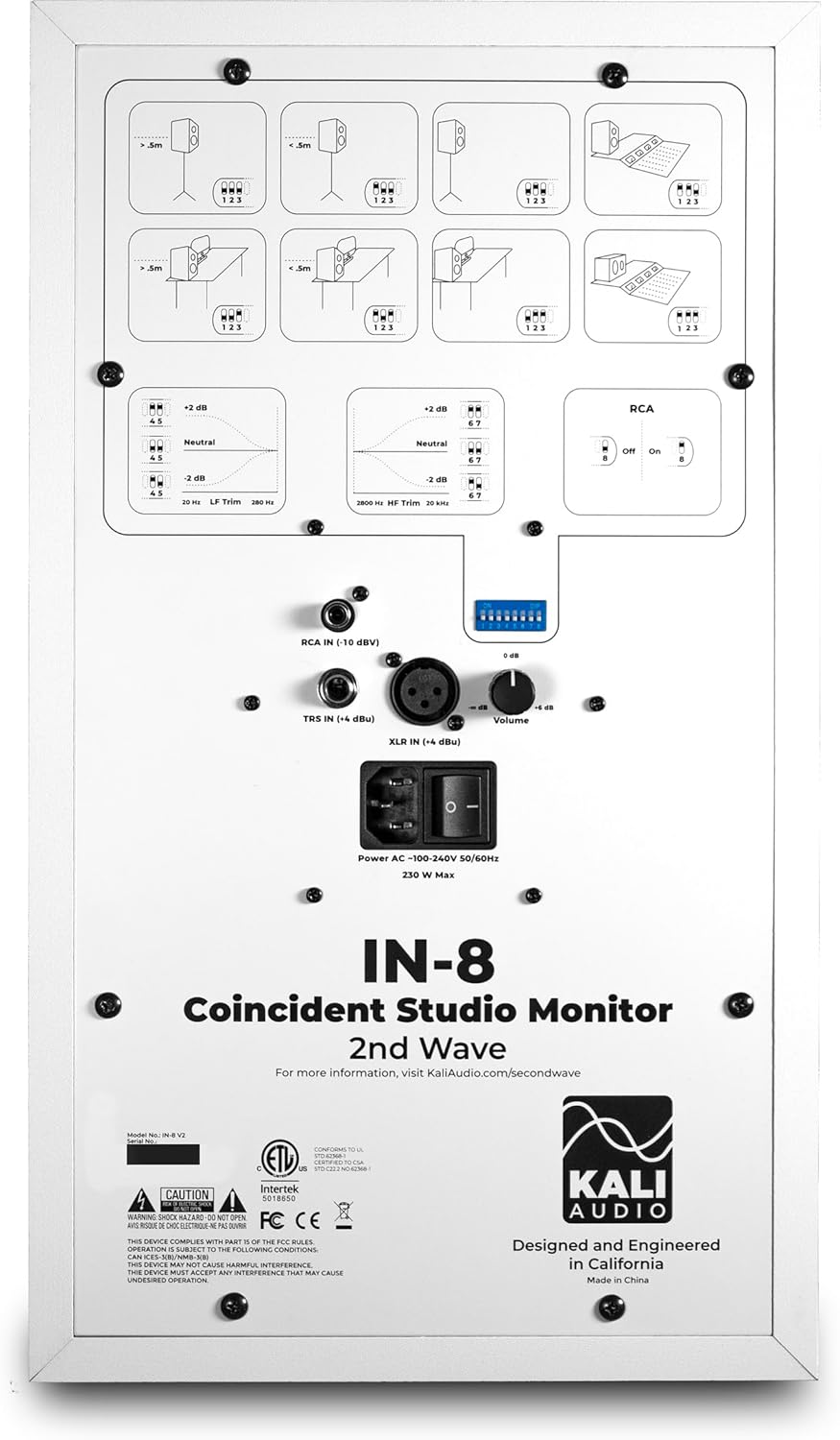
詳細 view of the rear panel of the Kali Audio IN-8W V2 studio monitor, displaying input connections (XLR, TRS, RCA), volume control, and DIP switches for boundary compensation and EQ settings.
6. 操作手順
6.1 ボリュームコントロール
The large knob on the rear panel controls the output volume of the monitor. Start with a low volume and gradually increase it to a comfortable listening level.
6.2入力の選択
The IN-8W V2 automatically detects which input is active. If multiple inputs are connected, ensure only one source is playing audio at a time to avoid signal conflicts.
6.3 Boundary Compensation EQ Settings
The IN-8W V2 features a series of DIP switches on the rear panel to adjust the monitor's frequency response based on its placement in your room. These settings help to compensate for acoustic anomalies caused by boundaries (walls, desks, etc.). Refer to the diagrams printed on the rear panel for recommended settings based on your monitor's position.
- LFトリム: 低周波応答を調整します。
- HFトリム: 高周波応答を調整します。
- RCA Input On/Off: Activates or deactivates the RCA input. Ensure this is set correctly if using RCA.
Experiment with these settings to achieve the most neutral and accurate sound in your listening environment.
7. メンテナンス
7.1 クリーニング
To clean the monitor, use a soft, dry cloth. Do not use abrasive cleaners, waxes, or solvents, as these can damage the cabinet finish or drivers. Avoid spraying liquids directly onto the monitor.
7.2 ストレージ
If storing the monitor for an extended period, ensure it is powered off and disconnected from the power source. Store it in a cool, dry place, ideally in its original packaging, to protect it from dust and physical damage.
8。 トラブルシューティング
| 問題 | 考えられる原因 | 解決 |
|---|---|---|
| 音が出ない |
|
|
| 歪んだ音 |
|
|
| ハムまたはノイズ |
|
|
9. 仕様
| モデル名 | IN-8W V2 |
| スピーカータイプ | 3ウェイパワードスタジオモニター |
| ウーファー直径 | 8インチ |
| ミッドレンジドライバー | 4 Inches (Coaxial) |
| ツイーター直径 | 1 Inch (Coaxial) |
| Ampリファイアパワー | 140ワット(クラスD) |
| 周波数応答 | 42 Hz - 22 kHz |
| 入力 | XLR (+4 dBu), TRS (+4 dBu), RCA (-10 dBV) |
| 製品寸法(奥行き×幅×高さ) | 10インチ x 15インチ x 12インチ |
| アイテム重量 | 25.9ポンド |
| 色 | 白 |
| 電源 | コード式電気 |
10. 保証とサポート
This Kali Audio IN-8W V2 studio monitor is covered by a manufacturer's warranty. For specific details regarding the warranty period and terms, please refer to the documentation included with your product or visit the official Kali Audio website. For technical support, troubleshooting assistance beyond this manual, or warranty claims, please contact Kali Audio customer service directly.
You can find more information and support resources on the official Kali Audio webサイト: www.kaliaudio.com