
ファミデュオ DS-ダック-1
FAMIDUO DoDo Duck Night Light Instruction Manual
Model: DS-DUCK-1
導入
Thank you for choosing the FAMIDUO DoDo Duck Night Light. This manual provides essential information for the safe and effective use of your new night light. Please read it thoroughly before use and retain it for future reference.
The DoDo Duck Night Light is a charming and functional addition to any child's room, offering soft illumination and a comforting presence. Its squishy silicone design and user-friendly features make it ideal for various uses, from bedtime companion to a gentle light for nighttime activities.
箱の中身
- DoDo Duck Night Light (x1)
- USB-C充電ケーブル(x1)
- 取扱説明書 (x1)
主な特徴
- 抱きしめたくなるデザイン: Inspired by a cute duck shape, made from soft, squishy silicone.
- 目に優しい照明: Emits a 3000K warm white light that is soft, comfortable, anti-blue light, and flicker-free, ideal for sensitive eyes.
- 調光可能なタッチコントロール: Easily switch between two brightness levels (low for sleep, normal for ambient light) by tapping the duck.
- 20分の自動オフタイマー: Features an optional timer that automatically turns off the light after 20 minutes, conserving energy and aiding sleep.
- 充電式&ポータブル: Equipped with a 1200mAh built-in lithium-ion battery, offering up to 12 hours of cordless use on a single charge. Recharges via USB-C.
- 耐久性と安全性: Constructed from non-toxic, BPA-free silicone, making it 100% safe for children. It is water-resistant and drop-proof.
セットアップと充電
- 初期費用: Before first use, fully charge the night light. Connect the provided USB-C cable to the charging port on the bottom of the duck and plug the other end into a compatible USB power adapter (not included).
- 充電インジケーター: The light will indicate charging status (e.g., a red light may appear while charging and turn off when fully charged, refer to the product for specific indicator behavior).
- 充電時間: フル充電には通常約 3 時間かかります。

Image: The bottom of the DoDo Duck Night Light, highlighting the USB-C charging port and battery specifications.
操作手順
- 電源オン/オフ: Locate the power switch on the bottom of the night light. Slide it to the 'ON' position to activate the light. Slide it to 'OFF' to turn it off completely.
- Brightness Adjustment (Touch Control): Once powered on, gently tap the silicone body of the duck to cycle through brightness levels:
- First tap: Low brightness (ideal for sleeping).
- Second tap: Normal brightness (suitable for feeding or moving around).
- Third tap: Turns the light off.
- 20分タイマー機能: To activate the 20-minute auto-off timer, slide the switch on the bottom to the '20'' position. The light will remain on for 20 minutes and then automatically turn off. To disable the timer, slide the switch back to the 'ON' position.

Image: Demonstrating the touch control for dimming the DoDo Duck Night Light.

Image: The 20-minute auto-off timer function, ideal for bedtime.
Video: A demonstration of the FAMIDUO DODO Duck Night Light, showcasing its soft, squishy texture, touch control for turning on/off and dimming, and the charging port. The video highlights the product's ease of use and appealing design.
お手入れとメンテナンス
- クリーニング: To clean the silicone surface, wipe gently with a soft, damp 布で拭いてください。強力な化学薬品や研磨剤入りの洗剤は使用しないでください。
- 耐水性: The night light is water-resistant, but it is not designed to be submerged in water. Avoid direct exposure to excessive moisture.
- ストレージ: 長期間使用しない場合は、ナイトライトを涼しく乾燥した場所に保管してください。
- バッテリーのケア: バッテリー寿命を最適に保つには、バッテリーを頻繁に完全に放電することを避け、定期的に充電してください。
トラブルシューティング
| 問題 | 考えられる原因 | 解決 |
|---|---|---|
| ライトが点灯しません。 | バッテリー残量が少なくなっています。電源スイッチがオフになっています。 | Charge the night light using the USB-C cable. Ensure the power switch on the bottom is in the 'ON' or '20'' position. |
| ライトが突然消えます。 | 20-minute timer is active. Battery is low. | Check if the switch is in the '20'' timer position. If so, slide it to 'ON' for continuous light. Recharge the night light if the battery is low. |
| タッチコントロールが反応しません。 | Power switch is off. Internal malfunction. | Ensure the power switch is 'ON' or '20''. If the issue persists after charging and checking the switch, contact customer support. |
仕様
- モデル名: DS-ダック-1
- ブランド: ファミデュオ
- 材料: Silicone (Shade), ABS+PP (Base)
- 製品寸法: 奥行き4.8インチ x 幅3.62インチ x 高さ4.1インチ
- 商品の重量: 223グラム(7.9オンス)
- 光源の種類: 導かれた
- ライトカラー: 暖かい光
- 色温度: 3000ケルビン
- スイッチタイプ: 触る
- 電源: 充電式リチウムイオン電池
- バッテリー容量: 1200mAh
- バッテリー寿命: Up to 12 hours (depending on brightness setting)
- 充電時間: 約3時間
- 耐水性レベル: 耐水性
- 特別な機能: Dimmable, Pat Control, Portable, Timer, Energy Efficient
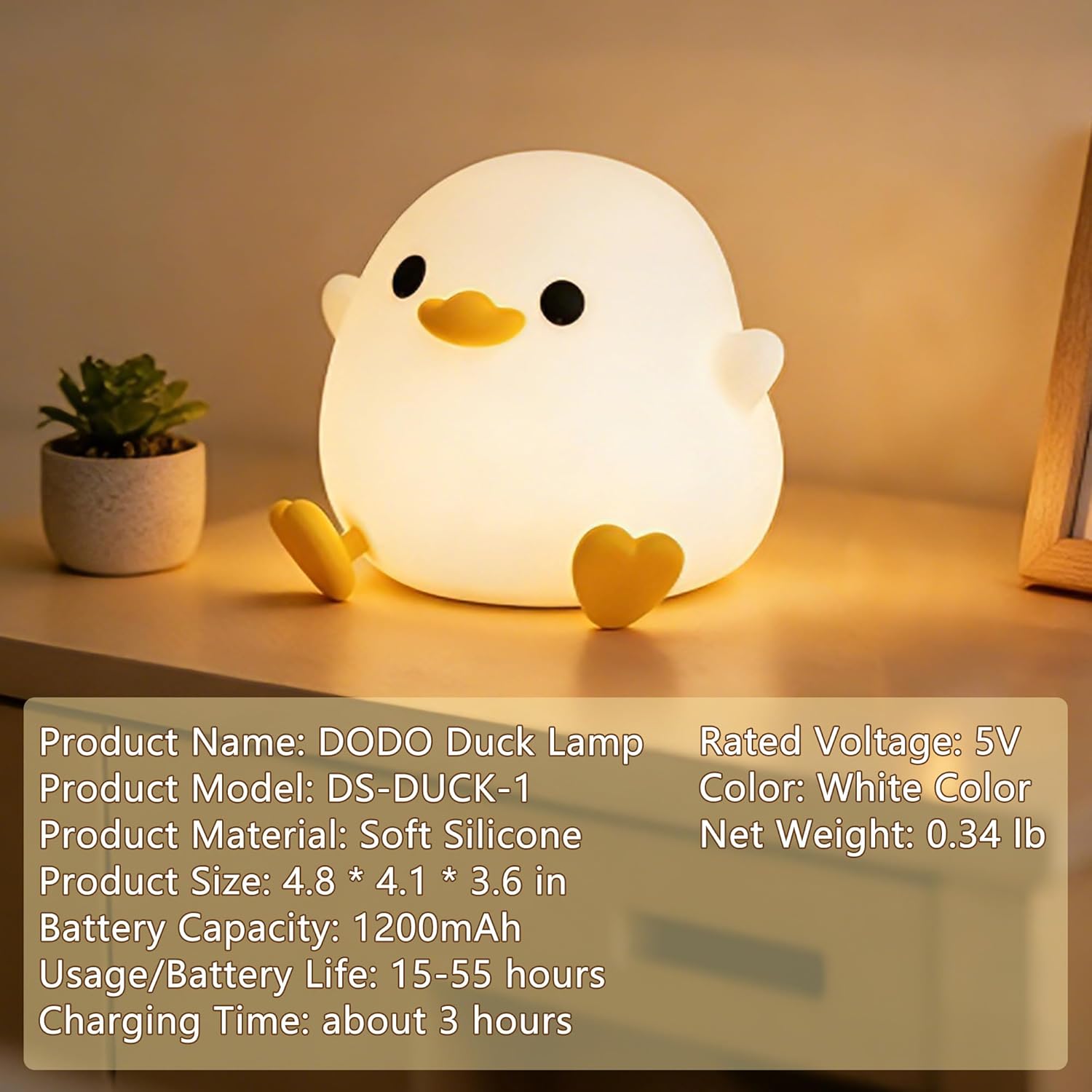
Image: Detailed product specifications of the DoDo Duck Night Light.
安全情報
- Keep out of reach of very young children without supervision to prevent choking hazards from small parts (e.g., charging cable).
- Do not disassemble or attempt to repair the device yourself. This may void the warranty and pose a safety risk.
- 充電には付属の USB-C ケーブルのみを使用してください。
- Avoid exposing the night light to extreme temperatures or direct sunlight for prolonged periods.
- 製品とそのバッテリーは、地域の規制に従って責任を持って廃棄してください。
保証とサポート
For warranty information, technical support, or any questions regarding your FAMIDUO DoDo Duck Night Light, please refer to the contact information provided on the product packaging or visit the official FAMIDUO webサイト。
Ask a question about this manual
Ask about setup, troubleshooting, compatibility, parts, safety, or missing instructions. Manuals+ will review the question and use this page’s manual context to help answer it.