
LAMA A2696/A2757/A2777/A3354/A3355/A3356
LAMA Magnetic Keyboard Case User Manual
iPad第10世代(2022年)およびiPad第11世代(2025年)向け
導入
This manual provides detailed instructions for the LAMA Magnetic Keyboard Case, designed to enhance the functionality of your compatible iPad. It covers setup, operation, maintenance, and troubleshooting to ensure optimal performance and user experience.

Image: The LAMA Magnetic Keyboard Case with an iPad attached, showcasing the keyboard and trackpad in use.
互換性
The LAMA Magnetic Keyboard Case is compatible with the following iPad models:
- iPad 10th Generation 10.9-inch (2022): Model Numbers A2696, A2757, A2777
- iPad (A16) 11th Generation 11-inch (2025): Model Numbers A3354, A3355, A3356
To verify your iPad model, check the "Axxxx" logo on the rear of your iPad or navigate to 設定 > 一般 > 情報 and tap the "Mxxxx" part number to reveal the "Axxxx" model number.

Image: Visual representation of compatible iPad models and their corresponding model numbers.
パッケージ内容
- LAMA Magnetic Keyboard Case
- USB-C充電ケーブル
- ユーザーマニュアル(このドキュメント)
セットアップガイド
1. iPadの取り付け
- iPad をケースの磁気背面パネルに合わせます。
- The iPad will magnetically snap into place, ensuring a secure connection.
- Ensure the camera cutout and ports align correctly with the case openings.
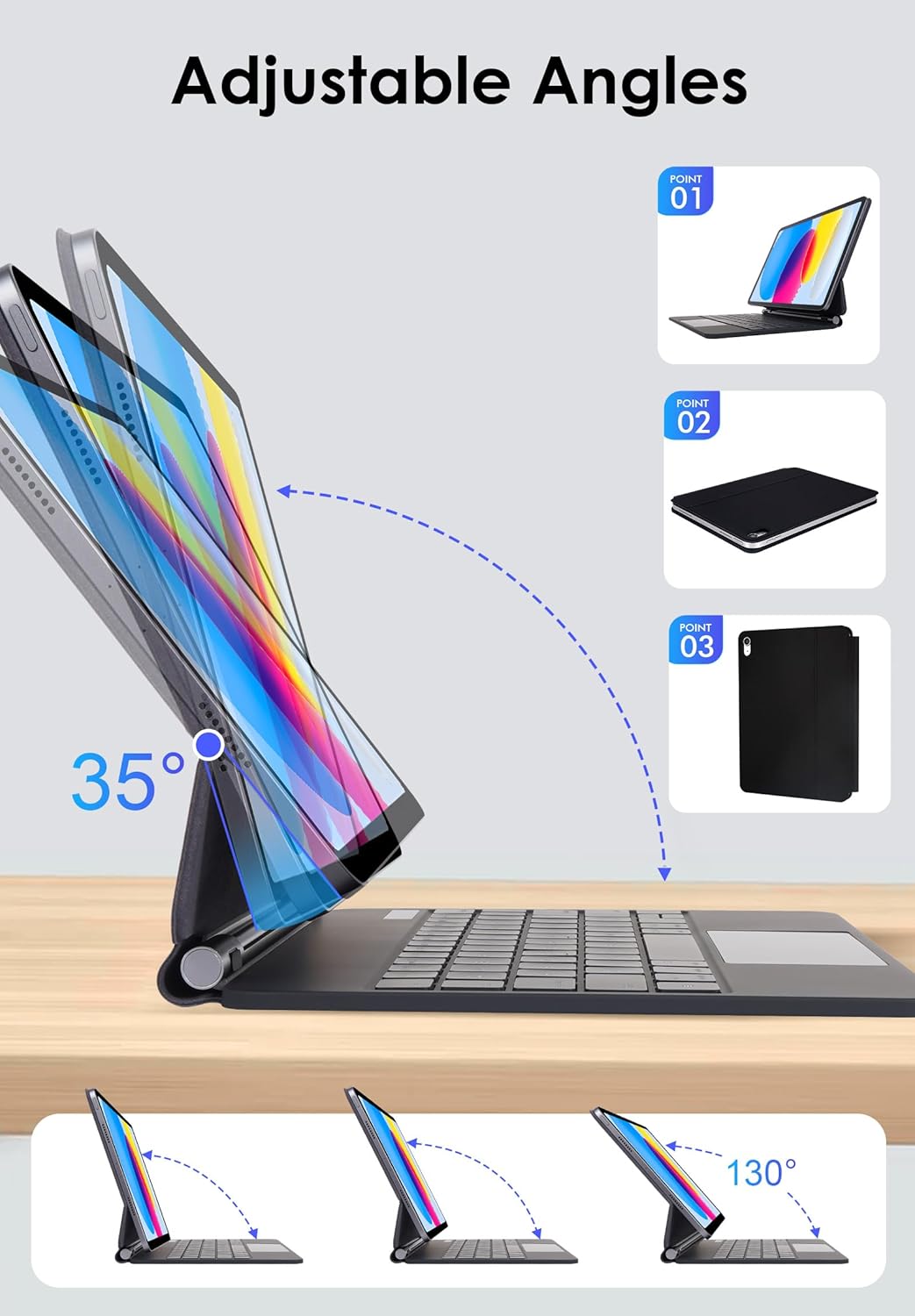
Image: The keyboard case demonstrating its adjustable angles and how the iPad attaches magnetically.
2. キーボードの充電
- キーボードの側面にある USB-C 充電ポートを見つけます。
- Connect the provided USB-C cable to the keyboard and a power source (e.g., USB wall adapter, computer USB port).
- 充電インジケーターライトが点灯します。フル充電には通常2~3時間かかります。
- The keyboard has a long standby time of up to 150 days and a working time of 80 hours on a single charge.
3.Bluetoothペアリング
- 電源スイッチをスライドしてキーボードの電源を入れます。Bluetoothインジケーターライトが点滅します。
- iPadで、 設定 > Bluetooth.
- Bluetoothがオンになっていることを確認します。
- Select "LAMA Keyboard" (or similar name) from the list of available devices.
- 画面の指示に従ってペアリングを完了してください。ペアリングが成功すると、キーボードのBluetoothインジケーターライトの点滅が停止します。
Video: This video demonstrates the magnetic attachment of the iPad to the keyboard case, followed by typing and trackpad usage, illustrating the setup and basic operation.
操作手順
キーボード機能
- バックライト制御: プレス ファンクション+ ライトアイコン to cycle through 7 backlight colors. Press ファンクション+ 太陽のアイコン to adjust the 3 levels of brightness.
- ショートカットキー: The keyboard includes dedicated iOS multimedia and standard layout shortcut keys. Refer to the keyboard layout for specific functions (e.g., volume control, media playback, home screen).

Image: The keyboard displaying its 7-color backlight feature with brightness adjustment options.
Multi-Touch Trackpad Gestures
The integrated multi-touch trackpad supports various gestures for enhanced navigation:
- シングルフィンガータップ: Click/Select.
- 2本指スクロール: Scroll up/down or left/right.
- Two Finger Pinch: Zoom in/out.
- XNUMX本の指で上にスワイプ: Open the App Switcher.
- XNUMX本の指で下にスワイプ: Return to Home Screen.
- 感度の調整: へ移動 iPad Settings > General > Trackpad & Mouse > Tracking Speed.

Image: A user's hands demonstrating multi-touch gestures on the trackpad of the LAMA keyboard case.
調節可能なスタンド
フローティングカンチレバースタンドは柔軟な viewing angles from 0-180°. Adjust the iPad to your preferred angle for typing, drawing, viewing、または読む。
自動スリープ/ウェイク機能
The keyboard case features an auto sleep/wake function. Opening the case will wake your iPad, and closing it will put your iPad to sleep, conserving battery life. The iPad will automatically disconnect from the keyboard after 10 minutes of inactivity; press any key to re-establish the connection.
メンテナンス
- クリーニング: ソフト、d を使用します。amp ケースとキーボードの外側を布で拭いてください。刺激の強い化学薬品や研磨剤は使用しないでください。
- ストレージ: When not in use, keep the keyboard case closed to protect your iPad and conserve keyboard battery. Store in a cool, dry place.
- 充電: Charge the keyboard regularly, even if not used frequently, to maintain battery health.
トラブルシューティング
キーボードがBluetooth経由で接続されない
- キーボードがオンになっていて、完全に充電されていることを確認してください。
- Turn off and then turn on Bluetooth on your iPad.
- Forget the device ("LAMA Keyboard") in your iPad's Bluetooth settings and attempt to re-pair.
- iPadとキーボードの両方を再起動します。
トラックパッドが反応しない
- キーボードが Bluetooth 経由で接続されていることを確認します。
- Check iPad settings for trackpad functionality: Settings > General > Trackpad & Mouse.
- トラックパッドの表面を清掃してゴミを取り除きます。
キーが機能しない
- キーボードが充電され、接続されていることを確認します。
- キーの下に異物が入っていないことを確認してください。
- 特定のキーが反応しない場合は、カスタマー サポートにお問い合わせください。
仕様
| ブランド | ラマ |
| モデル番号 | A2696/A2757/A2777 (iPad 10th Gen), A3354/A3355/A3356 (iPad 11th Gen) |
| 接続性 | ワイヤレス(Bluetooth) |
| キーボードバックライト | 7色、3段階の明るさ(RGB) |
| 特集 | Multi-Touch Trackpad, Floating Cantilever Stand, Auto Sleep/Wake, Foldable |
| 電池のタイプ | リチウムポリマー(付属) |
| 勤務時間 | 最大80時間 |
| 待機時間 | 最長150日間 |
| 充電時間 | 2~3時間 |
| 製品寸法 | 9.84 x 7.56 x 4.33インチ |
| アイテム重量 | 1.5ポンド |
保証とサポート
LAMA products are designed for quality and reliability. For warranty information or technical support, please refer to the contact details provided with your purchase or visit the official LAMA webサイト。 保証請求に備えて購入時のレシートを保管しておいてください。
さらに詳しいサポートが必要な場合は、 LAMA Store on Amazon.
Ask a question about this manual
Ask about setup, troubleshooting, compatibility, parts, safety, or missing instructions. Manuals+ will review the question and use this page’s manual context to help answer it.