
1. はじめに
Thank you for choosing the PULWTOP 9-in-1 Powered USB C Hub. This instruction manual provides essential information for the safe and efficient use of your new device. Please read it thoroughly before operation and retain it for future reference.
This USB C Powered Hub is designed to expand the connectivity of your laptop, desktop, or gaming host by adding multiple USB-C and USB-A ports for data transfer and charging. It comes with a dedicated power adapter to ensure stable performance across all connected devices.
2. 主な特徴
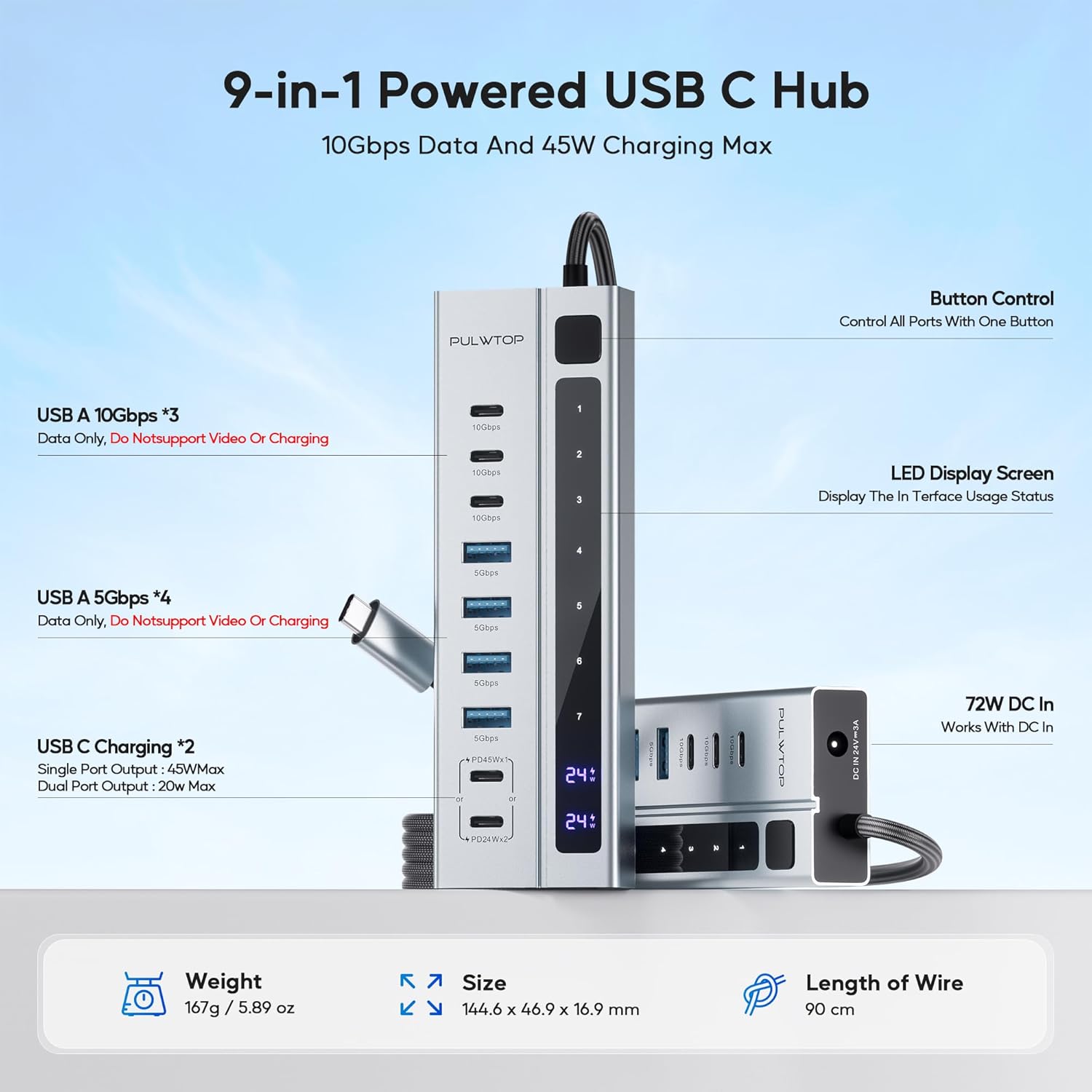
- Hybrid Powered USB C Hub: Adds 3 USB-C 3.2 10Gbps ports (Data ONLY), 4 USB-A 3.0 5Gbps ports (Data ONLY), and 2 USB-C PD Charging Ports (Charge ONLY).
- パワフルかつ安全: Equipped with a 72W (24V/3A) power adapter, supporting 1x45W or 2x24W charging via PD ports. Ensures secure and stable data transfer for all connected devices.
- 超高速データ転送: 3 USB-C ports provide up to 10Gbps and 4 USB-A 3.0 ports provide up to 5Gbps for rapid file 転送。
- Sturdy Design & Button Control: High-quality aluminum housing with a durable 90cm braided cable. Features a single power button to control all ports.
- Note on Video Output: All ports of this Powered USB C Hub do NOT support video output function.
- Note on PD Charging: USB-C PD ports only support charging, without data and video transmission. Not designed to provide power to your laptop.
- Samsung Charging Protocol: Due to Samsung's charging protocol, the hub supports a maximum of 24W charging for Samsung phones and tablets.
3. パッケージ内容
開梱時にすべての品目が揃い、良好な状態であることを確認してください。
- PULWTOP 9-in-1 Powered USB C Hub
- 72W DC電源アダプター
- ユーザーマニュアル

4. セットアップ手順
- 電源アダプタを接続: Plug the 72W DC Power Adapter into the DC IN 24V=3A port on the hub. Then, plug the power adapter into a wall outlet.
- ホストデバイスに接続します: Connect the integrated USB-C cable from the hub to a compatible USB-C port on your laptop, desktop, or gaming host.
- 電源オン: Press the power button on the hub to activate the device. The LED display screen will show usage status.
- 周辺機器を接続します。 You can now connect your USB-C and USB-A devices to the available ports on the hub.

5. 操作手順
5.1 ポート機能
- USB-C 3.2 10Gbps Ports (x3): These ports are for data transfer ONLY. They do NOT support video output or charging.
- USB-A 3.0 5Gbps Ports (x4): These ports are for data transfer ONLY. They do NOT support video output or charging.
- USB-C PD Charging Ports (x2): These ports are for charging ONLY. They do NOT support data transfer or video output. They can deliver 45W max for a single port or 24W max per port when both are connected.
5.2ボタンコントロール
The hub features a single power button that controls all ports. Press the button to turn the hub on or off. If you reconnect or restart your laptop, please press the USB-C hub's power button to re-enable the device.


5.3 ユニバーサルな互換性
The PULWTOP 9-in-1 Powered USB C Hub is compatible with a wide range of operating systems and devices:
- システム: MacOS, Windows, Linux, ChromeOS, Android
- ホストデバイス: PC, Laptop, Phone, Tablet
- 周辺機器: Keyboard, Flash Drive, USB Fan, USB Lamp, HDD/SSD, Gamepad, Camera, Printer, Card Reader

5.4 公式製品ビデオ
6. 仕様
| 製品寸法 | 4.25 x 1.85 x 0.66インチ |
| アイテム重量 | 1.32ポンド |
| 商品型番 | CW2403000C6 |
| ブランド | パルトップ |
| メーカー | パルトップ |
| ハードウェアインターフェイス | USB |
| 特集 | 9-Port Powered USB hub, Fast Data Transfer, Indicator Light, Multiple USB C Port Hub Powered |
| 対応デバイス | ノートパソコン |
7. メンテナンス
- クリーニング: ハブの清掃には、柔らかく乾いた布をご使用ください。液体洗剤やエアゾールの使用は避けてください。
- ストレージ: ハブは直射日光や極端な温度を避け、涼しく乾燥した場所に保管してください。
- 取り扱い: デバイスを落としたり、強い衝撃を与えたりしないでください。
8。 トラブルシューティング
- デバイスが認識されません:
- ハブの電源アダプタが壁のコンセントとハブにしっかりと差し込まれていることを確認します。
- Verify the hub's integrated USB-C cable is firmly connected to your host device.
- Press the power button on the hub to ensure it is turned on.
- If using a Windows laptop, ensure its USB C port supports data transfer.
- データ転送が遅い:
- Ensure your connected devices and cables support 10Gbps or 5Gbps speeds.
- 同時に高帯域幅のデバイスを多数接続することは避けてください。
- 充電されないデバイス:
- Confirm you are using the dedicated USB-C PD Charging Ports for charging.
- Check if the device you are trying to charge is compatible with the hub's charging output (e.g., Samsung devices have a 24W max limit).
- Ensure the hub's power adapter is providing sufficient power.
- ビデオ出力なし:
- This hub does NOT support video output from any of its ports. It is designed for data and charging only.
9. 保証とサポート
For warranty information and technical support, please refer to the contact details provided on the product packaging or visit the official PULWTOP webサイトでご確認ください。保証請求の際は購入証明として領収書を保管してください。