
1. はじめに
The Fuers WLAN Water Leak Detector (Model WFSJ01) is designed to provide real-time monitoring for water leaks and drips in your home or office. This device connects to your 2.4 GHz Wi-Fi network and sends instant notifications to your smartphone via the Tuya app, allowing for prompt action to prevent potential water damage. Its robust design and dual detection capabilities make it an essential tool for safeguarding your property.
2. 安全情報
- デバイスを極端な温度や直射日光にさらさないでください。
- デバイスを子供やペットの手の届かない場所に保管してください。
- 指定された種類の電池(単4電池2本)のみを使用してください。
- 取り付け時に電池の極性が正しいことを確認してください。
- 使用済みバッテリーは、地域の規制に従って廃棄してください。
- ご自身でデバイスの分解や修理を試みないでください。必要に応じてサポートにお問い合わせください。
3. パッケージ内容
- 1 x Fuers WLAN Water Leak Detector (Model WFSJ01)
- 単2電池XNUMX本
- ユーザーマニュアル x 1
4.製品オーバーview
The Fuers WLAN Water Leak Detector features a compact design with advanced sensors for reliable water detection. It operates wirelessly and integrates with the Tuya Smart Life app for remote monitoring and alerts.
主な特徴:
- Smart Monitoring & Remote Notifications: Connects via 2.4 GHz Wi-Fi to send real-time alerts to your smartphone.
- Dual Detection Modes: Equipped with rear sensors for leak detection and a front probe for small drip detection.
- 100dB Local Alarm: Emits a loud audible alarm upon water detection.
- IP67防水等級: Designed for long-term use in humid environments.
- 耐久性のあるABS素材: High-quality construction ensures longevity and resistance to breakage.
- 電池駆動: Operates on 2 AAA batteries (included) for flexible placement and continuous protection during power outages。
- 低バッテリー警告: Sends app notifications when batteries need replacement.
コンポーネント:
The device consists of a main body housing the electronics, battery compartment, and an audible alarm. It features two types of sensitive probes:
- リアセンサー: For detecting widespread water leaks.
- Front Probe: Specifically designed for detecting small drips.

Image: The Fuers Water Leak Detector with its battery compartment open, revealing two AAA batteries and illustrating the front and rear sensitive probes.
5. セットアップ
5.1 バッテリーの取り付け
- Gently twist the cover of the device counter-clockwise to open it.
- Confirm the positive (+) and negative (-) poles inside the battery compartment.
- Insert the two AAA batteries, ensuring correct polarity.
- Align the cover and twist clockwise to tighten and secure it.

Image: A four-step visual guide demonstrating how to open the device cover, confirm battery polarity, insert AAA batteries, and securely close the cover.
5.2 App Pairing (Tuya Smart Life)
- スマートフォンのアプリストア(iOS または Android)から「Tuya Smart」または「Smart Life」アプリをダウンロードします。
- アカウントに登録またはログインします。
- スマートフォンが2.4GHzのWi-Fiネットワークに接続されていることを確認してください。このデバイスは5GHzのWi-Fiをサポートしていません。
- アプリを開き、「+」アイコンをタップして新しいデバイスを追加します。
- Select "Security & Video Surveillance" > "Water Leak Sensor (Wi-Fi)" or search for "Water Leak Sensor".
- Follow the on-screen instructions to put the device into pairing mode (usually involves pressing and holding a button on the device until an indicator light flashes).
- Enter your Wi-Fi network password in the app.
- Wait for the device to connect. Once connected, you can rename the device and assign it to a specific room.
6. 操作手順
Once set up, the Fuers WLAN Water Leak Detector continuously monitors for water presence. It features two primary detection methods:
- 漏れ検出: The rear sensors detect larger water leaks, triggering a 100dB alarm and sending an immediate app notification.
- 滴下検出: The front probe is designed to detect small drips, ideal for placement under faucets or pipes. This also triggers the alarm and app notification.
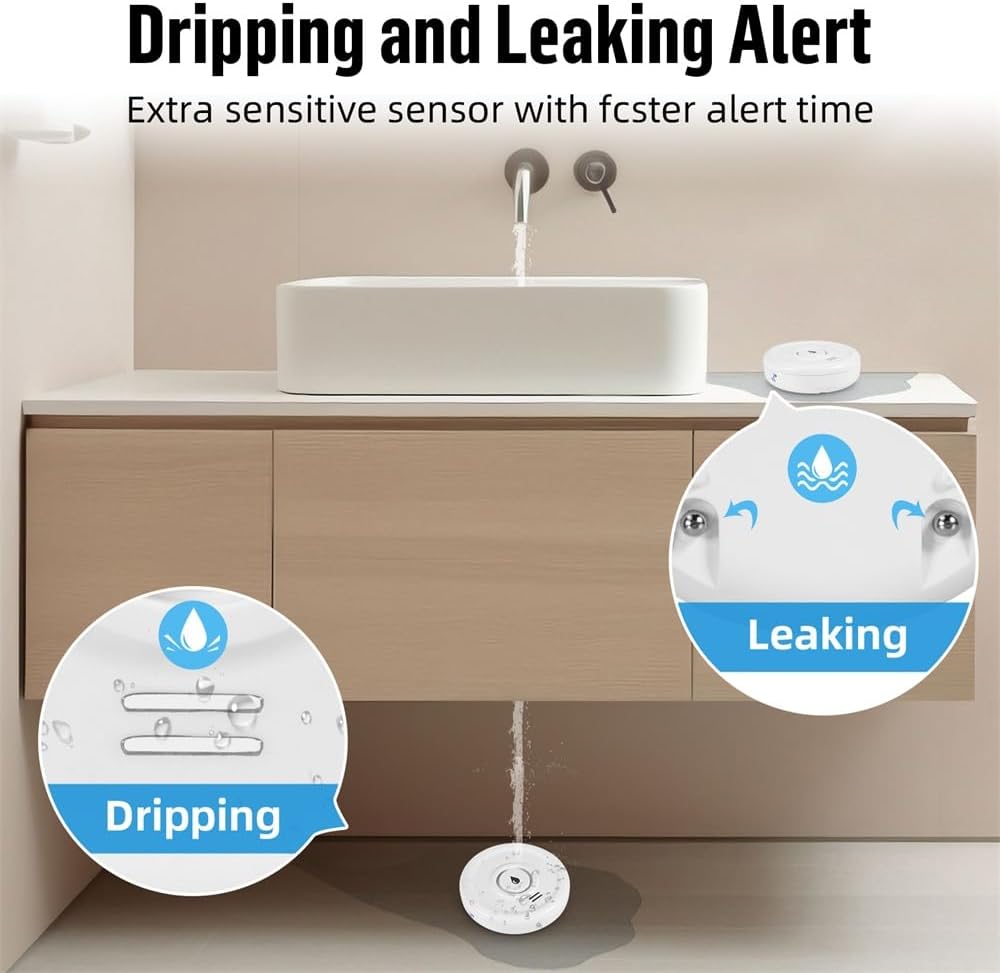
Image: A visual representation of the device's ability to detect both small drips and larger leaks, highlighting its versatile sensing capabilities.
アラートの受信:
When water is detected, the device will:
- Emit a loud 100dB audible alarm.
- Send a real-time push notification to your smartphone via the Tuya Smart Life app.

Image: The water leak detector placed on a wet surface, indicating a leak, while a smartphone displays a 'Water Leakage Alarm' notification from the app.
You can customize notification settings within the Tuya Smart Life app. The app also allows you to view the device's status and battery level.
7. メンテナンス
7.1 電池の交換
The device operates on 2 AAA batteries with a standby time of up to two years. The app will send a low battery warning notification to your smartphone when the batteries need replacement. To replace batteries, follow the steps in Section 5.1.

Image: The Fuers Water Leak Detector with its battery compartment open, showing two AAA batteries and a graphical representation of battery life, indicating up to 2 years of standby time.
7.2 クリーニング
Wipe the device with a soft, dry cloth. Do not use abrasive cleaners or immerse the device in water (beyond its intended IP67 rating for detection) as this may damage internal components.
8。 トラブルシューティング
| 問題 | 考えられる原因 | 解決 |
|---|---|---|
| デバイスがWi-Fiに接続できない | Incorrect Wi-Fi password; Not a 2.4 GHz network; Device too far from router; Pairing mode not activated. | Verify Wi-Fi password. Ensure router is 2.4 GHz. Move device closer to router. Re-enter pairing mode as per app instructions. |
| アプリ通知なし | App notifications disabled; Device offline; Low battery. | Check app notification settings. Verify device is online in the app. Replace batteries if low battery warning is present. |
| アラームが鳴らない | バッテリー残量が少ない、デバイスが故障している。 | 電池を交換してください。問題が解決しない場合は、カスタマーサポートにお問い合わせください。 |
| 誤警報 | Condensation or high humidity; Device placed on a damp 表面。 | Ensure placement is on a dry surface. Avoid areas with excessive condensation. |
9. 仕様
- モデル番号: WFSJ01
- 寸法: 20mm (長さ) x 50mm (幅) x 65mm (高さ)
- 電源: 単2電池XNUMX本(付属)
- ワイヤレス接続: Wi-Fi 2.4GHz(IEEE 802.11b/g/n)
- 対応アプリ: トゥヤスマート / スマートライフ
- アラーム音量: 100デシベル
- 防水等級: IP67
- 材料: 高品質のABSプラスチック
- Max Range (Wireless): 20メートル(障害物がない状態)
- センサー技術: 接触センサー
- インストールタイプ: Floor/Surface Mount

Image: The Fuers Water Leak Detector partially submerged in water, demonstrating its IP67 waterproof and durable construction.
10. 保証とサポート
This product comes with a standard manufacturer's warranty. For detailed warranty information, please refer to the documentation included with your purchase or contact the retailer. For technical support, troubleshooting assistance, or any inquiries regarding your Fuers WLAN Water Leak Detector, please visit the official Fuers webサイトまたは顧客サービス部門に連絡してください。
オンラインリソース:
- Tuyaスマートアプリ: www.tuya.com/app
- スマートライフアプリ: www.smartlife.com/app