
導入
This manual provides detailed instructions for the Svetaecho Wireless Controller. This controller is designed for use with Nintendo Switch, Switch Lite, Switch OLED, Windows PC (wired connection), iOS, and Android devices. Please read this manual thoroughly before use to ensure proper operation and to maximize your gaming experience.
注記: This controller does not support Xbox games.
製品の特徴
- Customizable Macro Buttons: Two back buttons (ML/MR) can be programmed to map 1-20 combined functions from A/B/X/Y/L/ZL/R/ZR/L3/R3/D-pad for enhanced gameplay. Double-click SR/SL to temporarily enable/disable macro functions.
- 調整可能なターボ機能: Supports both Auto and Manual Turbo modes with three adjustable speeds: 5 shots/s, 12 shots/s, and 20 shots/s.
- デュアル振動モーター: Built-in motors provide 3-level vibration feedback (None, Weak, Strong) for Switch and Windows PC games. Adjust intensity by pressing and holding L, R, ZL, ZR simultaneously.
- 6軸ジャイロセンサー: High-sensitivity gyro sensors offer precise motion control for Nintendo Switch games.
- One-Key Wake-Up (Switch Only): After initial connection, press the HOME button to wake up and reconnect the Switch console.
- 大容量バッテリー: Integrated 1000mAh battery provides over 16 hours of playtime in LED lit mode. Fully charges in approximately 3 hours via USB Type-C.
- 自動スリープモード: The controller automatically shuts down after 20 minutes of inactivity in a connected state. Press the HOME button to wake and reconnect.
パッケージ内容
- 1x Svetaecho Wireless Controller
- USB Type-C充電ケーブル x 1
- ユーザーマニュアル (本書) x 1
コントローラーのレイアウト

画像: フロント view of the Svetaecho Wireless Controller, highlighting the main buttons, joysticks, D-pad, and the M1/M2 back buttons.
The controller features standard gaming buttons including A, B, X, Y, L, R, ZL, ZR, D-pad, Left and Right Analog Sticks, HOME button, SHARE button, TURBO button, and two programmable back buttons (M1/ML and M2/MR).

画像: 後方 view of the Svetaecho Wireless Controller, showing the SR, SL, and M buttons, along with the ML and MR programmable back buttons.
セットアップとペアリング
1. Nintendo Switch Pairing
- SwitchのHOMEメニューから、「コントローラー」>「グリップ/順序の変更」を選択します。
- Press and hold the HOME button on the Svetaecho controller for 3-5 seconds until the LED indicators begin to flash rapidly.
- 接続されると、コントローラー上の対応するプレーヤー LED が点灯します。
- To wake up the Switch console after the first connection, simply press the HOME button on the controller.
2. PC(有線接続)
- Connect the controller to your Windows PC using the provided USB Type-C cable.
- コントローラーは有線ゲームパッドとして自動的に認識されます。
- Vibration function is supported on Windows PC.
3. iOS/Android Pairing (Wireless)

画像: The Svetaecho Wireless Controller shown alongside various compatible devices including Nintendo Switch, PC, iOS, and Android phones/tablets.
- iOS または Android デバイスで Bluetooth が有効になっていることを確認します。
- Press and hold the HOME button on the controller for 3-5 seconds until the LED indicators flash rapidly.
- On your device, search for Bluetooth devices and select the controller (e.g., 'Pro Controller' or similar).
- ペアリングされると、LED インジケーターが点灯します。
操作手順
1. Custom Macro Buttons (ML/MR)
- プログラミング: Press and hold the 'M' button, then press the ML or MR button you wish to program. The LED will flash. Now, press the sequence of buttons (up to 20) you want to assign. Press ML or MR again to save the macro.
- マクロの使用: Simply press the programmed ML or MR button to execute the assigned sequence.
- Enable/Disable Macro: Double-click the SR or SL button to temporarily enable or disable the macro function.
2. ターボ機能

画像: The Svetaecho Wireless Controller illustrating the three adjustable Turbo speeds: 5 shots/s, 12 shots/s, and 20 shots/s.
- マニュアルターボ: Press and hold the TURBO button, then press the desired action button (A/B/X/Y/L/R/ZL/ZR) to enable Turbo for that button. Release TURBO. Now, holding the action button will trigger rapid presses.
- 自動ターボ: Press and hold the TURBO button, then double-press the desired action button. Release TURBO. The action button will now continuously trigger rapid presses without being held down.
- ターボ速度の調整: With Turbo enabled for a button, press and hold the TURBO button, then move the Right Analog Stick Up or Down to cycle through the three speeds (5, 12, 20 shots/s).
- クリアリングターボ: To clear Turbo for a single button, press and hold TURBO, then press the action button twice. To clear all Turbo settings, press and hold the TURBO button for 5 seconds.
3. Vibration Adjustment (Switch/PC Only)

画像: The Svetaecho Wireless Controller highlighting its 6-axis gyro sensor for precise motion control and dual motor vibration with adjustable intensity levels (None, Weak, Strong).
To cycle through vibration intensities (None, Weak, Strong), press and hold the L, R, ZL, and ZR buttons simultaneously.
4. Motion Control (Switch Only)
The built-in 6-axis gyro sensor provides motion control capabilities for compatible Nintendo Switch games. No special setup is required; the feature activates automatically when supported by the game.
5. LED照明モード
The controller features multi-RGB lighting. Specific instructions for changing LED modes are typically found in the quick start guide or by pressing a dedicated button (often indicated by a lightbulb icon) on the controller. Refer to the quick start guide for detailed steps on adjusting LED patterns and colors.
バッテリーと充電
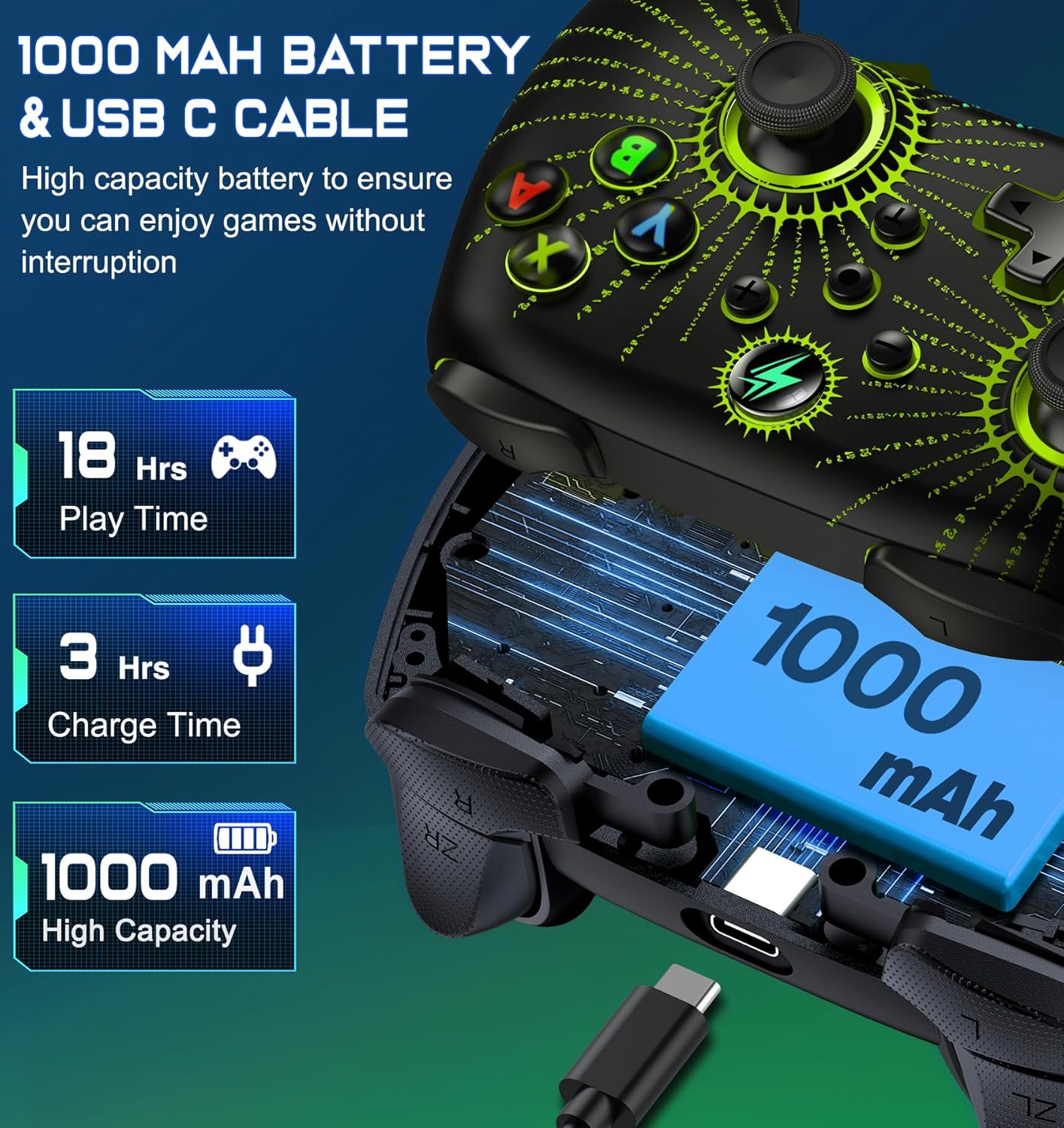
画像: 爆発した view of the Svetaecho Wireless Controller showing the internal 1000mAh battery and the USB Type-C charging port with cable.
- コントローラーには1000mAhの充電式バッテリーが搭載されています。
- Connect the controller to a USB power source (e.g., Switch dock, PC, USB wall adapter) using the provided USB Type-C cable to charge.
- 充電時間はフル充電まで約 3 時間です。
- A full charge provides over 16 hours of playtime with LED lighting active.
- LED インジケーターは充電状態を示し、完全に充電されると消灯するか色が変わります。
メンテナンス
- コントローラーは乾燥した場所に保管し、極端な温度から遠ざけてください。
- コントローラーは柔らかく乾いた布で拭いてください。刺激の強い化学薬品や研磨剤の使用は避けてください。
- コントローラーを分解しないでください。保証が無効になり、損傷が発生する可能性があります。
- 偶発的な損傷を防ぐため、使用していないときはコントローラーを安全な場所に保管してください。
トラブルシューティング
- コントローラーが接続されていません: Ensure the controller is charged. Re-attempt the pairing process. For Switch, ensure 'Pro Controller Wired Communication' is enabled in system settings if using wired mode.
- 入力遅延または切断: Ensure there are no strong wireless interferences nearby. Move closer to the console/device. Ensure the controller battery is not low.
- ボタンが反応しない: Check if the macro function is temporarily disabled (double-click SR/SL). If the issue persists, try resetting the controller (a small reset button may be located on the back, often requiring a pin to press).
- 振動が機能しない: Ensure the vibration intensity is not set to 'None'. Check game settings for vibration support.
- コントローラーが充電されない: Ensure the USB-C cable is securely connected to both the controller and the power source. Try a different USB port or cable.
Firmware Update for Switch 2

画像: A step-by-step guide demonstrating how to update the controller's firmware for Switch 2 compatibility using the 'KeyLinker' mobile application.
注記: All functions are supported except "One Press Home key to Wake up the Switch 2 console" and "Open voice menu" after the update.
- ステップ1: 検索する the "KeyLinker" app in your mobile app store, then download and install it.
- ステップ2: Turn on Bluetooth on your phone and pair the controller with your phone. (Refer to the pairing method in this manual).
- ステップ3: Open the "KeyLinker" app.
- ステップ4: In the app, search for the Bluetooth name "NC100" and tap to pair. (If the controller's Bluetooth name does not appear on the screen, press and hold the screen, then pull down to refresh several times.)
- ステップ5: Tap the three dots in the top right corner, then select "Update device".
- ステップ6: Enter the upgrade interface, tap "Update Now" at the bottom of the screen, and confirm. (If the update button doesn't appear, please wait a few minutes.)
- ステップ7: Wait for the update to complete. (If the upgrade fails, please try several more times.)
仕様
| メーカー | スヴェタエチョ |
| アイテム重量 | 11.3オンス |
| パッケージ寸法 | 6.38 x 4.72 x 2.64インチ |
| バッテリー容量 | 1000mAh |
| 充電時間 | 約3時間 |
| Playtime (LED Lit Mode) | 16時間以上 |
| 接続性 | ワイヤレス(Bluetooth)、有線(USB Type-C) |
| 互換性 | Nintendo Switch/Lite/OLED, Windows PC, iOS, Android |
保証とサポート
For warranty information or technical support, please refer to the contact details provided with your purchase or visit the official Svetaecho webサイト。 保証請求に備えて購入時のレシートを保管しておいてください。