1. はじめに
This manual provides instructions for the NYXI Striker Retro Mechanical Gaming Keyboard (Model: CA01). This keyboard features multi-device connectivity, hot-swappable switches, RGB backlighting, and a customizable display screen. It is compatible with Windows, macOS, and iOS systems.

Image 1.1: The NYXI Striker Retro Mechanical Gaming Keyboard, showcasing its GameCube-inspired design and full layout.
2. パッケージ内容
パッケージにすべてのアイテムが揃っていることを確認します。
- NYXI Striker Retro Mechanical Gaming Keyboard
- キーキャッププーラー
- USBケーブル(USB-C - USB-A)
- Additional Switches (5x Red, 5x Blue)
- 2.4GHz Wireless Receiver (stored in keyboard compartment)

Image 2.1: All components included with the NYXI Striker Retro Mechanical Gaming Keyboard.
3.製品オーバーview
The NYXI Striker keyboard features a 97-key layout with several distinct components:
- キーキャップ: Dual-color keycaps for a comfortable typing experience.
- メカニカルスイッチ: Hot-swappable switches for customization.
- RGBバックライト: さまざまな効果を備えたキーごとの RGB イルミネーション。
- 表示画面: A pixelated dot matrix screen for animations and status.
- ボリュームローラー: A dedicated roller for audio adjustment.
- 接続スイッチ: Located on the side/back for switching between wired, 2.4G, and Bluetooth modes.
- USB-Cポート: 有線接続と充電用。
- 2.4GHz Receiver Compartment: A dedicated slot to store the wireless receiver.
- 調節可能な足: XNUMX秒tage tilt stands for ergonomic positioning.

画像3.1: 上 view of the keyboard, showing the full key layout and integrated display screen.

画像3.2: サイドプロfile キーボードの。

Image 3.3: Location of the 2.4GHz wireless receiver compartment.

Image 3.4: Three-level adjustable tilt stand for ergonomic comfort.
4. セットアップ
4.1 初期充電
Before first use, connect the keyboard to a USB power source using the provided USB-C cable to ensure it is fully charged. The keyboard can be used while charging in wired mode.
4.2 接続モード
The NYXI Striker keyboard supports three connection modes: Bluetooth 5.0, 2.4GHz wireless, and USB wired. Use the switch located on the keyboard to select your desired mode.
- USB有線モード:
- Set the mode switch on the keyboard to the wired (USB) position.
- ケーブルの USB-C 端をキーボードに接続し、USB-A 端をコンピューターに接続します。
- キーボードはオペレーティング システムによって自動的に認識されます。
- 2.4GHzワイヤレスモード:
- Retrieve the 2.4GHz USB receiver from its compartment on the keyboard.
- Set the mode switch on the keyboard to the 2.4G wireless position.
- 2.4GHz USB レシーバーをコンピューターの使用可能な USB ポートに接続します。
- キーボードは自動的に接続されるはずです。
- Bluetooth 5.0 モード:
- キーボードのモードスイッチを Bluetooth の位置に設定します。
- The keyboard supports up to 5 Bluetooth channels. Press Fn + 1/2/3/4/5 to select a Bluetooth channel. The display screen will indicate the selected channel.
- ペアリングモードに入るには、長押しします。 Fn + 1/2/3/4/5 for 3-5 seconds until the indicator light flashes rapidly or the display screen shows a pairing icon.
- デバイス(コンピューター、タブレット、スマートフォン)で Bluetooth 設定に移動し、新しいデバイスを検索します。
- Select "NYXI Striker" from the list of available devices to pair.
- Once paired, the indicator light will become solid, and the display screen will confirm the connection.

Image 4.1: Compatible operating systems for the keyboard.
5. 操作手順
5.1 電源オン/オフ
The keyboard powers on automatically when connected via USB or when a wireless mode is selected and the battery has charge. To conserve battery, ensure the keyboard is switched off when not in use for extended periods.
5.2 デバイス/モードの切り替え
接続されているBluetoothデバイスを切り替えるには、 Fn + 1/2/3/4/5 to select the desired paired channel. To switch between wired, 2.4G, and Bluetooth modes, use the physical switch on the keyboard.
5.3 RGBバックライト制御
The keyboard features 22 RGB lighting modes. Use the following key combinations to control the backlighting:
- Fn + 左 Ctrl: さまざまな RGB 照明効果を切り替えます。
- Fn + 矢印キー上/下: 明るさのレベルを調整します。
- Fn + 左/右矢印: 照明効果の速度を調整します。

Image 5.1: RGB Hybrid Underglow lighting in action.
5.4 表示画面の操作
The integrated display screen can show various animations and status indicators. Use the NYXI Driver App for advanced customization of the display screen content.
5.5ボリュームローラー
Rotate the dedicated roller on the top right of the keyboard to adjust the system volume. Pressing the roller typically mutes/unmutes audio.
6. 主な特徴
The NYXI Striker keyboard is designed with several advanced features to enhance your user experience:
- マルチデバイス接続: Supports Bluetooth 5.0, 2.4GHz wireless, and USB wired modes. It also features a built-in five-channel mode for seamless switching between multiple devices (Windows, Android, macOS, iOS, iPad systems).
- Hot-Swappable and Gasket Structure: The keyboard supports hot-swappable switches, allowing for easy replacement without soldering. Its gasket structure, constructed with PC+ABS material, provides a soft and elastic typing feel, reducing noise and improving overall acoustics.
- パーソナライズされた美学: Features 22-color RGB backlighting with various glow modes and effects. The display screen supports 4 dynamic matrix display modes, which can be customized further via software.
- NYXI Driver App - Macro Customization: A dedicated software application allows for extensive macro customization, key remapping, and lighting management. This app supports wired, 2.4G, and Bluetooth connections for flexible setup.
- 快適なデザイン: Integrates a precision volume roller, anti-slip silicone pads for stability, and a three-stage tilt stand for adjustable ergonomic comfort during extended use.

Image 6.1: Gasket structure for enhanced typing experience.

Image 6.2: Hot-swappable PCB for easy switch replacement.
6.1 Using the NYXI Driver App
The NYXI Driver App provides advanced customization options for your keyboard. Download the application from the official NYXI webサイト。
- マクロのカスタマイズ: 複雑なマクロを作成してキーに割り当てます。
- 照明設定: Fine-tune RGB effects, colors, and animations.
- Display Screen Customization: Upload custom images or animations to the dot matrix display.

Image 6.3: NYXI Driver App interface for macro customization.
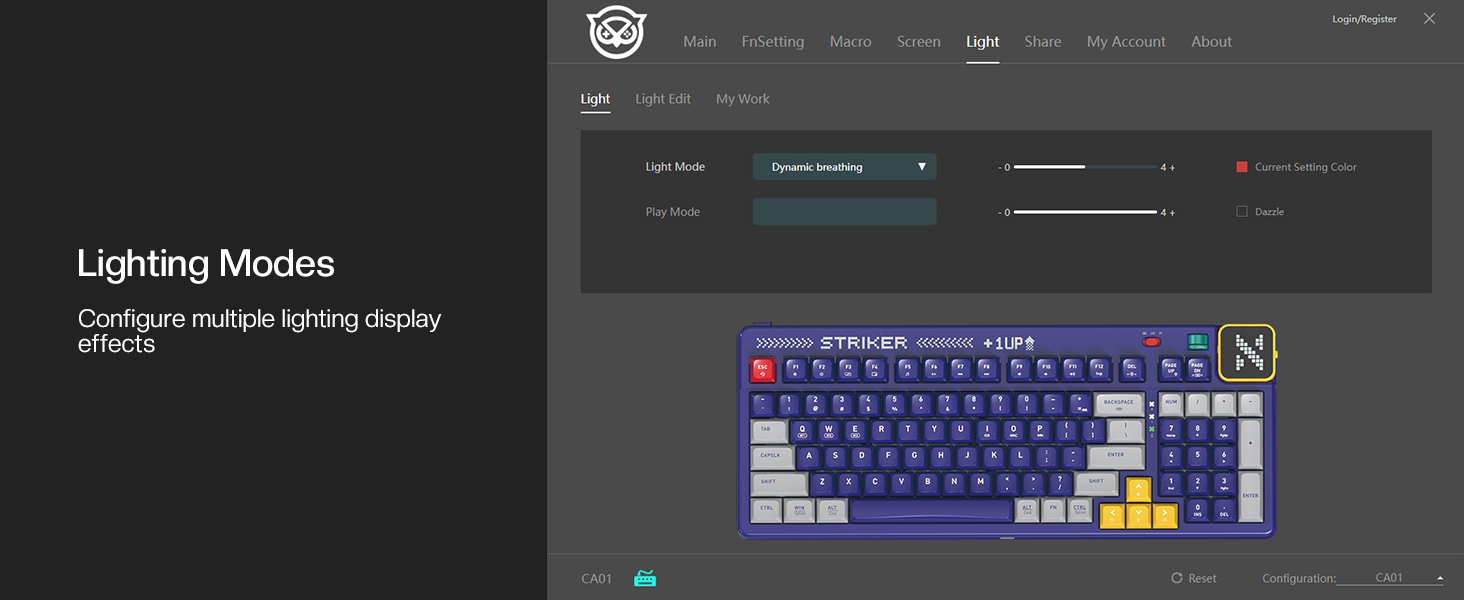
Image 6.4: NYXI Driver App interface for lighting mode configuration.

Image 6.5: NYXI Driver App interface for dot matrix screen customization.
7. メンテナンス
7.1 クリーニング
- キーボードの表面を拭くときは、柔らかく乾いた布を使用してください。
- For deeper cleaning, use the provided keycap puller to remove keycaps and clean dust or debris with compressed air.
- キーボードの仕上げやキーキャップの凡例を損傷する可能性のある、強力な化学薬品や研磨材の使用は避けてください。
7.2 ストレージ
Store the keyboard in a cool, dry place away from direct sunlight and extreme temperatures. If storing for an extended period, ensure the keyboard is fully charged and then powered off.
8。 トラブルシューティング
- キーボードが反応しない:
- Ensure the keyboard is powered on and the correct connectivity mode (wired, 2.4G, or Bluetooth) is selected.
- For wireless modes, check battery level. Recharge if necessary.
- For 2.4GHz, ensure the receiver is properly plugged into a USB port.
- For Bluetooth, ensure it is paired correctly and the selected channel (Fn + 1-5) matches the paired device. Try re-pairing.
- ワイヤレスの問題を排除するために、USB 有線モードで接続してみてください。
- RGB lights not working/displaying correctly:
- Ensure RGB is enabled (check the NYXI Driver App if installed).
- 照明モードを切り替えるには Fn + 左Ctrl.
- 明るさを調整する Fn + 上矢印.
- キーが登録されない:
- If a specific key is not working, the switch might be faulty. Utilize the hot-swappable feature to replace the switch with one of the spares provided.
- キーキャップまたはスイッチの下にゴミが詰まっていないことを確認してください。
- 接続の問題(遅延、切断):
- For wireless modes, ensure the keyboard is within range of the receiver/device and there are no significant obstructions.
- 他のワイヤレス デバイスからの干渉を最小限に抑えます。
- キーボードのバッテリーが十分に充電されていることを確認してください。
問題が解決しない場合は、保証とサポートのセクションを参照してさらにサポートを受けてください。
9. 仕様
| 特徴 | 詳細 |
|---|---|
| モデル番号 | CA01 |
| 接続技術 | 2.4Gワイヤレス、Bluetooth 5.0、USB-C有線 |
| キーボードの説明 | 機械 |
| キーの数 | 97つのキー |
| 対応デバイス | macOS, Windows 7 or later, iOS |
| 特集 | Backlit (RGB), Customizable Display Keys, Gasket Structure, Hot-Swappable |
| キーボードのバックライト色のサポート | RGB(22モード) |
| スタイル | NGC Retro |
| 製品寸法 | 長さ15.32インチ x 幅6.08インチ x 高さ1.3インチ (38.91 x 15.44 x 3.3 cm) |
| アイテム重量 | 3.56ポンド(1.61kg) |
| メーカー | ニクシー |
10. 保証とサポート
10.1 保証情報
NYXI products are covered by a limited warranty against defects in materials and workmanship. Please refer to the official NYXI web期間や保証内容の詳細など、具体的な保証条件については、サイトまたは購入書類をご覧ください。
10.2 カスタマーサポート
For technical assistance, troubleshooting, or warranty claims, please contact NYXI customer support through their official website. You may need to provide your product model number (CA01) and proof of purchase.
Thank you for choosing the NYXI Striker Retro Mechanical Gaming Keyboard.